by community-syndication | Mar 8, 2011 | BizTalk Community Blogs via Syndication
A natural follow up to my BizTalk 2010: Calling Dynamics CRM 4.0 Web Services post is one that deals with the Exceptions, or Faults, that these Web Services may return. When using the CRM 4.0 Adapter, the adapter would take care of handling SOAP exceptions and bundling them up into a CRM Response message that had a Return Code and Error Nodes. Whether your operation was successful or not, you could always expect the same type of response message from CRM.
<ns0:Response xmlns:ns0="http://schemas.microsoft.com/crm/BizTalkAdapter/Response">
<Header>
<ReturnCode>1</ReturnCode>
<ErrorCode />
<ErrorString />
<Retryable />
</Header>
Now that we are not using this adapter anymore we need to be able to catch our own exceptions coming out of CRM. If we don’t perform these actions below(or similar actions) we can expect an error message like the following.
Inner exception: Received unexpected message type ‘http://schemas.xmlsoap.org/soap/envelope/#Fault’ does not match expected type ‘http://schemas.microsoft.com/crm/2007/WebServices#CreateResponse’.
The issue is we have a Solicit Response Send Port in which we are sending a typed Request message into CRM and are expecting a typed Response message in return. When we encounter a SOAP Fault, a typed message is being returned, it just isn’t what we are expecting. In order to avoid these situations, we need to perform the following actions within our BizTalk solution.
Note: these actions are not specific to CRM, but may be used in other Web Service scenarios.
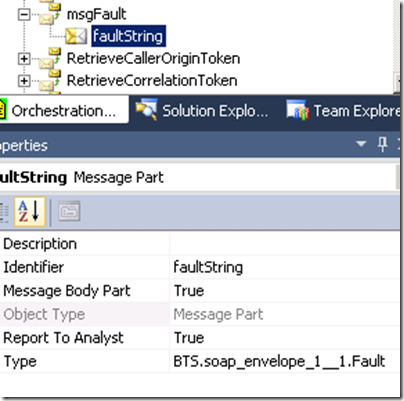
- Create a multi-part message that includes a part that is of type BTS.soap_envelope_1__1.Fault. You will find this schema in the Microsoft.BizTalk.GlobalPropertySchemas assembly.
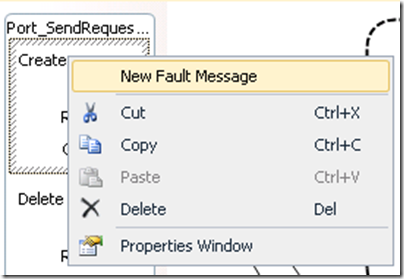
- Right mouse click on your selected operation and select “New Fault Message”
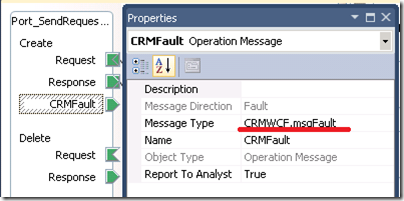
- Select the Message Type to be the value of our Multi-part message that we just created.
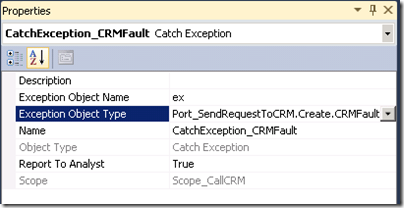
- Add a scope around your send/receive shapes. The transaction type can be “None” and the Exception Object Type should be set to the Fault that we just created within our Operation.
- So while technically this is defined as a message, within our current scope exception handler it is actually an object. So if we wanted to dump the contents of this message to the Event Viewer we could perform the following actions by assigning the message to an XML Document and then getting the OuterXml so that we can send this text into the event viewer.
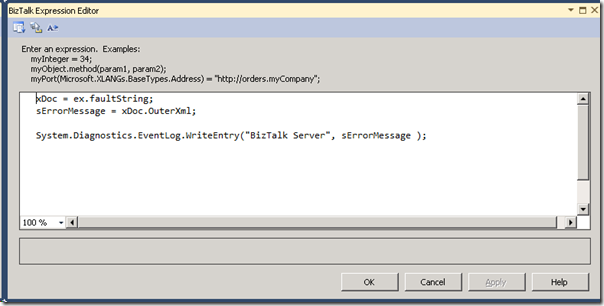
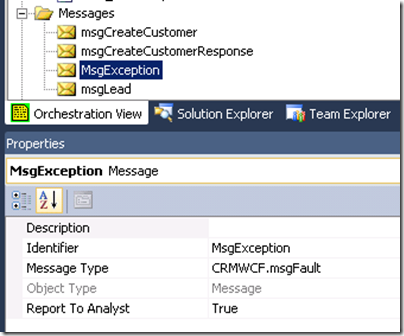
- At this point we can stop if we are so inclined. If we wanted to actually use this information in our CRM Response message we can assign this “exception” object into an instance of a message that is of the same type (our multi-part message).
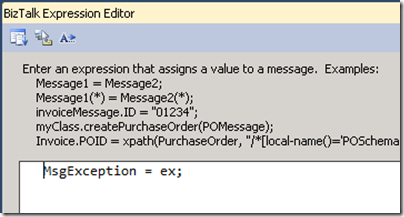
- We then can use a Message Assignment shape to assign this object into an instance of our message.
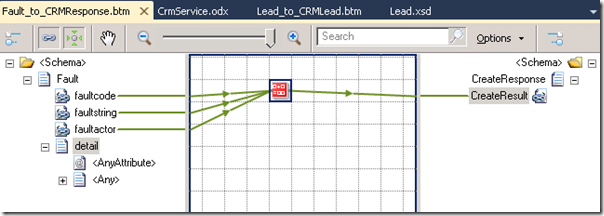
- Now that we have a typed message, we can use this message in a map to instantiate an instance of our CRM Response. To keep things simple I am just going to concatenate the faultcode, faultstring and faultactor values and assign to the CreateResult node. If we wanted to get the actual details out, we will need to write a .Net helper method or use XSLT to extract this content out since we have an untyped “Any” node.
- After all of these changes, our Orchestration should look like this:
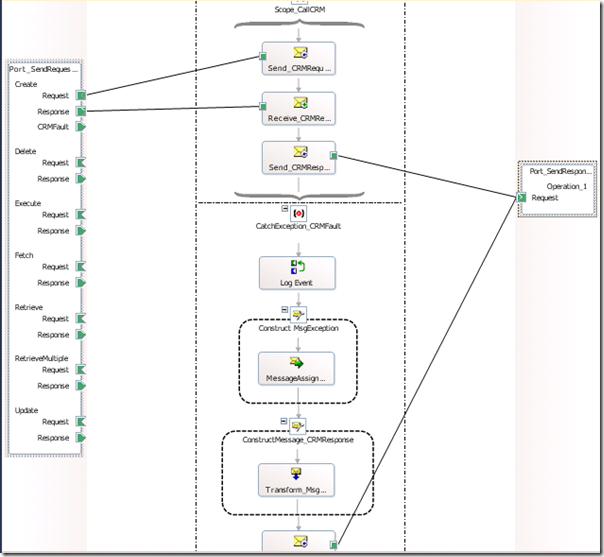
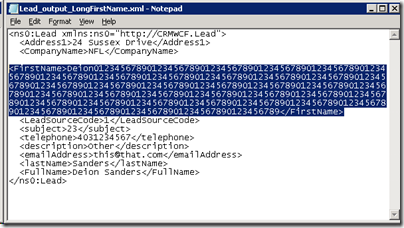
- We can now deploy our application and test it. In order to generate a SOAP Fault, I am going to send in the same message as in my previous post, but this time I am going to make the First Name to be greater than 50 characters.
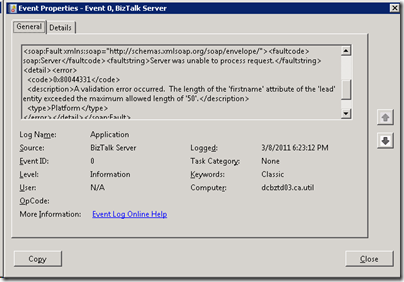
- Now when we process this message, we will not get an unhandled exception or suspended message. Instead, we will see an informational message in our event viewer that contains the details that we are interested in.
- Also, we will send this error information to a folder in the form of a CreateResponse message that will include some SOAP Fault details.
<ns0:CreateResponse xmlns:ns1="http://schemas.microsoft.com/crm/2007/CoreTypes" xmlns:ns2="http://microsoft.com/wsdl/types/" xmlns:ns3="http://schemas.microsoft.com/crm/2006/Query" xmlns:ns0="http://schemas.microsoft.com/crm/2007/WebServices" xmlns:ns4="http://schemas.microsoft.com/crm/2006/Scheduling" xmlns:ns5="http://schemas.microsoft.com/crm/2006/WebServices" xmlns:ns6="http://schemas.microsoft.com/crm/2006/CoreTypes">
<ns0:CreateResult>soap:Server – Server was unable to process request. -</ns0:CreateResult>
</ns0:CreateResponse>
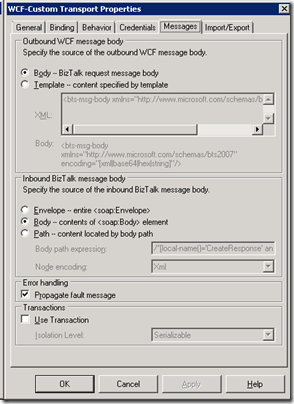
Note: some other blog posts mention using an XPATH statement, within our WCF Send Port, for both types of messages that we are expecting; typed CRM response and SOAP Fault. In my scenario, this step was not required since I am expecting a typed SOAP Fault exception object within my Scope – Exception handler.
by community-syndication | Mar 8, 2011 | BizTalk Community Blogs via Syndication
Just to let everyone know the BizTalk Light and Easy Webcast Series has been updated with some new BizTalk 2010 videos
http://www.cloudcasts.net/Default.aspx?category=BizTalk+Light+and+Easy
by community-syndication | Mar 7, 2011 | BizTalk Community Blogs via Syndication
The project that I am on ran into a critical and somewhat embarrassing situation this past week. As we moved from a single node project environment into a multi-node test environment we discovered that the Dynamics 4.0 Adapter cannot be installed on multiple BizTalk Servers in the same group. Yes – you read that correctly. I have never heard of this kind of limitation and struggle with the idea the adapter was actually made available without this feature. You can read more about this limitation in the FAQ section here.
With this in mind, we needed to quickly make a 180 degree turn. I had heard of other people calling the ASMX CRM Web Services from BizTalk via WCF Adapter. The process of consuming these ASMX services is much like consuming any other Web Service. That is until you start your application and get the dreaded 401 Unauthorized error.
System.ServiceModel.Security.MessageSecurityException: The HTTP request is unauthorized with client authentication scheme ‘Negotiate’. The authentication header received from the server was ‘Negotiate,NTLM’. —> System.Net.WebException: The remote server returned an error: (401) Unauthorized
This seems like a pretty common error within the BizTalk and CRM forums. However, I was not able find any resolutions to the issue. It wasn’t until I started stepping through a .NET SDK sample that I realized that I was missing something and that was a required SOAP header. For your convenience I have built an end to end sample that will walk through creating a Lead within a Dynamics 4.0 system. Keep an eye open for the Message Assignment shape where I assign this header.
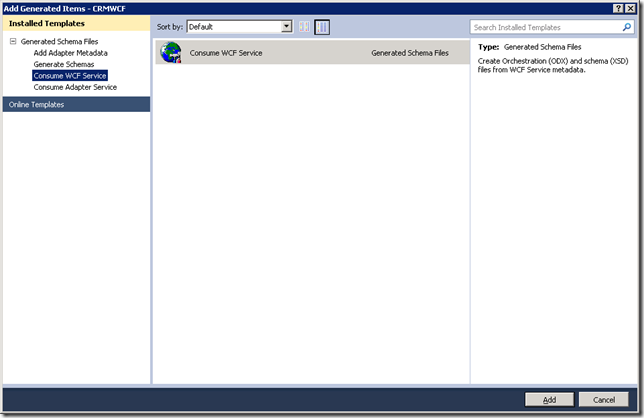
- Once we have created a BizTalk project we need to “Add Generated Items” and then select “Consume WCF Service”
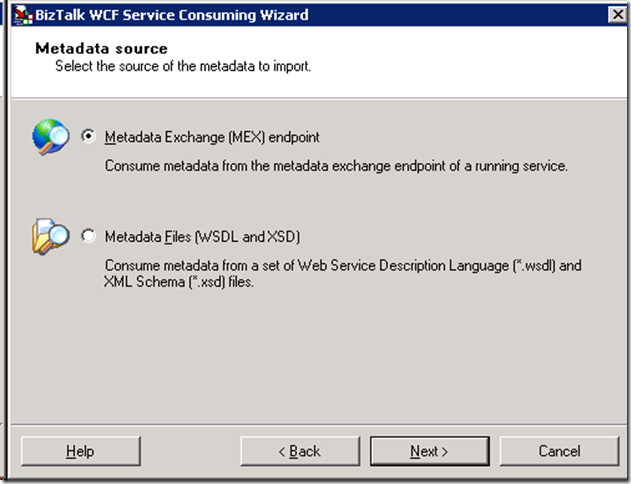
- Even though Dynamics 4.0 still uses ASMX style Web Services we can select “Metadata Exchange (MEX) endpoint.
- Enter the location of your CRM Web Service i.e. http://server/MSCrmServices/2007/CrmService.asmx and click on the “Get” button.
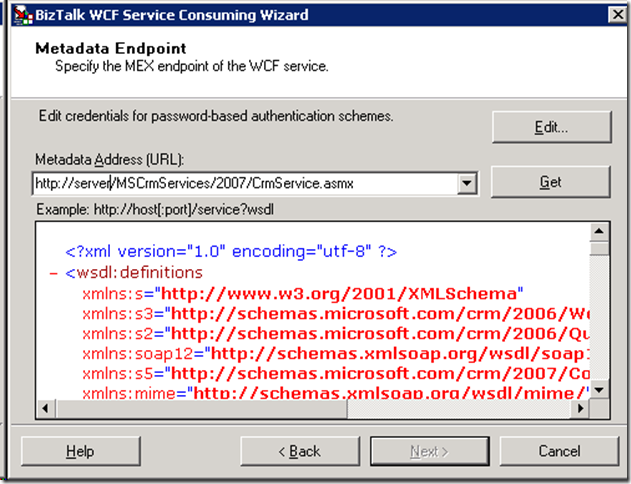
- Once the WSDL definition has been loaded, click the “Next” button to continue.
- Click “Import” to create your schemas and sample Orchestration.
- You should find that the following artifacts have been added to your BizTalk Solution.
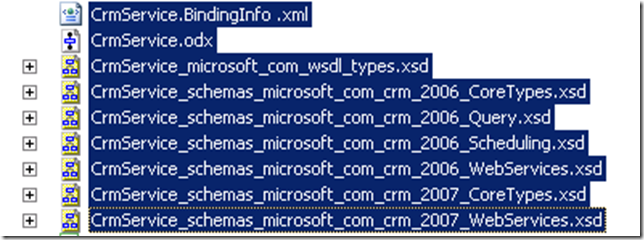
- Our “main” schema is called CrmService_schemas_microsoft_com_crm_2007_WebServices.xsd. Within this schema you will find all of the available Actions (Create/Update/Delete/Fetch etc) and the related entities (both custom and out of box). In this scenario we are going to create a “Lead” within our CRM system. So we can find the “Create” node and then scroll down and find the “Lead” entity.
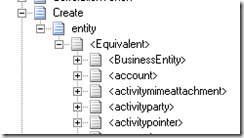
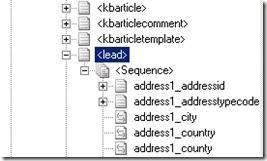
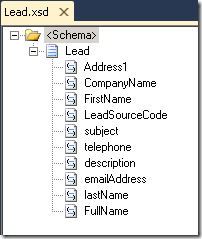
- To keep things simple, I have created a little helper message that I will use in a Map to create an instance of this CRM Create message.
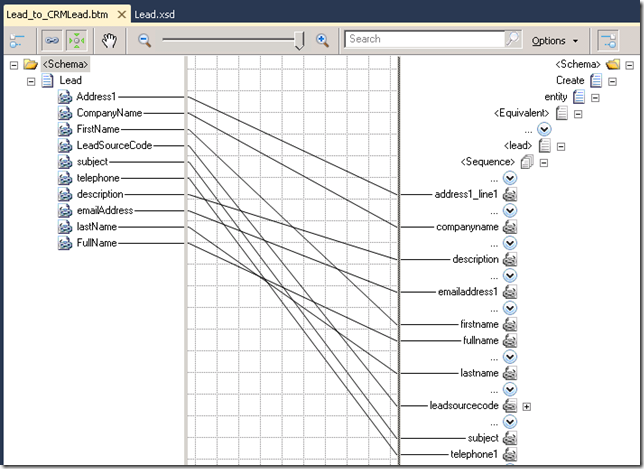
- Inside my map, I will simply map from this helper message to the actual CRM Request.
- With the building blocks in place, the next step was to update the Orchestration that was generated for us. Pretty standard stuff going on here. We want to receive an instance of our “helper” message, transform it, send the request to CRM and then write the response to disk.
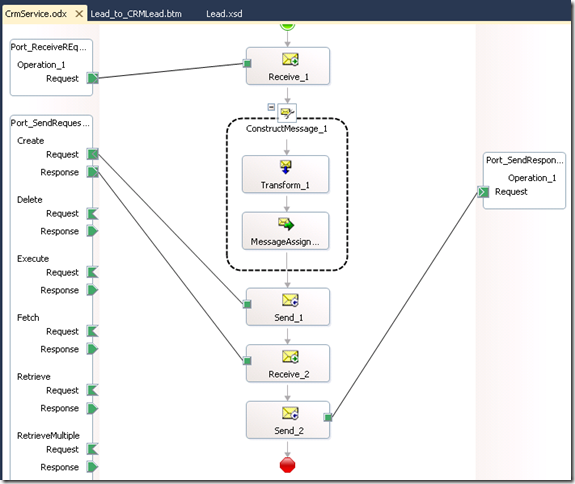
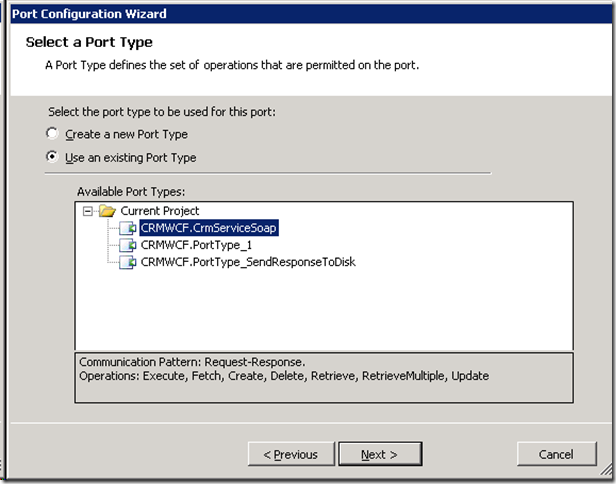
- When we generated our CRM schemas, BizTalk also created a Port Type called “CrmServiceSoap” that contains all of the available operations including “Create”.
- Earlier in this post I mentioned that we need to set a SOAP header on the CRM Request message. In order to do this we want to add a Message Assignment shape after our Transformation shape.
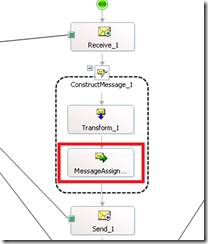
- Within this shape we want to set the following:
msgCreateCustomer (WCF.OutboundCustomHeaders) = "<headers><CrmAuthenticationToken xmlns=\"http://schemas.microsoft.com/crm/2007/WebServices\"><AuthenticationType xmlns=\"http://schemas.microsoft.com/crm/2007/CoreTypes\">0</AuthenticationType><OrganizationName xmlns=\"YourOrganizationhttp://schemas.microsoft.com/crm/2007/CoreTypes\">YourOrganization</OrganizationName><CallerId xmlns=\"http://schemas.microsoft.com/crm/2007/CoreTypes\">00000000-0000-0000-0000-000000000000</CallerId></CrmAuthenticationToken></headers>";
- The two important settings are the “AuthenticationType” and the “OrganizationName” properties. The Authentication property can take one of three values:
- 0 – AD
- 1 – Passport
- 2 – Internet Facing Deployment
- Since this is an on-premise installation we will go with 0.
- The “OrganizationName” property becomes extremely important in multi-tenant configurations where you may have multiple organizations or departments sharing a CRM implementation. Since we only have 1 organization in our deployment it is safe to just set our default value.
- It is now time to deploy and configure the BizTalk application.
- When BizTalk generated our CRM schemas and sample Orchestration, it also generated a Binding file. When we import the binding file we will discover that two send ports have been created. The first is a basicHttpBinding and the second send port uses a Custom Adapter with a Custom binding. What is the difference? Really it comes down to some addition security configuration that is available with the Custom adapter.
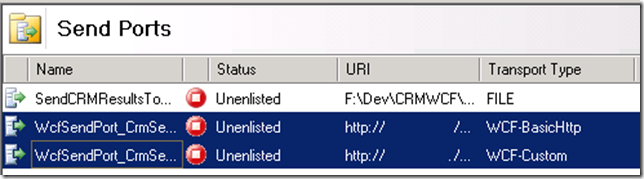
- Using these binding as is didn’t work for me. I needed to change the WCF-Custom Adapter to use the basicHttpBinding. I also had to make a few Security related changes including setting the Security “mode” was set to “TransportCredentialOnly”
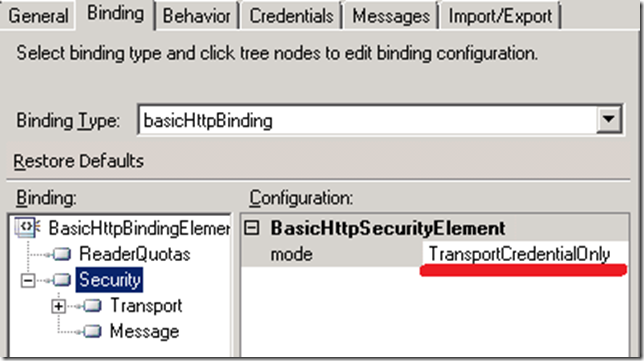
- I also needed to set the “clientCredentialType” to “Windows”
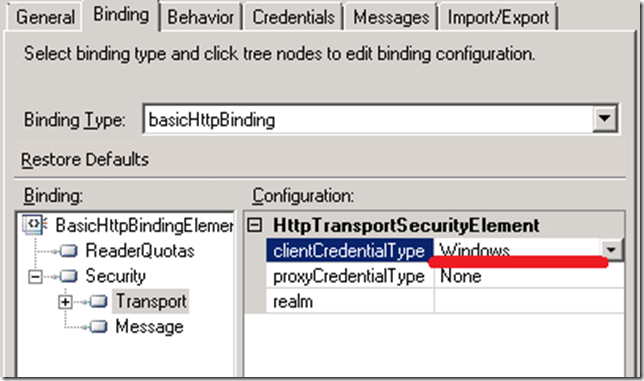
- I wasn’t quite done here. I also need to add an Endpoint Behavior. In this case it was a “clientCredentials” behavior. Within this behavior, I set “Windows” – “allowedImpersonation” = “Impersonation”
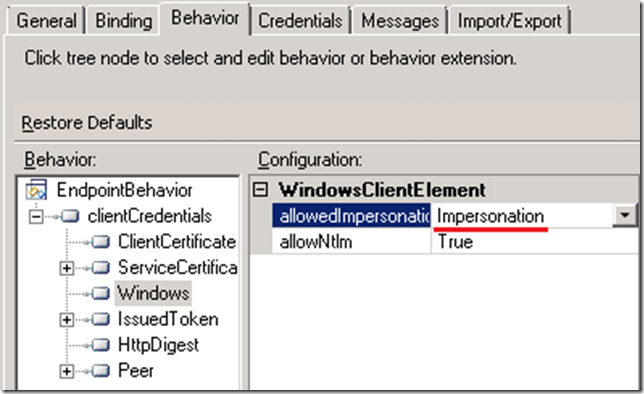
- At this point, I am ready to configure the rest of the application and start it. Once started, I can process my sample helper message.
- Within my sample file, I have provided the following information. Once processed by BizTalk, I expect this Lead to be created within our CRM system and the CRM response to be send to disk.
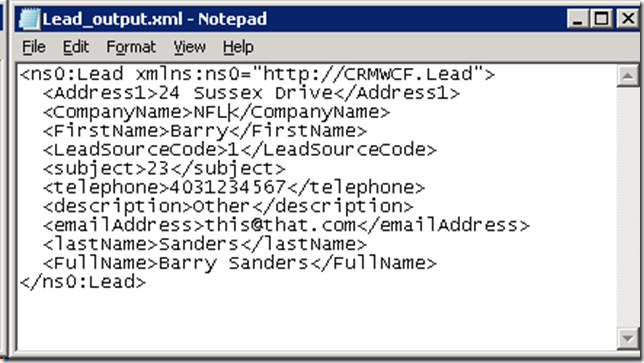
- The response from CRM is a GUID.

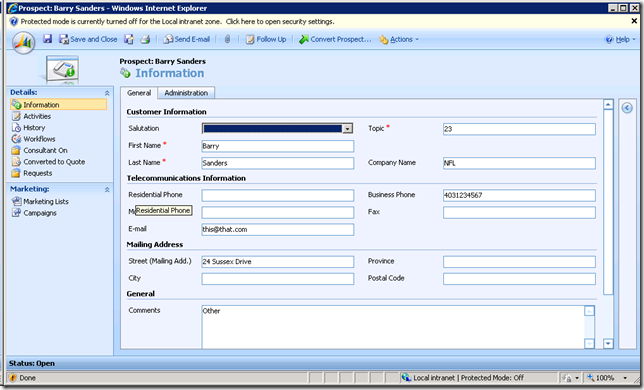
- Once we launch the Dynamics CRM GUI, I am able to find my Barry Sanders record.
Conclusion
If you have high-availability requirements then I highly recommend abandoning the Dynamics CRM 4.0 adapter. Currently, and I am not sure if there are any plans, CRM 2011 does not have an adapter so now is as good as time as any to make the move. You can read more about CRM 2011 integration on Richard Seroter’s blog. Also look for a chapter on CRM 2011 integration in our upcoming book.

by community-syndication | Mar 7, 2011 | BizTalk Community Blogs via Syndication
Pluralsight is a premier developer training company that has an excellent library of “on-demand” courses that cover topics like ASP.NET, BizTalk Server, SharePoint, Silverlight, SQL Server, WCF, Windows Azure and more. Late last year, Matt Milner reached out and asked if I’d like to teach some courses for them, and because I have trouble saying […]
by community-syndication | Mar 7, 2011 | BizTalk Community Blogs via Syndication
This blog post is about troubleshooting seemingly random recycles of the application domain. We take a look at the symptoms, troubleshooting and finally a resolution to the problem. This case is…
Daniel Berg’s blog about ASP.NET, EPiServer, SharePoint, BizTalk
by community-syndication | Mar 5, 2011 | BizTalk Community Blogs via Syndication
Here is a some additional information regarding extending BTARN 2010 with new PIP’s. The artifacts generated are going to be .Net 4.0 unless Visual Studio is configured to do otherwise. This means along with setting the application pools for the 32-bit the .Net setting must be set to match.
The error will happen after receiving a document using the new schema. Here is a sample error.
Event Type: Error
Event Source: BizTalk Accelerator for RosettaNet
Event Category: None
Event ID: 4096
Date: 3/3/2011
Time: 4:28:03 PM
User: N/A
Computer: BASE08R2-1.northamerica.corp.microsoft.com
Description:
Source module:
RNDisAssembler
Correlation information:
Description:
Receive pipeline rejected incoming message
due to the following RNIF exception:
UNP.SCON.VALERR : A failure occurred while validating the service content.
Details:
The document specification <MyCustomPIP._2A1_MS_V02_00_ProductCatalogInformationNotification> from assembly <MyCustomPIP, Version=1.0.0.0, Culture=neutral, PublicKeyToken=279ae20de2fddcaf> failed to load. Verify the schema for this document specification is deployed and is in the Global Assembly Cache.
For more information, see Help and Support Center at http://go.microsoft.com/fwlink/events.asp.

by community-syndication | Mar 4, 2011 | BizTalk Community Blogs via Syndication
Microsoft StreamInsight is a powerful tool for event stream processing and monitoring complex events. To be sure, StreamInsight is not designed to be a message routing engine. It’s primarily a foundation for real-time business intelligence where events are run through (temporal) queries and new insight is discovered. To have a useful event-driven architecture (EDA), we […]
by community-syndication | Mar 4, 2011 | BizTalk Community Blogs via Syndication
Microsoft Dynamics CRM (Or just CRM) has recently upgraded from version 4.0 to version 2011. For an overview of Microsoft Dynamics CRM head here: http://crm.dynamics.com. With this new release there have been many improvements to the system. One of the improvements that I think has great potential is the introduction of Solutions.
What is a […]
by community-syndication | Mar 3, 2011 | BizTalk Community Blogs via Syndication
During MVP summit I was interviewed by my fellow MVP Richard Seroter. MVP summit was great and it was nice to be elected/nominated for diner with Soma. Thanks Richard for including me in the monthly interviews and the entertaining “Soma” diner together with Stephen. I enjoyed the conversations and laughs.

by community-syndication | Mar 2, 2011 | BizTalk Community Blogs via Syndication
Greetings and welcome to my 27th interview with a thought leader in the “connected technology” domain. This month, I’ve wrangled Steef-Jan Wiggers into participating in this little carnival of questions. Steef-Jan is a new Microsoft MVP, blogger, obsessive participant on the MSDN help forums, and an all around good fellow. Steef-Jan and I have joined […]



