by community-syndication | Jan 8, 2011 | BizTalk Community Blogs via Syndication
In my last post I showed you how the _XamlStaticHelper class uses different semantics when loading assemblies referenced by XAML files.
Today I’m going to show you a solution I’ve built into the Microsoft.Activities library that can help you apply standard CLR behavior when loading referenced assemblies.
Strict Assembly Resolution for Compiled Workflows
Step 1: Download and reference Microsoft.Activities.dll
Download the latest version
Step 2: Create a partial class definition for your compiled workflow
In my example project, I have a compiled workflow named WorkflowCompiled.xaml. I have added a partial class with the same name and .cs extension
Step 3: Create a ReferencedAssemblies static property in your partial class
Add the FullName of any assemblies that you are referencing from your XAML
/// <summary>
///   Gets the referenced assemblies.
/// </summary>
/// <remarks>
/// The XamlAppDef build task generates a list of referenced assemblies automatically in the (XamlName).g.cs file
/// You can find the list of assemblies and version that need to be referenced there.
/// This property returns a simple string list of the assemblies that will cause them to be loaded using the
/// standard Assembly.Load method
/// </remarks>
public static IList<string> ReferencedAssemblies
{
    get
    {
        // Create a list of activities you want to reference here
        var list = new List<string> {
                "ActivityLibrary1, Version=1.0.0.0, Culture=neutral, PublicKeyToken=c18b97d2d48a43ab",
            };

        // Add the standard list of references
        list.AddRange(StrictXamlHelper.StandardReferencedAssemblies);
        return list;
    }
}
Step 4: Create a Constructor in your partial class with a XamlAssemblyResolutionOption argument
The default constructor in your partial class will use the loose assembly loading behavior. You must supply an alternate constructor to get the strict behavior
/// <summary>
/// Initializes a new instance of the <see cref="WorkflowCompiled"/> class.
/// </summary>
/// <param name="assemblyResolutionOption">
/// The assembly Resolution Option.
/// </param>
public WorkflowCompiled(XamlAssemblyResolutionOption assemblyResolutionOption)
{
    switch (assemblyResolutionOption)
    {
        case XamlAssemblyResolutionOption.Loose:
            this.InitializeComponent();
            break;
        case XamlAssemblyResolutionOption.Strict:
            StrictXamlHelper.InitializeComponent(this, this.FindResource(), ReferencedAssemblies);
            break;
        default:
            throw new ArgumentOutOfRangeException("assemblyResolutionOption");
    }
}
Step 5: Construct your workflow using the new constructor passing XamlAssemblyResolutionOption.Strict
WorkflowInvoker.Invoke(new WorkflowCompiled(XamlAssemblyResolutionOption.Strict));
Result
Your compiled workflow will now behave like any other CLR object and construct successfully if and only if it can resolve the specific version of all referenced assemblies. If it cannot locate the assembly file it will throw a FileNotFoundException and if it can locate the file but it is not the correct version or public key token it will throw a FileLoadException.
Strict Assembly Resolution for Loose XAML
Loose XAML is an activity loaded from a XAML file using ActivityXamlServices.Load(). Unless the XAML file has FullName references (which it does not by default) ActivityXamlServices.Load will load with a partial name. This means it could load any assembly it finds with a matching name without regard to the version or public key token.
There are two ways to fix this.
- You can use the <qualifiedAssembly>configuration element to specify the FullName of the assembly you want to use
- Use Microsoft.Activities.StrictXamlHelper.ActivityLoad()
Step 1: Download and reference Microsoft.Activities.dll
Download the latest version
Step 2: Create a list of referenced assemblies
public static IList<string> GetWorkflowLooseReferencedAssemblies()
{
    // Create a list of activities you want to reference here
    var list = new List<string> { "ActivityLibrary1, Version=1.0.0.0, Culture=neutral, PublicKeyToken=c18b97d2d48a43ab", };

    // Add the standard list of references
    list.AddRange(StrictXamlHelper.StandardReferencedAssemblies);
    return list;
}
Step 3: Load the activity using StrictXamlHelper.ActivityLoad()
// This will ensure the correct assemblies are loaded prior to loading loose XAML
var activity = StrictXamlHelper.ActivityLoad(
    "WorkflowLoose.xaml", GetWorkflowLooseReferencedAssemblies());
WorkflowInvoker.Invoke(activity);
Summary
Loading the correct version of a referenced assembly is vital. The default behavior of both compiled workflows and loading loose XAML may result in unexpected behavior due to loading a newer version of the referenced assembly.
I recommend that you use StrictXamlHelper to ensure that you load the expected version of referenced assemblies.
by community-syndication | Jan 7, 2011 | BizTalk Community Blogs via Syndication
A spike is a short project where you investigate how something works and report back to the team with your results.
For this spike I want to answer the following questions
- What happens when a V1 workflow loads a V2 activity?
- What happens when a V2 workflow cannot find a V2 activity but a V1 activity is available?
- What difference if any does it make if the activity is deployed in the GAC?
- What difference does it make if you use Compiled or Loose XAML
I will run through a number of scenarios with various options. For each scenario the format is Activity (version), Host (version), Deploy (option), XAML option (which one runs first)
Deployment options
| Application Base |
Deploy the activity assembly to the same directory as the workflow application |
| GAC |
Deploy the activity assembly in the GAC |
XAML options
| Compiled XAML |
A .XAML file that has a XamlAppDef build task in Visual Studio and is deployed in the assembly – this is the default setting for XAML |
| Loose XAML |
.XAML file that is deployed as a file and loaded by ActivityXamlServices.Load |
Project artifacts
| Host |
XamlAssemblyResolution.exe |
Workflow Console Application with WorkflowCompiled.xaml and WorkflowLoose.xaml |
| Activity |
AcvitityLibrary1.dll |
Contains a custom activity named GetTypeInfo |
Scenario 1: Activity V1, Host V1, Deploy Application Base, Compiled/Loose
Expected: Both Compiled and Loose should use V1
Scenario 2: Activity V1, Host V1, Deploy GAC (V1), Compiled/Loose
Expected: Both Compiled and Loose should use V1 from the GAC even though the Activity DLL is in the Application Base
Actual: The activity was loaded from the GAC. For more info see How the Runtime Locates Assemblies.
Scenario 3: Activity V2, Host V1, Deploy Application Base, Loose
Expected: Activity V1 from the GAC will be used for both loose and compiled
Actual: Not Expected! When you run the Loose XAML first, it will load V2 from the file and the Compiled XAML will load V1.
Why does Loose XAML load a different activity version when run before compiled XAML?
Scenario 4: Activity V2, Host V1, Deploy Application Base, Compiled
Expected: Activity V1 from the GAC will be used for both loose and compiled
Actual: Behaves as expected
Scenario 5: Activity V2, Host V1, Deploy GAC (V1/V2), Loose
Expected: Activity V1 from the GAC will be used for both loose and compiled because the host was built for V1
Actual: Not Expected! When you run the Loose XAML first, it will load V2 from the GAC and the Compiled XAML will load V1.
Why does Loose XAML load a different activity version when run before compiled XAML?
Scenario 6: Activity V2, Host V1, Deploy GAC (V1/V2), Compiled
Expected: Activity V1 from the GAC will be used for both loose and compiled because the host was built for V1
Actual: Behaves as expected
Scenario 7: Activity V2, Host V1, Deploy GAC (V2), Loose/Compiled
Expected: Compiled and Loose will fail because V1 is not available
Actual: Not Expected! Both Compiled and Loose loaded V2 from the GAC even though they were not built for V2 of the activity
Why do both Compiled and Loose XAML load versions of the activity than what they were built with?
Scenario 8: Activity V2, Host V1, Deploy Application Base, Loose/Compiled
Expected: Compiled and Loose will fail because V1 is not available
Actual: Not Expected! Both Compiled and Loose loaded V2 from the application base
Why do both Compiled and Loose XAML load versions of the activity than what they were built with?
Scenario 9: Activity V1, Host V2, Deploy Application Base, Loose/Compiled
Expected: Compiled and Loose will fail because V2 is not available
Actual: Not Expected! Both Compiled and Loose loaded V1 from the application base
Why do both Compiled and Loose XAML load versions of the activity than what they were built with?
Scenario 10: Activity V1, Host V2, Deploy GAC (V1), Loose/Compiled
Expected: Compiled and Loose will fail because V2 is not available
Actual: Not Expected! Both Compiled and Loose loaded V1 from the GAC
Why do both Compiled and Loose XAML load versions of the activity than what they were built with?
Scenario 11: Activity V1/V2, Host V2, Deploy GAC (V2), Application Base (V1), Compiled
Expected: Workflow will run V2 from GAC
Actual: Compiled and Loose loaded V2 from the GAC as expected when Compiled ran first
Scenario 12: Activity V1/V2, Host V2, Deploy GAC (V2), Application Base (V1), Loose
Expected: Workflow will run V2 from GAC
Actual: Not Expected! Loose loaded V1 from Application Base and Compiled loaded V2 from the GAC
Why do both Compiled and Loose XAML load versions of the activity than what they were built with?
Investigations
A: Because the generated class _XamlStaticHelper specifically tried to load the version that was referenced at compile time.
When you look at the activity assembly reference in XAML you will see that it does not include the version or public key token
xmlns:a="clr-namespace:ActivityLibrary1;assembly=ActivityLibrary1"
How does the version get referenced in compiled XAML?
The XamlAppDef build task will generate a file that creates a class which represents the compiled workflow. My workflow is WorkflowCompiled.xaml so the generated file (located under obj\x86) is WorkflowCompiled.g.cs. Contained in that file is a line of code that reveals where the XAML comes from
System.IO.Stream initializeXaml = typeof(WorkflowCompiled).Assembly.GetManifestResourceStream(resourceName);
When this class reads the XAML it uses a XamlSchemaContext to help it interpret the XAML and it gets the context from a generated class called _XamlStaticHelper. Here is the line of code.
System.Xaml.XamlSchemaContext schemaContext = XamlStaticHelperNamespace._XamlStaticHelper.SchemaContext;
So what? Well if we open the host assembly with Reflector and look at the _XamlStaticHelper.SchemaContext property we can see what is going on
if (AssemblyList.Count > 0)
{
   target = new XamlSchemaContext(AssemblyList);
}
There is an AssemblyList property! And what does it contain? We see from the LoadAssemblies method that the XamlAppDef build task has generated a fully qualified reference to ActivityLibrary1 (version 1)
private static IList LoadAssemblies()
{
    IList list = new List();
    list.Add(Load("ActivityLibrary1, Version=1.0.0.0, Culture=neutral, PublicKeyToken=c18b97d2d48a43ab"));
    // (a bunch of other assemblies here)
    list.Add(Assembly.GetExecutingAssembly());
    return list;
}
Because this code is generated at build time, the Compiled XAML will first try to load the specific version of the activity it was created with.
In spite of the fact that the compiled host assembly specifies a version of the activity library should be loaded; our testing shows that a compiled will load older or newer versions of the activity if the specific version is not available, and loose XAML will load any assembly with a matching name (even one that does not have a strong name).
The _XamlStaticHelper.Load() method is the reason why this happens
private static Assembly Load(string assemblyNameVal)
{
    AssemblyName name = new AssemblyName(assemblyNameVal);
    byte[] publicKeyToken = name.GetPublicKeyToken();
    try
    {
        return Assembly.Load(name.FullName);
    }
    catch (Exception)
    {
        AssemblyName assemblyRef = new AssemblyName(name.Name);
        if (publicKeyToken != null)
        {
            assemblyRef.SetPublicKeyToken(publicKeyToken);
        }
        return Assembly.Load(assemblyRef);
    }
}
It first tries to load the assembly using the full name and if that fails it catches the exception and tries to load it with the name and public key token but no version. This is different than the typical CLR behavior which requires a specific version match.
Summary
To wrap this up I have to say be careful. WF4 workflows do not follow the same rules for assembly versioning that you might expect.
- Compiled XAML will try to load the specified version if available. If not, they will do a version independent load but will respect the PublicKeyToken so they won’t load assemblies with the wrong signature
- Loose XAML will load any matching assembly based on name alone with no respect for version or public key token. If the AppDomain has previously loaded the type from some other mechanism (CLR or XAML) then the Loose XAML will always load the type previously loaded.
- If you have to use Loose XAML and you want to be sure that you are loading a type of a certain version and/or PublicKeyToken you could use some code with a CLR reference to those types to cause the types to load into the AppDomain prior to calling ActivityXamlServices.Load
by community-syndication | Jan 7, 2011 | BizTalk Community Blogs via Syndication
The WorkflowApplication is a great way to execute your workflows in process. Usually the fact that the WorkflowApplication is asynchronous is a great thing but there are cases when a little more synchronous execution is nice. For example executing a workflow and updating the state of the user interface is much simpler when the WorkflowApplication.Run() doesn’t finish until all work is done.
The key to creating a synchronous WorkflowApplication is using its SynchronizationContext. Normally you set this to SynchronizationContext.Current so everything executes on the current UI thread. However this is still an asynchronous call and the Run doesn’t block.
Take this very simple workflow and its execution output.
var workflow = new Sequence()
{
Activities = {
new WriteLine(){ Text="Workflow is running"}
}
};
var app = new WorkflowApplication(workflow);
Console.WriteLine("Before WorkflowApplication.Run()");
app.Run();
Console.WriteLine("After WorkflowApplication.Run()");
As you can see the Run() didn’t block and the message after the Run() was printed before the message from the workflow.
Executing the workflow synchronously
Making this workflow execute in a synchronous fashion is easy and requires only a very small change by setting the SynchronizationContext to a custom implementation.
var workflow = new Sequence()
{
Activities = {
new WriteLine(){ Text="Workflow is running"}
}
};
var app = new WorkflowApplication(workflow);
app.SynchronizationContext = new SynchronousSynchronizationContext();
Console.WriteLine("Before WorkflowApplication.Run()");
app.Run();
Console.WriteLine("After WorkflowApplication.Run()");
The SynchronousSynchronizationContext used is real simple. The workflow internals always call the Post() method to execute work, so all we need to do is just execute the delegate passed with the state passed.
class SynchronousSynchronizationContext : SynchronizationContext
{
public override void Post(SendOrPostCallback d, object state)
{
d(state);
}
}
Executing an asynchronous workflow
Using this same SynchronousSynchronizationContext with an asynchronous workflow works just fine. If I add the following simple bookmarked activity to the workflow and execute it I get the following result:
The code to execute the workflow is as follows
var workflow = new Sequence()
{
Activities = {
new WriteLine(){ Text="Workflow has started"},
new MyBookmarkedActivity(),
new WriteLine(){ Text="Workflow is done"}
}
};
var app = new WorkflowApplication(workflow);
app.SynchronizationContext = new SynchronousSynchronizationContext();
app.Idle = e => Console.WriteLine("WorkflowApplication.Idle called");
Console.WriteLine("Before WorkflowApplication.Run()");
app.Run();
Console.WriteLine("After WorkflowApplication.Run()");
Console.WriteLine();
Console.WriteLine("Before WorkflowApplication.ResumeBookmark()");
Console.WriteLine("ResumeBookmark: {0}", app.ResumeBookmark("MyBookmark", null));
Console.WriteLine("After WorkflowApplication.ResumeBookmark()");
And the bookmarked activity is as follows:
class MyBookmarkedActivity : NativeActivity
{
protected override bool CanInduceIdle
{
get { return true; }
}
protected override void Execute(NativeActivityContext context)
{
Console.WriteLine("Creating bookmark");
context.CreateBookmark("MyBookmark", BookmarkResumed);
}
private void BookmarkResumed(NativeActivityContext context, Bookmark bookmark, object value)
{
Console.WriteLine("Bookmark resumed");
}
}
Conclusion
A simple yet effective addition to the workflow runtime for that special case where the asynchronous behavior is not quite what you want but the WorkflowInvoker is not flexible enough
Enjoy!
www.TheProblemSolver.nl
Wiki.WindowsWorkflowFoundation.eu
by community-syndication | Jan 6, 2011 | BizTalk Community Blogs via Syndication
If we have to get data from the SQL database, the standard way is to use a receive port with SQL adapter.
SQL receive adapter is a solicit-response adapter. It periodically polls the SQL database with queries. That’s only way it can work. Sometimes it is undesirable. With new WCF-SQL adapter we can use the lightweight approach but still with the same principle, the WCF-SQL adapter periodically solicits the database with queries to check for the new records.
Imagine the situation when the new records can appear in very broad time limits, some – in a second interval, others – in the several minutes interval. Our requirement is to process the new records ASAP. That means the polling interval should be near the shortest interval between the new records, a second interval. As a result the most of the poll queries would return nothing and would load the database without good reason. If the database is working under heavy payload, it is very undesirable.
Do we have other choices? Sure. We can change the polling to the “eventing”.
The good news is the SQL server could issue the event in case of new records with triggers. Got a new record -the trigger event is fired. No new records – no the trigger events – no excessive load to the database.
The bad news is the SQL Server doesn’t have intrinsic methods to send the event data outside. For example, we would rather use the adapters that do listen for the data and do not solicit. There are several such adapters-listeners as File, Ftp, SOAP, WCF, and Msmq. But the SQL Server doesn’t have methods to create and save files, to consume the Web-services, to create and send messages in the queue, does it?
Can we use the File, FTP, Msmq, WCF adapters to get data from SQL code?
Yes, we can. The SQL Server 2005 and 2008 have the possibility to use .NET code inside SQL code. See the
SQL Integration.
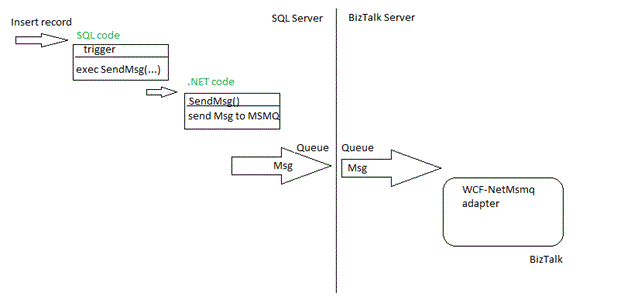
How it works for the Msmq, for example:
%u00b7 New record is created, trigger is fired
%u00b7 Trigger calls the CLR stored procedure and passes the message parameters to it
%u00b7 The CLR stored procedure creates message and sends it to the outgoing queue in the SQL Server computer.
%u00b7 Msmq service transfers message to the queue in the BizTalk Server computer.
%u00b7 WCF-NetMsmq adapter receives the message from this queue.
For the File adapter the idea is the same, the CLR stored procedure creates and stores the file with message, and then the File adapter picks up this file.
Using WCF-NetMsmq adapter to get data from SQL
I am describing the full set of the deployment and development steps for the case with the WCF-NetMsmq adapter.
Development:
1. Create the .NET code: project, class and method to create and send the message to the MSMQ queue.
2. Create the SQL code in triggers to call the .NET code.
Installation and Deployment:
1. SQL Server:
a. Register the CLR assembly with .NET (CLR) code
b. Install the MSMQ Services
2. BizTalk Server:
a. Install the MSMQ Services
b. Create the MSMQ queue
c. Create the WCF-NetMsmq receive port.
The detailed description is below.
Code
.NET code
using System.Xml;
using System.Xml.Linq;
using System.Xml.Serialization;
//namespace MyCompany.MySolution.MyProject – doesn’t work. The assembly name is MyCompany.MySolution.MyProject
// I gave up with the compound namespace. Seems the CLR Integration cannot work with it L. Maybe I’m wrong.
public class Event
{
static public XElement CreateMsg(int par1, int par2, int par3)
{
XNamespace ns = “http://schemas.microsoft.com/Sql/2008/05/TypedPolling/my_storedProc”;
XElement xdoc =
new XElement(ns + “TypedPolling”,
new XElement(ns + “TypedPollingResultSet0”,
new XElement(ns + “TypedPollingResultSet0”,
new XElement(ns + “par1”, par1),
new XElement(ns + “par2”, par2),
new XElement(ns + “par3”, par3),
)
)
);
return xdoc;
}
}
////////////////////////////////////////////////////////////////////////
using System.ServiceModel;
using System.ServiceModel.Channels;
using System.Transactions;
using System.Data;
using System.Data.Sql;
using System.Data.SqlTypes;
public class MsmqHelper
{
[Microsoft.SqlServer.Server.SqlProcedure]
// msmqAddress as “net.msmq://localhost/private/myapp.myqueue”;
public static void SendMsg(string msmqAddress, string action, int par1, int par2, int par3)
{
using (TransactionScope scope = new TransactionScope(TransactionScopeOption.Suppress))
{
NetMsmqBinding binding = new NetMsmqBinding(NetMsmqSecurityMode.None);
binding.ExactlyOnce = true;
EndpointAddress address = new EndpointAddress(msmqAddress);
using (ChannelFactory<IOutputChannel> factory = new ChannelFactory<IOutputChannel>(binding, address))
{
IOutputChannel channel = factory.CreateChannel();
try
{
XElement xe = Event.CreateMsg(par1, par2, par3);
XmlReader xr = xe.CreateReader();
Message msg = Message.CreateMessage(MessageVersion.Default, action, xr);
channel.Send(msg);
//SqlContext.Pipe.Send(); // to test
}
catch (Exception ex)
{
}
}
scope.Complete();
}
}
SQL code in triggers
— sp_SendMsg was registered as a name of the MsmqHelper.SendMsg()
EXEC sp_SendMsg‘net.msmq://biztalk_server_name/private/myapp.myqueue’, ‘Create’, @par1, @par2, @par3
Installation and Deployment
On the SQL Server
Registering the CLR assembly
1. Prerequisites: .NET 3.5 SP1 Framework. It could be the issue for the production SQL Server!
3. Copy files:
>copy “\Windows\Microsoft.net\Framework\v3.0\Windows Communication Foundation\Microsoft.Transactions.Bridge.dll” “\Program Files\Reference Assemblies\Microsoft\Framework\v3.0 \Microsoft.Transactions.Bridge.dll”
If your machine is a 64-bit, run two commands:
>copy “\Windows\Microsoft.net\Framework\v3.0\Windows Communication Foundation\Microsoft.Transactions.Bridge.dll” “\Program Files (x86)\Reference Assemblies\Microsoft\Framework\v3.0 \Microsoft.Transactions.Bridge.dll”
>copy “\Windows\Microsoft.net\Framework64\v3.0\Windows Communication Foundation\Microsoft.Transactions.Bridge.dll” “\Program Files\Reference Assemblies\Microsoft\Framework\v3.0 \Microsoft.Transactions.Bridge.dll”
4. Execute the SQL code to register the .NET assemblies:
— For x64 OS:
CREATE ASSEMBLY SMdiagnostics AUTHORIZATION dbo FROM ‘C:\Windows\Microsoft.NET\Framework\v3.0\Windows Communication Foundation\SMdiagnostics.dll’WITH permission_set = unsafe
CREATE ASSEMBLY [System.Web] AUTHORIZATION dbo FROM ‘C:\Windows\Microsoft.NET\Framework64\v2.0.50727\System.Web.dll’ WITH permission_set = unsafe
CREATE ASSEMBLY [System.Messaging] AUTHORIZATION dbo FROM ‘C:\Windows\Microsoft.NET\Framework\v2.0.50727\System.Messaging.dll’ WITH permission_set = unsafe
CREATE ASSEMBLY [System.ServiceModel] AUTHORIZATION dbo FROM ‘C:\Program Files (x86)\Reference Assemblies\Microsoft\Framework\v3.0\System.ServiceModel.dll’WITH permission_set = unsafe
CREATE ASSEMBLY [System.Xml.Linq] AUTHORIZATION dbo FROM ‘C:\Program Files\Reference Assemblies\Microsoft\Framework\v3.5\System.Xml.Linq.dll’WITH permission_set = unsafe
— For x32 OS:
–CREATE ASSEMBLY SMdiagnostics AUTHORIZATION dbo FROM ‘C:\Windows\Microsoft.NET\Framework\v3.0\Windows Communication Foundation\SMdiagnostics.dll’WITH permission_set = unsafe
–CREATE ASSEMBLY [System.Web] AUTHORIZATION dbo FROM ‘C:\Windows\Microsoft.NET\Framework\v2.0.50727\System.Web.dll’WITH permission_set = unsafe
–CREATE ASSEMBLY [System.Messaging] AUTHORIZATION dbo FROM ‘C:\Windows\Microsoft.NET\Framework\v2.0.50727\System.Messaging.dll’WITH permission_set = unsafe
–CREATE ASSEMBLY [System.ServiceModel] AUTHORIZATION dbo FROM ‘C:\Program Files\Reference Assemblies\Microsoft\Framework\v3.0\System.ServiceModel.dll’WITH permission_set = unsafe
5. Register the assembly with the external stored procedure:
CREATE ASSEMBLY [HelperClass] AUTHORIZATION dbo FROM ’<FilePath>MyCompany.MySolution.MyProject.dll’WITH permission_set = unsafe
where the <FilePath> – the path of the file on this machine!
6.Create the external stored procedure
CREATE PROCEDURE sp_SendMsg
(
@msmqAddress nvarchar(100),
@Action NVARCHAR(50),
@par1 int,
@par2 int,
@par3 int
)
AS EXTERNAL NAME HelperClear.MsmqHelper.SendMsg
Installing the MSMQ Services
1. Check if the MSMQ service is NOT installed.
To check:
Start / Administrative Tools / Computer Management,
on the left pane open the “Services and Applications”,
search to the “Message Queuing”. If you cannot see it, follow next steps.
2. Start / Control Panel / Programs and Features
3. Click “Turn Windows Features on or off”
4. Click Features, click “Add Features”
5. Scroll down the feature list; open the “Message Queuing” / “Message Queuing Services”; and check the “Message Queuing Server” option
6. Click Next; Click Install; wait to the successful finish of the installation
Creating the MSMQ queue
We don’t need to create the queue on the “sender” side.
On the BizTalk Server
Installing the MSMQ Services
The same is as for the SQL Server.
Creating the MSMQ queue
1. Start / Administrative Tools / Computer Management,
on the left pane open the “Services and Applications”,
open the “Message Queuing”, and open the “Private Queues”.
2. Right-click the “Private Queues”; choose New; choose “Private Queue”.
3. Type the Queue name as ’myapp.myqueue’; check the “Transactional” option.
Creating the WCF-NetMsmq receive port
I will not go through this step in all details. It is straightforward.
URI for this receive location should be ‘net.msmq://localhost/private/myapp.myqueue’.
Notes
%u00b7 The biggest problem is usually on the step the “Registering the CLR assembly”. It is hard to predict where are the assemblies from the assembly list, what version should be used, x86 or x64. It is pity of such “rude” integration of the SQL with .NET.
%u00b7 In couple cases the new WCF-NetMsmq port was not able to work with the queue. Try to replace the WCF- NetMsmq port with the WCF-Custom port with netMsmqBinding. It was working fine for me.
%u00b7 To test how messages go through the queue you can turn on the Journal /Enabled option for the queue. I used the QueueExplorer utility to look to the messages in Journal. The Computer Management can also show the messages but it shows only small part of the message body and in the weird format. The QueueExplorer can do the better job; it shows the whole body and Xml messages are in good color format.



