by community-syndication | Sep 15, 2010 | BizTalk Community Blogs via Syndication
I’ve been invited to speak tonight at the Spokane .NET Users Group and I’ll be talking about Heresy with MongoDB.
In the back of most developers minds, lingering in their subconscious and waiting to pounce when they least expect it is the nagging concept that not every system in the world is an ideal fit for the structured life of a relational database. Join Microsoft MVP, Tim Rayburn as he reviews MongoDB, a document database, its concepts, ideas and the drivers available to the .NET developer for using this project. Come learn how you may never again have to separate OrderLines from Orders just to make a database happy – and similar approaches used by the likes of Amazon and Google (just to name a few).
by community-syndication | Sep 15, 2010 | BizTalk Community Blogs via Syndication
The IE9 beta was released today, and I’m really excited. Sure, it supports HTML5 and modern web standards, leverages hardware acceleration to make it faster than any other browser on the world, and more. But that’s not what really gets me excited about it. DoKashiteru / CC BY 2.5 For those of you unable to […]
by community-syndication | Sep 15, 2010 | BizTalk Community Blogs via Syndication
IE9 Beta 1 arrived today, and it looks great. The browser wars are back on and getting heated. The IE guys have been getting very bullish about performance on their blog site. See their post from a few days ago at http://blogs.msdn.com/b/ie/archive/2010/09/10/the-architecture-of-full-hardware-acceleration-of-all-web-page-content.aspx. Mozilla got beta 5 of Firefox 4 out of the door a couple of days ago and have hit back hard with various counterclaims see http://www.theregister.co.uk/2010/09/13/mozilla_v_windows_on_hardware_acceleration/. Who is right? Well, as I see it, we have an unwinnable playground spat about who was ‘first’ in GPU acceleration and the undignified sight of both sides claiming to have the fastest browser.
It’s easy to investigate the performance side of things, at least in a casual way. One place to start is the IE9 test site at http://ie.microsoft.com/testdrive/Performance/01FlyingImages/Default.html. Now, of course, this is a Microsoft site and is likely to favour their browser. However, this site has been a work in progress for a long time now, and cannot, as a simple matter of chronology, have been explicitly doctored to show Firefox 4 beta 5 in a bad light. Whatever the truth about why things are as they are, it is clearly the case that Firefox 4 can sometimes rival IE9 performance when running the GPU-orientated demonstration pages on that site. Take ‘Flying Images’ for example. It’s fine if you view ‘My Browser’ or ‘All Browsers’. However, try ‘Fix Photo’ or ‘Large IE Logo’ and see the difference. IE9 is much faster. Try playing Browser Hunt on both browsers (hey, it’s Pac-Man). IE9 wins hands-down.
OK, so these test could be biased. Where else can we turn. Ahha. There is a single test page that Mozilla has been using to demonstrate the wonders of GPU acceleration in Firefox. You will find it at http://demos.hacks.mozilla.org/openweb/HWACCEL/. Let’s do a comparison. Oh my! Firefox 4 is the clear winner. It reports performance 50% faster than IE9. Turns out, though, that this page is no good for comparing hardware acceleration performance between different browsers (Mozilla, of course, never claimed it was). The culprit is the line ‘if (!stop) setTimeout(draw, TO)’ where TO, which is initially 30, tends to a value of 0. As the test speeds up, you just end up measuring the browser-specific resolution of the timer set by the zero-interval call to setTimeout(), rather than the speed of rendering. Differences in rendering are so small that they are hidden by timer resolution characteristics. At least we can say that when using setTimeout() in this way, FF4 is faster than IE9. Maybe MS should change the timer resolution in IE9? Just an idea.
OK. So we can see, as so often with micro benchmarks, that you can pick the test of your choice to ‘prove’ whatever you wish.
Let’s try the SunSpider test.
IE9 Beta 1:383.6 ms
Firefox 4 Beta 5:504.2 ms
Today, IE9 has a faster JavaScript implementation than Firefox 4. That surely is beyond contention. But wait a moment. The Mozilla crew are working an on a new JavaScript engine which they claim will propel them into poll position at some point in the future. Watch this space!
One thing that surprised me going through the Microsoft tests is the number of technologies that the Firefox beta does not seem to support. I ran into issues with SVG, MP3, etc. I was also surprised that, going through Microsoft’s tests, I couldn’t immediately locate any obvious improvement in FF4 over FF3.6 in terms of standards compliance. That surely can’t be right. I haven’t the time to investigate this further, but it was a weird experience to see IE9 happily doing a whole bunch of things Firefox 4 can’t, and doing them in a more standards-compliant fashion. I’m sure, though, that someone could come up with stuff that Firefox handles and which IE9 does not.
I’m going to largely steer clear of commenting further on standards compliance for the simple reason that this is such a fraught area, it needs proper independent assessment. I will say this, though. IE8 made significant improvements, but still fell short in several areas. IE9 is clearly in a different league to previous versions. I’m sure we will see a huge effort to try to trash what Microsoft has achieved and the advent of new web sites dedicated to trying to convince you that IE9 is a failure. However, I expect that IE9 will do rather well when tested independently using official compliance test suites for various specifications, and may even emerge as best-of-breed in a number of areas.
Microsoft has been playing catch-up with the other browser suppliers for a very long time. There are many people in the web development community for whom the notion that IE is a perpetual poor relation to other browsers forms a core part of their belief system. The trouble is that, as often tends to happen over time, the laggards catch up. They may even become the leaders. Some people find this unnerving. Expect an avalanche of claims and counter-claims in the days to come, and lots of red-hot anger and bile. WebGL support seems to be one area of contention currently, so why not use that to have a go at MS, if you are so inclined.
We are seeing the dawn of the end of an era. Of course, older versions of IE (especially IE6) are still widely used and will haunt Microsoft for years to come. The IE6 phenomenon is due to the fact that many corporates have far slower cycles than Microsoft when it comes to technology refresh and remain locked down on this dinosaur of a browser. Anyway, the point is this. IE has now climbed its way fully out of the hole it was in and is back in contention, at least on the Windows platform (multi-platform support is one thing that IE certainly can’t touch). This is a good thing. It results in greater competition and better browsers. IE9 would not exist if it were not for Firefox, Chrome and Safari. Firefox, Chrome and Safari will end up as better, faster, more standards-compliant browsers because of the new ‘threat’ from IE9. We all win. Thanks, Microsoft, and thanks Mozilla, Google and Apple.
by community-syndication | Sep 15, 2010 | BizTalk Community Blogs via Syndication
Note: The following steps do not represent a supportable configuration by Microsoft and extreme caution should be used when following these steps. To my knowledge, these steps are complete, but it is possible that I missed something. These steps have been tested in a Send Port Subscription scenario. Use these instructions at your own risk.
At the organization that I work for, we are rolling out SharePoint 2010. We currently run BizTalk 2009 and at this point in time, the BizTalk 2009 SharePoint Adapter Web Service isn’t supported with SharePoint 2010. BizTalk 2010 has been updated to support SharePoint 2010. We really have no choice but to head in this direction since upgrading to BizTalk 2010 just isn’t an option at this point in time.
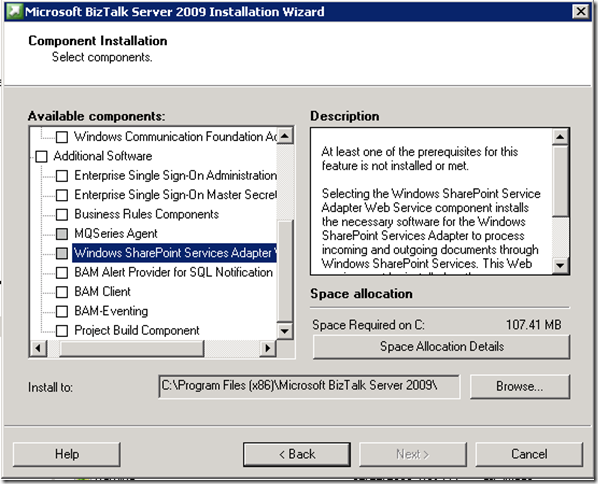
When you launch the BizTalk 2009 installation on a SharePoint 2010 Server you will not be able to install the Windows SharePoint Services Adapter Web Service as it is not able to detect the pre-requisite Windows SharePoint Services v 3.0 files.
Mick Badran has a post that helped me out tremendously. However, I found that I had to take a few additional steps so I will recap exactly what we did in order for us to get this to function in our environment.
We had an existing MOSS 2007 server that had the BizTalk Adapter Web Service installed and functioning correctly. Since you cannot use the BizTalk installation wizard to install this Web Service, we decided to reverse engineer what was deployed on MOSS 2007 and manually deploy on SharePoint 2010.
- Copy the c:\program files\Microsoft BizTalk 2009 folder from your MOSS 2007 Server to your SharePoint 2010 Server
- Create the BTSharePointAdapterWS Web Application in IIS Manager and set the physical path to C:\Program Files (x86)\Microsoft BizTalk Server 2009\Business Activity Services\BTSharePointV3AdapterWS
Note: This path represents a 64 bit installation.
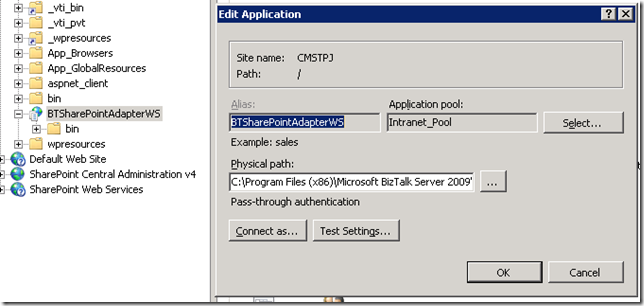
- We leveraged the existing App Pool that the SharePoint Site was using
- Modify the web.config to set the appropriate SharePoint Enabled Hosts, if required. For us, we use AD Groups and had to change to reflect our “DEV” AD group
- Rebind the Microsoft.SharePoint.dll to point to version 14.
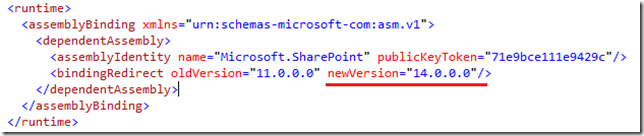
- We removed the Document Tag so that we could browse the WSDL properly. See this post for more info.

- We then exported two keys from the Registry on our MOSS 2007 Server and import them on your SharePoint 2010 Server:
- [HKEY_LOCAL_MACHINE\SOFTWARE\Microsoft\BizTalk Server]
- [HKEY_LOCAL_MACHINE\SOFTWARE\Wow6432Node\Microsoft\BizTalk Server]
- At this point we thought we were done and attempted to push a message from BizTalk 2009 to SharePoint 2010 but discovered the following message in event viewer:
Event Type: Warning
Event Source: BizTalk Server 2009
Event Category: (1)
Event ID: 5743
Date: 9/10/2010
Time: 1:37:51 PM
User: N/A
Computer: SERVER
Description:
The adapter failed to transmit message going to send port "SendPort1" with URL "wss://SERVER:80/DropOffLibrary". It will be retransmitted after the retry interval specified for this Send Port. Details:"System.Web.Services.Protocols.SoapException: Server was unable to process request. —> System.IO.FileNotFoundException: Could not load file or assembly ‘Microsoft.BizTalk.KwTpm.OfficeImporters2, Version=3.0.1.0, Culture=neutral, PublicKeyToken=31bf3856ad364e35’ or one of its dependencies. The system cannot find the file specified.
File name: ‘Microsoft.BizTalk.KwTpm.OfficeImporters2, Version=3.0.1.0, Culture=neutral, PublicKeyToken=31bf3856ad364e35’
at Microsoft.BizTalk.KwTpm.WssAdapter.BTSharePointAdapterWS..ctor()
WRN: Assembly binding logging is turned OFF.
To enable assembly bind failure logging, set the registry value [HKLM\Software\Microsoft\Fusion!EnableLog] (DWORD) to 1.
Note: There is some performance penalty associated with assembly bind failure logging.
To turn this feature off, remove the registry value [HKLM\Software\Microsoft\Fusion!EnableLog].
— End of inner exception stack trace —
This error was triggered by the Windows SharePoint Services receive location or send port with URI wss://SERVER:80/DropOffLibrary.
Windows SharePoint Services adapter event ID: 12462".
For more information, see Help and Support Center at http://go.microsoft.com/fwlink/events.asp.
Once again it was back to the MOSS 2007 server and more specifically, a trip to the GAC where we discovered the following BizTalk Dlls. This list included the Microsoft.BizTalk.KwTpm.OfficeImporters2.dll that was mentioned in the event viewer. We then pulled these dlls off of the installation CD and gac’d them on the SharePoint 2010 server using gacutil.

After Gac’ing these assemblies we had success pushing messages from BizTalk 2009 to SharePoint 2010.
Note: There is another option which I have not tried that Kirk Hofer discusses here. It involves installing WSS v3.0 SP2, but not configuring it, so that the BizTalk install Wizard thinks it is installed. Our SharePoint team was not crazy about having these other dlls on their fresh SharePoint 2010 server so we were unable to proceed with this approach.
by community-syndication | Sep 15, 2010 | BizTalk Community Blogs via Syndication
When we asked you what you wanted to see on endpoint.tv, one of the top three most requested topics was How to Unit Test Workflows.
On this episode, I’ll show you how to test
- Simple activities using WorkflowInvoker
- Complex activities with bookmarks and WorkflowApplication
- WorkflowServices with Extensions
Links from this episode
- Workflow Test Helper (MSDN Code Gallery)
- How to Unit Test Activities
- How to Unit Test Activities with Bookmarks
- How to Unit Test Workflow Services
Ron Jacobs
blog http://blogs.msdn.com/rjacobs
twitter @ronljacobs
What do you want to see on endpoint.tv?

by community-syndication | Sep 14, 2010 | BizTalk Community Blogs via Syndication
Last week I had the pleasure of presenting two sessions at the Heartland Developer’s Conference (HDC). I love this show and meeting people from the central region, as well as catching up with colleagues. It’s always a great time and this year was no different.
For those who attended, you can find the samples I used at the links below. Thanks for coming, I hope you enjoyed the show as much as I did.
WF 4 from hello world to real world
Choosing service technology

by community-syndication | Sep 14, 2010 | BizTalk Community Blogs via Syndication
Following in the great tradition of other learn through example LINQ example pages, such as 101 LINQ Samples, here’s the first in a series of posts on StreamInsight query examples. This will first show up on this blog, then get migrated over to a centralized site on the StreamInsight developer center. We’ve got a fairly hefty queue we’re working through, but if there are specific examples or query patterns of interest, please post them in the comments.
Each query pattern will consist of a description of the input set (.csv file samples for most of these, for ease of use), the full query and the output result. For more complicated query structures the query pattern will also be described visually, using a Visio stencil (to be described in future posts).
The full application framework that I use to run all of these queries, associate with the data sources, etc, is available here. Illustration of the techniques in this codebase will be left for a future post.
In this post:
- Filtering
- How do I filter a stream, keeping only specific events?
- How do I filter on multiple conditions?
- Windows and Aggregates
[Where] – How do I filter a stream, keeping only specific events?
var filterQuery = from e in inputStream
    where e.Value > 20
    select e;
[Input] Result:
SimpleFilter,Point,12:00:02.000,1001,77
SimpleFilter,Point,12:00:03.000,1001,44
SimpleFilter,Point,12:00:04.000,1001,22
SimpleFilter,Point,12:00:05.000,1001,51
SimpleFilter,Point,12:00:06.000,1001,46
SimpleFilter,Point,12:00:07.000,1001,71
SimpleFilter,Point,12:00:08.000,1001,37
SimpleFilter,Point,12:00:09.000,1001,45
|
How do I filter on multiple conditions?
var filterQuery = from e in inputStream
where e.Value > 70 && e.SensorId == 1001
select e;
[Input] Result:
MediumFilter,Point,12:00:01.001,1001,77
MediumFilter,Point,12:00:03.010,1001,72
MediumFilter,Point,12:00:12.082,1001,73
MediumFilter,Point,12:00:14.145,1001,75
MediumFilter,Point,12:00:14.154,1001,71
MediumFilter,Point,12:00:15.163,1001,74
MediumFilter,Point,12:00:15.172,1001,73
|
How can I calculate aggregates, such as averages, over a set of events?
All aggregates, such as averages, min, max, etc are calculated over a set of events. Sets of events in StreamInsight are defined as those events falling into a window. Windows operate over a period of time (hopping, tumbling and sliding), or over a specific number of events (count).
How can I calculate the average of all events in the last 5 seconds?
var query = from window in inputStream.TumblingWindow(
    TimeSpan.FromSeconds(5),
    HoppingWindowOutputPolicy.ClipToWindowEnd)
select new
{
    Average = window.Avg(e => e.Value)
};
[Input] Result:
SimpleTumblingWindow,Point,12:00:00.000,32.2
SimpleTumblingWindow,Point,12:00:05.000,50
|
How can I calculate the average of all events in the past 5 seconds, every 2 seconds?
var query = from window in inputStream.HoppingWindow(
                TimeSpan.FromSeconds(5), TimeSpan.FromSeconds(2),
                HoppingWindowOutputPolicy.ClipToWindowEnd)
            select new
            {
                Average = window.Avg(e => e.Value)
            };
[Input] Result:
SimpleHoppingWindow,Point,11:59:56.000,14
SimpleHoppingWindow,Point,11:59:58.000,31.66666
SimpleHoppingWindow,Point,12:00:00.000,32.2
SimpleHoppingWindow,Point,12:00:02.000,48
SimpleHoppingWindow,Point,12:00:04.000,45.4
SimpleHoppingWindow,Point,12:00:06.000,49.75
SimpleHoppingWindow,Point,12:00:08.000,41
|
How can I calculate the average of all events in the past 5 seconds, every time a new event arrives?
var query = from window in inputStream.HoppingWindow(
    TimeSpan.FromSeconds(5), TimeSpan.FromSeconds(2),
    HoppingWindowOutputPolicy.ClipToWindowEnd)
select new
{
    Average = window.Avg(e => e.Value)
};
[Input] Result:
SimpleSlidingWindow,Point,12:00:00.000,14
SimpleSlidingWindow,Point,12:00:01.000,9
SimpleSlidingWindow,Point,12:00:02.000,31.66
SimpleSlidingWindow,Point,12:00:03.000,34.75
SimpleSlidingWindow,Point,12:00:04.000,32.2
SimpleSlidingWindow,Point,12:00:05.000,39.6
SimpleSlidingWindow,Point,12:00:06.000,48
SimpleSlidingWindow,Point,12:00:07.000,46.8
SimpleSlidingWindow,Point,12:00:08.000,45.4
SimpleSlidingWindow,Point,12:00:09.000,50
SimpleSlidingWindow,Point,12:00:10.000,49.75
SimpleSlidingWindow,Point,12:00:11.000,51
SimpleSlidingWindow,Point,12:00:12.000,41
SimpleSlidingWindow,Point,12:00:13.000,45
|
How can I calculate the average of the past 5 events?
Aggregates over a set number of events are produced using Count windows. As of StreamInsight v1, Count Windows cannot use the built-in aggregate functions (Count, Avg, Min, Max), but must instead use user-defined aggregates. The code sample below shows the use of a simple averaging function with a count window with the user defined aggregate.
var query = from window in inputStream.CountByStartTimeWindow(
            5, CountWindowOutputPolicy.PointAlignToWindowEnd)
        select new
        {
            Average = window.UserDefinedAverage(e => e.Value)
        };

 public class SimpleAggregate : CepAggregate<double, double>
{
    public override double GenerateOutput(IEnumerable<double> payloads)
    {
        return payloads.Average();
    }
}

public static class MyExtensions
{
    [CepUserDefinedAggregate(typeof(SimpleAggregate))]
    public static double UserDefinedAverage<InputT>(this CepWindow<InputT> window,
        Expression<Func<InputT, double>> map)
    {
        throw CepUtility.DoNotCall();
    }

}
[Input] Result:
SimpleCountWindow,Point,12:00:04.000,32.2
SimpleCountWindow,Point,12:00:05.000,39.6
SimpleCountWindow,Point,12:00:06.000,48
SimpleCountWindow,Point,12:00:07.000,46.8
SimpleCountWindow,Point,12:00:08.000,45.4
SimpleCountWindow,Point,12:00:09.000,50
|
How do I measure the rate of arriving events every two seconds?
var query = from window in inputStream.TumblingWindow(
    TimeSpan.FromSeconds(2),
    HoppingWindowOutputPolicy.ClipToWindowEnd)
select new
{
    Count = window.Count()
};
[Input] Result:
SimpleEventCount,Point,12:00:00.000,54
SimpleEventCount,Point,12:00:02.000,54
SimpleEventCount,Point,12:00:04.000,54
SimpleEventCount,Point,12:00:06.000,54
SimpleEventCount,Point,12:00:08.000,54
SimpleEventCount,Point,12:00:10.000,54
SimpleEventCount,Point,12:00:12.000,54
SimpleEventCount,Point,12:00:14.000,54
SimpleEventCount,Point,12:00:16.000,54
|
How can I calculate the average of each group of events in the last 10 seconds?
For this example, we’ll calculate the average of each sensor every 10 seconds. We do this by first grouping the events by the sensor ID, then performing the same aggregation operation from the average without grouping (with the addition of the group key – in this case, the sensor ID).
var query = from e in inputStream
group e by e.SensorId into sensorGroups
from window in sensorGroups.TumblingWindow(
    TimeSpan.FromSeconds(10),
    HoppingWindowOutputPolicy.ClipToWindowEnd)
select new
{
    SensorId = sensorGroups.Key,
    Average = window.Avg(e => e.Value)
};
[Input] Result:
GroupedTumblingWindow,Point,12:00:00.000,42.1,1001
GroupedTumblingWindow,Point,12:00:00.000,34.6,1002
GroupedTumblingWindow,Point,12:00:00.000,39.7,1003
GroupedTumblingWindow,Point,12:00:00.000,50.9,1004
GroupedTumblingWindow,Point,12:00:00.000,30.7,1005
GroupedTumblingWindow,Point,12:00:00.000,38.3,1006
GroupedTumblingWindow,Point,12:00:00.000,36.8,1007
GroupedTumblingWindow,Point,12:00:00.000,41.7,1008
GroupedTumblingWindow,Point,12:00:00.000,34.4,1009
GroupedTumblingWindow,Point,12:00:10.000,46.375,1001
GroupedTumblingWindow,Point,12:00:10.000,40.2,1002
GroupedTumblingWindow,Point,12:00:10.000,36.1,1003
GroupedTumblingWindow,Point,12:00:10.000,37.3,1004
GroupedTumblingWindow,Point,12:00:10.000,31.8,1005
GroupedTumblingWindow,Point,12:00:10.000,41.4,1006
GroupedTumblingWindow,Point,12:00:10.000,40.3,1007
GroupedTumblingWindow,Point,12:00:10.000,43.5,1008
GroupedTumblingWindow,Point,12:00:10.000,43.3,1009
|
How can I calculate the average of each group of events in the last 20 seconds, every 10 seconds?
var query = from e in inputStream
group e by e.SensorId into sensorGroups
from window in sensorGroups.TumblingWindow(
    TimeSpan.FromSeconds(10),
    HoppingWindowOutputPolicy.ClipToWindowEnd)
select new
{
    SensorId = sensorGroups.Key,
    Average = window.Avg(e => e.Value)
};
[Input] Result:
GroupedHoppingWindow,Point,11:59:50.000,42.1,1001
GroupedHoppingWindow,Point,11:59:50.000,34.6,1002
GroupedHoppingWindow,Point,11:59:50.000,39.7,1003
GroupedHoppingWindow,Point,11:59:50.000,50.9,1004
GroupedHoppingWindow,Point,11:59:50.000,30.7,1005
GroupedHoppingWindow,Point,11:59:50.000,38.3,1006
GroupedHoppingWindow,Point,11:59:50.000,36.8,1007
GroupedHoppingWindow,Point,11:59:50.000,41.7,1008
GroupedHoppingWindow,Point,11:59:50.000,34.4,1009
GroupedHoppingWindow,Point,12:00:00.000,44,1001
GroupedHoppingWindow,Point,12:00:00.000,37.0,1002
GroupedHoppingWindow,Point,12:00:00.000,38.1,1003
GroupedHoppingWindow,Point,12:00:00.000,44.8,1004
GroupedHoppingWindow,Point,12:00:00.000,31.2,1005
GroupedHoppingWindow,Point,12:00:00.000,39.7,1006
GroupedHoppingWindow,Point,12:00:00.000,38.4,1007
GroupedHoppingWindow,Point,12:00:00.000,42.5,1008
GroupedHoppingWindow,Point,12:00:00.000,38.4,1009
GroupedHoppingWindow,Point,12:00:10.000,46.3,1001
GroupedHoppingWindow,Point,12:00:10.000,40.2,1002
GroupedHoppingWindow,Point,12:00:10.000,36.1,1003
GroupedHoppingWindow,Point,12:00:10.000,37.3,1004
GroupedHoppingWindow,Point,12:00:10.000,31.8,1005
GroupedHoppingWindow,Point,12:00:10.000,41.4,1006
GroupedHoppingWindow,Point,12:00:10.000,40.3,1007
GroupedHoppingWindow,Point,12:00:10.000,43.5,1008
GroupedHoppingWindow,Point,12:00:10.000,43.3,1009
|
How can I calculate the average of each group of events in the past 10 seconds, every time a new event in that group arrives?
var query = from e in inputStream
    .AlterEventDuration(e => TimeSpan.FromSeconds(10))
group e by e.SensorId into sensorGroups
from window in sensorGroups
    .SnapshotWindow(SnapshotWindowOutputPolicy.Clip)
select new
{
    SensorId = sensorGroups.Key,
    Average = window.Avg(e => e.Value)
};
[Input] Result:
<snip>
GroupedSlidingWindow,Point,12:00:17.017,39.3,1008
GroupedSlidingWindow,Point,12:00:17.018,39.4,1009
GroupedSlidingWindow,Point,12:00:17.019,43,1001
GroupedSlidingWindow,Point,12:00:17.020,43.1,1002
GroupedSlidingWindow,Point,12:00:17.021,37.8,1003
GroupedSlidingWindow,Point,12:00:17.022,41.8,1004
GroupedSlidingWindow,Point,12:00:17.023,33.7,1005
GroupedSlidingWindow,Point,12:00:17.024,39.2,1006
GroupedSlidingWindow,Point,12:00:17.025,40.3,1007
GroupedSlidingWindow,Point,12:00:17.026,38.9,1008
GroupedSlidingWindow,Point,12:00:17.027,40.8,1009
<snip>
|
How can I find the events with the largest value every 10 seconds?
var query = (from window in inputStream.TumblingWindow(
    TimeSpan.FromSeconds(10),
    HoppingWindowOutputPolicy.ClipToWindowEnd)
from e in window
orderby e.Value descending
select e).Take(1);
[Input] Result:
TopK_TumblingDescending,Point,12:00:00.000,1006,80
TopK_TumblingDescending,Point,12:00:00.000,1007,80
TopK_TumblingDescending,Point,12:00:00.000,1009,80
TopK_TumblingDescending,Point,12:00:10.000,1007,81
|
Note that for the first group of events, the are three events with the same maximum value (80) in the same window of time. Thusly, all of the events with that maximum value are returned.
How can I find the events with the two smallest values in the last 10 seconds, every 5 seconds?
var query = (from window in inputStream.HoppingWindow(
   TimeSpan.FromSeconds(10), TimeSpan.FromSeconds(5),
   HoppingWindowOutputPolicy.ClipToWindowEnd)
from e in window
orderby e.Value ascending
select e).Take(2);
[Input] Result:
TopK_HoppingAscending,Point,11:59:55.000,1004,2
TopK_HoppingAscending,Point,11:59:55.000,1007,1
TopK_HoppingAscending,Point,11:59:55.000,1008,2
TopK_HoppingAscending,Point,12:00:00.000,1001,1
TopK_HoppingAscending,Point,12:00:00.000,1001,1
TopK_HoppingAscending,Point,12:00:00.000,1003,1
TopK_HoppingAscending,Point,12:00:00.000,1007,1
TopK_HoppingAscending,Point,12:00:05.000,1001,1
TopK_HoppingAscending,Point,12:00:05.000,1001,1
TopK_HoppingAscending,Point,12:00:05.000,1003,1
TopK_HoppingAscending,Point,12:00:10.000,1004,2
TopK_HoppingAscending,Point,12:00:10.000,1004,2
TopK_HoppingAscending,Point,12:00:10.000,1006,2
TopK_HoppingAscending,Point,12:00:10.000,1007,2
TopK_HoppingAscending,Point,12:00:15.000,1004,2
TopK_HoppingAscending,Point,12:00:15.000,1007,2
|
Note the same effect herein – multiple events having identical minimum values in the window.
How can I find the group of events with the highest average value in the last 10 seconds?
This query is performed in two stages. In the first query we determine the average value of each sensor over the past 10 seconds (using a group by, a tumbling window and an Avg()). Then we take the output of that aggregate and perform a snapshot on top of that (against each set of events from the first query), sort it and take the top value.
var avg = from e in inputStream
    group e by e.SensorId into sensorGroups
    from window in sensorGroups.TumblingWindow(
        TimeSpan.FromSeconds(10),
        HoppingWindowOutputPolicy.ClipToWindowEnd)
    select new
    {
        SensorId = sensorGroups.Key,
        Average = window.Avg(e => e.Value)
    };

var query = (from win in avg
        .SnapshotWindow(SnapshotWindowOutputPolicy.Clip)
    from e in win
    orderby e.Average descending
    select e).Take(1);
[Input] Results:
TopK_GroupTumblingDescending,Point,12:00:00.000,50.9,1004
TopK_GroupTumblingDescending,Point,12:00:10.000,46.3,1001
|
How can I find the group of events with the highest maximum value in the last 10 seconds, every 5 seconds?
var avg = from e in inputStream
    group e by e.SensorId into sensorGroups
    from window in sensorGroups.HoppingWindow(
        TimeSpan.FromSeconds(10), TimeSpan.FromSeconds(5),
        HoppingWindowOutputPolicy.ClipToWindowEnd)
    select new
    {
        SensorId = sensorGroups.Key,
        Maximum = window.Max(e => e.Value),
        Minimum = window.Min(e => e.Value)
    };

var query = (from win in avg
        .SnapshotWindow(SnapshotWindowOutputPolicy.Clip)
    from e in win
    orderby e.Maximum descending
    select e).Take(1);
[Input] Result:
TopK_GroupHoppingDescending,Point,11:59:55.000,80,6,1006
TopK_GroupHoppingDescending,Point,11:59:55.000,80,1,1007
TopK_GroupHoppingDescending,Point,11:59:55.000,80,4,1009
TopK_GroupHoppingDescending,Point,12:00:00.000,80,6,1006
TopK_GroupHoppingDescending,Point,12:00:00.000,80,6,1006
TopK_GroupHoppingDescending,Point,12:00:00.000,80,1,1007
TopK_GroupHoppingDescending,Point,12:00:00.000,80,1,1007
TopK_GroupHoppingDescending,Point,12:00:00.000,80,2,1009
TopK_GroupHoppingDescending,Point,12:00:00.000,80,4,1009
TopK_GroupHoppingDescending,Point,12:00:05.000,80,2,1006
TopK_GroupHoppingDescending,Point,12:00:05.000,80,6,1006
TopK_GroupHoppingDescending,Point,12:00:05.000,80,1,1007
TopK_GroupHoppingDescending,Point,12:00:05.000,80,2,1009
TopK_GroupHoppingDescending,Point,12:00:10.000,81,2,1007
TopK_GroupHoppingDescending,Point,12:00:15.000,81,2,1007
TopK_GroupHoppingDescending,Point,12:00:15.000,81,2,1007
TopK_GroupHoppingDescending,Point,12:00:20.000,81,2,1007
|
Again, note the StreamInsight engine delivering the values corresponding to the top maximum value (80 or 81).
How can I detect if two events with the same ID value are received within a specific time frame, such as a 5 minute window?
To implement this query, we use a sliding window to look at arriving events in a 5 minute window, grouped by their ID value. We then count the number of events in the window with that ID, and filter for groups that have less than 2 events.
var eventCount = from e in inputStream.AlterEventDuration(e => TimeSpan.FromMinutes(5))
     group e by e.SensorId into sensorGroups
     from win in sensorGroups.SnapshotWindow(SnapshotWindowOutputPolicy.Clip)
     select new
     {
         SensorId = sensorGroups.Key,
         Count = win.Count()
     };

var query = from e in eventCount
where e.Count >= 2
select e;
[Input] Result:
DetectMultipleInWindow,Point,12:05:16.206,4,1008
DetectMultipleInWindow,Point,12:05:16.207,4,1009
DetectMultipleInWindow,Point,12:05:16.208,3,1001
DetectMultipleInWindow,Point,12:05:16.209,3,1002
<snip>
|
by community-syndication | Sep 14, 2010 | BizTalk Community Blogs via Syndication
The next update to the Windows Azure AppFabric LABS environment is scheduled for September 16, 2010 (Thursday). Users will have NO access to the AppFabric LABS portal and services during the scheduled maintenance down time.
When:
START: September 16, 2010, 10am PST
END: September 16, 2010, 6pm PST
Impact Alert:
The AppFabric LABS environment (Service Bus, Access Control and portal) will be unavailable during this period. Additional impacts are described below.
Action Required:
Existing accounts and Service Namespaces will be available after the services are deployed.
However, ACS Identity Providers, Rule Groups, Relying Parties, Service Keys, and Service Identities will NOT be persisted and restored after the maintenance. Users will need independently back up their data if they wish to restore them after the Windows Azure AppFabric LABS September Release.
Thanks for working in LABS and giving us valuable feedback. Once the update becomes available, we’ll post the details via this blog.
Stay tuned for the upcoming LABS release!
The Windows Azure AppFabric Team
by community-syndication | Sep 14, 2010 | BizTalk Community Blogs via Syndication
If you are learning about Windows Identity Foundation, you should install these components in the following order:
WIF runtime
WIF SDK
Identity Developer Training Kit
Note that there is a version of the SDK and Training Kit for Visual Studio 2008 SP1 (.NET 3.5) and one for Visual Studio 2010 (.NET 4.0.)
Note: Side by side installation of the WIF […]
by community-syndication | Sep 14, 2010 | BizTalk Community Blogs via Syndication
Centralized configuration is one of the most attractive features of SO-Aware . The ability of managing WCF bindings and behaviors from a central location without imposing the scalability limitations of a message broker, addresses some of the key challenges…(read more)



