by community-syndication | Apr 18, 2010 | BizTalk Community Blogs via Syndication
Thanks to everyone who could make it to what turned out to be an excellent SBUG event. First some thanks to:
- Speakers: Anthony Ross and Elton Stoneman
- Host: The various people at Hitachi who helped to organise and arrange the venue.
Session 1 – Getting up and running with Windows Mobile and the Windows Azure Service Bus
In this session Anthony discussed some considerations for using Windows Mobile and the Windows Azure Service Bus from a real-world project which Hitachi have been working on with EasyJet. Anthony also walked through a simplified demo of the concepts which applied on the project.
In addition to the slides and demo it was also very interesting to discuss with the guys involved on this project to hear about their real experiences developing with the Azure Service Bus and some of the limitations they have had to work around in Windows Mobiles ability to interact with the service bus.
On the back of this session we will look to do some further activities around this topic and the guys offered to share their wish list of features for both Windows Mobile and Windows Azure which we will look to share for user group discussion.
Another interesting point was the cost aspects of using the ISB which were very low.
Session 2 – The Enterprise Cache
In the second session Elton used a few slides which are based around one of his customer scenario’s where they are looking into the concept of an Enterprise Cache within the organisation. Elton discusses this concept and also a codeplex project he is putting together which allows you to take advantage of a cache with various providers such as Memcached, AppFabric Caching and Ncache.
Following the presentation it was interesting to hear peoples thoughts on various aspects such as the enterprise cache versus an out of process application cache. Also there was interesting discussion around how people would like to search the cache in the future.
We will again look to put together some follow-up activity on this
Meeting Summary
Following the meeting all slide decks are saved in the skydrive location where we keep content from all meetings:
http://cid-40015ea59a1307c8.skydrive.live.com/browse.aspx/.Public/SBUG/SBUG%20Meetings/2010%20April
Remember that the details of all previous events are on the following page.
http://uksoabpm.org/Events.aspx
Competition
We had three copies of the Windows Identity Foundation Patterns and Practices book that were raffles on the night, it would be great to hear any feedback on the book from those who won it.
Recording
The user group meeting was recorded and we will look to make this available online sometime soon.
UG Business
The following things were discussed as general UG topics:
- We will change the name of the user group to the UK Connected Systems User Group to we are more inline with other user groups who cover similar topics and we believe this will help us to attract more members. The content or focus of the user group is not expected to change.
- The next meeting is 26th May and can be registered at the following link: http://sbugmay2010.eventbrite.com/
by community-syndication | Apr 18, 2010 | BizTalk Community Blogs via Syndication
Following a recent user group meeting we have decided that the UKSOA/BPM User Group will be renamed to the UK Connected Systems User Group. The reasons for this are as follows:
1. Other user groups who cover the same topics as us are all called something similar
2. We feel the name change will help to increase user group membership
The focus and topics of the user group will remain the same.
by community-syndication | Apr 18, 2010 | BizTalk Community Blogs via Syndication
When I started this series, I was more focused on the challenges that are involved with receiving XML IDocs and the schema versions that are tightly coupled to the version of SAP that you generated them on. In Post 1 we discussed how the SAP Adapter will use the DOCREL version that is provided by SAP and line this up with your schema forcing you to be in sync with SAP Upgrades. I wanted to better understand the implications on the Send side so you will find some of my notes below. The story is a little better on the Send side when sending XML IDocs.
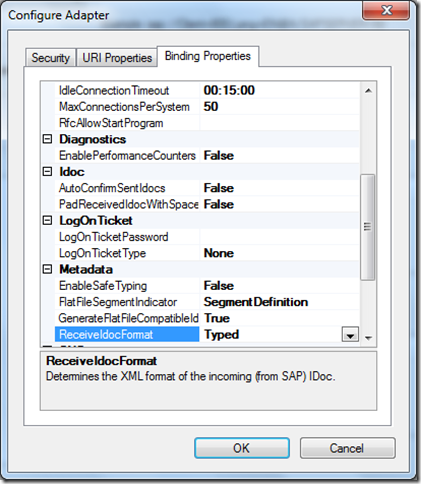
- When generating your XML IDoc schemas ensure that the RecieveIdoc Format = Typed.
- Since BizTalk will be sending IDocs to SAP, you want to select “Client (Outbound operations)” and ensure that your schema has a name of “Send”.

- You still want to be aware of the version of SAP that you will be connecting to but it is not as important as when you are choosing to Receive an XML IDoc. You are best off asking your BASIS admin what version you are on.

- My initial test scenario was generating a ZCONF32 – 700 version of my IDoc. The version of SAP that I am connecting to is 700 so everything should work correctly.
- As expected when I wired up my Receive Port to my Send Port, I am able to submit an IDoc to SAP successfully. Something that I was interested in knowing was the namespace that was included in the context properties.

Something also to note is that when you import the Binding file, that was generated when you created your IDoc Schemas, is the SOAP Action header configured in your send port. You will notice that the Action includes the namespace for the Schema that was generated.
<BtsActionMapping xmlns:xsi="http://www.w3.org/2001/XMLSchema-instance" xmlns:xsd="http://www.w3.org/2001/XMLSchema">
<Operation Name="Send" Action="http://Microsoft.LobServices.Sap/2007/03/Idoc/3/CONF32/ZCONF32/700/Send" />
</BtsActionMapping>
- My next scenario included downloading schemas for version 710 of the IDoc(knowing that I am connecting to an SAP version that is set to version 700). I updated my map to include this version of the schema. All of the “connection lines” in the mapper updated successfully which makes me think that there are no structural differences between these two versions – at least not with the data elements that I was trying to map. I redeployed the application and left the existing send port in tact. I was prompted with a warning/error in the event viewer:
Event Type: Warning
Event Source: BizTalk Server 2009
Event Category: (1)
Event ID: 5743
Date: 4/18/2010
Time: 8:50:45 AM
User: N/A
Computer: BizTalkServer
Description:
The adapter failed to transmit message going to send port "SendSAPIDoc" with URL "sap://CLIENT=XXX;LANG=EN;@a/SAPSERVER/XX?RfcSdkTrace=False&AbapDebug=False". It will be retransmitted after the retry interval specified for this Send Port. Details:"System.Xml.XmlException: Start element ‘Send’ from namespace ‘http://Microsoft.LobServices.Sap/2007/03/Idoc/3/CONF32/ZCONF32/700/Send’ expected. Found element ‘ns0:Send’ from namespace ‘http://Microsoft.LobServices.Sap/2007/03/Idoc/3/CONF32/ZCONF32/710/Send’.
Server stack trace:
at System.ServiceModel.AsyncResult.End[TAsyncResult](IAsyncResult result)
at System.ServiceModel.Channels.ServiceChannel.SendAsyncResult.End(SendAsyncResult result)
at System.ServiceModel.Channels.ServiceChannel.EndCall(String action, Object[] outs, IAsyncResult result)
at System.ServiceModel.Channels.ServiceChannel.EndRequest(IAsyncResult result)
Exception rethrown at [0]:
at System.Runtime.Remoting.Proxies.RealProxy.HandleReturnMessage(IMessage reqMsg, IMessage retMsg)
at System.Runtime.Remoting.Proxies.RealProxy.PrivateInvoke(MessageData& msgData, Int32 type)
at System.ServiceModel.Channels.IRequestChannel.EndRequest(IAsyncResult result)
at Microsoft.BizTalk.Adapter.Wcf.Runtime.WcfClient`2.RequestCallback(IAsyncResult result)".
For more information, see Help and Support Center at http://go.microsoft.com/fwlink/events.asp.
- This error leads me to believe that the “magic” when sending XML IDocs is in the SOAP Action Header in the Send Port. Upon updating the SOAP Action Header to reference the 710 version of the IDoc, I had success.
<BtsActionMapping xmlns:xsi="http://www.w3.org/2001/XMLSchema-instance" xmlns:xsd="http://www.w3.org/2001/XMLSchema">
<Operation Name="Send" Action="http://Microsoft.LobServices.Sap/2007/03/Idoc/3/CONF32/ZCONF32/710/Send" />
</BtsActionMapping>
- I checked the WE02 SAP Transaction and found that my IDoc was processed successfully as indicated by the green light.

Conclusion
What I am able to conclude from this exercise is that you are not bound by the version of DOCREL like you are when Receiving IDocs but rather by the structure of the IDoc itself. I am pretty confident that you can update your SAP version without having to regenerate your schemas as long as the structure of the IDoc itself does not change. This puts you in a similar risk category as using flat file schemas which I will discuss in the next post of this series. Something that became evident is that the SOAP action header must match the version of the schema that you have generated.
by community-syndication | Apr 16, 2010 | BizTalk Community Blogs via Syndication
If you love Flowcharts as I do you might have wondered if it is possible to create a Workflow Service as a Flowchart. The short answer is yes but we didn’t have a template for creating one until now.
Today on my blog, I’ve posted detailed instructions for how you can create a Workflow Service using a Flowchart. Or if you want to do it the easy way just look in the online templates for Workflow using Visual Studio 2010 and you will see it there.
by community-syndication | Apr 16, 2010 | BizTalk Community Blogs via Syndication
I been working for a while on an internal application involving the following technologies.
- Silverlight 3,
- .NET 3.5
- VS 2008,
- Prism,
- WCF RIA Service Beta,
- Silverlight Toolkit (Nov 2009 Release)
Project Statistics:
Here is the content of our VS solution file, quite reasonable sized application.
- .NET Library Projects : 8
- WCF RIA Services Project : 4
- Prism Modules (Silverlight Application Projects) : 8
- Silverlight Business Application : 2 (Client and the Server)
First I converted the solution to VS 2010 by just opening the solution file from VS 2010 and navigating through the conversion wizard. No errors encountered during the migration. But obviously the solution didn’t compile for few reasons. Majority of the errors were mainly due to 2 references
- System.ComponentModel.DataAnnotation, and
- System.Web.DomainService
I changed the target framework setting in all the .NET Library projects to ".NET Framework 4.0", and fixed the System.ComponentModel.DataAnnotation reference.
RIA Services Changes:
Server Side: Removed the following references from the server side (RIA services) project
- System.Web.DomainServices
- System.Web.Ria
and added the following new references
- System.ServiceModel.DomainServices.Server.dll
- System.ServiceModel.DomainServices.Hosting.dll
which can be found under c:\Program Files\Microsoft SDKs\RIA Services\v1.0\Libraries\Server\.
Client Side: Removed the following references from the client side (Silverlight Application) project
and added the following new references
- System.ServiceModel.DomainServices.Client.dll
- System.ServiceModel.DomainServices.Client.Web.dll
In addition to the above RIA dll’s you also need to add reference to System.ServiceModel.Web.Extensions.dll (found under c:\Program Files\Microsoft SDKs\Silverlight\v4.0\Libraries\Client).
On both the server and client projects you need to correct the "using" statements in all the source files.
RIA Services Link Not Visible:
By default after the conversion your WCF RIA Client projects will still remain on "Silverlight 3" target settings. WCF RIA services is not supported on Silverlight 3 and hence you won’t see any option to configure the "WCF RIA Services Link" in the properties windows. Change the "Target Silverlight Version" to Silverlight 4 and you’ll see the option to select the RIA services link.
Option to copy xap files (PRISM Modules) to ClientBin folder was broken
The xap files were not automatically copied to the ClientBin folder (as part of build process) after the migration. I had to reconfigure it by going to Properties (In the Web – Server side project) and selecting Silverlight Applications tab.
Silverlight Toolkit Changes:
Remove the existing references for older version of Toolkit and add the following from the .NET list
- System.Windows.Controls.Toolkit
Silverlight Business Application Template Changes:
This was the biggest challenge for me and took considerable amount of time. At the end, I couldn’t fix the existing solution, so recreated a standalone project using the new template and added the files from the previous solution.
Busy Indicator:
The Silverlight Business Application template uses its own version of BusyIndicator (source included) instead of the one from ToolKit, which resulted in some conflicts. I deleted the files under Control (BusyIndicator.*), removed the references and configured to use the one from Toolkit. Beware you need to comment the lines in Style.xaml.
Note:
After the upgrade there is no choice for you to go back to VS 2008. If you are using WCF RIA RC2 then the only choice is VS 2010, SL 4.
Nandri!
Saravana
by community-syndication | Apr 16, 2010 | BizTalk Community Blogs via Syndication
This is a temporary post that was not deleted. Please delete this manually. (324c070d-6e4a-4ce6-a8ac-8c725fee3aef – 3bfe001a-32de-4114-a6b4-4005b770f6d7)
by community-syndication | Apr 16, 2010 | BizTalk Community Blogs via Syndication
The final release of Silverlight 4 is now available.
[In addition to blogging, I am also now using Twitter for quick updates and to share links. Follow me at: twitter.com/scottgu]
What is in the Silverlight 4 Release
Silverlight 4 contains a ton of new features and capabilities. In particular we focused on three scenarios with this release:
- Further enhancing media support
- Building great business applications
- Enabling out of the browser experiences
On Tuesday I gave a 60 minute keynote about Silverlight 4 which showed off many of the new features and capabilities now available. You can watch my keynote to learn more about Silverlight 4 and see a ton of great demos of it in action.
Also check out these three great posts by Tim Heuer that talk about the new features and provide a guide to the new Silverlight 4 capabilities:
Also read David Anson’s great Silverlight 4 Toolkit post to learn more about the new controls and functionality also available within the Silverlight Toolkit release we also made available today. Visit this page to learn more about the new Pivot functionality in Silverlight 4 – which makes it really easy to visualize and interact with collections of images using Silverlight.
Lastly – make sure to visit the www.silverlight.net web-site and visit the “Get Started” section to find free tutorials that you can use.
Download and Install Silverlight 4 Tools for VS 2010
To develop Silverlight 4 applications you should first download and install Visual Studio 2010 or download and install the free Visual Web Developer 2010 Express edition.
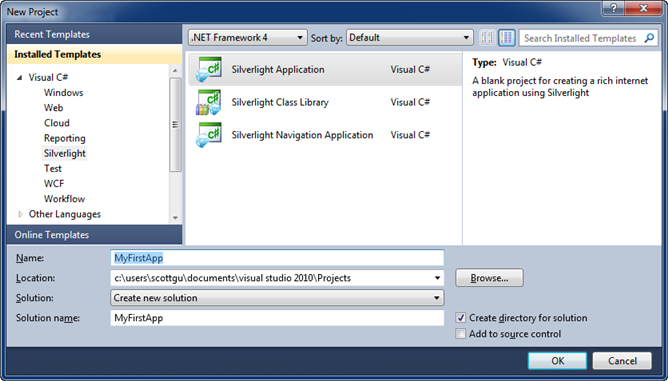
Then install the Silverlight Tools RC2 for Visual Studio 2010. This setup includes the Silverlight 4 Developer Runtime, Silverlight 4 SDK, RIA Services, and VS 2010 tools support. Once installed you can do File->New Project and choose Silverlight Application to create your first Silverlight 4 project. You can then use the new WYSIWYG Silverlight designer in Visual Studio 2010 to design and build rich Silverlight 4 applications.
Important: If you previously installed the Silverlight 4 Beta or RC build on your machine, please make sure to go into Add/Remove programs and uninstall the “Update for Visual Studio 2010 (KB976272)” package prior to installing the Silverlight Tools RC2 for Visual Studio 2010 setup.
Note that while Silverlight 4 is released, the “Silverlight 4 Tools for VS 2010” is currently in “RC2” mode (meaning we are going to keep an eye out for any remaining issues before finally calling it done). We’ll update the tools to be “final” in a few weeks once we verify that no last minute issues/bugs remain.
Download and Install Expression Blend 4 Release Candidate
You can also download and install the Expression Blend 4 RC to create and design great Silverlight 4 applications.
Blend contains “Sketchflow” support – which makes it really easy to rapidly prototype ideas and applications. To learn more about Sketchflow watch this 90 second video of it in action.
Summary
Today’s release is the fourth release of Silverlight that we’ve shipped in the last 2.5 years. The team has done a great job of advancing it quickly and staying focused.
Today’s Silverlight 4 release opens up a ton of new opportunities to build great solutions for both consumers and business scenarios. We are looking forward to seeing what you build with it!
Hope this helps,
Scott
by community-syndication | Apr 15, 2010 | BizTalk Community Blogs via Syndication
(or why my previous post doesn’t apply to all adapters)
In a previous post I identified how if you had the WCF-BasicHttp adapter on the backend send and the WCF-NetTcp adapter on the frontend receive you need a transformation for the client to interpret the backend Fault as a Fault since there is a SOAP version mismatch.
As was evident by a comment, this does not apply to all adapters, but only to the base WCF adapters. for example it does not work with the WCF-SQL adapter.
Why?
In contrast to the base WCF adapters, which when you enable the Propagate fault message treats a SOAP Fault coming from the recipient service as an acceptable message and returns it to the receive port as a valid SOAP Fault message that has Fault as the root element, the WCF-SQL adapter returns a NACK message (if there is an error raised in SQL) as the message. The NACK message has not got the Fault element as it’s root, but instead has Envelope, and looks like this:
<?xml version="1.0" encoding="utf-8"?>
<SOAP:Envelope xmlns:SOAP="http://schemas.xmlsoap.org/soap/envelope/" SOAP:encodingStyle="http://schemas.xmlsoap.org/soap/encoding/">
  <SOAP:Body>
    <SOAP:Fault>
      <faultcode>Microsoft BizTalk Server Negative Acknowledgment </faultcode>
      <faultstring>An error occurred while processing the message, refer to the details section for more information </faultstring>
      <faultactor>C:\Projects\Sample\Locations\Response\FM_%MessageID%.xml</faultactor>
      <detail>
        <ns0:NACK Type="NACK" xmlns:ns0="http://schema.microsoft.com/BizTalk/2003/NACKMessage.xsd">
          <NAckID>{FFB1A60B-E593-4620-8897-4E9C7030A937}</NAckID>
          <ErrorCode>0xc0c01658</ErrorCode>
          <ErrorCategory>0</ErrorCategory>
          <ErrorDescription>There was a failure executing the send pipeline: "Microsoft.BizTalk.DefaultPipelines.XMLTransmit, Microsoft.BizTalk.DefaultPipelines, Version=3.0.1.0, Culture=neutral, PublicKeyToken=31bf3856ad364e35" Source: "XML assembler" Send Port: "Failed Message" URI: "C:\Projects\Sample\Locations\Response\FM_%MessageID%.xml" Reason: This Assembler cannot retrieve a document specification using this type: "http://Sample#Unknown".  </ErrorDescription>
        </ns0:NACK>
      </detail>
    </SOAP:Fault>
  </SOAP:Body>
</SOAP:Envelope>
Therefore it cannot be mapped by the map presented in that post, although the Fault it contains is a SOAP 1.1 Fault.
Read more about ACK and NACK messages here.
by community-syndication | Apr 15, 2010 | BizTalk Community Blogs via Syndication
One of the fundamental differentiators of Microsoft’s StreamInsight compared to other Complex Event Processing (CEP) technologies is its flexible deployment model. In that sense, a StreamInsight solution can be hosted within an application or as a server…(read more)
by community-syndication | Apr 15, 2010 | BizTalk Community Blogs via Syndication
[Source: http://geekswithblogs.net/EltonStoneman]
I did a session on “The Enterprise Cache” at the UK SOA/BPM User Group yesterday which generated some useful discussion. The proposal was for a dedicated caching layer which all app servers and service providers can hook into, sharing resources and common data. The architecture might end up like this:
I’ll update this post with a link to the slide deck once it’s available.
The next session will have Udi Dahan walking through nServiceBus, register on EventBrite if you want to come along.
Synopsis
- Looked at the benefits and drawbacks of app-centric isolated caches, compared to an enterprise-wide shared cache running on dedicated nodes;
- Suggested issues and risks around caching including staleness of data, resource usage, performance and testing;
- Walked through a generic service cache implemented as a WCF behaviour – suitable for IIS- or BizTalk-hosted services – which I’ll be releasing on CodePlex shortly;
- Listed common options for cache providers and their offerings.
Discussion
Cache usage. Different value propositions for utilising the cache: improved performance, isolation from underlying systems (e.g. service output caching can have a TTL large enough to cover downtime), reduced resource impact – CPU, memory, SQL and cost (e.g. caching results of paid-for services).
Dedicated cache nodes. Preferred over in-host caching provided latency is acceptable. Depending on cache provider, can offer easy scalability and global replication so cache clients always use local nodes. Restriction of AppFabric Caching to Windows Server 2008 not viewed as a concern.
Security. Limited security model in most cache providers. Options for securing cache content suggested as custom implementations. Obfuscating keys and serialized values may mean additional security is not needed. Depending on security requirements and architecture, can ensure cache servers only accessible to cache clients via IPsec.
Staleness. Generally thought to be an overrated problem. Thinking in line with eventual consistency, that serving up stale data may not be a significant issue. Good technical arguments support this, although I suspect business users will be harder to persuade.
Providers. Positive feedback for AppFabric Caching – speed, configurability and richness of the distributed model making it a good enterprise choice. .NET port of memcached well thought of for performance but lack of replication makes it less suitable for these shared scenarios. Replicated fork – repcached – untried and less active than memcached. NCache also well thought of, but Express version too limited for enterprise scenarios, and commercial versions look costly compared to AppFabric.



