Goodbye Evangelist, Hello Program Manager

For the last 5 years I’ve been a Technical Evangelist in the Developer & Platform Evangelism Group (DPE) at Microsoft.  Today is my last day as a Technical Evangelist.  Starting on Monday I’m going to be a Program Manager in the AppFabric Developer Platform Group where I will do much the same thing.

That’s right.  I’ll keep doing the blog, more endpoint.tv episodes more sample code etc.  What will change is that I will have a more direct influence on the next generation of WF/WCF and AppFabric.

As one of my first official duties I’ll be speaking on Windows Workflow in Azure at PDC10 which will be a lot of fun.  So though I won’t have “Evangelist” in my title, you know I can’t keep my mouth shut about things I care about – I’ll still be evangelizing so stay tuned for more.

Teaching SolidQ Australia BI Bootcamp in Darwin last week of October

It has been almost a year since my trip to Darwin, I am going to be back there at the end of October. I will be there for the week of the 24th – 30th of October teaching the SolidQ BI Bootcamp course, if you are interested in catching up or doing some SQL training drop me an email. I will also be running a BizTalk Community Event on Saturday the 30th of October for details drop me an email email.

Building Your Dynamic Router on AppFabric Cache

I’ve seen a lot of services routing solutions. Some used expensive hardware. Some were built on top of integration or ESB platforms and others were simply built from the ground up.

 Building from the ground up has always been the most flexible method with the obvious drawback that it was also potentially the most difficult, least maintainable and ultimately expensive choice. But, after reconsidering the options and the new features introduced in .NET 4.0 and AppFabric I started to doubt that’s the case any longer.

 I tested my hunch by building a prototype utilizing:

·         WCF Routing Service

·         AppFabric Cache

·         Entity Framework

·         AppFabric Hosting

·         ASP.NET Dynamic Data Entities Web Application template.

 The reason there’s so many technologies in the prototype is I didn’t want to build the typical standalone console app. Instead, I wanted to convince myself that the administration and deployment aspects didn’t materially impact the viability of a custom solution.


Before jumping right into the bits though, I’ll address a basic question.

Why Would Anyone Want This?

 The quick answer to the general question is that the reason products exist today that are either dedicated to this problem or offer it as a part of their SOA offering is that a single endpoint that can service many different types of requests turns a many-to-many problem into a one-to-many problem and that’s just easier to deploy and manage. It frees the IT professional to concentrate on “one side” of the clients and services they manage because the clients are required to access the target services via a consistent address, security and protocol. This then frees the IT professional to move services, add services and bridge protocols as needed without impacting the client.

A more specific answer that directly applies to the subject of this blog and this prototype is –Why use AppFabric Cache for this? I chose AppFabric Cache for several reasons most notably:

·         Scalability and HA

·         Performance

·         Notifications

·         Ease of use

These features combine to give me a reliable platform, the ability to update the router’s configuration without explicit polling and to minimize access to the database that serves as our persistent store for routing configuration.  Also, if for some heretical or insane reason I kept my persistent routing data in something other than SQL Server (I suppose SQL Azure would be an acceptable alternative) the impact is minimal. Finally, I also think in the future developers are going to use distributed memory stores more and more for what they use the file system for now especially when it comes to flexible configuration but that’s an entire topic in and of itself!


That’s enough theory for now. Let’s dig in!

The Architecture


The prototype’s architecture is straightforward. The routing configuration is persisted to the database and AppFabric Cache simultaneously. When the routing information is updated a callback fires in the router and a new RoutingConfiguration is applied.

This architecture persists routing information so the router can use the persisted information to build its routing table after a reboot of the server.

Building the Router

 The Router uses a simple service behavior to register the ServiceHost with an UpdateManager class that in turn will manage the App Fabric Cache Notifications.

    public class CacheDrivenRoutingBehavior:BehaviorExtensionElement,IServiceBehavior

    {

        public override Type BehaviorType

        {

            get { return typeof(CacheDrivenRoutingBehavior); }

        }


        protected override object CreateBehavior()

        {

            return new CacheDrivenRoutingBehavior();

        }


public void AddBindingParameters(ServiceDescription serviceDescription, ServiceHostBase serviceHostBase, System.Collections.ObjectModel.Collection<ServiceEndpoint> endpoints, BindingParameterCollection bindingParameters)

        {

         }

public void ApplyDispatchBehavior(ServiceDescription serviceDescription, ServiceHostBase serviceHostBase)

        {

            serviceHostBase.Extensions.Add(new CacheDrivenRoutingHostExtension());

        }

public void Validate(ServiceDescription serviceDescription, ServiceHostBase serviceHostBase)

        {

         }


        class CacheDrivenRoutingHostExtension : IExtension<ServiceHostBase>, IDisposable

        {

            private bool _disposed;

            private UpdateManager _routeManager;

            public CacheDrivenRoutingHostExtension()

            {

                _disposed = false;

            }


            void IExtension<ServiceHostBase>.Attach(ServiceHostBase owner)

            {

                _routeManager = new UpdateManager(owner);

                _routeManager.UpdateRoutes();

            }


            void IExtension<ServiceHostBase>.Detach(ServiceHostBase owner)

            {

                Dispose();

            }

             private void Dispose(bool disposing)

            {

                if (!_disposed)

                {

                    if (disposing)

                    {

                        if (_routeManager != null)

                        {

                            _routeManager.Dispose();

                        }

                    }

                    _disposed = true;

                    _routeManager = null;

                }

            }


            public void Dispose()

            {

                Dispose(true);

                GC.SuppressFinalize(this);

            }


        }


The UpdateManager

The CacheDrivenRoutingBehavior contains an instance of the UpdateManager class. This class has the responsibility for monitoring cache events and for rebuilding the RoutingConfiguration . The heart of the UpdateManager is its callback.

private void RoutingTableUpdatedCallback(

            string cacheName,

            string regionName,

            string key,

            DataCacheItemVersion version,

            DataCacheOperations cacheOperation,

            DataCacheNotificationDescriptor nd)

{

      Dictionary <string, MessageFilter> filters = (Dictionary<string, MessageFilter>)_cache.Get(_routingEntriesKey);

         var rtConfig = new RoutingConfiguration();

          rtConfig.RouteOnHeadersOnly = false;

         rtConfig.SoapProcessingEnabled = true;


        foreach (string address in filters.Keys)

        {

                var ep = new ServiceEndpoint(

                ContractDescription.GetContract(typeof(IRequestReplyRouter)),

new BasicHttpBinding(), // a production router would likely drive this dynamically as well as the message filters and endpoint address.

                     new EndpointAddress(address));

rtConfig.FilterTable.Add(filters[address], new List<ServiceEndpoint> { ep } );

        }

         _serviceHost.Extensions.Find<RoutingExtension>().ApplyConfiguration(rtConfig);

}

 The callback simply retrieves a structure from cache that contains a collection that maps an endpoint address to its corresponding MessageFilter. As noted in the comments, the destination binding is inflexible in the prototype. In a production implementation you would likely drive those choices dynamically. A RoutingConfiguration should always be  swapped  whole rather than partially updated.

Our mapping is contained in a single cache item that gets replaced in its entirety so it was sufficient to use a simple strategy when we registered the callback

  _cache.AddItemLevelCallback(_routingEntriesKey, DataCacheOperations.ReplaceItem, RoutingTableUpdatedCallback);

Can I Get a Little Help Here?

 You might have noticed the line _routeManager.UpdateRoutes(); in the code above. What that method does is in turn invoke a helper class’s method that hydrates the cache from routes that are persisted in SQL Server. The routes are represented and managed at runtime by Entity Framework objects.  This allows the service to survive cache restart.


In the Router itself, the method called only on startup in the prototype because I wanted everything driven from cache. In a production system you could use it as a backup should the cache fail for whatever reason. The helper class is called CacheUtil.

public static class CacheUtil

{

        private static DataCacheFactory factory;


        static  CacheUtil()

        {

            factory = new DataCacheFactory();

        }

        /// <summary>

        /// Method which reads routes persisted to SQL Server and then updates the cache

        /// </summary>

        public static void UpdateCache()

        {


            var cache = factory.GetCache(ConfigurationManager.AppSettings[cacheKey]);

            var filters = new Dictionary<string, MessageFilter>();

            using (var ctx = new RoutingManagerEntities())

            {

                var actionFilters = ctx.ActionFilters;

                foreach (var actionFilter in actionFilters)

                {

filters.Add (actionFilter.Address, new ActionMessageFilter(actionFilter.SoapAction));

                }

                foreach (var messageFilter in ctx.XPathFilters)

                {

                      if (messageFilter.XPathFilterNamespaces.Count == 0)

                    {

filters.Add(messageFilter.Address, new XPathMessageFilter(messageFilter.XPath));

                    }

                    else

                    {

                        var nt = new NameTable();

                        var mgr = new XmlNamespaceManager(nt);

                        foreach (var ns in messageFilter.XPathFilterNamespaces)

                        {

                            mgr.AddNamespace(ns.Prefix, ns.Namespace);

                        }

filters.Add (messageFilter.Address, new XPathMessageFilter(messageFilter.XPath,mgr));  

                    }

                }

            }

             cache.Put(ConfigurationManager.AppSettings[itemKey], filters);

        }

 We’ll also use CacheUtil in the GUI later but for now let’s get the Router ready to run.

Hosting and Configuring the Router

One of the things I wanted to accomplish with the prototype was allowing it to be managed by the AppFabric tools in IIS Manager. This was difficult for me because when I create a service that depends on things starting up right away I like to use the old standby of creating a host that can run either as a Windows Service or in the console so I can have full control of the lifecycle and debug easily…

In the past this was fine because it could be argued that while deploying a separate service was a pain it was necessary for anything that needed to start right away. That’s not really true any longer. So, I took the plunge and used Auto-Start. Before using Auto-Start, you should review the information here http://msdn.microsoft.com/en-us/library/ee677285.aspx . You may be tempted to skim. Don’t!

Now that I had it configured for Auto-Start all I had left was creating a simple factory so I had control of my start up.

public class RouterFactory : ServiceHostFactory

{

protected override ServiceHost CreateServiceHost(Type serviceType, Uri[] baseAddresses)

     {

            var retVal = new ServiceHost(serviceType, baseAddresses);

            retVal.Description.Behaviors.Add(

            new RoutingBehavior(new RoutingConfiguration()));                     

            retVal.Description.Behaviors.Add(new CacheDrivenRoutingBehavior());

            return retVal;

      }

}

 Ok we have a Router. But, if we start it up it’s not going to work because we don’t have a cache!

Setting up the Cache

 Assuming you’ve installed the AppFabric Caching Feature and have ensured it is running then all that’s left to do is to set up and configure the cache. Use the PowerShell console to run New-Cache. For the prototype I used:

New-Cache  -CacheName DynamicRouting  -NotificationsEnabled  true  –Eviction false –Expirable false

Eviction and Expirable are set to false because it is unlikely a routing table- even one that contains many services- is going to stress memory on today’s hardware. The goal here is to minimize the likelihood of having to refill the cache unnecessarily from the persistent store thereby maximizing performance.

A cache of a routing table is not particularly sensitive data so encryption overhead also was not desired. For the prototype Set-CacheClusterSecurity was invoked as:

Set-CacheClusterSecurity –SecurityMode None –ProtectionLevel None

Now we’re ready to build the GUI.

“Building The GUI”

 The noted philosopher Harry Callahan once said “A man’s got to know his limitations”. Words to live by!

I’m unashamedly GUI challenged and If I had tried to build a respectable GUI from scratch that wasn’t simply a giant column of input tags then I’d need some help or this would take a while. It’s not that I haven’t done it before it’s just that it takes me way longer than it does someone who lives in that stuff..

So I punted and  used the ASP.NET Dynamic Data Entities Web Application template and a touch of Entity Framework and Huzzah! a GUI! 


All it took was installing the template and dropping this in global.asax.cs…


    DefaultModel.RegisterContext(

      typeof(RoutingManagerEntities),

      new ContextConfiguration()

     {    ScaffoldAllTables = true });


          routes.Add(new DynamicDataRoute(“{table}/{action}.aspx”)

            {

 Constraints = new RouteValueDictionary(new { action = “List|Details|Edit|Insert” }),

                Model = DefaultModel

      });


Then strategically inserting CacheUtil.UpdateCache() whenever CRUD occurred and  it was time to amuse myself in the debugger for longer than is decent watching my new Insta-GUI updates cause my callback to fire in my Router.


It’s hard to beat that for a Friday night of fun!


Ok. So, for the hardcore GUI ninja that’s just not going to cut it but that wasn’t the point of the exercise. What I wanted to do was convince myself was that it was a low barrier to entry to create a useable GUI to drive a custom router and I’d have to say I’m pretty sure someone with actual GUI skills could make something happen pretty quickly.

Wrapping Up

At this point I’m convinced that building a manageable and scalable router from “scratch” would not be an untenable undertaking given all the power provided by .NET 4.0 and AppFabric.  Of course, I’m always willing to listen to other viewpoints so if you disagree please feel free to share your concerns.

Source code for this prototype is available here



Considerations when managing source control via Visual Studio Team Foundation Server and using Text Template Transformation Toolkit to generate .NET4 Entity Framework objects

T4 background

Leveraging the power of Text Template Transformation Toolkit (T4 template) to generate code (or any other type of text) is a great time saver and it is particularly useful when working with Entity Framework (EF) since it allows to easily (almost in a batch like fashion) do things like creating Plain Old CLR Object (POCO), ADO.NET objects and as mentioned in a previous blog, compiled views (a simple search on “Entity Framework T4 templates” will result in lots of these samples). T4 templates are not particular to EF, since they can be leverage to generate any other type of code (or text) – they help in the creation of anything where lots of text is needed (code) based on a pre-defined set of rules and some given parameters/properties. The following, describes some problem scenarios which maybe experienced when using T4 templates to generate object layer code when working with large models and managing source control via Visual Studio Team Foundation Server.

The scenario

Extracting from a customer engagement, take the creation of POCO objects via a T4 template. As it will be expected, it generates the appropriate .CS files (in the case of C#) for every entity in your model which in many of our customer’s scenarios will translate into a large amount of files. Now, if Visual Studio Team Foundation (VSTFS) is been leveraged as the source control, then the tendency will be to simply check in all of these newly generated objects, which in itself is a fairly harmless situation. The problem will arise if any of the following actions is done while working with large amount of entities in your model, these actions will cause huge amounts of updates to the generated code files, this can cause a large amount of Check-ins in the source control which, in turn, will negatively slow down the whole VSTFS server (others working on the system will also experience the effect).

·         Any entity changes/updates – this simple act can trigger the T4 template to re-generate all the code files, even if the changes were limited to some files/entities, if you have 500 entities that will translate in 500 files been checked-in

·         T4 template code itself is changed – all the generated objects will also require re-generation.

·        T4 template is deleted – this will trigger more actions on the VSTFS server as well.

Hence, a simple edit action can significantly create long periods of synchronization time across all VSTFS users. This is not an independent issue with T4 POCO template or the Entity Framework or large models, but the consequence of having the combination of the three easily generating many files needing to be source controlled.

Workarounds

·         Split your EF model – this will minimized the total amount of file been re-generated

·         Lock down the modification of the model – this way the long check-in times can be scheduled

·         Leverage the Team Foundation Server Power Tools – Since not all the re-generated files are necessarily changed files (an entity update maybe limited to some entities but the re-generation will affect all files), the ability to undo unchanged files will be very useful, the tfpt.exe command line tool will allow doing exactly this when using the “uu” flag, as follows:

·         Create a separate assembly for the model and have a separate project for the T4 template which will reference the separate assemblies, this way, changes will not propagate until manually triggered. This is similar to the point above, since it will allow scheduling of check-in times.

·         Modify the T4 template to generate fewer files, less files to re-generate translates to less check-ins

·         Selecting all of the files that will be re-generated and check them all out (right click and choose ‘Check Out for Edit…’) , do the required edits, let them re-generate and then scheduled all your check-ins

Conclusion

The power of T4 templates is great and should be leverage where it makes sense but if a large amount of code is been generated then the development environment should be taken into consideration, more so when a source control system is used. In general terms, the solution is to minimize the amount of changes, the amount of generated files or find ways to perform large updates in a scheduled manner.

Ø  tfpt uu [/changeset:changesetnum] [/recursive] [/noget] [filespec…]

endpoint.tv – AppFabric Caching vs. IBM eXtreme Scale benchmark

Greg Leake has been at it again.  He has emerged from his lab with the latest results of benchmark testing of Windows Server AppFabric Caching vs. IBM eXtreme Scale and the results are something you definitely want to see.

Microsoft® Windows® Server AppFabric vs. IBM® WebSphere® eXtreme Scale 7.1 Benchmark Report

Ron Jacobs
blog        http://blogs.msdn.com/rjacobs
twitter    @ronljacobs

AppFabric Cache – Deploying cache servers and cache clients on different Active Directory Domains

Recently, a particular deployment with cache servers on domain1 and cache clients (app servers or web servers) running on domain2 lead to some debugging challenges when the cache clients are unable to communicate with the servers. Whether it is your DEV servers accessing cache servers or a production topology that is common in your enterprise, this blog might help to unblock you with a quick workaround.

Symptoms

In such a deployment, your cache client might receive the following exception:

Message : ErrorCode<ERRCA0016>:SubStatus<ES0001>:The connection was terminated, possibly due to server or network problems or serialized Object size is greater than MaxBufferSize on server. Result of the request is unknown.

We understand that this message is misleading especially when the object being stored is only a few bytes, a string object for instance. Secondly, you might also notice that the instantiation of the DataCacheFactory and getting a reference to the DataCache object in your code succeeds and the exception gets thrown only when the first cache operation (GET or PUT) is executed.

Here are a set of things to confirm before concluding the problem:

  • Export the cache cluster configuration and verify the cache server names specified under the ‘hosts’ section match with the server names specified in the cache client configuration file
  • In the cache client configuration file, try changing the cache server names to Fully Qualified Domain Name (FQDN) and redo the operation. Eg: SERVER1.DOMAIN1.com
  • Do a simple ‘ping command’ from the cache client machine first using just the server name (SERVER1) and then using the Fully Qualified Domain Name (FQDN) server name. You might notice that the ping command with FQDN succeeds while the other one fails.
  • Capture a trace session from the client machine when this issue happens and analyze the output. For tracelog instructions, please refer to this blog.

Network trace analysis

Here is an extract from a trace file captured when this problem occurred.

2010-9-15 13:33:01.466

DistributedCache.ClientChannel.Client1

0x000005CC

Creating channel for [net.tcp://SERVER1.DOMAIN1:22233].”

—-

—-

2010-9-15 13:33:01.664

DistributedCache.DRM.Client1

0x00000A1C

‘2:-1’ PUT;Routed;MyCache;Default_Region_0982;1975349082;test key;Version = 0:0 – Starting to process.”

2010-9-15 13:33:01.665

DistributedCache.DRM.Client1

0x00000A1C

Config for [MyCache,1975349082] is [net.tcp://SERVER1:22233 (120)].”


The problem is that the DataCacheFactory instantiation uses FQDN as seen above. Subsequently, the internal data structures reference only the server name which is maintained in the internal routing table. This causes an issue during a cache operation execution, since the cache client machine (app server or web server machine) DNS is unable to resolve SERVER1.

Workaround

  1. Modify the c:\windows\system32\drivers\etc\hosts file on the cache client machine (web or app server) by adding an IP address entry for the cache server(s). Retry the operation.


  2. If the above step does not succeed, try changing the search suffix order by browsing to the network connections as shown below:

The above snapshots have been taken from a customer engagement which resulted in this key lesson learnt. We deeply appreciate such feedback and patience in working with us to identifying the root cause.

We have surfaced this issue to the product team who are fixing this in the next subsequent release.

Author: Rama Ramani

Reviewers: Jaime Alva Bravo, Rahul Kaura, Jason Roth

Don’t copy and paste VS 2010 UML diagrams

[Source: http://geekswithblogs.net/EltonStoneman]

A quick tip that may save a lot of anguish.

The UML diagrams and editor in Visual Studio 2010 Ultimate are excellent, and you can quickly and easily create very snazzy diagrams like this:

– and link components to TFS Work Items.

But if you want to base a new diagram from an existing one, don’t copy and paste the file from Solution Explorer. VS will let you do it, but what you end up with is effectively a shallow copy, where components in your new diagram are using the same element IDs as the old diagram, so if you make a change in one, it will be duplicated in the other.

VS will give you a hint with this warning if you try to open both files:

“Cannot load ‘x.y.z.sequencediagram’: Element with ID [guid] already exists in element directory”.

Instead, create a new file and copy-and-paste all the elements from the old one, and they will be created as new elements in the new diagram.

Announcing NuPack, ASP.NET MVC 3 Beta, and WebMatrix Beta 2

Announcing NuPack, ASP.NET MVC 3 Beta, and WebMatrix Beta 2

I’m excited to announce the beta release of several projects today.

Two of these releases – ASP.NET MVC 3 Beta and WebMatrix Beta 2 – are evolutions of projects we first previewed this summer.  The third – NuPack – is a new project that I’m particularly excited about.

NuPack – Open Source Package Manager for .NET

NuPack is a free open source package manager that makes it easy for you to find, install, and use .NET libraries in your projects. It works with all .NET project types (including, but not limited to, both ASP.NET Web Forms and ASP.NET MVC).

NuPack enables developers who maintain open source projects (for example, projects like Moq, NHibernate, Ninject, StructureMap, NUnit, Windsor, RhinoMocks, Elmah, etc) to package up their libraries and register them with an online gallery/catalog that is searchable.  The client-side NuPack tools – which include full Visual Studio integration – make it trivial for any .NET developer who wants to use one of these libraries to easily find and install it within the project they are working on.

NuPack handles dependency management between libraries (for example: library1 depends on library2). It also makes it easy to update (and optionally remove) libraries from your projects later. It supports updating web.config files (if a package needs configuration settings). It also allows packages to add PowerShell scripts to a project (for example: scaffold commands). Importantly, NuPack is transparent and clean – and does not install anything at the system level. Instead it is focused on making it easy to manage libraries you use with your projects.

NuPack is itself an open-source project.  The Outercurve Foundation (formerly CodePlex Foundation) today announced the acceptance of the NuPack project to the ASP.NET Open Source Gallery.  Developers – both inside and outside Microsoft – will contribute features, bug fixes and patches to NuPack.

Our goal with NuPack is to make it as simple as possible to integrate open source libraries within .NET projects.  It will be supported in all versions of Visual Studio.  You can start using the first developer preview of it today.

A Simple NuPack Scenario – Enabling ELMAH

As a simple example to show off what NuPack enables – let’s assume we are working on a brand new ASP.NET application and want to use the popular open-source “ELMAH” library to log and report errors with our site.  To install ELMAH today, you’d need to manually download it, unzip it, add a reference to your project, make sure you have source control bindings for the library setup correctly, and update the web.config file of your application to include the Elmah HttpModule entries.  All doable – but a little tedious.

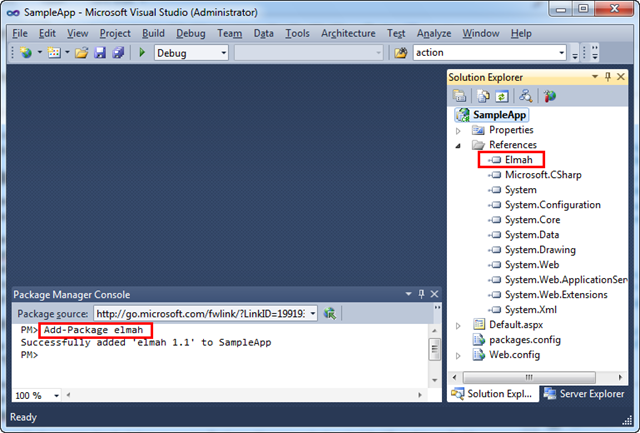
With NuPack installed, you can simply open the new “Package Manager Console” that NuPack enables inside VS and type “Add-Package elmah” within it:

image

Typing "Add-Package elmah” causes NuPack to check an online feed to locate the Elmah library, download it, add a reference of it to your current project, and automatically add the appropriate Elmah registration entries within your application’s web.config file:

image

And now we have Elmah setup and installed for our project, and error report logging enabled.  No additional manual steps required to make it work.

Learn More About NuPack

Check out the following links to learn more about NuPack and some of the many scenarios it enables:

.NET and Open Source

We think NuPack will be a fundamental component of the .NET stack going forward.  It will encourage more .NET developers to use open-source libraries.  Having a standard package manager integrated into millions of copies of Visual Studio will hopefully also encourage the creation of more open source projects with .NET.

ASP.NET MVC 3 Beta

Today we are also shipping a Beta Release of ASP.NET MVC 3.  This release is a significant update of the ASP.NET MVC 3 Preview we shipped two months ago, and includes a bunch of great feature improvements.

In addition to the ASP.NET MVC 3 features introduced with the first preview, today’s beta includes:

  • Razor Enhancements: ASP.NET MVC 3 supports the new Razor view-engine option. In addition to the functionality enabled with the ASP.NET MVC 3 Preview, today’s Beta adds a bunch of additional capabilities: Cleaner MVC integration – including the ability to use a new @model syntax to more cleanly specify the type being passed to the view.  A new @helper syntax for declaring re-usable HTML helpers (really slick).  A new @* *@ comment syntax.  The ability to specify defaults (like layoutpage) once for the entire site – keeping your views DRY.  Support for using both C# and VB flavors of Razor.

  • New View Helpers: New view helper methods are now supported.  This includes a new Chart() helper method for dynamically creating charts (same features as the <asp:chart> control in ASP.NET 4 – except now using view helper methods), as well as a new WebGrid() helper method that can be used to create data-grid style UI (including paging and sorting).

  • Unobtrusive JavaScript and HTML 5: The AJAX and Validation helpers in ASP.NET MVC now both use an unobtrusive JavaScript approach by default. Unobtrusive JavaScript avoid injecting inline JavaScript into HTML, and instead enables cleaner separation of behavior using the new HTML 5 data- convention (which conveniently works on older browsers as well). This makes your HTML smaller and cleaner, and makes it easier to optionally swap out or customize JS libraries.  The Validation helpers in ASP.NET MVC 3 also now use the jQueryValidate plugin by default.

  • Dependency Injection: The initial ASP.NET MVC 3 Preview added better support for Dependency Injection (DI) with Controllers, Views and Action Filters.  Today’s Beta extends this with better dependency injection support for Model Binders, Model Validation Providers, Model Metadata Providers, and Value Providers.  It also supports a new IDependencyResolver interface that makes it easier to integrate Dependency Injection Frameworks.

  • NuPack Integration: ASP.NET MVC 3 automatically installs and enables NuPack as part of its setup.  This makes it trivial to take advantage of NuPack to find and add lots of MVC extensions and libraries to your projects.

  • Other Goodness: The initial ASP.NET MVC 3 Preview added lots of additional helpers and classes to make everyday coding better.  Today’s beta includes a bunch of additional improvements: more granular XSS HTML input validation, HTML helper improvements to support HTML 5, Crypto helpers for salting and hashing passwords, easier Email APIs, improved “New Project” dialog, etc.

The ASP.NET MVC 3 beta supports “go-live” deployments – which means the license does not restrict you from building and deploying production applications with it.

Learn more about ASP.NET MVC 3

Check out the below links to learn more about the ASP.NET MVC 3 Beta:

  • Phil Haack’s Overview Post
  • Brad Wilson’s Unobtrusive JavaScript Post
  • Brad Wilson’s Unobtrusive JavaScript Validation Post
  • Brad Wilson’s Dependency Injection Series (Model Validation, Model MetaData, Value Providers, Model Binders, Controller Activator, View Page Activator)

Download

Click here to download and install the ASP.NET MVC 3 Beta using the Microsoft Web Platform Installer.

Alternatively you can download and install the ASP.NET MVC 3 Beta using a standalone installer here (note: for today’s beta you need to first install the AspNetWebPages.msi link from that page and then the AspNetMVC3Setup.exe file).

WebMatrix Beta 2

Today we are also shipping WebMatrix Beta 2.  This release is an update of the WebMatrix Beta 1 preview we shipped this summer, and includes a number of great feature improvements.

In addition to the WebMatrix features introduced with the first beta, today’s Beta 2 release includes:

  • Web Page Enhancements: WebMatrix supports building standalone ASP.NET Web Pages using the new Razor syntax. It includes the same syntax improvements (@helper, @* comment *@, etc) that I mentioned above with ASP.NET MVC 3.  It also now supports building pages using both VB and C#.

  • Improved Templates: WebMatrix includes template projects for common scenarios.  The template projects now use HTML 5 and CSS 3 (and also work with downlevel browsers).  A new Wishlist project template has been added with Beta 2.

  • NuPack Integration: WebMatrix provides NuPack integration and supports a web-based admin experience for installing libraries to an application you are working on.

  • Toolkit Support: We are delivering a toolkit (that can be installed via NuPack) that provides convenient helpers that can be used within ASP.NET applications.  This includes helpers for Analytics, Facebook, GamerCard, Gravatar, LinkShare, Captcha, Twitter and Video scenarios.

Download

Click here to download and install WebMatrix Beta 2.

Summary

Today’s releases further evolve and enhance the Microsoft Web Stack.  All of the above capabilities work with .NET 4 and VS 2010, and do not modify any existing files that ship with it (they are all additive and safe to install on your machine). 

I’ll be blogging more details about some of the above improvements in the weeks ahead.

Hope this helps,

Scott