
Notification when Receive Locations/Send Ports change
Instead of scanning the Event Log and capturing when the Receive Locations or Send Ports go down, you can use the following triggers to send out an email when they change status:
Receive Location:
CREATE TRIGGER [dbo].[ReceiveLocationChangeNotification]
   ON [dbo].[adm_ReceiveLocation]
   AFTER UPDATE
AS
BEGIN
  -- SET NOCOUNT ON added to prevent extra result sets from
  -- interfering with SELECT statements.
  SET NOCOUNT ON;

    DECLARE @oldstatus int
  DECLARE @newstatus int
  DECLARE @ReceiveLocationName nvarchar(256)
  DECLARE @status nvarchar(10)
  DECLARE @message nvarchar(300)
  --Was the status not changed
  IF NOT UPDATE([Disabled])
  BEGIN
  RETURN
  END
  --Otherwise send out email
  select @oldstatus=(select [Disabled] from Deleted)
  select @newstatus=(select [Disabled] from Inserted)
  select @ReceiveLocationName=(select [Name] from Inserted)
  SET @message=@ReceiveLocationName+' recieve location changed from '+ case
                     when @oldstatus=-1 then 'Disabled'
                    when @oldstatus=0 then 'Enabled'
                    END + ' to ' +
                    case
                    when @newstatus=-1 then 'Disabled'
                    when @newstatus=0 then 'Enabled'
                    END
                EXEC msdb.dbo.sp_send_dbmail @recipients='[email protected]',
                @subject = @message,
                @body = @message,
                @body_format = 'HTML' ;

--  print @message

END
GO
Send Port:
CREATE TRIGGER dbo.SendPortChangeNotification
   ON dbo.bts_sendport
   AFTER UPDATE
AS
BEGIN
  -- SET NOCOUNT ON added to prevent extra result sets from
  -- interfering with SELECT statements.
  SET NOCOUNT ON;

    DECLARE @oldstatus int
  DECLARE @newstatus int
  DECLARE @PortName nvarchar(256)
  DECLARE @status nvarchar(10)
  DECLARE @message nvarchar(300)
  --Was the status not changed
  IF NOT UPDATE(nPortStatus)
  BEGIN
  RETURN
  END
  --Otherwise send out email
  select @oldstatus=(select nPortStatus from Deleted)
  select @newstatus=(select nPortStatus from Inserted)
  select @PortName=(select nvcName from Inserted)
  SET @message=@PortName+' changed from '+ case
                     when @oldstatus=1 then 'Unenlisted'
                    when @oldstatus=2 then 'Stopped'
                    when @oldstatus=3 then 'Started'
                    END + ' to ' +
                    case
                    when @newstatus=1 then 'Unenlisted'
                    when @newstatus=2 then 'Stopped'
                    when @newstatus=3 then 'Started'
                    END
                EXEC msdb.dbo.sp_send_dbmail @recipients='[email protected]',
                @subject = @message,
                @body = @message,
                @body_format = 'HTML' ;

    --print @message

END
GO
(Did I mention the disclaimer noted on the right side of this blog?)
On ASMX, WCF, namespaces and generated schemas (in BizTalk 2006)
Gjeeeeez, Guidance automation and VS 2008 SP1, Thank Google for that !
When you are working with the Guidance Automation toolkit, you are creating all kind of wizards yoursef. Currently I am in the middle of doing so and after adding a specific recipe to create a Biztalk Project I got the following error :" project…(read more)
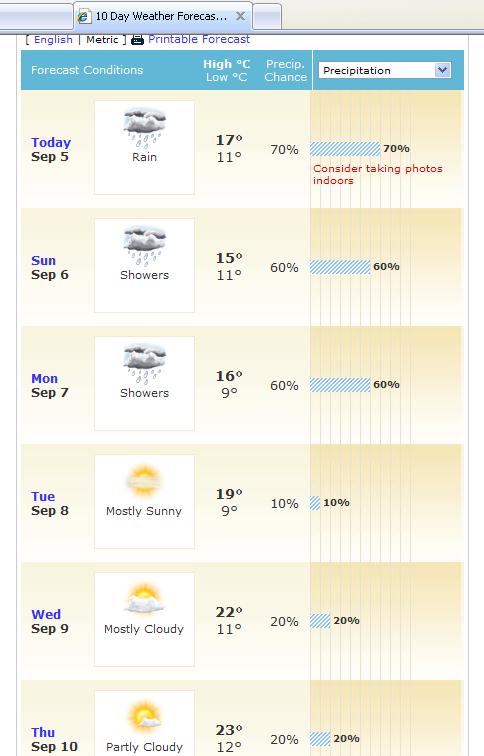
Labor Day weekend in Seattle
“How do you call two rainy days in a row in Seattle?
Weekend!”
For reference, Labor Day is September 7th here, so we have a long weekend: from Saturday September 5th ro Monday September 7th:
As usual from the personal blog…
Unable to get binding type for binding extension sqlBinding
While promoting code from one 64 bit environment to another, I can across the following error while changing the configuration
Unable to get binding type for binding extension "sqlBinding".
Verify the binding extension is registered in machine.config."
Since I have come across this a couple of times, I might as well put a reminder out for myself:
The SQL adapter is a WCF custom binding, which is registered under System.ServiceModel in the machine.config file. A 64-bit platform has two machine.config files, one used by the 32-bit applications and the other used by the 64-bit applications. So, when you install the 64-bit version of the BizTalk Adapter Pack, the setup wizard registers the bindings in the 64-bit version of the machine.config file. However, BizTalk Server Administration console runs as a 32-bit process and hence when you configure a port for the adapter, it checks for the bindings in the 32-bit version of the machine.config file and fails giving an error.
Resolution
Install both the 32-bit and 64-bit versions of the BizTalk Adapter Pack on a 64-bit WCF LOB Adapter SDK installation.
Two More Contributors on CloudCasts
I’ve just added two more webcasts to the “BizTalk Light and Easy” series, with a webcast on the HL7 Accelerator from Mark Brimble and the WCF-Oracle adapter from Miguel Herrera. It’s great to see good coverage of some of the less mainstream bits of BizTalk Server, very useful to have if you are working with it in a project.
www.CloudCasts.net
You can also follow CloucCasts on Twitter: http://twitter.com/CloudCasts
New podcast on .NET Service Bus with Jeff Brand
A couple of weeks ago, I sat down with Jeff Brand to do a podcast on the .NET Service Bus and Cloud Computing in general. We had a fun conversation about the cloud and why it is such a big deal, then dove into more detailed conversation about the .NET Service Bus. Get the link for the audio from Jeff’s post.
I’m really getting excited for the release of Windows Azure and seeing the kinds of applications people build on this new platform.
Troubleshooting BTARN Web Pages and more on BTARN x64
Support for BTARN often involves issues connecting with the partner. Unfortunately the web pages deployed for this purpose are not the best when it comes to troubleshooting. It can be problematic to tell a customer they need to deploy new pages with increased tracking capabilities into their production environment. This is especially true if it is 3 AM. This was generally the situation prior to BTARN 3.3.
With .Net 2.0 some cut and paste changes to the web.config file often provide the same information without the need to redeploy pages to the production environment. The configuration changes provided here should be pasted in after the closing </system.web> tag. Then make sure the logging location exists and is available for output.
<system.diagnostics>
<trace autoflush=”true” />
<sources>
<source name=”System.Net”>
<listeners>
<add name=”System.Net”/>
</listeners>
</source>
<source name=”System.Net.HttpListener”>
<listeners>
<add name=”System.Net”/>
</listeners>
</source>
<source name=”System.Net.Sockets”>
<listeners>
<add name=”System.Net”/>
</listeners>
</source>
<source name=”System.Net.Cache”>
<listeners>
<add name=”System.Net”/>
</listeners>
</source>
</sources>
<sharedListeners>
<add
name=”System.Net”
type=”System.Diagnostics.TextWriterTraceListener”
initializeData=”c:\\trace\\System.Net.trace.log”
/>
</sharedListeners>
<switches>
<add name=”System.Net” value=”Verbose” />
<add name=”System.Net.Sockets” value=”Verbose” />
<add name=”System.Net.Cache” value=”Verbose” />
<add name=”System.Net.HttpListener” value=”Verbose” />
</switches>
</system.diagnostics>
A log will be created with great deal of detail. This includes the messages being passed. The log eliminates the previous issues with same-box transfers, SSL encryption, and sometimes limited access to network resources. Armed with this information it should be straight forward to understand the problem. The same information from BTARN 3.0 would require many lines of code added to the web pages to get the same information and as mentioned before redeployment of the enhanced pages.
BTARN and Windows 08 x64
In my previous blog I published help when using x64 with BTARN. This is particularly bothersome for Windows 03 x64 because BTARN is only available as a 32 bit application. Another little discovery has been detected with Windows 08 x64.
It turns out Windows 08 uses TLS protocol 1.0 as the default when attempting connections for BTARN (any HTTP). This was not the case with Windows 03. In some cases this turns out to be a problem. Close examination of the conversation shows the “Client Hello” being responded to with an “Encryption Error” or some other server drop. When things work properly the first attempt to use the TLS protocol should be followed with a second attempt to revert back to SSL 3.0 if the server cannot use TLS 1.0. Some servers don’t allow the second attempt.
The fix for this situation is to change the code in the BTARN web pages. The following line of code should be added.
//this line for compatibility with Win08
ServicePointManager.SecurityProtocol = SecurityProtocolType.Ssl3;
//rest of the code
HttpWebRequest outerRequest = null;
ErrorLevel level = ErrorLevel.ProxyToOuterFailure;
This code sets a property. Location is not critical except I would keep it close to the HttpWebRequest object so it is easy to follow like listed above. This will prevent the use of the TLS protocol for this communication.
BizTalk DR: Configuring BizTalk Backup for Disaster Recovery – Part 2
Originally posted by Nick Heppleston at: http://www.modhul.com/2009/09/04/configuring-biztalk-backup-for-disaster-recovery-part-2/
This is the second of a three-part series covering the BizTalk Backup Process, where I’m looking at one of the two supported methods to backup and restore a BizTalk Server environment – Log Shipping. The series will cover the following topics:
In Part 1, I’ll provide a high-level overview of […]