by community-syndication | Oct 24, 2009 | BizTalk Community Blogs via Syndication
As I mentioned before, I was invited to participate in a working group to define a SOA Manifesto.
That happened this week at the SOA Symposium in Rotterdam. It was truly an honor to work with such a talented and intelligent group of individuals to define a SAO Manifesto, there were a lot of intense discussions and much hard work, but we got it done.
The manifesto was agreed upon, formally signed, and officially unveiled on Friday. The Web site is up now at SOA-Manifesto.org, but this is all just happening now, more information will be added to the site in the coming weeks.
I (and my co-authors) will be certainly be blogging more about this, but for now, you can see the official ceremony at http://www.youtube.com/watch?v=TCg16oTZSV0
by community-syndication | Oct 24, 2009 | BizTalk Community Blogs via Syndication
Hi all
If you are also receiving this error when unit testing your schemas:
TOMTreeGenerator.GetElementAbsoluteType: Object reference not set to an instance of
an object.
then I can inform you that the reason is, that the built-in unit test framework does
not support schemas that include or import other schemas.
To partially overcome this, take a look at the seventh issue of the BizTalk Hotrod
at http://biztalkhotrod.com/default.aspx,
where it is explained how to write a small helper class that will allow you to do
unit testing on schemas that include and/or import other schemas.
Unfortunately this does not cover native file formats, but one can hope that Microsoft
will improve the unit testing features in future versions of BizTalk.

by community-syndication | Oct 24, 2009 | BizTalk Community Blogs via Syndication
Hello,
I did recently a webcast about MBV for the UK SOA/BPM User Group (SBUG)
Link to the video is available here : http://geekswithblogs.net/michaelstephenson/archive/2009/10/13/135448.aspx
I would like to thank Michael Stephenson for this web cast invitation which was a good opportunity for me to explain MBV goal and its usage and do some Q&A with participants !
JP

by community-syndication | Oct 23, 2009 | BizTalk Community Blogs via Syndication
The easiest way to do this is multiply by 1, but if it is a (n)varchar data type, it is a little more challenging.
This was the query I had to run:
DECLARE @insurancenumber nvarchar(100),@charactertopurge nvarchar(1)
SET @charactertopurge='0'
SET @insurancenumber='00PK102947'
SELECT @GMPI=GMPI
from Patient.dbo.PatientAlias
where AliasField=substring(@insurancenumber, patindex('%[^'+@charactertopurge+']%',@insurancenumber), len(@insurancenumber))

by community-syndication | Oct 23, 2009 | BizTalk Community Blogs via Syndication
This is the tenth in a series of blog posts I’m doing on the upcoming VS 2010 and .NET 4 release.
In today’s blog post I’m going to cover a small but really nice improvement to code intellisense with VS 2010 – which is its ability to better filter type and member code completion. This enables you to more easily find and use APIs when writing code.
Code Intellisense with VS 2008
To help illustrate this intellisense improvements coming with VS 2010, let’s start by doing a simple scenario in VS 2008 where we want to write some code to enable an editing scenario with a GridView control.
We might start off by typing “GridView1.Edit” to bring up intellisense to see what Edit members are available on the control. Doing this with VS 2008 brings up the intellisense drop-down and filters the current location in the dropdown to the members that start with the word “Edit”:
This is great if the method/property/event we want to work with starts with “Edit” – but doesn’t really help us if the “Edit” member we are looking for starts with something else (for example: the “RowEditing” event or the “SetEditRow()” helper method). We have to either manually scroll up and down looking for the other edit members, or pull up the object browser or help system to find them.
Code Intellisense with VS 2010
Let’s now try out the same scenario with VS 2010. When we type “GridView1.Edit” within VS 2010 we’ll find that the EditIndex property is still highlighted by default. But the intellisense list has also been filtered so that it enables you to quickly locate all other members that have the word “Edit” anywhere in them:

This allows us to quickly see all of the edit related methods/properties/events and more quickly find what we are looking for.
Searching for Keywords
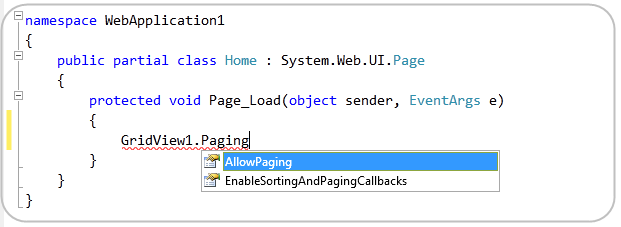
This new intellisense filtering feature of VS 2010 is useful for searching for any member – regardless of what word it starts with. For example, if we want to enable paging on a datagrid and can’t remember how to-do it, we could just type “GridView1.Paging” and it would automatically filter out everything but members that have the word paging. Notice below how no members on the GridView class actually start with the word “Paging” – but I am still finding the two members that do have paging in them later in their names:

Searching for Types
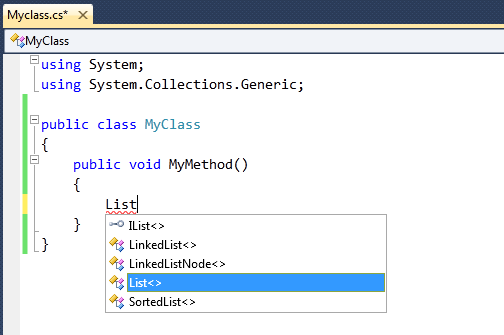
This new intellisense filtering capability of VS 2010 is also useful for quickly finding classes and types. For example, when we type “List” to declare a variable, the editor will provide automatic filtering to show all types that have the word “List” somewhere in them (including IList<> and SortedList<> – which do not start with List):

This makes it much easier to find type names you can’t entirely remember – without having to resort to searching through the object browser and/or using help documentation.
Pascal Case Intellisense
The .NET Framework naming guidelines specify that type and member names should be “Pascal Cased” by default. This means that each word in a type or member should start with a capitalized letter (for example: PageIndexChanged).
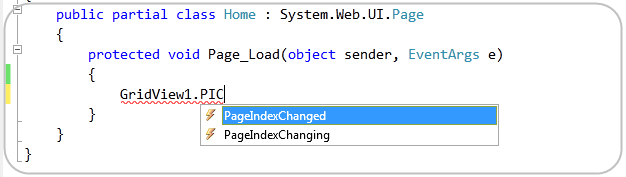
VS 2010’s intellisense filtering support now enables you to take advantage of this to quickly find and filter methods based on their pascal naming pattern. For example, if we typed “GridView1.PIC” VS 2010 would filter to show us the members that have PIC in their name, as well as those members which have a pascal cased name where the word segments start with that letter sequence:

Notice above how PIC caused both “PageIndexChanged” and “PageIndexChanging” to show up. This saves us a few keystrokes when resolving either member or type names.
Summary
I think you’ll find that the new intellisense filtering approach in VS 2010 makes it easier to quickly find and use classes and members when writing code. You can take advantage of it with both VB and C#.
Hope this helps,
Scott
P.S. In addition to blogging, I have recently been using Twitter to-do quick posts and share links. You can follow me on Twitter at: www.twitter.com/scottgu (@scottgu is my twitter name)
by community-syndication | Oct 22, 2009 | BizTalk Community Blogs via Syndication
Microsoft Support have just a published a helpful support article discussing some of the general guidelines that need to be followed when applying BizTalk Server Hotfixes, applicable to all versions from BizTalk Server 2004 onwards.
The article covers some of the more salient points we need to remember as BizTalk Adminstrators, including:
Considerations when installing Hotfixes on […]
by community-syndication | Oct 22, 2009 | BizTalk Community Blogs via Syndication
I’ve just committed some updates changes to my KeywordClassifier extension for Visual Studio 2010 Beta 2.
I had already worked around some problems my custom classifier was causing with Beta 2 related to it’s use of a recursive invocation of the classifier services, but @noahsmark proposed a better way to get this done in Beta 2 […]
by community-syndication | Oct 22, 2009 | BizTalk Community Blogs via Syndication
I’ve just posted the second in a series of webcasts looking at Workflow Foundation 4.0 in Visual Studio 2010 Beta 2. This time the flowchart workflow designer takes centre stage, and I use it to build a basic workflow for the flight check-in process at an airport. I also make a few calls to a WCF service from the workflow using the new messaging activities, I’m going to focus on those next and hopefully get another webcast out very soon. Stay tuned…
The webcast is here.
by community-syndication | Oct 22, 2009 | BizTalk Community Blogs via Syndication
Grab a look at the SDK – here – http://msdn.microsoft.com/en-us/library/dd776256.aspx and
interestingly the BDC (now – Business Data Connectors) and BCS (Business Connectivity
Services) are the enhanced former 2007 BDC.
BCS = http://msdn.microsoft.com/en-us/library/ee556826(office.14).aspx
I’ve got lots to talk about and show but where to start.maybe “once there was a developer”
🙂
Stay tuned.
Mick.