
BizUnit 3.1

BizUnit 3.1

BizUnit 3.1 is now released. (Actually its been out for over a week). There are a few bug fixes in this release and most notable is the addition of the following steps that Bram Veldhoen contributed.

BizTalkSteps/ExecuteMapStep
BizTalkSteps/ExecuteReceivePipelineStep
BizTalkSteps/ExecuteSendPipelineStep

The Pipeline steps use Tomas Restrepo’s Pipeline Testing Library.
I had originally planned on incorporating Bram’s steps into Extensions as I […]

EDI/AS2 in BizTalk 2009 : How to get the BatchId for a specific BatchName

One of the new features in BizTalk 2009 EDI is the possibility to create multiple batch configurations for each party.
Each batch will have a specific name and specific batchID and can be managed individually.


For a specific batch name you can get the corresponding batch ID. For example you may need this for an external trigger message for that batch.


If you want to do that programmatically, you may expect you can just call Partner.GetBatchIdForBatchName method by passing the batch name.
http://msdn.microsoft.com/en-us/library/microsoft.biztalk.edi.partneragreementmanager.partner.getbatchidforbatchname.aspx


But looking at the signature of that method, it is probably not what you want. Instead of expecting just a string for the batch name, this method wants two int, the partyID and the messageType. But if you just want to pass in the batch name, you do not get very far with that method.


To get the batch ID for a batch name, we have a stored procedure you can call from code: edi_GetBatchIdForBatchName .
Calling 
  exec edi_GetBatchIdForBatchName ‘MyBatch’
will return the ID of the batch name MyBatch.


Note: both calling GetBatchIdForBatchName and edi_GetBatchIdForBatchName directly is not supported.


Manuel Stern

BizTalk 2009 Performance Slides release by Microsoft BizTalk CAT Team

BizTalk 2009 Performance Slides release by Microsoft BizTalk CAT Team

Just saw on Ewan Fairweather’s blog that the BizTalk Server Customer Advisory Team have released four presentation slides about BizTalk Server 2009 performance. The presentations will give you a great insight into how the team sets up performance labs for the BizTalk projects they’re involved in, and have many many performance tips, links to online […]

Looping around elements of a message, follow-up part II

Hi all

I did a follow
up
to my old
post
about how to loop around the elements of a message a couple of days ago.

As you can se from the comments to my followup, Thiago mentions that there isn’t any
performance hit because everything is done inside an atomic scope. Now, Thiago is
naturally correct when he states, that no persistence occurs inside an atomic scope.
But as you can also see from the comments, I wondered about what to do about using
a request-response port – so I just had to test it.

For BizTalk 2009, just as the previous versions, you CAN’T have both the send shape
and corresponding receive shape used for a request-response port in the same atomic
scope. At compile time you will get this error: “an atomic scope may not contain or
call a service or scope that contains both the send and the corresponding receive
of a requestresponse operation on a ‘uses’ port or servicelink”.

This may seem odd at first glance, but it is due to the fact, that in order to make
sure the ACID properties
are respected at runtime the orchestration engine submits messages that are sent out
to the messagebox, but it doesn’t release them for the messagebox to route until the
atomic scope has finished. This way, if an error occurs inside the atomic scope, no
messages have actually been sent, and therefore, BizTalk can guarantee a consistent
state.

So basically, if the message isn’t released until AFTER the atomic scope, then there
is no way you can receive the reply inside the same atomic scope. Makes sense.

SO, if you want to loop around elements in a message by calling a receive pipeline
inside your orchestration, you can’t use request-response ports, as you can with other
patterns. Sorry, but that is the way it is.

Conclusion:

If you want to loop around elements inside an orhestration, use a receive pipeline
if possible since this is done in an atomic scope and therefore no persistence points
occur. If not possible, use the pattern described here.

Thanks, Thiago for pointing out that my post needed some more details


eliasen

Schemas not compiled and do not show up anywhere

Schemas not compiled and do not show up anywhere

Hi all

Today I faced a very peculiar problem. I was helping a customer split a BizTalk project
into two projects, because some of the schemas that were in the original project needed
to be common for other projects.

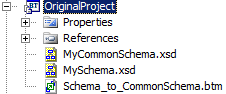
So this is what i started out with:

OriginalProject

which is: Two schemas and a map between them.

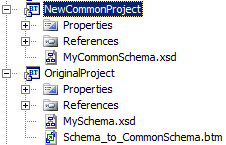
And this is what I would like:

OriginalAndNewProject

So basically, the common schema has been transferred to a common project. Now, naturally,
I need to reference the CommonProject from the OriginalProject and then reload the
schema in my map to make it work. But this is where the weird part starts. After compiling
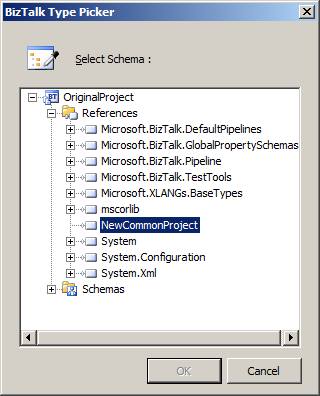
the NewCommonProject and adding the reference, this is what showed up in the schema
browser when I wanted to reload the schema in the map:

SchemaBrowser

Basically, my new project didn’t have any schemas inside it. After much troubleshooting,
thinking that the issue was something with the newly compiled dll didn’t get copied
to the bin folder of the OriginalProject and trying lots of stuff with that, I finally
figured it out.

I just happened to notice that the file size of the NewCommonProject.dll was only
5kb which seemed to small. So I browsed the dll in the object browser and it was totally
empty. Weird. Then I went and looked at the properties of the schema, and didn’t see
anything unusual. So I added a new schema to the project just to see what would happen
with that. This new schema showed up in the schema browser. Even weirder. But then
I went and looked at the properties of the schemas again and that’s when this new
property suddenly showed up:

NewProperty

I changed the build action on the schemas to be “BtsCompile” and this did the trick.
Now all the schemas showed up in the schema browser.

Now, another strange side to this story is, that by now, the Build Action property
has disappeared again I haven’t quite figured out when it appears and when it does
not.

BUT, if you ever run into issues where your schemas just don’t show up anywhere this
might be your issue.

Hope this helps someone.


eliasen

MMC Snap-in for MBV now available !

MMC Snap-in for MBV now available !


Hello.


As  I announced  in a previous post, I just released a MMC Snap-in for MBV.


To be honest, I did not have ideas about really new useful features I could add in  MBV itself or around MBV but reading some posts on other blogs talking about BizTalk Admin and suggestions of a better integration with MBV, I thouht : eh maybe I could  integrate MBV in an MMC !


Doing that will allow so any BizTalk administrator to have for example his own custom MMC console (.MSC) by adding the BizTalk Snap-in and the MBV one !


If yoo look at the file behind the BizTalk Administration console, you can see that it is an .msc file  containing both the Microsoft BizTalk Server MMC Snap-in and the EventViewer one; so you could create easily for example your own .msc  adding  BizTalk Snap-in, the Eventlog one, and MBV Snap-in


So I created a MMC snap-in for MBV in C# using the MMC 3.0 SDK: what is easier to develop an MMC Snap-in using .NET ! 🙂


Setup:


just run the setup.exe on your machine to register the snap-in automatically 

This snap-in use .NET 2 so on a BizTalk 2K4 machine, the setup  can propose you to download the .NET 2. framework.

This snap-in use Microsoft Mgmt Console 3.00 framework on a W2K3 machine,you may have also to install KB 907265 :

http://www.microsoft.com/downloads/details.aspx?FamilyID=4c84f80b-908d-4b5d-8aa8-27b962566d9f&displaylang=en


One the  setup finished, open MMC console and choose to add a Snap-in.
You should see in the list “MBV Snapin”.

The first version of this MBV snap-in I release allow to run a collect statement in the MMC by starting in an hidden mode the console version of MBV tool : “BTSDBCOLLECT.EXE”.

When you add first time the Snap-in, a dialogbox will be displayed inviting you to specify local path of MBV Console tool BTSDBCOLLECT.EXE.
Once it is one, you can also select the profile to use among the profiles present (created by GUI version of MBV) and then the MBV Snap-in will be added in the MMC console.


‘MsgBoxViewer’ Node


The ‘MsgBoxViewer’ MMC node will then allow you to start a Collect statement, change settings, open status file or History File or delete all HTML reports appearing as childre nodes.
This node display also as children nodes the existing HTML reports found in the HTML folder  (either the one configured in selected profile file ‘MBVSettings….XML’ or by default the folder of MBV tool).


Starting a Collect statement


When you put the focus on ‘MsgBoxViewer’ node, right-click on it and start a collect statement, the MMC display in the right pane the resulting cmd line executed, and the status bar will show all the steps of the Collect statement.

At the end of the collect statement, the MMC will add in the left pane a children node representing the MBV HTML file produced and will show this file in the right pane.

Complete status of the collect is displayed in the right pane when selecting back the node ‘MsgBoxViewer’.


Open an existing HTML MBV Report


Once you clicked a section (sub-node) of an HTML report node in the treeview of the left pane, you have immedialtely on the right pane of the MMC the selected sectioj of HTML MBV report displayed like in the Internet Browser.
You can so display quickly a Warning Report sectrion of an existing HTML Report.


Change Settings


Right-cliking on ‘MsgBoxViewer’ node and selecting the ‘Settings” action, you can change the global settings and for example selectb the  MBV profile to use for the collect, that you have prepared before with gui version of MBV.
Selecting a profile in the snap-in allow so to run only the queries you selected with also the global options you configured in the gui version of MBV.


Download here latest version :
http://blogs.technet.com/jpierauc/archive/2009/08/16/mbvmmc-latest-version.aspx


Let me know please your comments and questions on this Snap-in and any bugs you could find


Thanks !


JP