by community-syndication | Apr 4, 2008 | BizTalk Community Blogs via Syndication
As you all know, the BizTalk%u00ae Adapter Pack was released earlier this year and includes WCF based adapters for SAP, Oracle DB and Siebel. We have recently posted a detailed presentation about the Adapter Pack on Channel 9. You can view it at http://channel9.msdn.com/ShowPost.aspx?PostID=394792. Hope you find it useful. Look forward to hearing your feedback.
by community-syndication | Apr 4, 2008 | BizTalk Community Blogs via Syndication
One of the fundamental design goals of Silverlight and WPF is to enable developers to be able to easily encapsulate UI functionality into re-usable controls.
You can implement new custom controls by deriving a class from one of the existing Control classes (either a Control base class or from a control like TextBox, Button, etc). Alternatively you can create re-usable User Controls – which make it easy to use a XAML markup file to compose a control’s UI (and which makes them super easy to build).
In Part 6 of my Digg.com tutorial blog series I showed how to create a new user control using VS 2008’s "Add New Item" project item dialog and by then defining UI within it. This approach works great when you know up front that you want to encapsulate UI in a user control. You can also use the same technique with Expression Blend.
Taking Existing UI and Encapsulating it as a User Control
Sometimes you don’t always know you want to encapsulate some UI functionality as a re-usable user control until after you’ve already started defining it on a parent page or control.
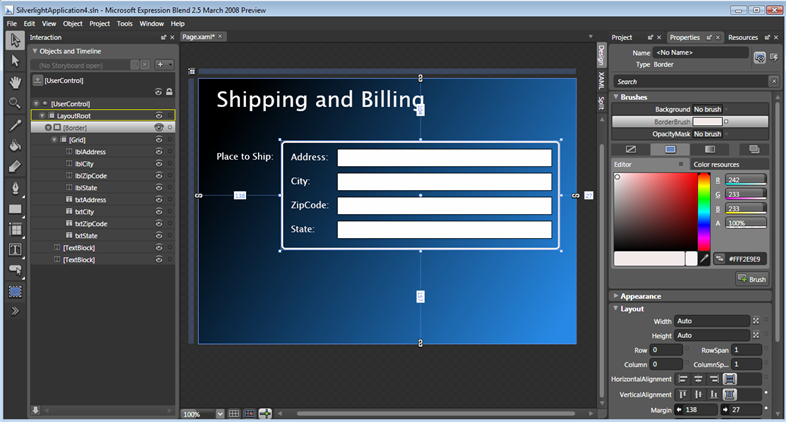
For example, we might be working on a form where we want to enable a user to enter shipping and billing information. We might begin by creating some UI to encapsulate the address information. To-do this we could add a <border> control to the page, nest a grid layout panel inside it (with 2 columns and 4 rows), and then place labels and textbox controls within it:
After carefully laying it all out, we might realize "hey – we are going to use the exact same UI for the billing address as well, maybe we should create a re-usable address user control so that we can avoid repeating ourselves".
We could use the "add new item" project template approach to create a blank new user control and then copy/paste the above UI contents into it.
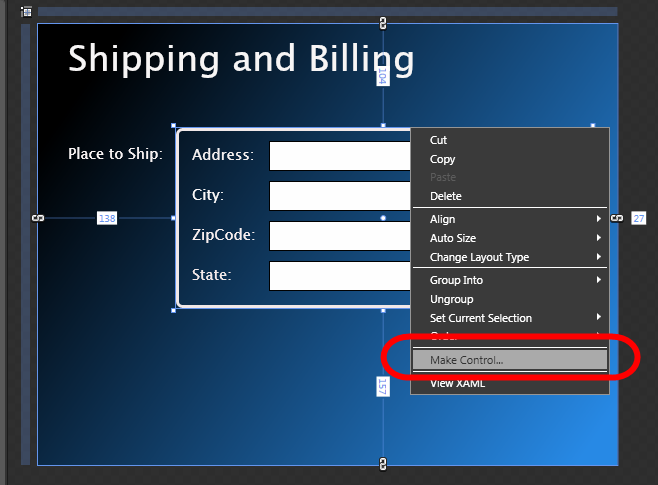
An even faster trick that we can use within Blend, though, is to just select the controls we want to encapsulate as a user control in the designer, and then "right click" and choose the "Make Control" menu option:
When we select the "Make Control" menu item, Blend will prompt us for the name of a new user control to create:
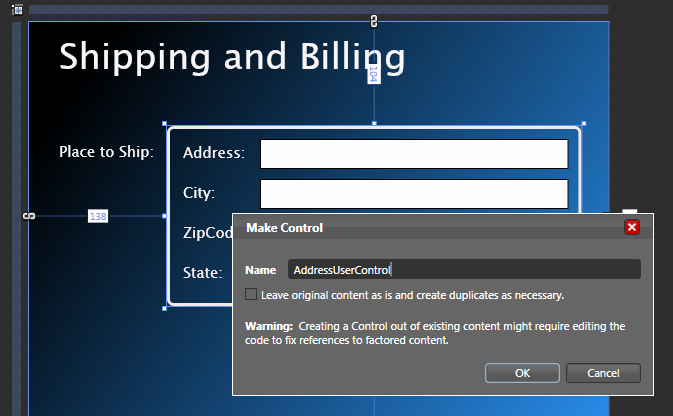
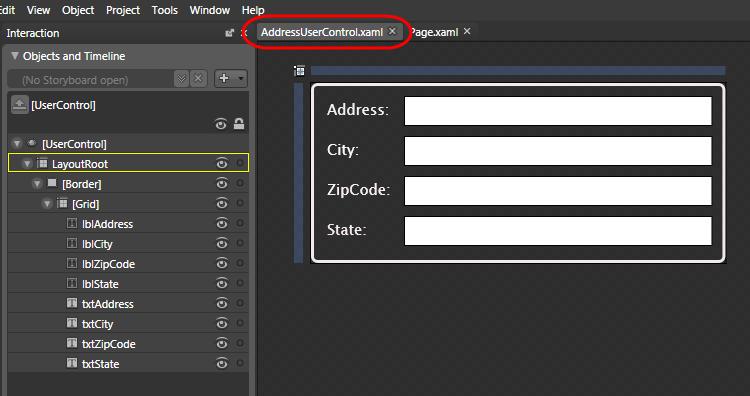
We’ll name it "AddressUserControl" and hit ok. This will cause Blend to create a new user control that contains the content we selected:
When we do a re-build of the project and go back to the original page, we’ll see the same UI as before – except that the address UI is now encapsulated inside the AddressUserControl:
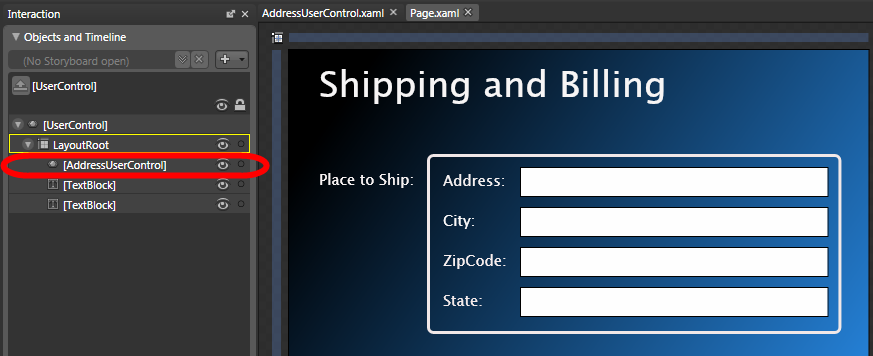
We could name this first AddressUserControl "ShippingAddress" and then add a second instance of the user control to the page to record the billing address (we’ll name this second control instance "BillingAddress"):
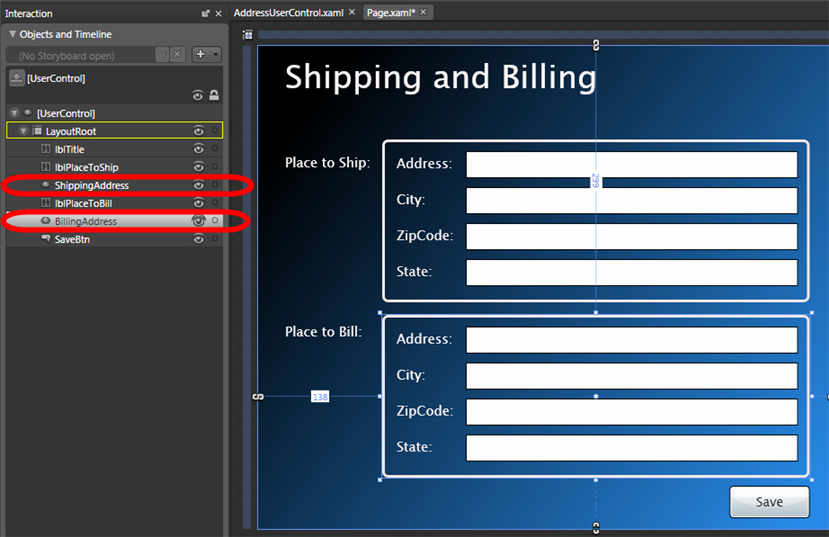
And now if we want to change the look of our addresses, we can do it in a single place and have it apply for both the shipping and billing information.
Data Binding Address Objects to our AddressUserControl
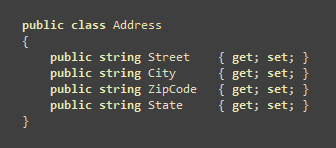
Now that we have some user controls that encapsulate our Address UI, let’s create an Address data model class that we can use to bind them against. We’ll define the class like below (taking advantage of the new automatic properties language feature):
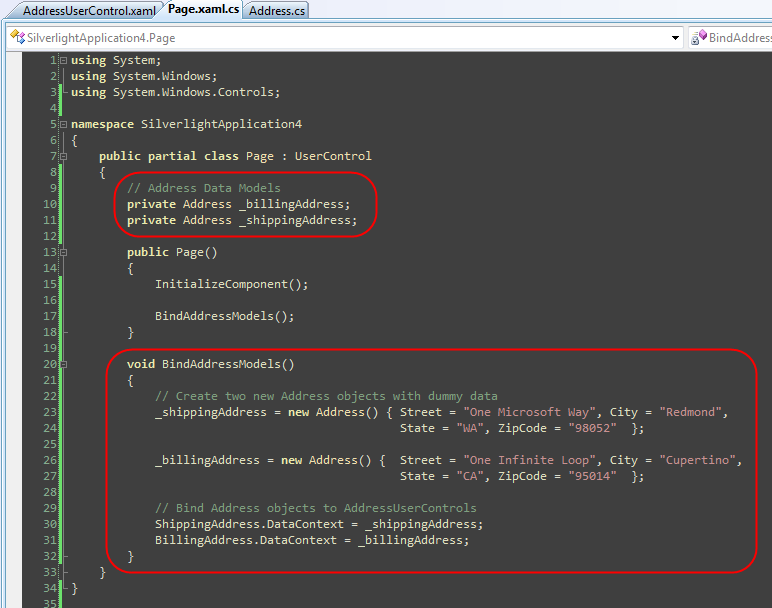
Within the code-behind file of our Page.xaml file we can then instantiate two instances of our Address object – one for the shipping address and one for the billing address (for the purposes of this sample we’ll populate them with dummy data). We’ll then programmatically bind the Address objects to our AddressUserControls on the page. We’ll do that by setting the "DataContext" property on each user control to the appropriate shipping or billing address data model instance:
Our last step will be to declaratively add {Binding} statements within our AddressUserControl.xaml file that will setup two-way databinding relationships between the "Text" properties of the TextBox controls within the user control and the properties on the Address data model object that we attached to the user control:

When we press F5 to run the application we’ll now get automatic data-binding of the Address data model objects with our AddressUserControls:
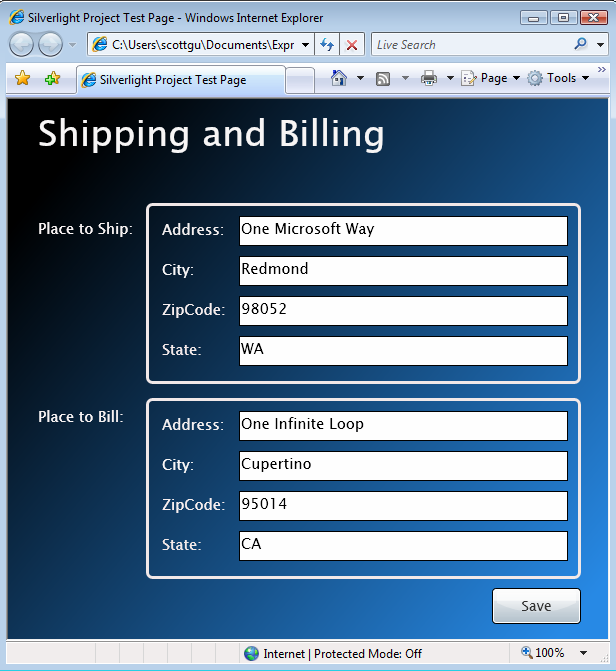
Because we setup the {Binding} declarations to be "Mode=TwoWay", changes users make in the textboxes will automatically get pushed back to the Address data model objects (no code required for this to happen).
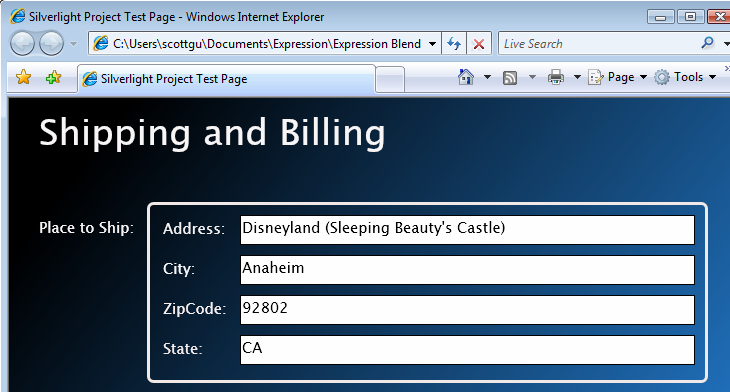
For example, we could change our original shipping address in the browser to instead go to Disneyland:
If we wire-up a debugger breakpoint on the "Click" event handler of the "Save" button (and then click the button), we can see how the above TextBox changes are automatically reflected in our "_shippingAddress" data model object:
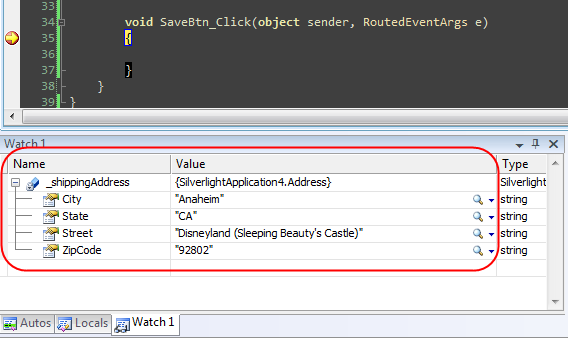
We could then implement the SaveBtn_Click event handler to persist the Shipping and Billing Address data model objects however we want – without ever having to manually retrieve or manipulate anything in the UI controls on the page.
This clean view/model separation that WPF and Silverlight supports makes it easy to later change the UI of the address user controls without having to update any of our code in the page. It also makes it possible to more easily unit test the functionality (read my last post to learn more about Silverlight Unit Testing).
Summary
WPF and Silverlight make it easy to encapsulate UI functionality within controls, and the user control mechanism they support provides a really easy way to take advantage of this. Combining user controls with binding enables some nice view/model separation scenarios that allow you to write very clean code when working with data.
You can download a completed version of the above sample here if you want to run it on your own machine.
To learn even more about Silverlight and WPF, check out my Silverlight Tutorials and Links Page. I also highly recommend Karen Corby’s excellent MIX08 talk (which covers User Controls, Custom Controls, Styling, Control Templates and more), which you can watch online for free here.
Hope this helps,
Scott
by community-syndication | Apr 4, 2008 | BizTalk Community Blogs via Syndication
One of the fundamental design goals of Silverlight and WPF is to enable developers to be able to easily encapsulate UI functionality into re-usable controls.
You can implement new custom controls by deriving a class from one of the existing Control classes (either a Control base class or from a control like TextBox, Button, etc). Alternatively you can create re-usable User Controls – which make it easy to use a XAML markup file to compose a control’s UI (and which makes them super easy to build).
In Part 6 of my Digg.com tutorial blog series I showed how to create a new user control using VS 2008’s "Add New Item" project item dialog and by then defining UI within it. This approach works great when you know up front that you want to encapsulate UI in a user control. You can also use the same technique with Expression Blend.
Taking Existing UI and Encapsulating it as a User Control
Sometimes you don’t always know you want to encapsulate some UI functionality as a re-usable user control until after you’ve already started defining it on a parent page or control.
For example, we might be working on a form where we want to enable a user to enter shipping and billing information. We might begin by creating some UI to encapsulate the address information. To-do this we could add a <border> control to the page, nest a grid layout panel inside it (with 2 columns and 4 rows), and then place labels and textbox controls within it:
After carefully laying it all out, we might realize "hey – we are going to use the exact same UI for the billing address as well, maybe we should create a re-usable address user control so that we can avoid repeating ourselves".
We could use the "add new item" project template approach to create a blank new user control and then copy/paste the above UI contents into it.
An even faster trick that we can use within Blend, though, is to just select the controls we want to encapsulate as a user control in the designer, and then "right click" and choose the "Make Control" menu option:
When we select the "Make Control" menu item, Blend will prompt us for the name of a new user control to create:
We’ll name it "AddressUserControl" and hit ok. This will cause Blend to create a new user control that contains the content we selected:
When we do a re-build of the project and go back to the original page, we’ll see the same UI as before – except that the address UI is now encapsulated inside the AddressUserControl:
We could name this first AddressUserControl "ShippingAddress" and then add a second instance of the user control to the page to record the billing address (we’ll name this second control instance "BillingAddress"):
And now if we want to change the look of our addresses, we can do it in a single place and have it apply for both the shipping and billing information.
Data Binding Address Objects to our AddressUserControl
Now that we have some user controls that encapsulate our Address UI, let’s create an Address data model class that we can use to bind them against. We’ll define the class like below (taking advantage of the new automatic properties language feature):
Within the code-behind file of our Page.xaml file we can then instantiate two instances of our Address object – one for the shipping address and one for the billing address (for the purposes of this sample we’ll populate them with dummy data). We’ll then programmatically bind the Address objects to our AddressUserControls on the page. We’ll do that by setting the "DataContext" property on each user control to the appropriate shipping or billing address data model instance:
Our last step will be to declaratively add {Binding} statements within our AddressUserControl.xaml file that will setup two-way databinding relationships between the "Text" properties of the TextBox controls within the user control and the properties on the Address data model object that we attached to the user control:
When we press F5 to run the application we’ll now get automatic data-binding of the Address data model objects with our AddressUserControls:
Because we setup the {Binding} declarations to be "Mode=TwoWay", changes users make in the textboxes will automatically get pushed back to the Address data model objects (no code required for this to happen).
For example, we could change our original shipping address in the browser to instead go to Disneyland:
If we wire-up a debugger breakpoint on the "Click" event handler of the "Save" button (and then click the button), we can see how the above TextBox changes are automatically reflected in our "_shippingAddress" data model object:
We could then implement the SaveBtn_Click event handler to persist the Shipping and Billing Address data model objects however we want – without ever having to manually retrieve or manipulate anything in the UI controls on the page.
This clean view/model separation that WPF and Silverlight supports makes it easy to later change the UI of the address user controls without having to update any of our code in the page. It also makes it possible to more easily unit test the functionality (read my last post to learn more about Silverlight Unit Testing).
Summary
WPF and Silverlight make it easy to encapsulate UI functionality within controls, and the user control mechanism they support provides a really easy way to take advantage of this. Combining user controls with binding enables some nice view/model separation scenarios that allow you to write very clean code when working with data.
You can download a completed version of the above sample here if you want to run it on your own machine.
To learn even more about Silverlight and WPF, check out my Silverlight Tutorials and Links Page. I also highly recommend Karen Corby’s excellent MIX08 talk (which covers User Controls, Custom Controls, Styling, Control Templates and more), which you can watch online for free here.
Hope this helps,
Scott
by community-syndication | Apr 3, 2008 | BizTalk Community Blogs via Syndication
Very interesting thread: “Am I wrong about WCF usage?” http://forums.microsoft.com/MSDN/ShowPost.aspx?PostID=2910261&SiteID=1&mode=1
There are the complains about WCF.
Why Microsoft looks at the future only with loose-coupled WCF and depreciates the Remoting technology?
My experience is from the BizTalk side. It’s interesting that we have similar issues.
For example, using contracts in the current formats tends to be rigid. What I need in the many cases from the data/message contracts is “use this XML structures form the data I care for and, please, please, do not validate other parts of the data/messages. I don’t care if there are errors in those parts, if those parts have the right format, etc. I just don’t care.”
But the current XML format tends to force using the strict contracts.
From the versioning perspective it means I could not easily expand the current message contracts in the future versions. The client is forced to recognize the different formats and generate errors when it get slightly different format.
Form the OO perspective it means the client could not easily extract the parts of the message that client cares about and just ignore other parts.
From the integration perspective it means to transfer the message format problems/errors to the client side if this is safe. In many cases these errors belongs to the business-rule layer, the transmitting layer mustn’t work with these errors.
My understanding is the roots of the problem are in the XML standard. It does NOT have good ability to describe the “undefined” parts of the document/message. With the “right” XML the WCF could possibly (and easily) solve several issues discussed in this thread.
by community-syndication | Apr 3, 2008 | BizTalk Community Blogs via Syndication
If we need to pass and process ONE row to the SQL store proc, it is pretty easy.
Just map the XML message (inside BizTalk) elements to the service SQL request schema elements. This schema is created by SQL Port wizard when we point it to the SQL store proc.
More interesting problem is to pass several rows to the SQL port. Here I use the SQL terminology. In Xml terms it means the Xml node with MaxOccurs=unbounded in the Xml document. (We can use the updategramm, but you can see this approach with all description in the BizTalk Help and I don’t want to repeat it. Here I want to describe how to use a SQL storproc for this.)
We cannot pass the rowset to the storeproc as a parameter, but we can use workaround.
- We serialize the Xml document with unbounded node(s) to the string .
- We pass this string to the store proc as one parameter with Text type. (Like string “<ns0:RootNode xmlns:ns0=” http://MyNamespace“>
<ElemName>…”)
Inside store proc we use the OPENXML to deserialize this XML-text to rowset.
- Process this rowset into store proc.
Moreover we can serialize not only the rowset but any DataSet, say Order row and all OrderDetail rows in one Text parameter.
Below is the sample source code:
=========================================================
text of the expression in the Message Assignment shape in the orchestration:
————————————-
var_XmlDocument.LoadXml( “<ns0:Insert_to_Table_Request xmlns:ns0=\” http://….Schemas.Insert_to_Table\”><ns0:Insert_to_Table Xml_Text=\”\” /></ns0:Insert_to_Table_Request>” );
msg_BTS_ProcessEDIDocumentRequest.parameters = var_XmlDocument; // var_XmlDocument is the “<NewDataSet><Table><railway>CNsd</railwa…”
// Distinguish an attribute the “Xml_Text” in the schema “ http://….Schemas.Insert_to_Table#Insert_to_Table_Request!
var_XmlDocument = msg_EDICanonical;
msg_BTS_ProcessEDIDocumentRequest.parameters.BTS_ProcessEDIDocument.Xml_Text = var_XmlDocument.OuterXml;
=========================================================
text of the stored proc:
————————————-
–================================================================================
— Created: *******
–================================================================================
CREATE PROCEDURE dbo.Insert_to_Table
(
@Xml_Text TEXT
)
AS
SET NOCOUNT ON
————————————————————————-
If ( @Xml_Text Like ‘ ‘ Or @Xml_Text Like ” )
Return 0
— ======================================= Variables: =======================================
Declare
—————- Internal:
@i int,
@CurrentDate datetime,
@isTransactionStart int,
— error handling:
@ErrorLogContext varchar(255),
@ErrorLogMessage varchar(500),
@EDI_History_Action varchar(50)
—————– Temp table
Declare @Table table
(
railway varchar(50) NOT NULL
,voyage varchar(50) NOT NULL
,vessel_name varchar(50) NOT NULL
,vessel_arrive datetime NOT NULL
,vessel_depart datetime NOT NULL
,_x0032_0_count int NOT NULL
,_x0034_0_count int NOT NULL
,container_count int NOT NULL
,teu real NOT NULL
,feet int NOT NULL
)
—————- Initializing:
set @ErrorLogContext = ‘Insert_to_Table: ‘
–=========================== Converting XML to the Variable-tables:
— Variable-tables have the same structure as XML records .
— Properties Null/NotNull set up here when data is converting from XML to the Variable-tables.
set @isTransactionStart = 0
— Calling a system stored procedure to prepare the document for calling OPENXML
set @ErrorLogMessage = ‘Error converting XML to @i ‘
EXEC sp_xml_preparedocument @i OUTPUT, @Xml_Text, ‘<NewDataSet/>’
if @@error <> 0 goto ON_ERROR
— preparing the common part of Xml document:
— Xml variables:
set @ErrorLogMessage = ‘Error Insert @Table ‘
Insert @Table
SELECT
isNull(railway, ”)
,isNull(voyage, ”)
,isNull(vessel_name, ”)
,vessel_arrive
,vessel_depart
,_x0032_0_count
,_x0034_0_count
,container_count
,teu
,feet
FROM
OPENXML(@i, ‘/NewDataSet/Table’, 2)
WITH
(
railway varchar(50)
,voyage varchar(50)
,vessel_name varchar(50)
,vessel_arrive datetime
,vessel_depart datetime
,_x0032_0_count int
,_x0034_0_count int
,container_count int
,teu real
,feet int
)
if @@error <> 0 goto ON_ERROR
set @ErrorLogMessage = ‘Error EXEC sp_xml_removedocument ‘
EXEC sp_xml_removedocument @i
if @@error <> 0 goto ON_ERROR
— ========================================================================
— Transfer data from the Variable-table to DB:
— Usualy this SP starts from the BizTalk SQL port which create transaction
— in this case we have to handle Rollback case accordingly:
declare @MyTransaction int
set @MyTransaction = 0
If @@Trancount = 0
Begin
Begin Transaction MAIN
Set @MyTransaction = 1
End
set @isTransactionStart = 1
set @ErrorLogMessage = ‘Error inserting into Table ‘
insert [Table]
select *
FROM @Table
if @@error <> 0 goto ON_ERROR
–===========================================================================================
— DONE:
If @MyTransaction = 1 and @@Trancount > 0
Begin
COMMIT work — TRAN MAIN
End
RETURN 0
–===========================================================================================
ON_ERROR:
If @MyTransaction = 1 and @@Trancount > 0
Begin
ROLLBACK work –TRAN MAIN
End
set @ErrorLogContext = ‘Insert_to_Table: ‘ + @ErrorLogContext
return 1
/* test case:
declare @ret int
exec @ret = Insert_to_Table ‘<NewDataSet><Table><railway>sd</railway><voyage>sdfsdfdfsdf</voyage><vessel_name>sdfgdfg</vessel_name><vessel_arrive>2007-06-30 06:34:00</vessel_arrive><_x0032_0_count>17</_x0032_0_count><_x0034_0_count>8</_x0034_0_count><container_count>25</container_count><teu> 33.000000</teu><feet>450</feet></Table></NewDataSet>’
select @ret — return 0
*/
=====================================================================
—
Let me know what are you think?
by community-syndication | Apr 3, 2008 | BizTalk Community Blogs via Syndication
I was stopped by the words “Contract-Driven Messaging” in the article “An XML Guru’s Guide to BizTalk Server 2004, Part I” by Aaron Skonnard (“Contract-Driven Messaging”
http://msdn.microsoft.com/msdnmag/issues/05/11/ServiceStation/#S6)
What does in mean the “Contract-driven” in the BizTalk?
The contract in the BizTalk means the same thing as in WCF, the signatures of the objects (documents, messages). But not only the the objects with entry data but the with context data. For example, the addresses of the endpoint where those documents came, the delivery transport protocol etc.
What is it means from the BizTalk point of view?
In BizTalk almost all messages are in the internal XML format and have a type (which compounded of the target namespace and the root element of the schema of this message). Contract-Driven Messaging from the BizTalk point of view is the Message-type driven messaging, because in the BizTalk the “Contract” is exactly the message type. Plus the context of the message!
How has the message got the type? The type is defined explicitly if the message comes to the BizTalk in the XML format.
How has the message got the type if it comes in other format, say comma-delimited text format? In this case the BizTalk uses the content and the context information to produce the message type. For instance, in EDI document the message type produced by the several data fields inside document and, maybe, the context information as an FTP address of the receive location of this document. And we have to explicitly map those input data set to the message type (as a namespace + the root node). Usually we don’t have the values from the input data to pass it implicitly or by some rule to the message type.
OK, and what does it mean the messaging “driven” by?
It means transformation and routing.
Thansformations like mapping, batching/debatching, aggregating, copying.
Routing is a choosing the subscribers of the message.
And one more interesting aspect of the “contract-driveness”. With it the data could be processed automatically, without human intervention. Data has all intrinsic information to be processed.
by community-syndication | Apr 3, 2008 | BizTalk Community Blogs via Syndication
I will be speaking at the Omaha BizTalk User Group April 3rd 2008 on Team Development and Testing. This is taking place at the Microsoft offices.
If you are going to be around stop by and say hi.
by community-syndication | Apr 3, 2008 | BizTalk Community Blogs via Syndication
While researching a post about message encoding in BizTalk, I can across this Microsoft Knowledge Base article regarding the TargetCharset property on the XmlAssembler component – it would appear that if the property is set through the Admin Console, it won’t take effect. This is strange, because this bug appears to have been fixed in […]

by community-syndication | Apr 3, 2008 | BizTalk Community Blogs via Syndication
A few years back I read Francis Fukuyama’s “The End of History and the Last Man”, a book that presented and defended the theory that the current political and economical status quo/zeitgeist is as good as it gets. There’s supposedly no better system, hence the title of the book. This was a book I profoundly disagreed with, but had to admit it had strong and extremely intelligent and well built arguments.
A few days back I finally ended reading Nicholas Carr‘s polemic “Does IT matter – Information Technology and the Corrosion of Competitive Advantage”. Being in a company that has “IT” in its name, the contents of these book are very relevant. The author spells a message similar to Fukuyama’s, but applied to IT, stating that IT cannot be seen as giving a real competitive advantage in today’s markets: whatever lead the use of Information Technology gives to a given organization, will be quickly replicated by its competitors. Additionally, the author defends that IT is becoming infrastructure, much like electricity or the railway (or other means of fast transportation). This analogy with electricity actually is used throughout most of the book to sustain the main thesis: no organization strategy today is based on the fact that the company has access to “state-of-the-art” electricity. And, consequently, no organization can base their strategies/market leads in investments in information technology.
This book had a lot of impact a few years back, and like Fukuyama’s, has strong, extremely intelligent and well built arguments. It’s a book I profoundly disagree with, as well, one that made me scribble lots of notes on its margins. Howard Smith and others wrote a book dedicated to contradict Carr, and there is information all over the net about this, so I doubt I can add much to this argument, so I’ll just leave some notes: there are a lot of anecdotes in the book that justify some positions. While stories and specific cases are interesting to know, they are hardly proof of anything: there are probably as many examples pointing in the opposite direction. The last part of the book I found especially dishonest, when the author compares the impact of IT with that of basic living conditions stuff, such as clean water to drink, or sanitation. My answer to this is: can’t the same be said of BOOKS (=recorded human history) and that same water/sanitation? We wouldn’t have this world without it. This is the stuff of journalist rhetoric, and not honest discussion.
ANYWAY, changing gears, I do think several of the arguments in the book make perfect sense. The emerging trend of moving into cloud-based, hosted, software, is clearly a step that brings more truth the analogy of electricity and IT (software is just… there, somewhere, I don’t really care). Having the software is no longer the advantage. At least, not for long periods of time, as it will be replicated by competitors sooner or later. So it all comes back to good, ol’, business strategy and practices.
The question I now pose myself is: how can I, aware of this line of reasoning, “sell” a project to a customer based on its technology merits? I happened to have a conversation with a long-time client and business partner about the book, which he had also read, and 5 minutes later the topic changed to a possible new project we are doing with them, where I am proposing brand new technology, one month old. I couldn’t help feeling something was wrong. I am going forward with it, especially because it’s a very sound architectural approach to the specific business problem, but I feels uncomfortable anyway.
Changing to the second, related, topic of this post: in college, quite a few years back, I remember studying Amdahl’s Law. It basically states (if I remember correctly) that the impact of a given change/optimization on a component of a system has an impact on the full system that is proportional to the relative importance of that component in the full system. Simple proportionality rules. An example. Like I said above, I have this situation where I am considering using this new technology that just came out. In the typical projects we do at |create|it|, 40-60% of the effort of a given project is spent in development/programming tasks, so let’s consider 50% as the average. Let’s suppose this technology is applies to 10% of the project, and that it allows me to cut in half (50%) the development time. This means, summit it up, that if the project had 100 days of development, we’d be saving the customer 0.5 * 0.1 * 0.5 * 100 = 2.5 days, or about 2.5% of the total cost of the project. And this is discounting the learning curve, obviously.
This whole rant is related to constant flux of innovations and new technology being made available almost everyday by Microsoft and other vendors (“can’t they just stop for a few months?” – sentence I heard recently), and it serves as a kind of reality check. It’s important to measure the impact of the technology we choose for our projects, especially if it’s new technology. I’m just bundling here for the sake of example, but make sure you have an answer, when a customer asks you what’s in it for him when you decide to use Linq, the Entity Framework Asp.Net MVC stuff, WCF/WPF/WF, Windows or Sql 2008, etc.
That said, and since I personally thrive on innovation and breathe new technology :-), I’ll make sure I have that answer. It’s a different world, out there in “Does IT matter“-land.
By the way: the new technology I mentioned is the BizTalk Adapter Pack.

by community-syndication | Apr 3, 2008 | BizTalk Community Blogs via Syndication
You asked, and we listened! Following on from a number of requests for the South African BizTalk community, Quicklearn’s BizTalk Deep Dive course is finally coming to Johannesburg, South Africa!
I will provide more information, and a copy of the invite once I receive it, but for now reserve the dates of 12-16 May 2008.
Thanks to Frikkie Bosch for taking the initiative and arranging this.
