by community-syndication | Jan 19, 2007 | BizTalk Community Blogs via Syndication
I just had a problem in BizTalk Server 2006. And since I couldn’t find a solution to it on the Internet I decided to post it here after I found out how to fix it!
Problem:
The problem is with the SQL Adapter. The SQL Adapter wizard would crash/disappear after I selected “Stored Procedure” and hit next. […]
by community-syndication | Jan 19, 2007 | BizTalk Community Blogs via Syndication
Short post, this one. While flying around the west coast, I fell into a discussion of the relative merits of Eclipse versus Visual Studio. I tend to use Visual Studio and, for smaller files or quick edits, Ultra Edit. I did take a look at Eclipse a few…(read more)
by community-syndication | Jan 18, 2007 | BizTalk Community Blogs via Syndication
A few people have asked if we are going to be selling the worlds first copy of Windows Vista in New Zealand like we did for Windows 95. The answer is ABSOLUTELY!
Where & When?
Date: Monday 29th/ Tuesday 30th January 2007 – Remember Monday is a day off work, Auckland Anniversary day.
Time: 10pm-2am (store opens at Midnight)
Place: Dick Smith Electronics PowerHouse, 5 Ronwood Avenue, Manukau City
What’s more you could meet Dan Carter (every geeks hero right?).
I’ll be going along to capture some footage… if you are in Auckland I hope to see you there.

by community-syndication | Jan 18, 2007 | BizTalk Community Blogs via Syndication
Harry
Pierson talked a bit about the stuff he’s learning on BizTalk Server in Morning
Coffee 12 entry (btw, loving the, keep it up!). Looks like he’s attending a great
class with Matt
Milner. A few comments that sparked my interest:
Harry says that conceptually BizTalk hasn’t changed all that much since the 2000/2002
days. I’m not sure I’d agree, but that would depend on what he means by “conceptually” 
I’d say that from an architecture point of view, the the change between 2002 and 2004
was a very significant one, requiring you to adapt to a lot of new stuff. Here’s
why I feel this way:
-
The orchestration engine was pretty much rewritten. The designer by itself is a great
improvement, but it’s far more than that:
-
There’s no more interpreted XLANG, now we have XLANG/s
-
Orchestrations (*.odx) are compiled down to C# and then to MSIL.
-
Now we have a pretty powerful correlation mechanism as well as convoys.
-
Native .NET support (it is .NET after all!)
-
The messaging model changed significantly:
-
Most of the terminology changed. Remember channels, AICs and Receive Functions?
-
The messaging model is now mostly symmetrical, unlike in 2000/2002 where the send
and receive sides were very different.
-
The pipeline model is far nicer (have I mentioned I love pipelines? they’re fantastic!).
-
The adapter framework. Sure beats down anything we had in 2000/2002! Writing adapters
is still hard, but writing them in .NET is far easier. Application Integration Components
(AIC) were a kludge, anyway.
-
New features:
-
Enterprise Single Sign-On
-
Business Activity Monitoring: Don’t disregard the power of BAM, it’s one of the coolest
features in BizTalk and coming soon to WCF and WF thanks to the new BAM interceptors
for WCF and WF in BizTalk 2006 R2.
-
Business Rules Engine
Maybe it’s just me, but I do consider that the change between 2002 and 2004 to be
very significant and a much needed improvement. But I’d agree that from some points
of view, yes, BizTalk is still BizTalk (e.g. you still use it for the same and a lot
of the usage scenarios haven’t changed at a conceptual level). Personally, I consider
understanding the BizTalk architecture an absolute must for any BizTalk developer,
and as you can see, I get all excited talking about it
Harry also mentioned something I’ve heard a lot of people say: that the Pub/Sub engine
in the BizTalk MessageBox was mostly useful for messaging-only scenarios. I agree
that’s what it might seem so at first but just to reinforce what Matt said in the
class: The Message Box really is the heart of BizTalk and the Pub/Sub engine in it
is exactly what gives it that power!
So let me briefly enumerate just why the Pub/Sub engine is extremely relevant to orchestrations
in BizTalk:
-
The Pub/Sub engine processes any message that comes into BizTalk, and that includes
messages that fire orchestration instances. Even when you do the simplest Port to
Orchestration bindings, subscriptions are still created/evaluated/matched in the MessageBox
to enable the processing to happen.
-
The MessageBox message store, which as Harry correctly points out, can be thought
of (to a degree) as a set of queues, coupled with the Pub/Sub engine gives BizTalk
some pretty powerful features. One of them is the capability to balance processing
loads between multiple BizTalk processing servers in a single BizTalk Group.
Basically the idea is that you can have a single BizTalk Host with multiple instances
(example, instances HA and HB in servers A and B respectively) and when a message
is received and fires an orchestration instance, then BizTalk might start some of
those instances in server A and other in server B. That’s something you get mostly
for free with BizTalk (though you still need to know how to take advantage of it and
how to architect for it).
-
Direct Binding: Direct
binding exposes the Pub/Sub model in the MessageBox to Orchestrations like no
other binding model does. It allows you to create orchestrations that are not bound
to a physical receive or send port but rather that directly subscribe or publish messages
to the MessageBox. This gives you a lot of power and flexibility in how orchestrations
connect to each other and how they connect to ports because it allows you to use them
and harness the full flexibility offered by the Pub/Sub engine.
-
Correlation Sets: A correlation basically gives you the ability to route an incoming
message into an existing orchestration instance (i.e. one already up waiting for it),
instead of always firing a new instance. When you initialize a Correlation Set what
essentially happens under the covers is that a new temporary subscription is
created (called an Instance Subscription), so the Pub/Sub engine is pretty important
for this aspect as well.
This is actually one of the aspects that I find more lacking in the current Windows
Workflow Foundation implementation, and it’s the lack of a reusable, generic correlation
engine. There is a basic correlation support for the HandleExternalEvent and InvokeExternalMethod
activities, but it’s not really very reusable. This means pretty much every developer
creating custom IEventActivity implementations needs to build their own correlation
mechanism if its needed, and it can be quite a bit of work, specially if you need
to make it work across a farm of machines hosting the workflows (BizTalk already
does this for you thanks to the Message Box architecture).
Hopefully this makes it more obvious just how important the Pub/Sub engine in the
Message Box is to BizTalk Orchestrations! Did I mention I love this stuff?
![Database Lookup Functiod[For Beginners only]](https://farm1.static.flickr.com/138/361435722_d1a6a21c76.jpg)
by community-syndication | Jan 18, 2007 | BizTalk Community Blogs via Syndication
Working with BizTalk and don’t need to interact with SQL database.nahthat’s not possible. I googled for database Lookup functiod but no link gave me a simple sample as to what this functiod does and other functiods which are linked to this Database Lookup Functiod. So I just thought to pen down few Standard database functiods available with BizTalk
First let’s start with.
Database lookup Functiod.
I created a table called “NishTable” with fields and values as below. 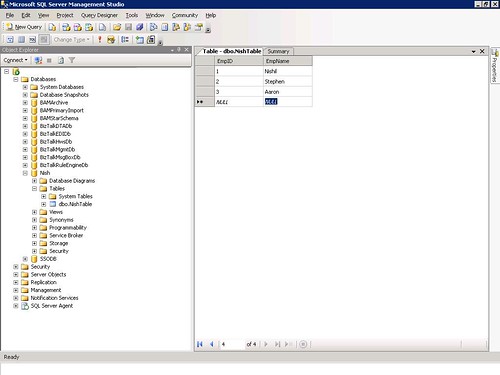
Fig1
Then I create an Empty BizTalk Project with
1 Map and 2 Schemas.
Create the Schemas as shown in the Fig2.
Just drop in the Database Lookup Functiod on the Map as shown in Fig2.
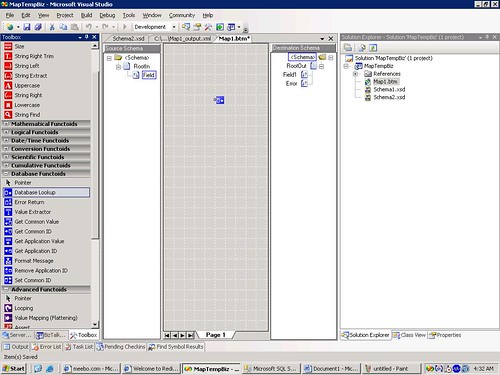
Fig2
Let’s Configure this Database Lookup Functiod.
For this Sample I won’t pass any input it would be harcoded.
Right click on the Functiodproperties
1 parameter-Just type 2
2nd Parameter-Sql connection String.
3rd Parameter-Table name-NishTable (Created before)
4th Parameter-Column name.-EmpID
What these configured values means is
“Select _ from NishTable where EmpID=2”.
See fig 3 for details.

Fig3
Now we need to fill in the blank space in the above sql query as to what should be selected. So we use value extractor functiod and configure it as soon in fig4.
EmpName is the field whose value I wantSo I type “EmpName” as second parameter.
Mapping is simple 1 to 1 map.
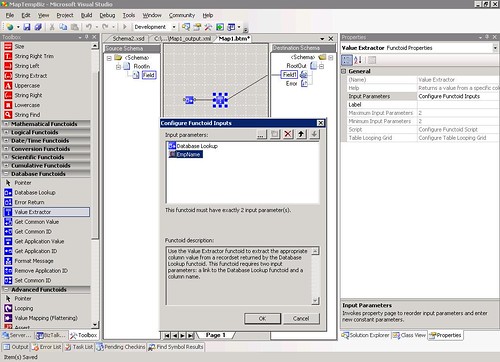
Fig4
This way a Database Lookup functiod works. You can test your map.
Now what about error handling. If the sql connection is down?
So let’s use “Error Return functiod” here.
Just link the functiods as shown.
“Error Return functiod” requires only 1 parameter that should be the output of Database Lookup functiod.
Refer fig 5 for more details.

Fig 5
Just to test it I stopped my Sql server and I can see the output as below. 
Fig6
So this was Database lookup Functiod. We can use this instead of using a .net component inside map to get the values from database.
NISHIL is online…Click to Chat right now!
by community-syndication | Jan 18, 2007 | BizTalk Community Blogs via Syndication
Recently I got a question from a student how to get a list of all the web parts (in code) that are displayed on a specific SharePoint Web Part Page. This could be useful if you would like to close all the web parts at once, add web parts programmatically etc. By using the SharePoint object model this is pretty easy, especially if you want to retrieve that list with code running in a web part. The WebPartManager property of the WebPart base class, gives you access to a collection of all the WebPartZones available on the page. Once you’ve got the zones, you can get the web part instances by using the WebParts property. The following web part code will display a small list of all the web parts found on the page, including the name of the web part class and the web parts zone.
using System;
using System.Runtime.InteropServices;
using System.Web.UI;
using System.Web.UI.WebControls.WebParts;
using Microsoft.SharePoint;
using System.Web.UI.WebControls;
namespace WebPartLister
{
public class WebPartLister : System.Web.UI.WebControls.WebParts.WebPart
{
BulletedList list;
protected override void CreateChildControls()
{
list = new BulletedList();
WebPartZoneCollection zones = this.WebPartManager.Zones;
foreach (WebPartZone zone in zones)
{
WebPartCollection webparts = zone.WebParts;
foreach (WebPart webpart in webparts)
{
list.Items.Add(
string.Format(“{0} ({1}), {2}”,
webpart.Title, webpart.GetType().Name,
zone.DisplayTitle));
}
}
this.Controls.Add(list);
}
protected override void Render(HtmlTextWriter writer)
{
EnsureChildControls();
list.RenderControl(writer);
}
}
}
Technorati tags: SharePoint, WebParts
by community-syndication | Jan 17, 2007 | BizTalk Community Blogs via Syndication
With the conversation going on regarding IE7’s 100 million installation (thanks Tony), the contrasting Infoweek article and also Richard’s Maxthon take, I was interested to see that Rowan has posted Trade Me’s logs for December on his blog.
If you analyse Rowans numbers further it shows that in the 6 month period from July 2006 to Dec 2006 that IE (all flavours) lost about 1.36% to FF’s gain of 1.1% amongst Trade Me customers.
Net Applications claims that during the same period IE lost 3.92% to FF’s 2.66% gain.
I wonder if this is partly due to the large growth in Macintosh%u00ae computers over the last quarter.
Given this information (even though it is global) one would assume that the number of safari users on Trade Me would have also gone up more than 0.5%.
Since the advent of intel mac and parallels I’ve talked to a few people that are using a Mac to run both OSX and Windows. On Windows they use IE7 and on OS X they use FF.
Just another take on the same old argument that is doing the rounds… I’m sure we’d see this number leap again if apple allows FF to be installed on the iPhone 😉
On another note Rowan has also posted that as of the 9th Jan Trade Me is 100% ASP .NET 2.0!
It was almost a year to the day that Trade Me released the first pieces of .Net onto their site and it’s been great to read Rowan’s after migration summary post.
Brad Abrams has sighted some other real world customer migration experiences on his blog.
by community-syndication | Jan 17, 2007 | BizTalk Community Blogs via Syndication
The client that I am working at wanted email notification when incoming HIPAA files were processed. I was able to put this in place. The only issue is that when files would not validate, all I could do was to wait and then finally send out an email stating that the file did not validate in time. This would immediately spin up calls asking me why it did not validate, and my love of looking around for the TA1 and 997 and then interpreting it to the business analyst was not my favorite thing to do especially since I knew that a more human readable version was available. I finally had enough time to look into this. I had the Sender Qualifier (ISA05) Sender Identifier (ISA06) and the control number (ISA13). I finally determined the relationship between the audin table and the the errors table. I eventually determined that I needed the errtxt table also. I created the following stored procedure to capture the description and details as long as you provide the above mentioned values.
Again, this will work for both the BizTalkEDIDb and the BizTalk_HIPAAEDIDb as the table structures are the same.
CREATE PROCEDURE dbo.captureDetails
@senderQual varchar(2),
@senderId varchar(15),
@controlNumber varchar(9)
AS
SELECT errtxt.descrp AS description, errors.descrp1 AS details
FROM audin INNER JOIN
errors ON audin.icin = errors.msgnr INNER JOIN
errtxt ON errors.etc = errtxt.etc
WHERE (audin.sid = @senderId)
AND (audin.icr = @controlNumber)
AND (audin.sidcdq =@senderQual)
AND (errors.inout = ‘2’)
for xml raw–, xmldata
GO
*As a note, if a duplicate file (duplicate ISA13) is sentthis stored procedure will return all of those records, the first one, and then the subsequent duplicated files, if you wanted to, you could capture the date from the audin table, but then it becomes a matter of tolerance on how long you want to go back.

by community-syndication | Jan 17, 2007 | BizTalk Community Blogs via Syndication
I haven’t seen anything on the interwebs on this issue so I’m blogging it.
I had an issue come across my desk recently where after an upgrade from BizTalk 2004 to BizTalk 2006 all the pipelines where failing. Even the pipelines that didn’t have custom components failed.
The error was like this:
Error details: There was a failure executing the receive pipeline: “XYZ.Orders.Common.BizTalk.Pipelines.MyPipeline, XYZ.Orders.Common.BizTalk.Pipelines, Version=1.0.0.0, Culture=neutral, PublicKeyToken=dfesd197d68db7dad” Source: “Unknown ” Receive Port: “Orders_Invoice_XYZ” URI: “D:\XYZ\in\*.txt” Reason: Unable to cast object of type ‘XYZ.Orders.Common.BizTalk.Pipelines.MyPipeline’ to type ‘Microsoft.BizTalk.PipelineOM.Pipeline’.
This was caused by one of the references in the pipeline projects being to a .Net 1.1 version of the assembly. This was unexpected because thesome of the pipelines that were failingweren’t evencalling the assembly (even though the reference existed). The resolution was to recompile the referenced assembly to .Net 2.0 and then update the references to the new version. Voila, all the pipelines worked properly.


by community-syndication | Jan 17, 2007 | BizTalk Community Blogs via Syndication
Identity Management is not one of my priorities, but it’s a subject I’ve been interested about for sometime, and which is very related to the work I am doing at the moment. It all started with Kim Cameron’s Identity Blog and his Laws of Identity.
The most visible face of this whole Identity Management issue is the multiple logins people have to make while browsing the internet, creating accounts at several sites to access their services or contents. I’ve had to resort to password-management software, but the problem is deeper than memorizing your multiple logins and passwords, especially when financial transactions are involved.
Probably the best description of the problem, or at least an introduction (and also a demonstration of what great presentation skills are), is 2005’s *** Hardt’s Identity 2.0 introduction to the concept of Digital Identity.
Yesterday I listened to Hanselman’s Identity podcast, and came home to read more and try Windows CardSpace (.Net’s 4th pillar). CardSpace is included in .Net 3.0, but if you are using Windows Vista, it’s built in (just type “card” on the start menu and “Windows CardSpace” shows up :-)). I started it and created a simple card with some of my information, and went looking for a place to use it. I found one at .Net 3.0’s site, the SandBox. The SandBox is a Community Server installation with CardSpace support for user registration and login. When I registered, I got into Vista’s Secure Desktop mode, with CardSpace open, selected the card I wanted to present to the SandBox (I got shown what fields the SandBox would get from the card), and BAM, I was registered and logged in. All I had to do was to pick a nickname. Later I got an email with an username and password, just in case I want to log in using “traditional” methods.
CardSpace is based on some of the WS-* standards, such as WS-Security and WS-Trust, which supposedly make it both “safe and standard“, but what I like the most is really the end user experience. For me, the idea of no longer having to create logins everywhere, and being able to select the specific pieces of information I want to share with each site I visit, is a very interesting prospect. The question is, obviously, if there will be acceptance to this outside Microsoft, or if this will be another Passport/Hailstorm situation. A major difference, the way I see it, is that information is stored in your computer, not at Microsoft somewhere, so the trust obstacles are aleviated.
As to this being available in public sites, I have no idea. I found a comment in a blog saying that Community Server 2.1 should include full CardSpace support soon, for all users to install, but found no details on this having happened yet, and found no major implementation of it yet (time to throw out Passport).
One final note, out of curiosity: when the screen greys out in Vista, you are in what MS calls “Secure Desktop” mode. This is Windows’ mode that is used, for example, when you log into your Windows computer (running Xp, Vista, 2003, …) . This mode is designed to block out processes from execution, to make sure you are inserting your password in a secure environment where no keyloggers or such can work. In Vista, you get a greyed out/transparent background when you are in this mode (which is just a UI thing, the grey is really a screenshot with transparency 🙂 Human Factors stuff). More information about this here and here.
Just before I go: there’s already Firefox support for CardSpace, and Kim Cameron has an implementation of the identity system in Php. Also note that CardSpace can be used for much more than simple site login, I just wanted to blog about it because the first impression it leaves was really positive.

