by community-syndication | Apr 10, 2007 | BizTalk Community Blogs via Syndication
You ever find that newsgroup post on a technical subject that absolutely saves the day? One of my projects has an orchestration that calls a web service. I call this service in a “loop” because if a call fails (for “business” or “technical” reasons), it may need to retried. So, until I […]
by community-syndication | Apr 10, 2007 | BizTalk Community Blogs via Syndication
My team has been using VS DBPro (DataDude) for a little over six months now and I thought I give you an update on how we use this tool in a "mixed" environment (SQL Management Studio & DataDude), what we like and what we'd like to see in future releases.
Using SQL Management Studio & Visual Studio Team Edition for Database Professionals Together
The first thing we found in our implementation of VS DBPro was that it took a serious effort (and some arm twisting) to overcome our bad development habit of opening SQL Management Studio for a "quick & dirty change" to a live database. Sometimes working in disconnected mode via VS DBPro it seemed as if we were taking a lot longer to complete a task than if we were working "connected" in SQL Management Studio. Given the small size of our team, we really needed to find a way to work quickly but safely during database development and using both tools together seems to have done the trick.
How This Works
We usually begin by "reverse engineering" an existing database using the VS DBPro (DataDude) import wizard and then verify the results using the Schema Compare tool. Then we create a "sandbox" copy of the original database on our local workstations or on a shared test SQL instance by building and deploying the project. We may also use SQL Server Integration Services (SSIS) to copy representative data from the original database to our sandbox or we generate test data using the VS DBPro Data Generation tool. Once everything is setup, we load our source code into our Team Foundation Server instance for safekeeping.
We then use whichever toolset (SQL Management Studio or VS DBPro) makes the most sense to modify our sandbox database but we never (EVER) touch the live database for "quick & dirty" changes. We make our changes using SQL Management Studio, import them into our VS DBPro projects using the Schema Compare tool, then test our changes, build our projects and check in our changes to TFS just as you would in any other development language. Then and only then, do we use the VS DBPro's Schema Compare tool to build our incremental change scripts that we run against our production database.
This gives us the best of both worlds by allowing us to work "connected" to our sandbox database using SQL Management Studio but still have an easy way to test, build and store our SQL code using VS DBPro. I've found this to be a very workable solution until VS DBPro (DataDude) contains all the same functionality (table designers, query execution plans, database diagrams, etc.) that SQL Management Studio does. This also allows each DB developer to work with the tools he or she is most comfortable with and this is vital for developer productivity!
What We Really Like!
The four main features that we really love about VS DBPro (DataDude) are the Schema Import, Schema Compare & Data Compare, Source Control (in TFS) and the Initial Deployment experience. These four features really do change the way that database development is done and they alone make the product worthwhile to own. For details about these features be sure to read my previous posts!
The Future of VS DBPro (Publicly Available Information Only – I Promise)
Jeff Beehler recently announced the Team System Roadmap in his blog. Last month I had the incredible opportunity to sit down with several members of the Visual Studio team that is responsible for developing VS DBPro (Cameron Skinner, Robert Merriman, Mairead O'Donovan, Richard Waymire and others) to discuss this roadmap and I've never walked away from a meeting more enthusiastic about the future.
Visual Studio Team Edition for Database Professionals – Service Release 1
Gert Drapers, the team's Architect has written a great post about the first service release for VS DBPro (DataDude). This service release builds upon the RTM version by adding three new features; Database References, File Group Support and SQLCMD Variable Support. It also adds "official" support for SQL Server 2005 SP2 and Vista.
Visual Studio Team Edition for Database Professionals – Power Tools
The VS DBPro team has been very very busy and is working on a set of power tools to enhance the functionality of the Service Release 1 bits. The planned power tools include "Move Schema Refactoring", "Schema & Data Compare MSBuild Tasks", "Schema Object Dependency Tree", "SQL Static Code Analysis", "Support for Fully-Qualified Names" and "Schema Reporting" as well as a few others.
Visual Studio Orcas, Rosario & Beyond
If you read between the lines in Mairead O'Donovan's recent blog posts (1, 2) you can get a feel for what the team is looking at for future releases of VS DBPro. Obviously, the future of any product is not set in stone, but it's great to see how VS DBPro is evolving and growing into a full featured database development platform.
by community-syndication | Apr 10, 2007 | BizTalk Community Blogs via Syndication
Hi All,
Software is undergoing a major revolution and windows workflow is definitely evolving in this process. Check out theWorkflow Foundations Web Workflow Approval Starter Kit which triggers a workflow from your asp.net application.
This starter kit is a Visual Studio 2005 project that demonstrates using Windows Workflow Foundation for simple task oriented workflow in an ASP.NET […]
by community-syndication | Apr 10, 2007 | BizTalk Community Blogs via Syndication
It is not so strightforward as it suppose to be.
Below are the bat files with comments:
@rem ———– Deploy.Policies.bat ———————————————
@call Settings.bat
@ECHO.
@ECHO. Deploy Policies:
@ECHO. ======================================================================
@ECHO.
@Time /T
@ECHO 1) Create the ResourceSpec.xml file.
@rem BTSTask ListApp /ApplicationName:%ApplicationName% /Server:%BizTalkDataBasesServer% /Database:%BizTalkConfigurationDataBase% /ResourceSpec:”%CurrentBuildPath%\ResourceSpec.xml
@Echo 2) Then edit it to remain only Policy recources.
@Echo 3) Export .xml to .msi
@rem BTSTask ExportApp /ApplicationName:%ApplicationName% /Package:”%CurrentBuildPath%\Policies.msi” /ResourceSpec:”%CurrentBuildPath%\ResourceSpec.xml” /Server:%BizTalkDataBasesServer% /Database:%BizTalkConfigurationDataBase%
@Echo 4) Import .msi (Before this Undeploy the existed policies, the /Overwrite doesn’t help! Or Stop the Application.)
BTSTask ImportApp /Package:”%CurrentBuildPath%\Policies.msi” /ApplicationName:%ApplicationName% /Overwrite /Server:%BizTalkDataBasesServer% /Database:%BizTalkConfigurationDataBase%
@Echo 5) Deploy policies one by one :((
@set PolicyName=VesselID
@set PolicyVersion=1.27
BTSTask AddResource /ApplicationName:%ApplicationName% /Type:System.BizTalk:Rules /Overwrite /Name:%PolicyName% /Version:%PolicyVersion% /Server:%BizTalkDataBasesServer% /Database:%BizTalkConfigurationDataBase%
@set PolicyName=CompanyID
@set PolicyVersion=1.0
BTSTask AddResource /ApplicationName:%ApplicationName% /Type:System.BizTalk:Rules /Overwrite /Name:%PolicyName% /Version:%PolicyVersion% /Server:%BizTalkDataBasesServer% /Database:%BizTalkConfigurationDataBase%
@set PolicyName=PortOfUnloadingID
@set PolicyVersion=1.0
BTSTask AddResource /ApplicationName:%ApplicationName% /Type:System.BizTalk:Rules /Overwrite /Name:%PolicyName% /Version:%PolicyVersion% /Server:%BizTalkDataBasesServer% /Database:%BizTalkConfigurationDataBase%
@set PolicyName=DocumentValidator
@set PolicyVersion=1.1
BTSTask AddResource /ApplicationName:%ApplicationName% /Type:System.BizTalk:Rules /Overwrite /Name:%PolicyName% /Version:%PolicyVersion% /Server:%BizTalkDataBasesServer% /Database:%BizTalkConfigurationDataBase%
@Time /T
@rem call RestartBTS.bat
pause
@rem ———– Settings.bat ———————————————
@set MyShortSolutionName=MyShortSolutionName
@Set SolutionName=MyCompany.Domain.%MyShortSolutionName%
@set SolutionDir=C:\Solutions\%MyShortSolutionName%
@SET CurrentBuildPath=%SolutionDir%\Builds\Current
@SET BizTalkServer=BTS-06V
@SET BizTalkDataBasesServer=BTS-06V
@SET BizTalkConfigurationDataBase=BizTalkMgmtDb
@Set ApplicationName=%MyShortSolutionName%.MyApp
by community-syndication | Apr 9, 2007 | BizTalk Community Blogs via Syndication
In the past I have noticed that system testers find it difficult to test middleware applications such as those implemented using BizTalk. System testers generally don’t want to read BizTalk xml messages dumped out to disk, they like to be able to query for their test results via some form of GUI. Many are adept at writing SQL to return result sets containing the test data they want to analyze.
I came up with the idea of using BAM relationships between different activities within a single view to log before and after snapshots of BizTalk messages. So when messages were transformed by maps, orchestrations or the BRE system testers could test those transforms. You can then give system testers’ access to the BAM Portal Website where they could view and query these before and after snapshots and match the actuals against the expected results to pass or fail their tests.
This solution for system testing only works for certain scenarios’ with certain types of schemas as each message logged cannot contain repeating records if it is to be logged to BAM.
So what am I on about? Take a single record schema which validates an xml message like the one below as I said before this technique won’t work with messages which contain multiple records.
<ns1:SampleTransaction TransactionID=”123456″ ProductName=”ABC” Amount=”1234.56″ Quantity=”24″ xmlns:ns1=”http://SynbogalooSamples/SampleTransaction/1.0.0.0″ />
Each time a map, orchestration or business rules were applied to a message I wanted to send messages to BAM so I was basically just logging messages to BAM each time the contents of the message changed. I used BAM relationships to associate the message before it was transformed to the message after it was transformed so the tester could assess whether the transformation worked.
OK this was all easy but very time consuming using the Excel add-in to create the xlsb files for each schema so I wrote a simple xlsb file generator. Note: For this code to work with schemas that have xsd types other than DateTime, Integer, Double and String you will need to add to the switch statement in the CreateActivity method.
using System;
using System.Collections.Generic;
using System.Text;
using System.Xml;
using System.IO;
namespace BAMXslbGenerator
{
class Program
{
private const string UCName = “Name”;
private const string LCName = “name”;
private const string View = “View”;
private const string BAMDefinition = “BAMDefinition”;
private const string BAMDefinitionNamespace = “http://schemas.microsoft.com/BizTalkServer/2004/10/BAM“;
private const string Extension = “Extension”;
private const string OWC = “OWC”;
private const string OWCNamespace = “urn:schemas-microsoft-com:office:excel”;
private const string ActivityView = “ActivityView”;
private const string ActivityRef = “ActivityRef”;
private const string Activity = “Activity”;
private const string Alias = “Alias”;
private const string CheckpointRef = “CheckpointRef”;
private const string Id = “ID”;
private const string Checkpoint = “Checkpoint”;
private const string XpathToAttribute =
“(//*[local-name()=’element’])[last()]/*[local-name()=’complexType’]/*[local-name()=’attribute’]”;
private const string DataType = “DataType”;
private const string DataLength = “DataLength”;
private const string Length = “length”;
private const string MaxLength = “maxLength”;
private const string XpathToLength = “*[local-name()=’simpleType’]/*[local-name()=’restriction’]/*[local-name()=’length’]/@value”;
private const string XpathToMaxLength = “*[local-name()=’simpleType’]/*[local-name()=’restriction’]/*[local-name()=’maxLength’]/@value”;
private const string SqlDateTime = “DATETIME”;
private const string SqlNvarchar = “NVARCHAR”;
private const string SqlInt = “INT”;
private const string SqlFloat = “FLOAT”;
private const string XsdDateTime = “xs:dateTime”;
private const string XsdString = “xs:string”;
private const string XsdInteger = “xs:int”;
private const string XsdDouble = “xs:double”;
private static StringBuilder xlsbText = null;
static void Main(string[] args)
{
by community-syndication | Apr 9, 2007 | BizTalk Community Blogs via Syndication
With over 6000+ EDI schemas and a brand new home grown EDI engine that WORKS!!!! (like
BTS2000/2002 days)
Here’s a great article that talks about the support for various schemas from the BizTalk
Team.
http://blogs.msdn.com/biztalkb2b/archive/2006/10/14/edi-support-in-biztalk-server-2006-r2.aspx
—snip —
EDI support in BizTalk Server (BTS) 2006 R2
Hello
all:
BTS2006
R2 provides for design and run time support for six encoding standards and includes
over 8000 ’standard’ XSD schemas ‘in the box’ ready for implementation. Please do
understand that these schemas will only operate with EDI systems in BTS 2006
R2 and are not compatible on Base EDI Adapter (BTS 2004 and 2006 versions). In
forthcoming topics I will include documentation on how to modify/customize these
schemas.
One
of the most asked question is the on a listing of the Version/Release schemas supported
in BTS2006 R2 – Microsoft EDI. So here goes:
|
Industry
Segment
|
Encoding
Standard
|
Version/
Release
|
Count
of Transaction Set XSD/Schemas
|
References
|
|
General
Industry
|
EDIFACT
|
D93A
|
55
|
Standards
Website (reference to payload): http://www.unece.org/trade/untdid/welcome.htm
Encoding
rule per ISO 9735-4.1 http://www.gefeg.com/jswg/v41/data/V41-9735-1.pdf
|
|
D94A
|
68
|
|
D94B
|
75
|
|
D95A
|
101
|
|
D95B
|
115
|
|
D96A
|
125
|
|
D96B
|
136
|
|
D97A
|
143
|
|
D97B
|
151
|
|
D98A
|
157
|
|
D98B
|
165
|
|
D99A
|
169
|
|
D99B
|
180
|
|
D00A
|
187
|
|
D00B
|
191
|
|
D01A
|
194
|
|
D01B
|
194
|
|
D02A
|
194
|
|
D02B
|
194
|
|
D03A
|
192
|
|
D03B
|
192
|
|
D04A
|
192
|
|
D04B
|
192
|
|
D05A
|
193
|
|
D05B
|
193
|
|
X12
|
2040
|
29
|
Standards
Website: http://www.x12.org/ and
Specifications Development http://www.disa.org/
|
|
3010
|
39
|
|
3020
|
104
|
|
3030
|
161
|
|
3040
|
187
|
|
3050
|
225
|
|
3060
|
245
|
|
3070
|
273
|
|
4010
|
293
|
|
4020
|
302
|
|
4030
|
309
|
|
4040
|
314
|
|
4050
|
314
|
|
5010
|
318
|
|
5020
|
317
|
|
5030
|
317
|
|
Retail
|
UCS
|
4010
|
46
|
Standards
website: http://www.uc-council.org/ean_ucc_system/stnds_and_tech/ucs.html
|
|
4040
|
65
|
|
5020
|
67
|
|
VICS
|
4010
|
27
|
Standards
website: http://www.vics.org/about/ucc_edi/
|
|
4050
|
36
|
|
5020
|
45
|
|
EANCOM*
|
EAN94
|
27
|
Standards
website: http://www.gs1.org.sg/edi.htm
|
|
EAN97
|
46
|
|
EAN02
|
46
|
|
Health
Care
|
HIPAA
X12N
|
4010A1
|
16
|
HIPAA
Implementation Guide: http://www.cms.hhs.gov/TransactionCodeSetsStands/
Specifications: http://www.wpc-edi.com/content/view/533/377/
|
|
|
|
|
|
|
* included in Beta 2 release.
NOTE: VICS
and UCS will not be included in BizTalk Server 2006 R2.
by community-syndication | Apr 9, 2007 | BizTalk Community Blogs via Syndication
As stated by other BizTalk developers as well, I think the UK SDC BizTalk 2006 Documenter is a great tool! It creates a good looking .CHM file which documents your entire BizTalk installation.
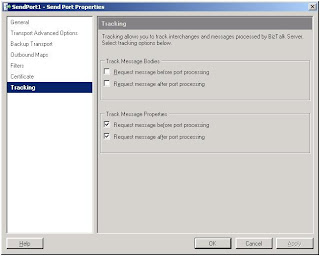
Unfortunately I found another error, or actually Brent Anderson did. He found out that when you have either or both Track Message Properties enabled on a Send port, the Documenter does not generate the documentation.
fig. 1 – Send Port Properties
The Documenter shows the following popup:
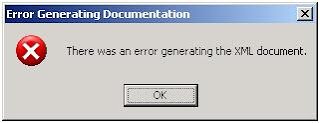
fig. 2 – Error popup
Under the hoods (with DebugView), the UK SDC Documenter gives more information:
TraceErr : Microsoft.Sdc.BiztalkDocumenter.Documenter.GenerateDocumentation: System.InvalidOperationException:
There was an error generating the XML document. —> System.InvalidOperationException:
Instance validation error: ‘192’ is not a valid value for Microsoft.Sdc.BizTalkOM.TrackingType.
Research learned that the values from the Track Message properties, don’t match the values from the enumeration Microsoft.Sdc.BizTalkOM.TrackingType, resulting in the error above.
Depending on which of the Track Message Properties are checked, another value will appear in the error message.
The consequence of this is that, until the bug is solved, it is not possible to use the documenter as long as you have one of the Track Message Properties checked.
I can’t wait for the next release J
by community-syndication | Apr 9, 2007 | BizTalk Community Blogs via Syndication
I was luck enough to attend the last Master Class that Readify held on WCF, we have now scheduled another master class, this time it is WPF. Ian Griffiths will be coming out from the UK to deliver Applied WPF in Sydney the week if the 23rd of April 2007, for details see – http://www.readify.net/Default.aspx?tabid=254.
From my experience with the WCF master class I can say the to get the depth of information delivered in these classes is second to none and not available anywhere else in Australia. If you want to take your WCF knowledge to the next level don’t miss this opportunity.
by community-syndication | Apr 9, 2007 | BizTalk Community Blogs via Syndication
We were contacted by Brent Anderson from RBA Consulting. He ran into some errors while using the UK SDC BizTalk 2006 Documenter as a post build event.
Error initialising documentation publisher
Brent found out that using the documenter in a post build event works fine, as long as you just use the /def[ault] parameter.
When we tried to use the /o[utput] parameter (to set another output directory), we were confronted with an ‘Error initialising documentation publisher’. We also tried other parameters, but that resulted in the same error.
Solution
After some research we found out that when you want to use other parameters, than the /def[ault] parameter, you must supply the /p:chm parameter to make sure the document publisher can be initialized.
by community-syndication | Apr 9, 2007 | BizTalk Community Blogs via Syndication
For almost two years now, I’ve been intending to write an article about the mysterious ‘side effects’ flag used in Microsoft Business Rule Engine policies. Microsoft documents this feature (see http://msdn2.microsoft.com/en-us/library/aa559124.aspx), and describes very briefly how to control it. The mystery that surrounds this flag arises because it is represented by an attribute named ‘sideeffects’ in Microsoft’s BRL (Business Rule Language) although it actually controls a caching mechanism, and because Microsoft has not provided access to the flag in their Rules Composer, thereby giving the impression that it is not a ‘first-class’ feature of rule definitions. In reality, this flag is an important aspect of the functional approach adopted in Microsoft’s Business Rule Language (BRL), and can have a significant effect on both behaviour and performance of your policies. Understanding the flag also requires a greater understanding of the way in which BRL binds functions to custom code, providing a clean mechanism for implementing domain-specific extensions to the rule language.
Incidently I apologise that, for a few hours after my initial posting, I had to withdraw the article. No sooner had I posted than I realised that I had not adequately investigated one aspect of MS BRE functionality. I have now corrected and extended the original version. I’m sorry if anyone found their aggregator reporting a page that wasn’t there.
The article is located at http://geekswithblogs.net/cyoung/articles/111169.aspx


