by community-syndication | Oct 23, 2007 | BizTalk Community Blogs via Syndication
Obligatory Introduction
BAM is such a good name for this technology for a few reasons. The first is that it reminds me of the kid Bambam on the Flinstones (You know, the baby with the club that had a thing for Pebbles). Very powerful and very cool. Also because “BAM” is the sound my forehead makes while it collides with the palm of my hand as I discover I could have simply used BAM instead of writing a custom reporting app.
Sample to Whet the Appetite
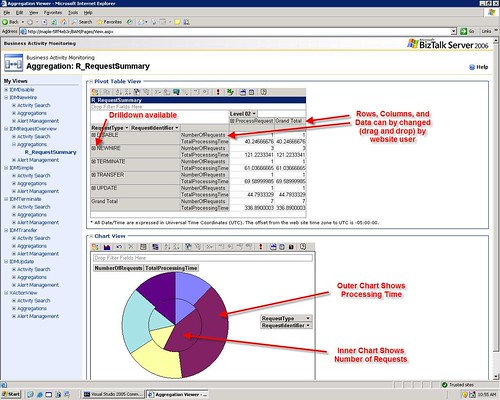
Here is a fictitious BAM portal Aggregation for one of my lab projects
The Basics
This article will be a fairly unstructured summary of my experiences with BAM under BTS 2006. If there is interest, I will create some more in-depth posts on the topic. I’ll be brief here because most of you know this already. The basic way BAM works is the following:
- Create a Business Activity showing the LOGICAL progression and points of interest in a process (using Excel, or Visio ODBA)
- Deploy that Activity (as .xls or .xml to the biztalk server) using BM.exe
- Associate low level technical events (i.e. hitting a shape in an orch or a method in a .net class) with items you defined in the activity (using the BAM API or the Tracking Profile Editor (TPE)
The end result of this is that you can take the mess of code, orchestrations etc and transform it back into a logical/business view that a CEO could understand. All in all, very cool.
Some Pragmatic Advice
“DO” List
- Try both ODBA and Excel for creating activities (I like excel better, but hey, who cares?)
- Become familiar with the BM.exe utility. You really only need the “deploy-all” and “remove-all” commands to start with
- Keep your activity files versioned! If you deploy an activity, then change the activity file, then try to undeploy you may have problems. Then you have to undeploy by manually deleting tables and rows in the BAMPrimaryImport table.
- I recommend that you manipulate your activity definition in Excel. When you are ready to deploy it, export it to xml and then deploy the xml. That way if you fiddle with the Excel file, you can still undeploy the activity using the same xml you used to deploy it.
- Before you re-export your activity to XML, undeploy the activity. Or even better export your Activity to a new version of the xml (i.e. with a version number in the file name
- Start with the tracking profile editor, master it, then move onto the BAM API calls.
“DON’T” List
- Don’t try to map milestones from Message Constructs or Loops (or other special cases). That is advanced and you may need to use the BAM API call to make that work as you would expect
- Don’t put spaces or special characters in your Activity Names. It can lead to problems later where the Event Log will say that “stored procedure does not exist” and your BAM Aggregation will not work.
- Don’t have a group shape as the last shape in the orchestration you are tracking in TPE. For some reason it won’t work. Just add any shape (i.e. Expression) after the group to fix the issue.
Continuations & Relationships
I can’t do these justice in this entry so this will be a bit shallow. I will probably blog on this separately. The more comments i see below requesting this, the sooner I will get around to it.
Continuations allow a single activity defintion to span muliple orchestrations or even other classes/systems seamlessly. It can also allow you to use different unique identifiers accross those systems to When using TPE to create a continuation. Create a continuation and name it, then create a continuationID and name it the exact same thing. Map some kind of ID value (PO ID, RequestID, etc.) from a messaging shape (receive, construct, send as described in the above DO List) in the first orchestration to the continuation. Then in the second orchestration map that same ID value to the continuationId. The idea is that the engine will recognize that those to values match and will correlate them so that both instances can contribute data to the same Activity instance
Use Continuations when the Relationship is 1:1
Use Relationships when the Relationship is 1:Many
Real-Time vs. Scheduled Aggregations
There is a little button in the Excel view (if you have installed the BAM addon) that will mark the aggregation as RealTime or Scheduled. Again, this is complex so I will summarize below.
|
RealTime |
Scheduled |
Maintenance |
Low maintencance – The data is kept in the relational tables and periodically cleaned. All you have to do is set the TimeSlice and TimeWindow values to determine the trimming behavior |
High Maintenance – This data is kept in cubes so you need to have Analisys server setup, schedule the packages, and make sure they execute as expected |
Amount of Data |
Small Amount of Data – Because this is kept in the relational tables the volume of data has to be kept rather trim |
Large Amount of Data – Because this is kept in cubes you can have almost unlimited amount of data |
Accuracy of Data |
Very Accurate – This provides up to the second view of data and can show in progress activities |
The data you have is correct, but you will be missing any data collected since the last execution of the packages |
Comprehensive Measures |
Limited – You can not use MIN,MAX, and apparently AVG functions in RTA |
Unlimited – You can use any type of measure in scheduled packages |
Performance |
This does contend with SQL and BizTalk for resources on the production box. |
This is presumably a separate machine serving as a DataWarehouse so it should not contend with the production server for resources. (except to execute the packages) |
BAM Alerts
For the most part, real time data is better for driving alerts, as they are usually time sensitive.
Common Problems & Solutions
Problem: The BAM Activity and the Tracking Profile have been deployed, the process has been run, but there is no data displayed for the activity in the BAM portal or LiveData Excel sheet.
Solution: When you deploy a non-Real Time Aggregation (this is default) while using SQL 2005. It will create the <package>_DM and <package>_AN packages. These packages need to be run to populate the BAM tables and get you the BAM Data. To run these packages you should select “Integration Services” in the SQL Management Console (not database engine). Once you have found them, run them. Hopefully, you’re data will appear.
Problem: The BAM portal or LiveData Excel sheet shows “BLANK” for one column and one row in the Aggregation display. It seems like the measures, and the milestones are not being combined into the same activity. Also, the data shows up in two rows (or more) in the BAMPrimaryImport.dbo.bam_<ActivityName_Completed table.
Solution: This could be a number of things, but if it was the same problem that I had the solution is the following. When you are in the TPE and you are associating data from the message, be sure to use the orchestration schedule. Right click on your receive, Message Construct, or Send shape and select Message Payload and map the items from there. Many people go to the “Select Event Source” and use the “Messaging Payload” from there. YOU ONLY WANT TO DO THAT IF YOU ARE JUST USING SEND RECEIVE PORTS TO MOVE MESSAGES. If you are using an orchestration, map everything from the orchestration schedule.
Problem: Your BAM aggregation is not working and you see “Could not find stored procedure” in your event log.
Solution: This is probably caused becaues you have a “space” or some other bad character in your Activity Name. Undeploy your activity, rename it so it does not have the space. Redeploy it. Adjust your TPE (if required). This should fix the problem.
Wish List
- Not being able to have spaces in the Activity Name AND not being warned about it is a serious limitation
- The length of Activity Names and Item names is too short. I wish for longer names.
- Measures using Average also seem to not show for RealTime Aggregations (at least they did not in mine).
- I would like to see this integrated with the Visual Studio Environment to a much greater degree. My vision is that we use Office and VS and nothing else.
- I also want to be able to deploy BAM stuff with MSI easier
by community-syndication | Oct 23, 2007 | BizTalk Community Blogs via Syndication
Obligatory Introduction
BAM is such a good name for this technology for a few reasons. The first is that it reminds me of the kid Bambam on the Flinstones (You know, the baby with the club that had a thing for Pebbles). Very powerful and very cool. Also because “BAM” is the sound my forehead makes while it collides with the palm of my hand as I discover I could have simply used BAM instead of writing a custom reporting app.
Sample to Whet the Appetite
Here is a fictitious BAM portal Aggregation for one of my lab projects
The Basics
This article will be a fairly unstructured summary of my experiences with BAM under BTS 2006. If there is interest, I will create some more in-depth posts on the topic. I’ll be brief here because most of you know this already. The basic way BAM works is the following:
- Create a Business Activity showing the LOGICAL progression and points of interest in a process (using Excel, or Visio ODBA)
- Deploy that Activity (as .xls or .xml to the biztalk server) using BM.exe
- Associate low level technical events (i.e. hitting a shape in an orch or a method in a .net class) with items you defined in the activity (using the BAM API or the Tracking Profile Editor (TPE)
The end result of this is that you can take the mess of code, orchestrations etc and transform it back into a logical/business view that a CEO could understand. All in all, very cool.
Some Pragmatic Advice
“DO” List
- Try both ODBA and Excel for creating activities (I like excel better, but hey, who cares?)
- Become familiar with the BM.exe utility. You really only need the “deploy-all” and “remove-all” commands to start with
- Keep your activity files versioned! If you deploy an activity, then change the activity file, then try to undeploy you may have problems. Then you have to undeploy by manually deleting tables and rows in the BAMPrimaryImport table.
- I recommend that you manipulate your activity definition in Excel. When you are ready to deploy it, export it to xml and then deploy the xml. That way if you fiddle with the Excel file, you can still undeploy the activity using the same xml you used to deploy it.
- Before you re-export your activity to XML, undeploy the activity. Or even better export your Activity to a new version of the xml (i.e. with a version number in the file name
- Start with the tracking profile editor, master it, then move onto the BAM API calls.
“DON’T” List
- Don’t try to map milestones from Message Constructs or Loops (or other special cases). That is advanced and you may need to use the BAM API call to make that work as you would expect
- Don’t put spaces or special characters in your Activity Names. It can lead to problems later where the Event Log will say that “stored procedure does not exist” and your BAM Aggregation will not work.
- Don’t have a group shape as the last shape in the orchestration you are tracking in TPE. For some reason it won’t work. Just add any shape (i.e. Expression) after the group to fix the issue.
Continuations & Relationships
I can’t do these justice in this entry so this will be a bit shallow. I will probably blog on this separately. The more comments i see below requesting this, the sooner I will get around to it.
Continuations allow a single activity defintion to span muliple orchestrations or even other classes/systems seamlessly. It can also allow you to use different unique identifiers accross those systems to When using TPE to create a continuation. Create a continuation and name it, then create a continuationID and name it the exact same thing. Map some kind of ID value (PO ID, RequestID, etc.) from a messaging shape (receive, construct, send as described in the above DO List) in the first orchestration to the continuation. Then in the second orchestration map that same ID value to the continuationId. The idea is that the engine will recognize that those to values match and will correlate them so that both instances can contribute data to the same Activity instance
Use Continuations when the Relationship is 1:1
Use Relationships when the Relationship is 1:Many
Real-Time vs. Scheduled Aggregations
There is a little button in the Excel view (if you have installed the BAM addon) that will mark the aggregation as RealTime or Scheduled. Again, this is complex so I will summarize below.
|
RealTime |
Scheduled |
Maintenance |
Low maintencance – The data is kept in the relational tables and periodically cleaned. All you have to do is set the TimeSlice and TimeWindow values to determine the trimming behavior |
High Maintenance – This data is kept in cubes so you need to have Analisys server setup, schedule the packages, and make sure they execute as expected |
Amount of Data |
Small Amount of Data – Because this is kept in the relational tables the volume of data has to be kept rather trim |
Large Amount of Data – Because this is kept in cubes you can have almost unlimited amount of data |
Accuracy of Data |
Very Accurate – This provides up to the second view of data and can show in progress activities |
The data you have is correct, but you will be missing any data collected since the last execution of the packages |
Comprehensive Measures |
Limited – You can not use MIN,MAX, and apparently AVG functions in RTA |
Unlimited – You can use any type of measure in scheduled packages |
Performance |
This does contend with SQL and BizTalk for resources on the production box. |
This is presumably a separate machine serving as a DataWarehouse so it should not contend with the production server for resources. (except to execute the packages) |
BAM Alerts
For the most part, real time data is better for driving alerts, as they are usually time sensitive.
Common Problems & Solutions
Problem: The BAM Activity and the Tracking Profile have been deployed, the process has been run, but there is no data displayed for the activity in the BAM portal or LiveData Excel sheet.
Solution: When you deploy a non-Real Time Aggregation (this is default) while using SQL 2005. It will create the <package>_DM and <package>_AN packages. These packages need to be run to populate the BAM tables and get you the BAM Data. To run these packages you should select “Integration Services” in the SQL Management Console (not database engine). Once you have found them, run them. Hopefully, you’re data will appear.
Problem: The BAM portal or LiveData Excel sheet shows “BLANK” for one column and one row in the Aggregation display. It seems like the measures, and the milestones are not being combined into the same activity. Also, the data shows up in two rows (or more) in the BAMPrimaryImport.dbo.bam_<ActivityName_Completed table.
Solution: This could be a number of things, but if it was the same problem that I had the solution is the following. When you are in the TPE and you are associating data from the message, be sure to use the orchestration schedule. Right click on your receive, Message Construct, or Send shape and select Message Payload and map the items from there. Many people go to the “Select Event Source” and use the “Messaging Payload” from there. YOU ONLY WANT TO DO THAT IF YOU ARE JUST USING SEND RECEIVE PORTS TO MOVE MESSAGES. If you are using an orchestration, map everything from the orchestration schedule.
Problem: Your BAM aggregation is not working and you see “Could not find stored procedure” in your event log.
Solution: This is probably caused becaues you have a “space” or some other bad character in your Activity Name. Undeploy your activity, rename it so it does not have the space. Redeploy it. Adjust your TPE (if required). This should fix the problem.
Wish List
- Not being able to have spaces in the Activity Name AND not being warned about it is a serious limitation
- The length of Activity Names and Item names is too short. I wish for longer names.
- Measures using Average also seem to not show for RealTime Aggregations (at least they did not in mine).
- I would like to see this integrated with the Visual Studio Environment to a much greater degree. My vision is that we use Office and VS and nothing else.
- I also want to be able to deploy BAM stuff with MSI easier

by community-syndication | Oct 23, 2007 | BizTalk Community Blogs via Syndication
Siva Ram asks in a comment on a previous post:
“How to Archive/(copy to another location) the Source file as it is , Before the biztalk
picks up the file?”
I think what he’s really asking is how he could archive an exact copy of the original
incoming message (possibly for regulatory compliance, auditing, or simply to provide
easier tracing of problems). This is a common question, and the truth is there are
several ways to approach this in BizTalk server.
Here are some options:
Double Hop: A fairly simple option is to do a double hop when processing
the incoming message. Instead of parsing and processing the message right away, receive
it through a pass-thru pipeline (so the message isn’t changed) and route it using
filters to two FILE send ports. One of them points to your archive location, while
the other points to a temporary folder, from which you pick up the message again using
the FILE adapter to do the real processing.
This is a rather simple way to implement this, but it can be pretty inefficient. It’s
particularly bad if messages are large because it involves several round-trips to
the message box.
Use BizTalk Tracking: For some scenarios, it is enough to just enable
message tracking in your receive location, making sure to select the option to track
the message before it goes through the pipeline. Messages will then be saved
in your DTA database, from which you can query and retrieve them using HAT or WMI.
Use a pipeline component: Using a custom decoding pipeline component
that writes the message out as it is read by the receive pipeline is another good
option. It is a bit more complex to implement, but it can be very efficient if implemented
properly. Jeff Lynch has a simple
Archive component you can use to start, though be aware his version will not work
if you’re dealing with adapters that use non-seekable streams to hold message content.
My own old Tracer
pipeline component might also be a place to start with this.
I hope this gives you an idea of how to start fulfilling your requirement!

by community-syndication | Oct 23, 2007 | BizTalk Community Blogs via Syndication
Hello,
In this post, I would like to share with you a tool I created and which is commonly used at Microsoft in the COM+ & MSDTC Support team but also in my Biztalk Support team for example to troubleshoot DB access & DTC issues : CHECKDB.
Be careful, don’t make confusion with the SQL CHECKDB command 🙂
Purpose of this tool is mainly to test very quickly Db connection/query execution to a Database using or not an MSDTC transaction.
I’m sure you already met errors saying that Db connection failed or that an MSDTC transaction can not be enlisted (“Failed to Enlist”) without to know really if the problem was specific to the client application you were using.
My tool just allow so to make quick connection/query tests to any ODBC or OLEDB compliant Databases w/o MSDTC and to Oracle via OCI 7 w/o XA.
It display then the detailed results of each step of the test (Connection to MSDTC, Tx creation, Db connection, Tx Enlistment, Query, Close…) with their duration.
This tool can also test quickly the db via 2 MTS/COM+ components, one configured to be non-Transactional and the other to be Transactional implementing both OLEDB, ODBC and ADO interfaces.
You can so verify very quickly if you can connect to the DB using the connection settings you configured and most important if an MSDTC transaction can be well propagated to the targeted Resource Manager (the DB).
This 32 bits tool was developed in C++ & MFC and can be used in any x86 windows platforms
Tool usage is very simple :
– Just select the options you want to use via the “Options” tab (like MSDTC usage or not, COM+ components usage or not)
– Select the tab corresponding to the API Db you want to use : ODBC, OLEDB, ADO, Native Oracle db using API OCI 7
– Then press the “Test” button to run the test
Detailed results of each step of the test (Connection to MSDTC, Tx creation, Db Connection Tx Enlistment, Query, Close…) with their duration will appear then in a Listbox and also in a log file (full path is shown in the “Options” tab).
If you see errors in the Enlistment step, you can read the two following good KB articles http://support.microsoft.com/kb/191168/en-us and http://support.microsoft.com/kb/306843/en-us
Feel free to add your comment if you have any question or feedback to raise
Thanks !
JP


by community-syndication | Oct 23, 2007 | BizTalk Community Blogs via Syndication
As promised,
here’s a sample managed adapter implementing a custom adapter configuration dialog
for BizTalk Server 2006 R2. It isn’t a fancy sample, just a new version of my /dev/null
adapter with a simple, custom dialog. It should be enough, however, to illustrate
the basic details needed to get you up and running quickly.
Here’s a snapshot of the configuration dialog when invoked from the BizTalk Administration
Console:

Some things I discovered that complement my previous article on the topic:
COM Registration: The class implementing IPropertyPageFrame needs to be registered
with COM. However, you won’t be able to use the “Register for COM interop” option
in the Visual Studio project settings for this, because you’ll get an error saying
that the Microsoft.BizTalk.ExplorerOM.dll assembly isn’t registered. To work around
this, I created a custom build step that calls regasm.exe with the /registered option.
Property Bags: Remember I said you needed to implement two versions of IPersistPropertyBag?
Turns out both are indeed needed. Even the BizTalk Administration Console will call
both implementations at different times.
Also, it can become cumbersome to implement your adapter configuration load/save code
for both IPropertyBag implementations, so I simply wrote a small adapter class that
wraps the Microsoft.BizTalk.ExplorerOM.IPropertyBag instance so that it looks like
a Microsoft.BizTalk.Admin.IPropertyBag one. This way I could write code just once
to serialize/deserialize the adapter settings. You can find the wrapper class in PropBagAdapter.cs,
Registry: As usual, the adapter ships with a .REG file containing the adapter
registry entries. Make sure to modify the file paths there so that they point to your
project’s location on disk. One thing worth noting here is how now the TransmitLocation_PageProv
value contains the CLSID I explicitly gave to my TransmitLocPageProvider class (which
implements IPropertyPageFrame).
Download: NullAdapterR2.zip.
I think you’ll find the code is pretty straightforward and should give you an idea
of how to get this up and running in your own adapters, if you’re interested.
by community-syndication | Oct 23, 2007 | BizTalk Community Blogs via Syndication
I’m going to Microsoft SOA and Business Process Conference running between Oct 29th to Nov 2nd. To make most out of my trip (going to spend 13hrs each way in flight) I decided to attend the 2 days pre-conference session by PluralSight presented by Matt Milner, Jon Flanders and Aaron Skonnard.
On the second day of the conference I’m hosting a round table session at "Ask the Expert (ATE)" reception, to cover the topic "BizTalk Overview".
Hope to see some of you there. Please ping me if you are going to be there.
Nandri!
Saravana
by community-syndication | Oct 22, 2007 | BizTalk Community Blogs via Syndication
This is the fourth in a series of eight articles reviewing my experiences with the Dynamics AX 4.0 Adapter for BizTalk Server 2006. In the second article, I reviewed an issue with IPC Ports. While the IPC Port issue referred to in the second article prevents the Dynamics AX adapter from working at all, the issue described in this article seems to suggests that the adapter tends to destabilizes over time. The failure that is encountered reads “IPC Port cannot be opened”. My observations suggests that this failure is related to how exceptions are managed by the Dynamics AX adapter.
If an exception occurs when importing a message in Dynamics AX, the exception is converted into a Soap exception, which can be caught as a DeliveryFailureException within an orchestration. The actual failure is buried in the inner exception.
When a failure occurs in Dynamics AX in my current implementation, the orchestration issues a compensating transaction back to the source system. At a later time, the transaction is attempted again. Ideally, the issue that caused the exception is resolved prior to the transaction being resubmitted to Dynamics AX. At times, especially In a test system, the issue may not resolved for days.
What I have observed is that over time, the Dynamics AX adapter appears to destabilize. A series of exceptions occur, usually in a predictable order. Eventually, the Dynamics AX adapter stops processing either inbound or outbound messages.
The error sequence typically starts with a random “Requested Service Not Found” failure. This failure may occur several times. Eventually, the dreaded “IPC Port cannot be opened” failure occurs. Once this happens, the Dynamics AX adapter running in the BizTalk Server host instance is toast. All subsequent inbound and outbound message will fail with the “IPC Port cannot be opened” exception. The only resolution is to restart the BizTalk Server Host Instance that the adapter is running in.
One thing to note is that on occasion the IPC port failure may occur on the return message back to BizTalk Server. In this scenario, the transaction may have succeeded in Dynamics AX, but BizTalk Server will view the transaction as a failure. In my implementation, the orchestration may encounter the “Duplicate Message” error when the offending message is resubmitted to Dynamics AX.
I am continuing to track this issue. As I gather more definitive information, I will update my blog.

by community-syndication | Oct 22, 2007 | BizTalk Community Blogs via Syndication
OK, time to post some technical content again 
If you’ve used BizTalk server 2004/2006, you’ve probably seen the configuration dialog
where you enter the adapter-specific settings on a send port or receive location.
Have you noticed how some adapters simply have a property grid with values, while
others have a full-blown set of custom property pages with custom dialogs? Ever wondered
why?
 The
The
standard property-grid based settings dialog is provided by the BizTalk Adapter Framework
by default, all you need to do have your adapter’s MgmtClass provide the proper XML
Schema (XSD) that defines the adapter options.
In a lot of ways this is very good, as it makes adding design-time configuration support
for your adapters very easy, and, while it might not be the best looking UI ever,
it is fairly usable and fairly standard, so it works fairly well.
Even more, the adapter framework provides you some useful ways to extend this model,
with, for example, custom value editors for specific properties. There’s good documentation
on this on the BizTalk Documentation on creating adapters, which can be found here.
 Other
Other
adapters, however, have a completely different configuration UI. A good example of
this is the standard FILE adapter, which has several different options and two property
pages. This is a lot more usable, but it does mean a lot more work on the part of
the developer (after all, you get the regular UI almost for free!).
Some people have asked me recently how you could do this for your own adapters, and
I really didn’t have a good answer for that (that is, I had no clue!). If you look
at the BizTalk documentation you’ll notice that there’s virtually no discussion of
this topic whatsoever. I also realized that the custom UI dialogs are used almost
exclusively by unmanaged adapters: FILE, SMTP, Receive Side HTTP, and so on.
Unmanaged adapter development is something supported in BizTalk right from 2004, but
I can’t say I know anyone doing it except Microsoft itself. It’s also noteworthy that
no where on the documentation is the topic of unmanaged adapter development
explicitly covered, and certainly the design-time configuration aspect isn’t
even mentioned. So I was under the impression that both topics were related somehow.
Managed Adapters can have custom configuration UIs
As it turns out, however, it is possible for a regular, managed adapter to
have it’s own custom adapter configuration design-time experience in BizTalk 2006
R2, though it isn’t very obvious how to do it.
I first realized this when I noticed that all the WCF adapters in BizTalk Server 2006
R2 had custom dialogs [1]. Looking a bit deeper I realized that the HTTP send-side
adapter also had one, but the HTTP adapter is a rare beast in the sense that the receive-side
adapter is unmanaged (an ISAPI extension, actually), while the send-side adapter is
managed (built on top of System.Net.HttpWebRequest). Because of this, the management
infrastructure for both receive and send side adapters is unmanaged, so it doesn’t
really count.
Sidebar: I haven’t seen a way in BizTalk 2006/4 to support this
yet. In particular, the interface used in R2 to support this is not even available
in previous versions, and as far as I can see, unmanaged adapters implement this in
a completely different way, using IPropertyPage and IPropertyPageSite, I think.
So, how does the WCF adapter do it? I haven’t traced yet all the details necessary,
but looking a bit with reflector and poking in the registry revealed some interesting
details. Here are some things that might get you started if you decide to try this
for yourself:
MgmtClass: Apparently you still need a MgmtClass for your adapter that implements IAdapterConfig (and
likely IAdapterConfigValidation as
well). However, your implementation of IAdapterConfig.GetConfigSchema() can simply
return null, as it isn’t apparently relevant.
Custom UI: You implement your custom UI by implementing a class that provides
BizTalk a way to load/save your adapter settings as well as provide it with the information
to create your custom dialog:
-
It needs to implement the Microsoft.BizTalk.Admin.IPropertyPageFrame interface [2].
This interface has a single ShowPropertyFrame() method
which gets handed the HWND of the window you should use as your custom dialog parent
(so that you can show it in modal form).
-
It needs to implement IPersistPropertyBag. Apparently, however, you need to implement
it in two variations: Microsoft.BizTalk.Admin.IPersistPropertyBag as well as Microsoft.BizTalk.ExplorerOM.IPersistPropertyBag.
This is probably done to support both the management console as well as the older
BizTalk Explorer inside Visual Studio. This is used to both load/save the adapter
configuration as well as some other stuff I’m not quite sure about yet.
-
It needs to be visible to COM and registered in the registry with a proper GUID you
can reference.
Registry Settings: For your custom UI class to be used by BizTalk, you need
to add a few new values in your adapter’s Registry key:
-
ReceiveLocation_PageProv: This will be the GUID of the class implementing IPropertyPageFrame
for the receive-side of your adapter.
-
TransmitLocation_PageProv: This will be the GUID of the class implementing IPropertyPageFrame
for the send-side of your adapter.
-
InboundProtocol_PageProv: This will be the GUID of the class implementing IPropertyPageFrame
for the receive handler configuration.
-
OutboundProtocol_PageProv:This will be the GUID of the class implementing IPropertyPageFrame
for the send handler configuration.
I’m in the process of trying this now and I’ll let you how it works.
[1] Actually, the WCF adapter creates it’s own model internally to
handle the custom configuration UI on top of the original extensibility model in the
adapter framework, which is then leveraged by all the WCF built-in adapters and custom
WCF adapters.
[2] This one is defined in the copy of Microsoft.BizTalk.Admin.dll
that’s in the GAC, which, oddly enough, is different from the Microsoft.BizTalk.Admin.Dll
that can be found in the BizTalk installation folder.
by community-syndication | Oct 21, 2007 | BizTalk Community Blogs via Syndication
I had a great time again this year at the Heartland Developers Conference (HDC) talking about extending WCF. The guys did a great job of putting on a top notch 2 day conference. It just gets better each year. If you attended my session, then you will find the source for the demos here.
I’m headed out to Redmond next week for Pluralsight’s 2 day pre-conference event on all the great technologies coming out of the Connected Systems Division at Microsoft and then speaking on best practices for building composite activities at the SOA and BP conference on the Microsoft campus.
by community-syndication | Oct 19, 2007 | BizTalk Community Blogs via Syndication
Mocking frameworks are growing more and more in popularity these days, because to
some degree Unit Testing, via TDD or otherwise, has been growing in popularity.
This week at the Heartland Developer Conference I
gave a talk on what I call “practical” TDD. The talk goes over the basics of
TDD quickly, but is really targeted at those who have tried to do TDD but found it
difficult because they are not working on a team that has adopted the practice, or
they are not working a project that was built to be testable. I spent a good
bit of time working no what is the easiest path to help such people adopt TDD, because
adoption of such good practices is far more important to me than perfection in them.
As has been said many times, Good Enough is by definition, Good Enough.
After a good bit of research on the subject of mocking frameworks, I have come to
the simple conclusion that:
-
This is an area that is growing still, as nearly every major framework differs on
the coding approach. This is in stark contrast to testing frameworks which,
to a one in .NET, all have settled on the NUnit 2.0 model of using attributes.
-
That if you’re not using TypeMock then you’re just working to damned hard.
Now, I’m sure my friends (and there are many) who use Rhino Mocks will believe that
I must be over-stating the issue, but I tell you clearly I am not. TypeMock
is not built like any other mocking framework currently available, it uses the profiling
APIs and not polymorphism or encapsulation in order to intercept calls and provide
return values. Let me give you just a few examples of things which TypeMock
can do in a few short lines of code which Rhino Mocks simply cannot do at all.
Mocking Static Methods
Take the following code, and assume that we wish to mock MessageBox.Show which is
a static method:
          private

          void MyCoolMethod(string msg)

{ if (MessageBox.Show(msg) == DialogResult.OK) Console.WriteLine("OK"); else Console.WriteLine("Not

OK! Not OK!"); }
.csharpcode, .csharpcode pre
{
font-size: small;
color: black;
font-family: consolas, “Courier New”, courier, monospace;
background-color: #ffffff;
/*white-space: pre;*/
}
.csharpcode pre { margin: 0em; }
.csharpcode .rem { color: #008000; }
.csharpcode .kwrd { color: #0000ff; }
.csharpcode .str { color: #006080; }
.csharpcode .op { color: #0000c0; }
.csharpcode .preproc { color: #cc6633; }
.csharpcode .asp { background-color: #ffff00; }
.csharpcode .html { color: #800000; }
.csharpcode .attr { color: #ff0000; }
.csharpcode .alt
{
background-color: #f4f4f4;
width: 100%;
margin: 0em;
}
.csharpcode .lnum { color: #606060; }
The following test will work perfectly to mock this call. No other hidden setup,
nothing more than a reference to TypeMock.dll and the following code:
        [Test]

        publicvoid MockMessageBoxShow()

{ MockManager.Init(); Mock mbMock = MockManager.Mock(typeof(MessageBox));

mbMock.ExpectAndReturn("Show", DialogResult.OK); MyCoolMethod("Here

we go again."); // Ensure that all expectations were met. MockManager.Verify();

}
.csharpcode, .csharpcode pre
{
font-size: small;
color: black;
font-family: consolas, “Courier New”, courier, monospace;
background-color: #ffffff;
/*white-space: pre;*/
}
.csharpcode pre { margin: 0em; }
.csharpcode .rem { color: #008000; }
.csharpcode .kwrd { color: #0000ff; }
.csharpcode .str { color: #006080; }
.csharpcode .op { color: #0000c0; }
.csharpcode .preproc { color: #cc6633; }
.csharpcode .asp { background-color: #ffff00; }
.csharpcode .html { color: #800000; }
.csharpcode .attr { color: #ff0000; }
.csharpcode .alt
{
background-color: #f4f4f4;
width: 100%;
margin: 0em;
}
.csharpcode .lnum { color: #606060; }
And with just that little code, just 4 lines dedicated to the mock, 2 of which should
be refactored to Setup and TearDown methods, we can mock a static method.
Not cool enough for you? Ok, fine.
Mocking Events
So you have something which expects an object to return certain events. This
example does require a professional license ofTypeMock, it will not work under
the Community Edition, but if you need this functionality then reallypay thenicefolks
their money.
          public

          class GUI

{ publicstring LovingCSharp {

get; set; } publicvoid Initialize()

{ this.LovingCSharp = string.Empty;

Button button = new Button(); button.Click += new EventHandler(button_Click);

} privatevoid button_Click(object sender,

EventArgs e) { this.LovingCSharp += "LOVE!";

} }
.csharpcode, .csharpcode pre
{
font-size: small;
color: black;
font-family: consolas, “Courier New”, courier, monospace;
background-color: #ffffff;
/*white-space: pre;*/
}
.csharpcode pre { margin: 0em; }
.csharpcode .rem { color: #008000; }
.csharpcode .kwrd { color: #0000ff; }
.csharpcode .str { color: #006080; }
.csharpcode .op { color: #0000c0; }
.csharpcode .preproc { color: #cc6633; }
.csharpcode .asp { background-color: #ffff00; }
.csharpcode .html { color: #800000; }
.csharpcode .attr { color: #ff0000; }
.csharpcode .alt
{
background-color: #f4f4f4;
width: 100%;
margin: 0em;
}
.csharpcode .lnum { color: #606060; }
.csharpcode, .csharpcode pre
{
font-size: small;
color: black;
font-family: consolas, “Courier New”, courier, monospace;
background-color: #ffffff;
/*white-space: pre;*/
}
.csharpcode pre { margin: 0em; }
.csharpcode .rem { color: #008000; }
.csharpcode .kwrd { color: #0000ff; }
.csharpcode .str { color: #006080; }
.csharpcode .op { color: #0000c0; }
.csharpcode .preproc { color: #cc6633; }
.csharpcode .asp { background-color: #ffff00; }
.csharpcode .html { color: #800000; }
.csharpcode .attr { color: #ff0000; }
.csharpcode .alt
{
background-color: #f4f4f4;
width: 100%;
margin: 0em;
}
.csharpcode .lnum { color: #606060; }
Now let’s mock this up, call that event three times, and assert that our property
is set correctly.
        [Test]

        publicvoid MockFormWithEvents()

{ MockManager.Init(); // Mock button so that we can... Mock

btnMock = MockManager.MockAll(typeof(Button)); //

Handle all calls to add an event handler. MockedEvent evntMock = btnMock.ExpectAddEventAlways("Click");

GUI frm = new GUI(); frm.Initialize(); evntMock.Fire(this,

EventArgs.Empty); evntMock.Fire(this, EventArgs.Empty);

evntMock.Fire(this, EventArgs.Empty); Assert.AreEqual("LOVE!LOVE!LOVE!",

frm.LovingCSharp); // Ensure that all expectations were met. MockManager.Verify();

} }
.csharpcode, .csharpcode pre
{
font-size: small;
color: black;
font-family: consolas, “Courier New”, courier, monospace;
background-color: #ffffff;
/*white-space: pre;*/
}
.csharpcode pre { margin: 0em; }
.csharpcode .rem { color: #008000; }
.csharpcode .kwrd { color: #0000ff; }
.csharpcode .str { color: #006080; }
.csharpcode .op { color: #0000c0; }
.csharpcode .preproc { color: #cc6633; }
.csharpcode .asp { background-color: #ffff00; }
.csharpcode .html { color: #800000; }
.csharpcode .attr { color: #ff0000; }
.csharpcode .alt
{
background-color: #f4f4f4;
width: 100%;
margin: 0em;
}
.csharpcode .lnum { color: #606060; }
Summary
These are just two examples, and don’t even delve into the whole “Natural Mocks” portion
of TypeMock. Do yourself a favor, download the evaluation, they’ll give you
30 days of all the features (which you can make any individual 30 days you’d like
BTW) and ask yourself why you’re jumping through all those hoops just to be
able to mock dependencies. With this project, you don’t have to create dependency
injection constructors just to make your classes testable.
Tim Rayburn is a consultant for Sogeti in the Dallas/Fort
Worth market.



