by community-syndication | Jan 19, 2007 | BizTalk Community Blogs via Syndication
In my last entry, I showed how developers could use our new ESB guidance to submit generic messages into BizTalk and have that message routed to a Service Endpoint based on a UDDI entry. Today, I thought I’d expand on that example and add in another common scenario that occurs within an ESB architecture, namely “Dynamic Transformations”. (If you haven’t seen the last post, its probably best to check it out first as I’ll be building on the concepts introduced there)
The Goal
Submit a generic message to the ESB and have it dynamically transformed and then have the new message dynamically routed to a Service Endpoint that is defined in a UDDI entry. The client application needs to be able to specific the transformation map to use as well as the name of the Service.
The Solution
The first thing I did was to build out a test client that I could use to submit message to the ESB. I needed to be able to specify the body of my message, the map I want to use for the transformation and the name of the Service that I want the message submitted to.
In my last post I spoke about the ESB On Ramp Web Service and show how you could submit generic XML message to it. I also outlined about how to submit message processing instructions to the ESB by using SOAP headers attached to that SOAP message. To achieve dynamic transformation and routing, we’ll again need to use the this On Ramp and we’ll again attach message processing instructions via the SOAP Headers. Therefore, the first thing I did after creating my test client was to add a Web Reference to the ESB On Ramp Web Service.
Next, I created a function that would handle all interaction with the OnRamp Web Service. To achieve both dynamic transformation followed by dynamic routing, I needed to use four of the SOAP headers.
- ProcessingInstruction – (Allows me to specify the first processing task for the ESB to perform)
- Itinerary – (I’ll talk more about this in a minute)
- MapType – (Allows me to specify the fully qualified name of the map I want BizTalk to use in the transformation)
- EndpoingUddiLabel – (Allows me to specify the name of the Service that I want message routed to)
private string Submit_Transform_Route(string strService, string strMessage, string strMap)
{
// Get an instance of the On Ramp Service
ESB.OnRamp ramp = new ESB.OnRamp();
// Assign security credentials
ramp.Credentials = new System.Net.NetworkCredential(“username”, “password”);
// Assign values to the headers we need to perform the UDDI based routing
ramp.EsbSoapHeadersValue = new ESB.EsbSoapHeaders();
//Tell the ESB that the first task is to “Transform” the message
ramp.EsbSoapHeadersValue.ProcessingInstruction = “TRANSFORM”;
//Let the ESB know what all of the steps I want performed are
ramp.EsbSoapHeadersValue.Itinerary = “TRANSFORM,ROUTE”;
//Tell the ESB which Map to use in the transform
ramp.EsbSoapHeadersValue.MapType = strMap;
ramp.EsbSoapHeadersValue.EndpointUddiLabel = strService;
// Get the message to send
XmlDocument doc = new XmlDocument();
doc.LoadXml(strMessage);
try
{
//Send the message to the OnRamp and return the result
ramp.Receive(doc);
return “Message Submitted Successfully.”;
}
catch (System.Exception ex)
{
return “Error: ” + ex.Message;
}
}
You’ll notice that its almost identical to the function I developed for my last post. In that function I had to set three of the EsbSoapHeaders to achieve UDDI based routing for my message. I had to set the ProcessingInstruction = “ROUTE”, the Itineray to “ROUTE” and the EndPointUddiLabel to the name of the Service I wanted the message routed to.
For this example, I actually wanted the ESB to perform multiple and sequential tasks on my message. (i.e. transform it first and then route it). Since the “ProcessingInstruction” header only allows me to specify a single task for the ESB to perform, I needed to find some header that would let me submit a list of instructions. This is where the “Itinerary” header comes into play. It is this header that allows me to pass in a comma delimited list of tasks which the ESB will perform one after the other.
Once I had this function built, all I had to do was call it from the onClick where I passed in the Map name and the Service name.
private void button1_Click(object sender, EventArgs e)
{
Cursor.Current = Cursors.WaitCursor;
btnSubmit.Enabled = false;
string result = Submit_Transform_Route(txtServiceName.Text, txtOriginalMessage.Text, txtMapName.Text);
btnSubmit.Enabled = true;
Cursor.Current = Cursors.Default;
MessageBox.Show(result, “Result”, MessageBoxButtons.OK, MessageBoxIcon.Information, MessageBoxDefaultButton.Button1, MessageBoxOptions.DefaultDesktopOnly);
}
Its important to understand that you can only use a Map that has already been deployed into your BizTalk server. So you do need to pre-develop the Map before you can use it. For my example here, I just used one of the prebuilt samples that comes with the SB guidance. Also, you have to provide the fully qualified name of the map.
How it Works
The way this scenario works is very similar to the Dynamic Routing scenario I explained in my last post. Our message is submitted to the OnRamp Web Service, it promotes all of the SOAP headers that we provided up into the standard BizTalk Message Context. Within BizTalk, we then have our “Agents” (i.e. Orchestrations) that are setup to subscribe to our message. Each Agent subscribes to a message based on the “ProcessingInstruction” property. In my example, I set the ProcessingInstruction equal to ” TRANSFORM”. This resulted in my message being picked up by the DynamicTransformation.odx orchestration. (Found in the Microsoft.BizTalk.ESB.Agents.Transform project). It is this orchestration that will perform the transformation for us.
This transformation orchestration does a couple of things for us.
- It checks to see if we have specified a map for us. If we haven’t it attempts to determine the map name based on information sent in the SOAP headers.
- Once a map name is determined, the transformation is performed for us.
- Advance the itinerary for us.
“Advance the itinerary”??? What’s that mean? We’ll lets take a look …
Itineraries
Things to understand:
- Message processing tasks are performed by “Agents” which are really just BizTalk Orchestrations
- Agents subscribe to messages based on the “ProcessingInstruction” property. I.e. The Transform agent only picks up messages with a ProcessingInstruction set to “TRANSFORM”. The delivery agent only to messages with “ROUTE”
- Itineraries are comma delimited list of processing instructions that will eventually be moved up into the ProcessingInstruction property as each step is completed.
After an agent picks up a message from the messageBox and completes its core task, it is required to examine the current message itinerary. If there are additional steps that need to be completed, the agent is responsible for extracting the next step out of the itinerary and moving it up into the ProcessingInstruction property. The message is then published into the messageBox where another agent can potentially pick it up based on the new processing instruction. It is this mechanism that allows us to “chain” together our agents and complete multiple tasks on our message as it moves through the ESB.
Lets take a look at a portion of the Transform agent orchestration.
In this image, we can see the 2 key tasks that the agent is performing. In the “MessageAssignment” step, the actual transformation is performed. The code that performs the dynamic transform is:
tMapType = System.Type.GetType(FullyQualifiedMapType);
transform (OutboundMessage) = tMapType(InboundMessage);
The second key box is the “Advance Itinerary” one. It contains the following code:
OutboundMessage(*) = InboundMessage(*);
itineraryStep = Microsoft.BizTalk.ESB.Helpers.ItineraryHelper.Advance(OutboundMessage(Microsoft.BizTalk.ESB.Itinerary));
OutboundMessage(Microsoft.BizTalk.ESB.Itinerary) = itineraryStep.Itinerary;
OutboundMessage(Microsoft.BizTalk.ESB.ProcessingInstruction) = itineraryStep.NextStep;
As you can see, this code advances the itinerary forward one step by calling the ItineraryHelper class. The ProcessingInstruction property is then updated to contain this next step. For our example, the “TRANSFORM” instruction I manually assigned to the ProcessingInstruction is replaced with the second Itinerary task “ROUTE”. Once this code runs, a new message is published back to the messageBox where our Routing agent picks it up and perform the dynamic routing. (If you want details on how that agent will run, check out the previous post) This is one way in which Dynamic Transformation and Dynamic Routing can be achieved using the ESB guidance.
Extending Beyond this Example:
The ESB guidance currently ships with two default agents, the Transform agent and the Delivery agent. It’s important to understand that you can extend your ESB beyond this basic functionality by creating you own Agent orchestrations that subscribe to your own custom ProcessingInstructions. The guidance contains a set of guidelines on how to develop your own agents so that you can develop your own custom and potentially complex ESB tasks.
Now, if you are interested in leveraging the ESB guidance for your organization, we have currently released it to a core set of Microsoft Partners. You can find a list of these partners at http://www.microsoft.com/biztalk/solutions/soa/esbpartners.mspx

by community-syndication | Jan 18, 2007 | BizTalk Community Blogs via Syndication
Harry
Pierson talked a bit about the stuff he’s learning on BizTalk Server in Morning
Coffee 12 entry (btw, loving the, keep it up!). Looks like he’s attending a great
class with Matt
Milner. A few comments that sparked my interest:
Harry says that conceptually BizTalk hasn’t changed all that much since the 2000/2002
days. I’m not sure I’d agree, but that would depend on what he means by “conceptually” 
I’d say that from an architecture point of view, the the change between 2002 and 2004
was a very significant one, requiring you to adapt to a lot of new stuff. Here’s
why I feel this way:
-
The orchestration engine was pretty much rewritten. The designer by itself is a great
improvement, but it’s far more than that:
-
There’s no more interpreted XLANG, now we have XLANG/s
-
Orchestrations (*.odx) are compiled down to C# and then to MSIL.
-
Now we have a pretty powerful correlation mechanism as well as convoys.
-
Native .NET support (it is .NET after all!)
-
The messaging model changed significantly:
-
Most of the terminology changed. Remember channels, AICs and Receive Functions?
-
The messaging model is now mostly symmetrical, unlike in 2000/2002 where the send
and receive sides were very different.
-
The pipeline model is far nicer (have I mentioned I love pipelines? they’re fantastic!).
-
The adapter framework. Sure beats down anything we had in 2000/2002! Writing adapters
is still hard, but writing them in .NET is far easier. Application Integration Components
(AIC) were a kludge, anyway.
-
New features:
-
Enterprise Single Sign-On
-
Business Activity Monitoring: Don’t disregard the power of BAM, it’s one of the coolest
features in BizTalk and coming soon to WCF and WF thanks to the new BAM interceptors
for WCF and WF in BizTalk 2006 R2.
-
Business Rules Engine
Maybe it’s just me, but I do consider that the change between 2002 and 2004 to be
very significant and a much needed improvement. But I’d agree that from some points
of view, yes, BizTalk is still BizTalk (e.g. you still use it for the same and a lot
of the usage scenarios haven’t changed at a conceptual level). Personally, I consider
understanding the BizTalk architecture an absolute must for any BizTalk developer,
and as you can see, I get all excited talking about it
Harry also mentioned something I’ve heard a lot of people say: that the Pub/Sub engine
in the BizTalk MessageBox was mostly useful for messaging-only scenarios. I agree
that’s what it might seem so at first but just to reinforce what Matt said in the
class: The Message Box really is the heart of BizTalk and the Pub/Sub engine in it
is exactly what gives it that power!
So let me briefly enumerate just why the Pub/Sub engine is extremely relevant to orchestrations
in BizTalk:
-
The Pub/Sub engine processes any message that comes into BizTalk, and that includes
messages that fire orchestration instances. Even when you do the simplest Port to
Orchestration bindings, subscriptions are still created/evaluated/matched in the MessageBox
to enable the processing to happen.
-
The MessageBox message store, which as Harry correctly points out, can be thought
of (to a degree) as a set of queues, coupled with the Pub/Sub engine gives BizTalk
some pretty powerful features. One of them is the capability to balance processing
loads between multiple BizTalk processing servers in a single BizTalk Group.
Basically the idea is that you can have a single BizTalk Host with multiple instances
(example, instances HA and HB in servers A and B respectively) and when a message
is received and fires an orchestration instance, then BizTalk might start some of
those instances in server A and other in server B. That’s something you get mostly
for free with BizTalk (though you still need to know how to take advantage of it and
how to architect for it).
-
Direct Binding: Direct
binding exposes the Pub/Sub model in the MessageBox to Orchestrations like no
other binding model does. It allows you to create orchestrations that are not bound
to a physical receive or send port but rather that directly subscribe or publish messages
to the MessageBox. This gives you a lot of power and flexibility in how orchestrations
connect to each other and how they connect to ports because it allows you to use them
and harness the full flexibility offered by the Pub/Sub engine.
-
Correlation Sets: A correlation basically gives you the ability to route an incoming
message into an existing orchestration instance (i.e. one already up waiting for it),
instead of always firing a new instance. When you initialize a Correlation Set what
essentially happens under the covers is that a new temporary subscription is
created (called an Instance Subscription), so the Pub/Sub engine is pretty important
for this aspect as well.
This is actually one of the aspects that I find more lacking in the current Windows
Workflow Foundation implementation, and it’s the lack of a reusable, generic correlation
engine. There is a basic correlation support for the HandleExternalEvent and InvokeExternalMethod
activities, but it’s not really very reusable. This means pretty much every developer
creating custom IEventActivity implementations needs to build their own correlation
mechanism if its needed, and it can be quite a bit of work, specially if you need
to make it work across a farm of machines hosting the workflows (BizTalk already
does this for you thanks to the Message Box architecture).
Hopefully this makes it more obvious just how important the Pub/Sub engine in the
Message Box is to BizTalk Orchestrations! Did I mention I love this stuff?
![Database Lookup Functiod[For Beginners only]](https://farm1.static.flickr.com/138/361435722_d1a6a21c76.jpg)
by community-syndication | Jan 18, 2007 | BizTalk Community Blogs via Syndication
Working with BizTalk and don’t need to interact with SQL database.nahthat’s not possible. I googled for database Lookup functiod but no link gave me a simple sample as to what this functiod does and other functiods which are linked to this Database Lookup Functiod. So I just thought to pen down few Standard database functiods available with BizTalk
First let’s start with.
Database lookup Functiod.
I created a table called “NishTable” with fields and values as below. 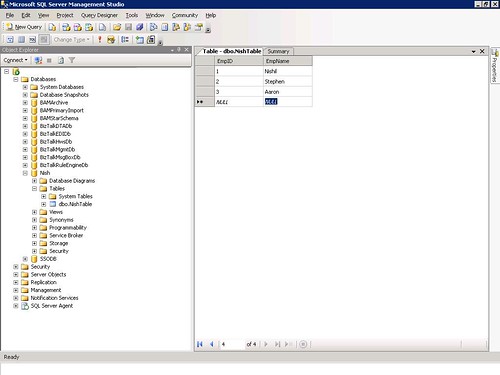
Fig1
Then I create an Empty BizTalk Project with
1 Map and 2 Schemas.
Create the Schemas as shown in the Fig2.
Just drop in the Database Lookup Functiod on the Map as shown in Fig2.
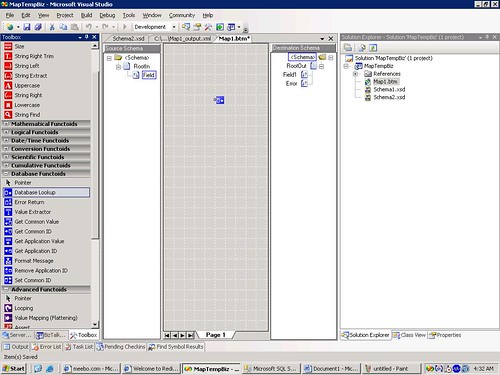
Fig2
Let’s Configure this Database Lookup Functiod.
For this Sample I won’t pass any input it would be harcoded.
Right click on the Functiodproperties
1 parameter-Just type 2
2nd Parameter-Sql connection String.
3rd Parameter-Table name-NishTable (Created before)
4th Parameter-Column name.-EmpID
What these configured values means is
“Select _ from NishTable where EmpID=2”.
See fig 3 for details.

Fig3
Now we need to fill in the blank space in the above sql query as to what should be selected. So we use value extractor functiod and configure it as soon in fig4.
EmpName is the field whose value I wantSo I type “EmpName” as second parameter.
Mapping is simple 1 to 1 map.
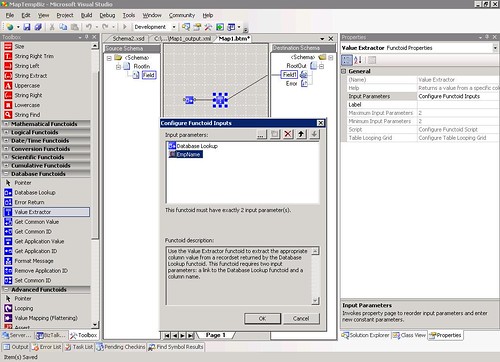
Fig4
This way a Database Lookup functiod works. You can test your map.
Now what about error handling. If the sql connection is down?
So let’s use “Error Return functiod” here.
Just link the functiods as shown.
“Error Return functiod” requires only 1 parameter that should be the output of Database Lookup functiod.
Refer fig 5 for more details.

Fig 5
Just to test it I stopped my Sql server and I can see the output as below. 
Fig6
So this was Database lookup Functiod. We can use this instead of using a .net component inside map to get the values from database.
NISHIL is online…Click to Chat right now!
by community-syndication | Jan 18, 2007 | BizTalk Community Blogs via Syndication
Recently I got a question from a student how to get a list of all the web parts (in code) that are displayed on a specific SharePoint Web Part Page. This could be useful if you would like to close all the web parts at once, add web parts programmatically etc. By using the SharePoint object model this is pretty easy, especially if you want to retrieve that list with code running in a web part. The WebPartManager property of the WebPart base class, gives you access to a collection of all the WebPartZones available on the page. Once you’ve got the zones, you can get the web part instances by using the WebParts property. The following web part code will display a small list of all the web parts found on the page, including the name of the web part class and the web parts zone.
using System;
using System.Runtime.InteropServices;
using System.Web.UI;
using System.Web.UI.WebControls.WebParts;
using Microsoft.SharePoint;
using System.Web.UI.WebControls;
namespace WebPartLister
{
public class WebPartLister : System.Web.UI.WebControls.WebParts.WebPart
{
BulletedList list;
protected override void CreateChildControls()
{
list = new BulletedList();
WebPartZoneCollection zones = this.WebPartManager.Zones;
foreach (WebPartZone zone in zones)
{
WebPartCollection webparts = zone.WebParts;
foreach (WebPart webpart in webparts)
{
list.Items.Add(
string.Format(“{0} ({1}), {2}”,
webpart.Title, webpart.GetType().Name,
zone.DisplayTitle));
}
}
this.Controls.Add(list);
}
protected override void Render(HtmlTextWriter writer)
{
EnsureChildControls();
list.RenderControl(writer);
}
}
}
Technorati tags: SharePoint, WebParts
by community-syndication | Jan 17, 2007 | BizTalk Community Blogs via Syndication
With the conversation going on regarding IE7’s 100 million installation (thanks Tony), the contrasting Infoweek article and also Richard’s Maxthon take, I was interested to see that Rowan has posted Trade Me’s logs for December on his blog.
If you analyse Rowans numbers further it shows that in the 6 month period from July 2006 to Dec 2006 that IE (all flavours) lost about 1.36% to FF’s gain of 1.1% amongst Trade Me customers.
Net Applications claims that during the same period IE lost 3.92% to FF’s 2.66% gain.
I wonder if this is partly due to the large growth in Macintosh%u00ae computers over the last quarter.
Given this information (even though it is global) one would assume that the number of safari users on Trade Me would have also gone up more than 0.5%.
Since the advent of intel mac and parallels I’ve talked to a few people that are using a Mac to run both OSX and Windows. On Windows they use IE7 and on OS X they use FF.
Just another take on the same old argument that is doing the rounds… I’m sure we’d see this number leap again if apple allows FF to be installed on the iPhone 😉
On another note Rowan has also posted that as of the 9th Jan Trade Me is 100% ASP .NET 2.0!
It was almost a year to the day that Trade Me released the first pieces of .Net onto their site and it’s been great to read Rowan’s after migration summary post.
Brad Abrams has sighted some other real world customer migration experiences on his blog.
by community-syndication | Jan 17, 2007 | BizTalk Community Blogs via Syndication
The client that I am working at wanted email notification when incoming HIPAA files were processed. I was able to put this in place. The only issue is that when files would not validate, all I could do was to wait and then finally send out an email stating that the file did not validate in time. This would immediately spin up calls asking me why it did not validate, and my love of looking around for the TA1 and 997 and then interpreting it to the business analyst was not my favorite thing to do especially since I knew that a more human readable version was available. I finally had enough time to look into this. I had the Sender Qualifier (ISA05) Sender Identifier (ISA06) and the control number (ISA13). I finally determined the relationship between the audin table and the the errors table. I eventually determined that I needed the errtxt table also. I created the following stored procedure to capture the description and details as long as you provide the above mentioned values.
Again, this will work for both the BizTalkEDIDb and the BizTalk_HIPAAEDIDb as the table structures are the same.
CREATE PROCEDURE dbo.captureDetails
@senderQual varchar(2),
@senderId varchar(15),
@controlNumber varchar(9)
AS
SELECT errtxt.descrp AS description, errors.descrp1 AS details
FROM audin INNER JOIN
errors ON audin.icin = errors.msgnr INNER JOIN
errtxt ON errors.etc = errtxt.etc
WHERE (audin.sid = @senderId)
AND (audin.icr = @controlNumber)
AND (audin.sidcdq =@senderQual)
AND (errors.inout = ‘2’)
for xml raw–, xmldata
GO
*As a note, if a duplicate file (duplicate ISA13) is sentthis stored procedure will return all of those records, the first one, and then the subsequent duplicated files, if you wanted to, you could capture the date from the audin table, but then it becomes a matter of tolerance on how long you want to go back.

by community-syndication | Jan 17, 2007 | BizTalk Community Blogs via Syndication
I haven’t seen anything on the interwebs on this issue so I’m blogging it.
I had an issue come across my desk recently where after an upgrade from BizTalk 2004 to BizTalk 2006 all the pipelines where failing. Even the pipelines that didn’t have custom components failed.
The error was like this:
Error details: There was a failure executing the receive pipeline: “XYZ.Orders.Common.BizTalk.Pipelines.MyPipeline, XYZ.Orders.Common.BizTalk.Pipelines, Version=1.0.0.0, Culture=neutral, PublicKeyToken=dfesd197d68db7dad” Source: “Unknown ” Receive Port: “Orders_Invoice_XYZ” URI: “D:\XYZ\in\*.txt” Reason: Unable to cast object of type ‘XYZ.Orders.Common.BizTalk.Pipelines.MyPipeline’ to type ‘Microsoft.BizTalk.PipelineOM.Pipeline’.
This was caused by one of the references in the pipeline projects being to a .Net 1.1 version of the assembly. This was unexpected because thesome of the pipelines that were failingweren’t evencalling the assembly (even though the reference existed). The resolution was to recompile the referenced assembly to .Net 2.0 and then update the references to the new version. Voila, all the pipelines worked properly.

