by community-syndication | Nov 1, 2006 | BizTalk Community Blogs via Syndication
This is a must read !
“As software developers, piracy is something that affects us all. If you are a software developer who works for a big company, you likely do not see it directly. But you still have an interest in who is using your company’s software. If you are in a small company or are a developer who sells software, piracy hits a lot closer to home.
However, the conventional wisdom, which often equates to the “knee jerk” reaction, is not the proper one.”
http://www.codeproject.com/gen/design/UnconventialWisdom.asp
by community-syndication | Nov 1, 2006 | BizTalk Community Blogs via Syndication
This post discusses Failed Message Routing and Failed Orchestration Routing in BizTalk 2006
Failed Message Routing
Failed Message Routing is a new feature of BizTalk 2006.
You can read about it here: Using Failed Message Routing
Below is an excerpt from the above help topic:
What Does Failed Message Routing Consist Of?
When failed message routing is enabled, BizTalk Server does not suspend the message—it routes the message instead. Failed message routing can be enabled on both receive and send ports, with the following results:
If failed message routing is enabled on a receive port and a message fails in the receive pipeline or in routing, a failed message is generated. In the case where an error occurs in or before the disassembly phase, the error message is a clone of the original interchange. If failed message routing is enabled on a send port and the message fails in the send pipeline, a failed message is generated. When a failed message is generated, BizTalk Server promotes error-report-related message context properties and demotes regular message context properties before publishing the failed message. Compare this to the default behavior when failed message routing is not enabled: Messages that fail are suspended.
There is much more information in the above article. I would highly recommend reading it. One of the properties promoted on a failed message is:
ErrorReport.ErrorMessage = “FailedMessage”
You can then subscribe to a failed message using a Send Port or Orchestration by filtering on the above property.
Failed Orchestrations Routing
There is no such thing. If an orchestration suspends, the orchestration and its contained messages will become suspended. If you have an orchestration or send port with a filter such as:
ErrorReport.ErrorMessage = “FailedMessage”
It will not subscribe to the failed orchestration. No failed message is automatically generated that can be subscribed on orchestration failure. But, if you have set up a subscriber that is set up for Failed Message Routing and would like a message generated by the Failed Orchestration to be routed to the same subscriber, you can do the below:
1) As below, add a scope shape and exception block in the orchestration to catch exceptions in the orchestration:
2) In the exception block construct a new message in the orchestration. While constructing the new message, promote the following property:
msgError(ErrorReport.ErrorType) = “FailedMessage”;
See below for an example:
3) As below, use the orchestration view to create the following Correlation Type.
4) As below, use the orchestration view to create a Correlation Set that derives from the Correlation Type.
5) As below add a Send shape to send out the newly constructed message. For the properties of the Send Shape, initialize the correlation set from 4).
6) As below, link the send shape to a Logical Send port in the orchestration that will do a direct send into the messagebox.
7) The ErrorReport.ErrorType is now promoted on the error message and you can now subscribe to it, using a filter condition as:
ErrorReport.ErrorType = FailedMessage
(if using a send port)
Or:
ErrorReport.ErrorType = “FailedMessage”
(For a Receive Shape in an orchestration.)
Note: You can also promote your own custom context property as described Here
There is an example that you can download Here. Read the Readme before installing.
by community-syndication | Nov 1, 2006 | BizTalk Community Blogs via Syndication
A colleague of mine just introduced me to the concept of Swicki’s, what on earth is that you ask? It’s effectively a community personalised search engine.
When you create a swicki you supply a initial list of sites that the community (BizTalk in this case) rates as having the most effective and relevant BizTalk information, you can then search this community knowledge-base and receive really accurate results. I’ve played with a few swicki’s today and they seem really effective.
I’ve therefore created a BizTalk Swicki and added a search box to the right hand side of my blog, it would be great if you could all add the same box to your sites and build the swicki network, can you also let me know your best BizTalk resources and I’ll ensure these are added to the swicki to make it even more relevant! I’ve added my starter for 10.
You can add the swicki to your site using this link, and search it directly using this link. A BizTalk focused search engine! Cool!
by community-syndication | Nov 1, 2006 | BizTalk Community Blogs via Syndication
I know this is an old one, but i recently searched for the answer to this in my archive, so I decided to place it here as a reminder.
Do you get the problem: every time I run HAT Query/Messages sent in pass day OR Query/Messages Received in pass day – I get the following error: The following error occurred when executing your SQL Query on the Tracking Database: Timeout Expired
Well do this:
There is a registry setting:
HKEY_CURRRENT_USER\Software\Microsoft\BizTalkServer\3.0\Tracking\ConnectionTimeout
ConnectionTimeout is a dword, set it to 0 and it will never time out, you
can also set it to 100 or 500 to increase the time out so it will time out,
but after a longer period. Restart hat to have it effected.
However, there could be a larger issue here, check the size of your DTA
database. If its massive you should purge it, and trim it. It is a potential
performance issue waiting to happen. Post SP1 there was a hotfix to allow
you to do this.
by community-syndication | Oct 31, 2006 | BizTalk Community Blogs via Syndication
Despite its flaws and bugs, Visual Source Safe continues to be the most popular source control program in the Microsoft realm. Many poeple I talk to are not aware some of its more useful functions such as “Pinning”. Understanding the use of pinning can be very useful in a multi-developer environment……(read more)
by community-syndication | Oct 31, 2006 | BizTalk Community Blogs via Syndication
When declaring complex types in XML schema definition, I have grown accustomed to suffix the type name with “_Type”. This allows me to easily distinguish a complex type from a global type when viewing the definition in a graphical design tool such as XML Spy. However, it has unintended consequences when incorporating such schema into a web service.
When using Microsoft’s Web Service proxy class generator (wsdl.exe) , the generator uses the type name for the names of the classes it generates. Which means you’ll end up with something like this:
WS.Employee_Type employee = new WS.Employee_Type();
Not as readable as this:
WS.Employee employee = new WS.Employee();
Also, avoid using the “any” type, as it produces a blank class. If you cannot avoid it, you must hand tweak the generated class to use a string type instead.

by community-syndication | Oct 31, 2006 | BizTalk Community Blogs via Syndication
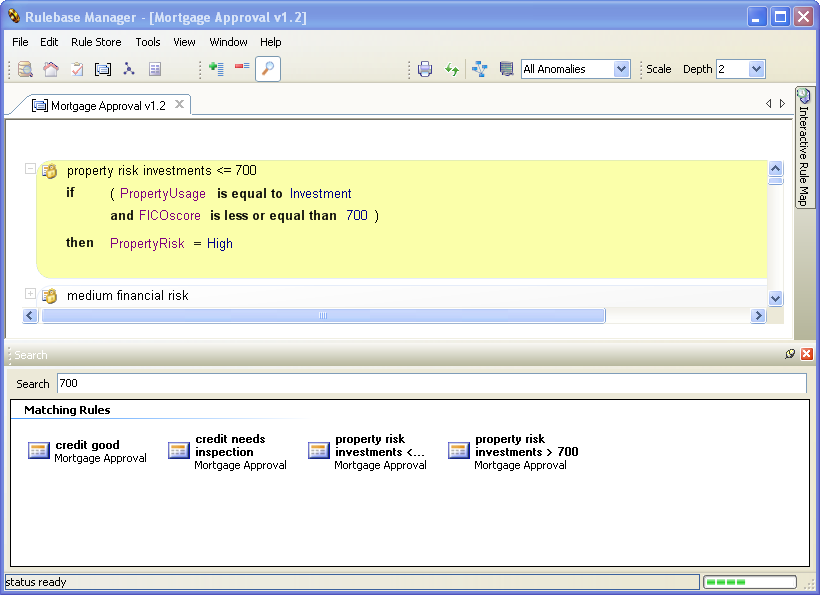
Acumen Business has just released the beta version of the new Policy Verificator that supports BizTalk 2006.
Major enhancements are made in the Interactive Rule Map (rule spider). There is a new free text search. And of course all the previous functions of Printing BizTalk Rules and Merging Vocabularies are available.

by community-syndication | Oct 31, 2006 | BizTalk Community Blogs via Syndication
A few months ago I
wrote about an issue with writing fully streaming custom decoding components for
BizTalk pipelines, which originated in limitations imposed by the disassembler components
(the XmlDisassembler component in particular) on the streams it received from the
decoding stage.
While doing some further work on custom decoding component I ran into what seems another
reason why you’ll need to do in memory buffering in some scenarios:
I think that for most purposes, all the components care about is that the position
of the stream can be queried; however, because of the mixed COM/.NET nature of the
BizTalk Messaging engine and some of the existing components, custom streams need
to be “partially” seekable. This is not so much because they are going to actually
try to move the position of the stream, but because they use the Seek() method of
the stream to discover the current position of it (instead of using the Position property)
as described here.
It does appear, unfortunately, that the disassembler will also require that your custom
stream class is able to determine the stream length; that is, that the Length property
is implemented and returns the correct value. If you don’t implement it, then an error
will be thrown during the disassembling. Furthermore, it appears that at some point
during the disassembling process something like this is tried:
int length = (int)stream.Length;
byte[] buffer = new byte[length];
stream.Read(buffer, 0, length);
Something that hints at this is that if you just return 0 from your Length implementation,
the disassembler tries to read 0 bytes from your stream (though I haven’t verified
this 100%, it might be something to watch out for).Anyway, just wanted to mention
that it appears it is important that your custom streams returned from your decoding
components are able to accurately return the stream length as it appears to the disassembler.
This can be hard in some scenarios without fully buffering the message in cases where
the length of the decoded data is different from the encoded data, because the component
cannot predict the resulting length before actually processing the entire stream.
by community-syndication | Oct 31, 2006 | BizTalk Community Blogs via Syndication
Scott Woodgate published the list of Biztalk Competition Winners. The vocabulary upgrader got mentioned at point F!
The Vocabulary Upgrader is also available at Acumen Business. Also available on this site is the automatic Business Rule Verification;
the Policy Verificator.
by community-syndication | Oct 31, 2006 | BizTalk Community Blogs via Syndication
The book (by Scott Woodgate, Stephen Mohr, Brian Loesgen ISBN 0-672-32598-5) seems to be getting into it’s final stage. There was a page advertisement in the MSDN magazine of November 2004 (Vol 19 NO 11 Page 108) offering a 30% discount for ordering the book from SamsPublishing.com (plus free shipping).
On Sams website I could not find any link or discount coupon. I opened an issue with Customer Service and they are contacting the Sams Marketing to inquire how we can get the 30% discount.
Update (18 Oct 2004):
I received an email from the Sams Marketing with the following information: In order to get the 30% discount you have to use the coupon code BIZTALK (note it must be all caps!). You enter the coupon code on the ‘Payment Method’ page in the order process. A review of the discount will be shown on the ‘Place Order’ page. The offer is valid till the Dec 15.
In a couple of days Sams website will provide a direct link.