by community-syndication | Oct 23, 2006 | BizTalk Community Blogs via Syndication
There is a new series of Connected Systems and Integration Workshops (Training) being held in Australia in NOV/DEC 06. I got an update from our internal readiness team. Summary details are:
Title: Connected Systems & Integration Workshop – Primary Technology Focus: BizTalk 2006, Windows Workflow & Microsoft Communications Foundation
Time: 8:30am Registration
Dates:
· Melbourne – 28th to 30th November 2006
· Brisbane – 12th to 14th December 2006
· Sydney – 5th to 7th December 2006
Cost: $751inc. GST
Objectives:
Learn about the new features of the upcoming BizTalk Server 2006 release (and beyond).
Learn about new solutions for implementing Microsoft based workflow solutions.
Learn about taking Web services to the next level with the WCF framework.
Go here for more info: https://www.local.microsoft.com.au/australia/events/register/home.aspx?levent=974419&linvitation
by community-syndication | Oct 23, 2006 | BizTalk Community Blogs via Syndication
In Part I of this two post series, I began a look at some advanced concepts around BizTalk-generated web services. In this post, we look at two additional concepts.
In the last post, I demonstrated the following topics …
- Using the “bare” and “wrapped” settings during web service generation
- Creating multi-parameter web services via BizTalk
In this post, I’ll investigate the final two points …
- How the “one way” flag affects the web service
- Decoupling the BizTalk web service from a particular assembly
First of all, what does the Force Request Response flag in the Web Services Publishing Wizard actually do? The idea is that you can control whether you have a one-way or request-response service. It basically adds the OneWay flag to the generated class.
When I took a one way service (built using the Web Services Publishing Wizard) and then set the Force Request Response to “true”, I expected that my one way service would actually return a response. My SOAP request/response looked like this …
<soap:Body>

    <PostNewOrder xmlns=”http://tempuri.org/”>

      <InsertOrder xmlns=”http://Microsoft.Demo.Blog.AdvancedServices.InsertOrder_XML”>

        <OrderID xmlns=””>string</OrderID>

        <CustomerName xmlns=””>string</CustomerName>

        <ItemID xmlns=””>string</ItemID>

        <Quantity xmlns=””>string</Quantity>

        <Status xmlns=””>string</Status>

      </InsertOrder>

    </PostNewOrder>

  </soap:Body>
and the *response* looked like this … <soap:Body>
<PostNewOrderResponse xmlns=”http://tempuri.org/” />
</soap:Body>
Interesting. So it threw a response node back at me. But what’s very curious, is that when I call this method from code, I still get a void return and my input parameter does not get submitted “by reference” (which would indicate that the output is the same type as the input). Next I wondered if even though no response was returned, the HTTP 200 code would only return after the service had finished processing. But no, that wasn’t the case (and wouldn’t really make sense anyway). So, at this point, I can’t say for sure that this makes ANY difference.
The next “one way” operation I tried was on an orchestration that had a request/response receive port. My thinking was that maybe this flag would make the service ignore the response. That is, it would open up a one-way SOAP channel into the orchestration, but, wouldn’t wait for a response. I hypothesized that this response message might get suspended, or something like that. So, I built a service using the Web Services Publishing Wizard, flipped the Force Request Response to “no” and took a look at the output. And … it’s the exact same whether I flip that flag to “yes” or “no.” Because the service is built with a return value, apparently you can’t set the “oneway” flag to true. I tried changing that attribute in the generated service, and then my service wouldn’t come up. Once again, I have no idea how this flag is supposed to be applied. Thoughts?
Now, let’s switch to something that DOES work. If you’re following best practices, you’re probably putting your external-facing schemas in one project, and your internal schemas in another. Reason being, if your vendor changes something, and you’ve been smart enough to do all your transformations at the port level, you can isolate how many assemblies you have to change. So let’s say you have a schema in this “external schemas assembly” that you’ve exposed using the Web Services Publishing Wizard by “generating web service from schemas.” Now let’s also say that ANOTHER schema in that assembly has changed, and you go ahead and redeploy a new version of that assembly and blow away the old one. Now your web service will cause your messages to be suspended.
When you use the generated web services, the DocumentSpecName is set on the inbound message by the web service. You can see this value in the message context here …
Problem is, this value is used to look up the message type, and since the DocumentSpecName contains the full assembly reference, your message will get suspended if it can’t find the specific version.
So how do you avoid this? What I’ve done is went into the generated web service, and changed the following value in my web method …
//set to *null* and comment out old value
string bodyTypeAssemblyQualifiedName = null;
// “Microsoft.Demo.Blog.AdvancedServices.VTest.NewContact_XML, Microsoft.Demo.Blog.Ad” +
//”vancedServices.VTest, Version=1.0.0.0, Culture=neutral, PublicKeyToken=94858e0d889683c1″;
Now, when messages come into BizTalk, the DocumentSpecName doesn’t get set and BizTalk does a lookup on the namespace#root to find the appropriate schema and assembly.
Conclusion
So what have we seen? First, the Force Request Response flag has no obvious use to me. Doesn’t seen to make a difference on existing one way services, and it can’t be applied on request/response services. If I’ve missed something, please tell me. Also, we’ve seen how you can modify your generated web service to insulate you against assembly version changes. Always be careful changing generated code, and clearly you want to regenerate your service if the corresponding message schemas has changed, but, this eliminates your need to regenerate the service when unrelated schemas change in the assembly. Fun stuff.
Technorati Tags: BizTalk, Web Services
by community-syndication | Oct 23, 2006 | BizTalk Community Blogs via Syndication
You dont need to wait for BTS2006 R2 to make this happen.
Basically there are several ways to approach this and one of the main exceptions is
that the corresponding BTS WSS Webservice fails when it finds the ‘new’ version of
Sharepoint on the box. (the Sharepoint apis etc. do maintain backward compatibility
for existing code)
One technique is to install Sharepoint V2, SP2 it, install BTS2006 and make sure the
WSS adapter is working. Then upgrade Sharepoint……fingers crossed.
the other simpler technique is to re-bind the BTS2006 WSS Webservice to work
with the new Sharepoint V12.0.0.0 version.
A new member of the BizTalk team Adrian Hamza – elaborates further here
by community-syndication | Oct 23, 2006 | BizTalk Community Blogs via Syndication
We have put together a very comprehensive in-depth course on the Microsoft Sharepoint
2007 platform.
We’ve had some great scores and feedback from the 80 students trained up so far….check
out some further details….
Breeze Trainings
Microsoft Office and Sharepoint 2007 Deep Dive
The best thing we come to you!
by community-syndication | Oct 23, 2006 | BizTalk Community Blogs via Syndication
I’ve recently had the opportunity to build some advanced web services with BizTalk Server 2006, and wanted to show 4 interesting use cases over this 2 part blog post.
Over these 2 posts, I will demonstrate and investigate the following topics …
- Using the “bare” and “wrapped” settings during web service generation
- Creating multi-parameter web services via BizTalk
- How the “one way” flag affects the web service
- Decoupling the BizTalk web service from a particular assembly
This post will focus on the first two. [UPDATE: See Part II here]
I would venture to say that virtually no one has clicked the “Advanced” button in the Web Services Publishing Wizard and changed any of those values. The first option in that “Advanced Properties” window is SOAP Parameter Style of which your options are Default, Bare or Wrapped.
This isn’t anything BizTalk specific, but a way to design the WSDL. By default, when you build your web service from code, your SOAP request bears the name of the function call as a wrapper element. For instance, if I have a method called “PostOrder” on my web service, then my SOAP request expects an input such as …
<soap:Body>

    <PostNewOrder xmlns=”http://tempuri.org/”>

      <InsertOrder xmlns=”http://Microsoft.Demo.Blog.AdvancedServices.InsertOrder_XML”>

        <OrderID xmlns=””>string</OrderID>

        <CustomerName xmlns=””>string</CustomerName>

        <ItemID xmlns=””>string</ItemID>

        <Quantity xmlns=””>string</Quantity>

        <Status xmlns=””>string</Status>

      </InsertOrder>

    </PostNewOrder>

  </soap:Body>
Plus, if this is request/response, you end up with a response node automatically generated (method name + “response”). This is the default behavior, and thus not terrible, but arguably a bit lame (read more here and here).
A more purist approach is to change this setting in the “Advanced Properties” window to Bare so that the expected SOAP request looks like …
<soap:Body>

    <InsertOrder xmlns=”http://Microsoft.Demo.Blog.AdvancedServices.InsertOrder_XML”>

      <OrderID xmlns=””>string</OrderID>

      <CustomerName xmlns=””>string</CustomerName>

      <ItemID xmlns=””>string</ItemID>

      <Quantity xmlns=””>string</Quantity>

      <Status xmlns=””>string</Status>

    </InsertOrder>

  </soap:Body>
Since BizTalk always deals in “messages”, this is almost always a very solid and clean approach. Why is the default value set to be Wrapped? Because it’s the safest way to go. Why? If I have *multiple* parameters, and I do a Bare service, I end up with an invalid WSDL. Let’s see that next.
So my next point is how to do multi-parameter web services generated by BizTalk. When using the Web Services Publishing Wizard and doing a “generate service from schema” you can only create a web service method accepting a single “part.”
Not so with orchestration. Within a BizTalk orchestration, I can easily build multi-part messages. These are messages containing one or more documents. A multi-part message can only have one “Body” but any number of other additional parts. So, I’ve built a multi-part message which has a “body” node and “attachment” node.
Now, I go ahead and make the “Receive” shape accept that multi-part message, and connect it to a “public” receive port. Build and deploy. Now, I walk through the Web Services Publishing Wizard and build a web service from the orchestration. I first kept the default SOAP Parameter Style (which is Wrapped) when publishing, and ended up with a WSDL looking like this …
<soap:Body>

    <PostNewCustomer xmlns=”http://tempuri.org/”>

      <InsertContact xmlns=”http://Microsoft.Demo.Blog.AdvancedServices.InsertContact_XML”>

        <Name xmlns=””>string</Name>

        <Address xmlns=””>string</Address>

      </InsertContact>

      <InsertContactAttachment xmlns=”http://Microsoft.Demo.Blog.AdvancedServices.InsertContact_XML”>

        <Payload xmlns=””>string</Payload>

      </InsertContactAttachment>

    </PostNewCustomer>

 </soap:Body>
See that? I have *two* parameters for my web service, both of different message types. When I call this from code, it looks like …
//svc is the web service; “contact” and “attachment” are both messages
svc.PostNewCustomer(contact, attachment);
So everything looks good. I now have a multi-parameter web service generated from BizTalk. Lots of use cases for this. Let’s circle back, though. What happens if I do this web service with the SOAP Parameter Style set to Bare? As I mentioned above, this leads to invalid WSDL. Why? Because you’ve removed the wrapped, and provided two different root nodes in the body. When I build my service this way and view the service, I get this …
When I click the web method name, I see this SOAP request … <soap:Body>
<InsertContact xmlns=”http://Microsoft.Demo.Blog.AdvancedServices.InsertContact_XML”>
<Name xmlns=””>string</Name>
<Address xmlns=””>string</Address>
</InsertContact>
<InsertContactAttachment xmlns=”http://Microsoft.Demo.Blog.AdvancedServices.InsertContact_XML”>
<Payload xmlns=””>string</Payload>
</InsertContactAttachment>
</soap:Body>
Not good. This would be the same if you used Bare on a web method that took in two native types (e.g. pair of integer values). If you aren’t passing in a single object (native type, message, whatever), then you need to wrap it.
Conclusion
So, what have we figured out so far? The SOAP Parameter Style is a nice way to gain ownership over the WSDL and control exactly what’s in the <soap:Body> node. We also saw how you can very easily build multi-parameter web services in BizTalk using orchestrations and multi-part messages. However, be careful when mixing the two, since a multi-parameter web service must be wrapped up.
Part II coming up …
[UPDATE: See Part II here]
Technorati Tags: BizTalk, Web Services

by community-syndication | Oct 23, 2006 | BizTalk Community Blogs via Syndication
Last week I finally took some time and build a version of my Pipeline
Testing library that can be used in Visual Studio .NET 2003 to test BizTalk pipelines
and custom pipeline components in BizTalk 2004. However I am not releasing it right
now, as the current version is slightly limited in functionality compared to the original
BizTalk 2006, though it’s very usable as is for most purposes.
I don’t have the time right now to spend bringing it up completely to the same level,
though hopfully in the future I’ll be able to do so.
So, if anyone is interested in it, for now, leave a comment or send me an email and
I’ll send it over.
by community-syndication | Oct 23, 2006 | BizTalk Community Blogs via Syndication
I’ve recently had the opportunity to build some advanced web services with BizTalk Server 2006, and wanted to show 4 interesting use cases over this 2 part blog post.
Over these 2 posts, I will demonstrate and investigate the following topics …
- Using the “bare” and “wrapped” settings during web service generation
- Creating multi-parameter web services via BizTalk
- How the “one way” flag affects the web service
- Decoupling the BizTalk web service from a particular assembly
This post will focus on the first two. [UPDATE: See Part II here]
I would venture to say that virtually no one has clicked the “Advanced” button in the Web Services Publishing Wizard and changed any of those values. The first option in that “Advanced Properties” window is SOAP Parameter Style of which your options are Default, Bare or Wrapped.
This isn’t anything BizTalk specific, but a way to design the WSDL. By default, when you build your web service from code, your SOAP request bears the name of the function call as a wrapper element. For instance, if I have a method called “PostOrder” on my web service, then my SOAP request expects an input such as …
<soap:Body>

    <PostNewOrder xmlns=”http://tempuri.org/”>

      <InsertOrder xmlns=”http://Microsoft.Demo.Blog.AdvancedServices.InsertOrder_XML”>

        <OrderID xmlns=””>string</OrderID>

        <CustomerName xmlns=””>string</CustomerName>

        <ItemID xmlns=””>string</ItemID>

        <Quantity xmlns=””>string</Quantity>

        <Status xmlns=””>string</Status>

      </InsertOrder>

    </PostNewOrder>

  </soap:Body>
Plus, if this is request/response, you end up with a response node automatically generated (method name + “response”). This is the default behavior, and thus not terrible, but arguably a bit lame (read more here and here).
A more purist approach is to change this setting in the “Advanced Properties” window to Bare so that the expected SOAP request looks like …
<soap:Body>

    <InsertOrder xmlns=”http://Microsoft.Demo.Blog.AdvancedServices.InsertOrder_XML”>

      <OrderID xmlns=””>string</OrderID>

      <CustomerName xmlns=””>string</CustomerName>

      <ItemID xmlns=””>string</ItemID>

      <Quantity xmlns=””>string</Quantity>

      <Status xmlns=””>string</Status>

    </InsertOrder>

  </soap:Body>
Since BizTalk always deals in “messages”, this is almost always a very solid and clean approach. Why is the default value set to be Wrapped? Because it’s the safest way to go. Why? If I have *multiple* parameters, and I do a Bare service, I end up with an invalid WSDL. Let’s see that next.
So my next point is how to do multi-parameter web services generated by BizTalk. When using the Web Services Publishing Wizard and doing a “generate service from schema” you can only create a web service method accepting a single “part.”
Not so with orchestration. Within a BizTalk orchestration, I can easily build multi-part messages. These are messages containing one or more documents. A multi-part message can only have one “Body” but any number of other additional parts. So, I’ve built a multi-part message which has a “body” node and “attachment” node.
Now, I go ahead and make the “Receive” shape accept that multi-part message, and connect it to a “public” receive port. Build and deploy. Now, I walk through the Web Services Publishing Wizard and build a web service from the orchestration. I first kept the default SOAP Parameter Style (which is Wrapped) when publishing, and ended up with a WSDL looking like this …
<soap:Body>

    <PostNewCustomer xmlns=”http://tempuri.org/”>

      <InsertContact xmlns=”http://Microsoft.Demo.Blog.AdvancedServices.InsertContact_XML”>

        <Name xmlns=””>string</Name>

        <Address xmlns=””>string</Address>

      </InsertContact>

      <InsertContactAttachment xmlns=”http://Microsoft.Demo.Blog.AdvancedServices.InsertContact_XML”>

        <Payload xmlns=””>string</Payload>

      </InsertContactAttachment>

    </PostNewCustomer>

 </soap:Body>
See that? I have *two* parameters for my web service, both of different message types. When I call this from code, it looks like …
//svc is the web service; “contact” and “attachment” are both messages
svc.PostNewCustomer(contact, attachment);
So everything looks good. I now have a multi-parameter web service generated from BizTalk. Lots of use cases for this. Let’s circle back, though. What happens if I do this web service with the SOAP Parameter Style set to Bare? As I mentioned above, this leads to invalid WSDL. Why? Because you’ve removed the wrapped, and provided two different root nodes in the body. When I build my service this way and view the service, I get this …
When I click the web method name, I see this SOAP request … <soap:Body>
<InsertContact xmlns=”http://Microsoft.Demo.Blog.AdvancedServices.InsertContact_XML”>
<Name xmlns=””>string</Name>
<Address xmlns=””>string</Address>
</InsertContact>
<InsertContactAttachment xmlns=”http://Microsoft.Demo.Blog.AdvancedServices.InsertContact_XML”>
<Payload xmlns=””>string</Payload>
</InsertContactAttachment>
</soap:Body>
Not good. This would be the same if you used Bare on a web method that took in two native types (e.g. pair of integer values). If you aren’t passing in a single object (native type, message, whatever), then you need to wrap it.
Conclusion
So, what have we figured out so far? The SOAP Parameter Style is a nice way to gain ownership over the WSDL and control exactly what’s in the <soap:Body> node. We also saw how you can very easily build multi-parameter web services in BizTalk using orchestrations and multi-part messages. However, be careful when mixing the two, since a multi-parameter web service must be wrapped up.
Part II coming up …
[UPDATE: See Part II here]
Technorati Tags: BizTalk, Web Services
by community-syndication | Oct 23, 2006 | BizTalk Community Blogs via Syndication
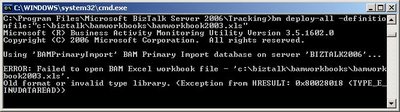
While trying to deploy a BAM workbook I created with Excel 2002, I received the following error message:
Since I was using an older version of Excel (2002) I thought that installing the 2003-version would fix my problem. Unfortunately it did not…
After some Googleing I found the blog from Don Glover, a Programming Writer for the BAM feature of BizTalk Server. He states that localization was the problem:
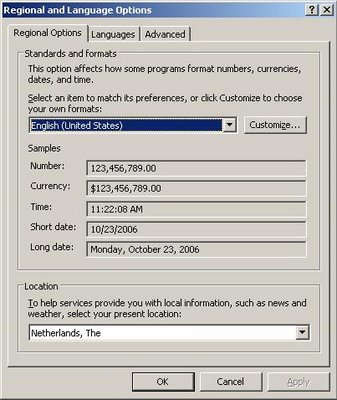
“BAM is made up of a number of separate components, SQL, web services, custom tools, and more. In order for each of the components to operate together effectively, they must all be set to the same locale/culture. In addition, your system and user locale/culture should match those set for BAM.”
In my case it was enough to change my ‘Regional options’ from Dutch to English (US).
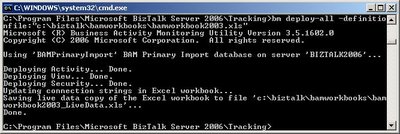
After firing the deployment command again, all went well.
Thanks Don!

by community-syndication | Oct 22, 2006 | BizTalk Community Blogs via Syndication

Hey All,
Just curious to know if any of you have actually taken a look at the first BizTalk 2006 book on the market? I have not gone out and bought it yet, but I am keen to know what some of your opinions are. You can actually buy it at Borders here in Australia for $59.99 http://www.bordersstores.com/search/title_detail.jsp?id=56056981&srchTerms=BizTalk&mediaType=1&srchType=Keyword
I will get out there at some stage soon, but in the interim, keen for your feedback….
by community-syndication | Oct 22, 2006 | BizTalk Community Blogs via Syndication
It’s been a crazy weekend, worked a ton of hours already. That said, I thought
I would archive here some information that can be found other places, but I wanted
at hand when next I needed it.
The following table contains the macro replacements that work within the File Adapter
for BizTalk Server.
|
Macro
name
|
Substitute
value
|
|
%datetime%
|
Coordinated
Universal Time (UTC) date time in the format YYYY-MM-DDThhmmss (for example, 1997-07-12T103508).
|
|
%datetime_bts2000%
|
UTC date time
in the format YYYYMMDDhhmmsss, where sss means seconds and milliseconds (for example,
199707121035234 means 1997/07/12, 10:35:23 and 400 milliseconds).
|
|
%datetime.tz%
|
Local date time
plus time zone from GMT in the format YYYY-MM-DDThhmmssTZD, (for example, 1997-07-12T103508+800).
|
|
%DestinationParty%
|
Name of the
destination party. The value comes from message the context property BTS.DestinationParty.
|
|
%DestinationPartyID%
|
Identifier of
the destination party (GUID). The value comes from the message context property BTS.DestinationPartyID.
|
|
%DestinationPartyQualifier%
|
Qualifier of
the destination party. The value comes from the message context property BTS.DestinationPartyQualifier.
|
|
%MessageID%
|
Globally unique
identifier (GUID) of the message in BizTalk Server. The value comes directly from
the message context property BTS.MessageID.
|
|
%SourceFileName%
|
Name of the
file from where the File adapter read the message. The file name includes extension
and excludes the file path, for example, foo.xml. When substituting this property,
the File adapter extracts the file name from the absolute file path stored in the
FILE.ReceivedFileName context property. If the context property does not have a value,
for example, if message was received on an adapter other than File adapter, then the
macro will not be substituted and will remain in the file name as is (for example,
C:\Drop\%SourceFileName%).
|
|
%SourceParty%
|
Name of the
source party from which the File adapter received the message.
|
|
%SourcePartyID%
|
Identifier of
the source party (GUID). The value comes from the message context property BTS.SourcePartyID.
|
|
%SourcePartyQualifier%
|
Qualifier of
the source party from which the File adapter received the message.
|
|
%time%
|
UTC time in
the format hhmmss.
|
|
%time.tz%
|
Local time plus
time zone from GMT in the format hhmmssTZD (for example, 124525+530).
|

