by [email protected] Steef-Jan Wiggers | Jan 25, 2015 | BizTalk Community Blogs via Syndication
In previous post I described a way to consume a public Rest API using the BizTalk WCF-WebHttp adapter in combination with JSON-decoder, which is a new component with the BizTalk Server 2013 R2 edition. Now I like to mix things up a bit and consume a different API that is public. That is you can use this API from Last.fm. This is an online music discovery service that gives you personalised recommendations based on the music you listen to. To use the API of this service you need to registering yourself first. Because when you call of one of the methods of the API you need to stick in an api_key as one of the parameters of your request. This is not uncommon as various cloud API’s have this kind of mechanism.
Scenario
I have the following scenario, where I have built a client application (still one of those old fashioned guys that use window forms). The client application have the following functionality:
- Get information of an artist.
- Get the top albums from the artist.
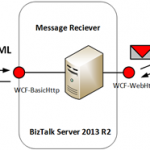
Information and top albums can be obtained through calling the Last.fm API artist methods. The client will via BizTalk call these API methods. Similar as in my previous post calling the Airport Service to retrieve its status. Below you find an overview of the scenario.
The communication with the internal endpoint in this scenario will be SOAP/XML. The endpoint is hosted in a two way receive port (request/response). It exposes schemas for two operations: GetArtistInfo and GetTopAlbums. The request message will subsequently be mapped to a REST call to the service indicating that the expected response format is Json or default xml. BizTalk will decode the response into XML, so that it is published as an XML message in the MessageBox in case the response message is Json (GetArtistInfo) otherwise it will be just received by the adapter (GetTopAlbums). The receive port will subscribe on that message so it will be routed back as response to the client that on his turn renders it in the UI (Form). This scenario shows that BizTalk acts as a broker and protocol mediator (SOAP/XML –> REST/JSON –> SOAP/XML or SOAP/XML –> REST/XML –> SOAP/XML) between internal client and the external Last.fm API.
The solution of the described scenario consists of the following parts that will be discussed in the subsequent paragraphs:
- Exposing schema’s for internal service exposing an operation to client application that will consume the service.
- Creating a custom receive pipeline to enable decoding of Json message to xml (see previous post).
- Configuration of a Send Port with the Web-Http adapter (or binding if you like), send and receive.
- Demonstrating the solution.
Exposing schema’s as service
To support both calls from the client to the Last.fm API the request schema’s are as follows:
Both request schemas look the same expect for the root name. These could be consolidated to one schema, nevertheless I choose to keep each method call isolated. Both schema contain promoted properties. The elements need to be promoted to variable mapping later when configuring the send port with WCF-WebHttp adapter to support dynamic URL mapping.
The response for the GetArtistInfo will be Json and therefore I will use the postman application in Google Chrome:
Here you can see that for calling the API you need a method parameter, artist name, api_key and format. However, the format is optional. By default XML will be returned when no format has been specified. The Json response can be used as instance for creating an XSD using the JSON Schema Wizard in Visual Studio BizTalk templates. The schema looks like:
Similar approach will be used to get an instance of the response to the GetTopAlbums call. This schema will be based on XML. Having the schemas enabled me to create an internal service that exposes two methods.
Once I have the internal service up and running the next part is to create a custom pipeline for receiving the Json response from the GetArtistInfo API method call. The Json decoder will be specified to serialize that response into XML. For the GetTopAlbums no specific custom pipeline is necessary. The schemas and custom pipeline will be deployed to BizTalk runtime.
Creating and configuring the Send Port with the Web-Http adapter
To be able to communicate with the Last.fm API and call both methods I will need to have two send ports configured with the WCF-WebHttp adapter. The Last.fm API doesn’t require authentication other than supplying the api_key as a parameter in call tp any of the API methods. In the general tab of the WCF-WebHttp Transport properties the address of the service can be specified (URI). Besides the address I need to specify here the HTTP Method (GET) and perform a URL mapping.
The URL mapping will be interesting as I need to add a few parameters to my REST call.
http://ws.audioscrobbler.com/2.0/?method=artist.getinfo&artist=Metallica&api_key=<your last fm api_key>&format=json
My HTTP Method and URL Mapping will look like:
<BtsHttpUrlMapping><Operation Method=”GET” Url=”/?method={method}&artist={artist}&api_key={api_key}&format=json”/></BtsHttpUrlMapping>
Interesting thing in this URL mapping is that & is and &. If you try to just use the & you will run into an error like depicted below:
Next I click Edit… to do the variable mapping i.e. map the parameters to promoted properties of my incoming request message.
Variable is mapped to the property namespace that defines the API_KEY, ARTIST and METHOD.
The general tab is important for specifying the address, method and URL mapping. The other tabs are:
- The Binding tab provides you the ability to configure the time-out and encoding-related properties.
- The Security tab provide you the ability to define the security capabilities of the WCF-WebHttp send port.
- The Behaviour tab provides you the ability to configure the endpoint behavior for the send port.
- The Proxy tab provides you the ability to configure the proxy setting for the WCF-WebHttp send port.
- The Messages tab provides you the ability to specify how the message is sent to the REST interface.
Note: In this scenario we only use GET operation of the Last.fm API service. Based on the verb you have to specify in the Suppress Body for Verbs the GET, because a payload is not required for this operation. Since BizTalk sends out messages with a payload this needs to suppress!
For further details on configuration settings for these tabs see MSDN article How to Configure a WCF-WebHttp Send Port.
Test the solution
Now building the client to call the Last.fm API methods indirectly via BizTalk was quite some work. I wanted to render the information nicely in a Windows Form. When I enter an artist name and click GetInfo then a request will be send to BizTalk routed to the send port that communicates with Lastfm API and request info of the band Metallica.
The response of the message is nicely rendered in the above form. When I click TopAlbums another request is sent to a different send port that send to a different Last.fm API method.
If we look at the traffic between BizTalk Server and Last.fm using Netmon I can examine what goes over the wire.
This blog has demonstrate how fairly easy it is to consume a Json message with BizTalk Server 2013 R2 after invoking a Rest API. And how I was able to leverage an API from Last.fm. The cool thing is that BizTalk Server 2013 R2 is capable to communicate with tons of REST API’s out there in the cloud with the WCF-WebHttp adapter. And with JSON support things get less complex. I haven’t tried communicating with an API that requires Basic- or OAuth authentication. I probably will have to do some custom coding using behavious like explained in the blog post from Quicklearn.
Cheers,
Steef-Jan
by [email protected] Steef-Jan Wiggers | Jan 22, 2015 | BizTalk Community Blogs via Syndication
BizTalk Server 2013 introduced a couple of new adapters. One of them was the
WCF-WebHttp adapter that offers REST Support. The WCF-WebHttp adapter gives you the ability to send messages to Restful services and receive messages through an exposed endpoint. One of the limitations with the adapter (binding) was the lack of Json support. You had to write your own custom pipeline components to serialize the Json format to XML (you can read about it in this blogpost: BizTalk Server support for restful services). In the new BizTalk Server 2013 R2 there is out-of the box support for sending and receiving JSON messages with the following features:
- a wizard to generate XSD schema from a JSON instance,
- and an Encoder and Decoder component to use with custom pipelines.
You do not have to write your own custom components anymore. By creating a custom pipeline and dragging either a JsonEncoder or JsonDecoder you can serialize Json into xml or vice versa. With an instance of a Json message you can use the wizard to create a Json XSD schema.
Scenario
There are many web services present that have a REST interface and talk JSON over the wire. The WCF-WebHttp adapter in BizTalk Server 2013 R2 provides means to communicate with these services. There are various scenario’s you can think of to how to demonstrate the functionality of the WCF- WebHttp. In this blog I will demonstrate how to consume a relatively simple Restful Endpoint that you can choose from the Restful Service endpoints of the US Federal Aviation Administration. In this case I will use the Airport Service as an example. The Airport service provides the airport status and delay information from the Air Traffic Control System Command Center (ATCSCC) for every US Airport. It has one endpoint that only supports the GET operation.
The GET request is the fundamental, widely used operation in the REST world. You can simply visit a URL in a browser (or programmatically) and for instance in the case of the Airport Service type the following URL:
http://services.faa.gov/airport/status/SEA?format=xml
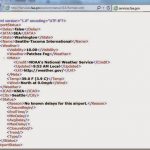
The browser will return a machine understandable structured data like below:
In this blog we will not specify the xml format, but the Json format i.e. format=json. There will be scenarios in the real world that services do not support xml format and only communicate through the REST protocol and json format. Let’s assume the airport service only supports json. The URL would look like:
http://services.faa.gov/airport/status/SEA?format=json
The following more advanced scenario describes how the airport service is consumed through BizTalk Server 2013 R2 that receives a request from a client application:
From a client application a request for the status of an airport will be send as a soap/xml message. BizTalk will map this request to a GET operation to the Restful service endpoint. That’s is the incoming message contains the airport code that is marked as property for its schema (xsd). That property will mapped to outgoing request URL to call the Restful endpoint. The endpoint on its turn will process the request and hopefully will provide the status of a given airport based upon the airport code provided within the request URL. The result will be mapped to response message that will be routed back to the client application, where it will be rendered in a Windows Form.
The communication with the internal endpoint in this scenario will be SOAP/XML as explained. The endpoint is hosted in a two way receive port (request/response). The message will subsequently be mapped to a REST call to the service indicating that the expected response format is json. BizTalk will decode the response into XML, so that it is published as an XML message in the MessageBox. The receive port will subscribe on that message so it will be routed back as response to the client that on his turn renders it in the UI (Form). This scenario shows that BizTalk acts as a broker and protocol mediator (SOAP/XML à REST/JSON à SOAP/XML) between internal client and the external airport service.
Building the solution
The solution of the described scenario consists of the following parts that will be discussed in the subsequent paragraphs:
- Exposing schema’s for internal service exposing an operation to client application that will consume the service.
- Creating a custom receive pipeline to enable decoding of json message to xml.
- Configuration of a Send Port with the Web-Http adapter (or binding if you like), send and receive.
- Testing the solution.
Exposing schema’s as service
The first step in this scenario is creating the internal service endpoint based on the following schemas
Request schema containing one element, AirportCode, which is promoted as property. Later I will explain, the reason why the AirportCode is promoted. The other schema is based on the Json response of the Airport Service. By calling the service in the browser (Chrome with Postman application) using the following http://services.faa.gov/airport/status/SEA?format=json you can obtain the Json.
Save this file as json. Subsequently you follow the following steps:
- In the Solution Explorer, right-click the project name > Add > New Item > JSON Schema Wizard. Provide a name for the schema (JSONSchemaAirportStatus.xsd), and then click Add.
- In the JSON Schema Wizard, on the welcome page, click Next.
- In the JSON Schema Information page, provide the location of the JSON purchase order file that is sent to the BizTalk Server application. Provide a root node name, a target namespace, and then click Finish.
- Now you will have a schema like below:
First schema will be request of the service endpoint and the second the response the generated schema based on json. Both schema are with the same BizTalk project. You must compile this BizTalk project as you will need the assembly later.
The following steps will lead to creation of a WCF Service based on the early two created schemas:
Launch the BizTalk Web Services Publishing Wizard and follow the steps described in MSDN page How to Use the BizTalk Web Services Publishing Wizard to Publish Schemas as a Web Service. Basically you launch the wizard, pass the welcome screen. Specify adapter (WCF binding) to communicate with the service, whether or not you want the service expose Meta data, in which application (receive location) you like tie the service to.
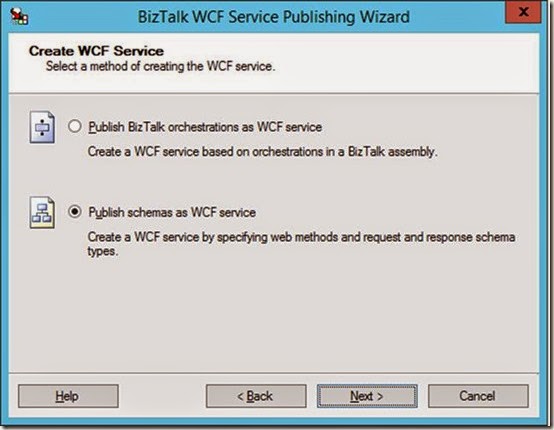
- Click Next and select Publish schemas as WCF Service.
- Again click Next and start specifying the service operations, assign schema’s you created earlier and that are within the BizTalk assembly to request and response of the Service Method.
- Again click Next and to specify the location of the service in IIS. BizTalk delegates the hosting of service to IIS, yet to start the service it relies on the receive location to be enabled.
- Last time to click Next to see the summary of what you have specified for the service.
- Click Create to provision the WCF-service.
- Click Finish to end the Wizard. The provisioned service will appear in IIS.
- When you enable the receive location in BizTalk that has the Uri of the service you can browse to it.

- The service is up and running the WSDL can be imported as service reference in the client.
Create a custom receive pipeline
BizTalk Server 2013 R2 provides pipeline components that can be used to process JSON messages within a BizTalk Server application, i.e. JSON decoder and JSON encoder. For the custom receive pipeline we will use the JSON decoder pipeline component. To create the custom receive pipeline you can follow the steps below:
In Visual Studio within your Solution Explorer of your project, you right-click and point to Add > New Item > Receive Pipeline. Specify a name for the pipeline name like JsonReceive.btp, and then click Add. Within the Decode stage you can add the new JSON decoder. In the other stages and other pipeline components as shown in the screenshot, and save changes.
In the properties of the JSON decoder you specify the Root Node and Root Node Namespace.
You can do this at design time like above or in run-time.
Next you add the XML Disassembler pipeline component in the Dissemble stage. Save and your custom receive pipeline for serializing JSON to XML is ready.
Creating and configuring the Send Port with the Web-Http adapter
To be able to consume the Airport Service with BizTalk you will need to have a send port configured with the WCF-WebHttp adapter. This can be done by configuring the WCF-WebHttp adapter or binding if you like in case you choose WCF-Custom. The configuration is pretty straight forward. The Airport Service is a public service that requires no authentication for its usage. In the general tab of the WCF-WebHttp Transport properties the address of the service can be specified (URI). Besides the address you specify here the HTTP Method (GET) and perform a URL mapping.
In HTTP Method and URL Mapping section you specify the method (operations) you are going to perform. In the case of the Airport Service this is going to be only the GET. In case you use an orchestration that the Name has to be specified, which is the name of the operation of the logical port. The URL mapping you define what is going to added after the specified URI. To make it more dynamic instead of hard-coding in general or like in this scenario the airport code you make use of variable mapping configuration feature. So what’s between the brackets is a variable that can be mapped to promoted property. The HTTP Method and URL Mapping looks in this case like:
<BtsHttpUrlMapping>
<Operation Method=”GET” Url=”status/{airportcode}?”/format=json”>
</BtsHttpUrlMapping>
Variable mapping is powerful technique to define any custom variable (or place holder) in your URL, in this scenario case {airportcode} and map that variable to any context property with property name and namespace. The Variable mapping is specified by click the Edit… button.
Variable is mapped to the property namespace that defines the AirportCode.
The general tab is important for specifying the address, method and URL mapping. The other tabs are:
- The Binding tab provides you the ability to configure the time-out and encoding-related properties.
- The Security tab provide you the ability to define the security capabilities of the WCF-WebHttp send port.
- The Behaviour tab provides you the ability to configure the endpoint behavior for the send port.
- The Proxy tab provides you the ability to configure the proxy setting for the WCF-WebHttp send port.
- The Messages tab provides you the ability to specify how the message is sent to the REST interface.
Note: In this scenario we only use GET operation of the Airport service. Based on the verb you have to specify in the Suppress Body for Verbs the GET, because a payload is not required for this operation. Since BizTalk sends out messages with a payload this needs to suppress!
For further details on configuration settings for these tabs see MSDN article How to Configure a WCF-WebHttp Send Port.
Test the solution.
Last part is the client. The client in this scenario is a Windows Forms application. This application has a simple UI and a reference to the created WCF-Service host in a BizTalk receive location. The client will send the chosen airport code to the service.
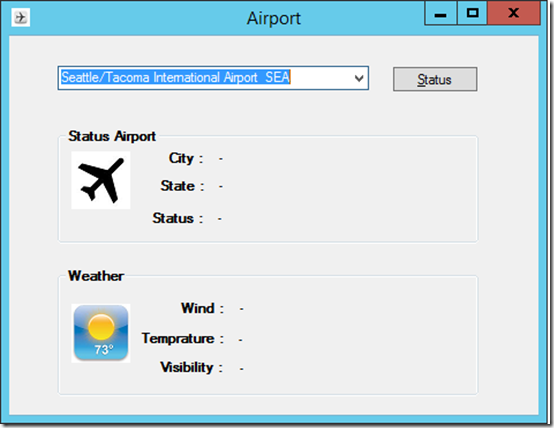
The client has a combo box with airport names and corresponding codes of all the US Airports. When you select SEA the code for Seattle/Tacoma Airport then the airport code SEA will be sent as a request message to the WCF-Service. Eventually the response will be rendered in the client.
If you want to monitor the network traffic between BizTalk and the Restful service you could for instance use Netmonitor 3.4.
And examine the out- and inbound traffic from BizTalk to Restful endpoint and back.
In case you enable tracking for the WCF-WebHttp configured send port you can examine the tracked messages in BizTalk.
Above you see the response from the Restful endpoint that arrives at BizTalk.
And how it is send to the client as XML.
This blog has demonstrate how fairly easy it is to consume a json message with BizTalk Server 2013 R2 after invoking a Restful service. Now custom coding is required to serialize a Json format into XML the internal format of the BizTalk messaging engine. Currently REST/Json has taken over the XML/Soap world, at least in the cloud that is. Numerous services available in the cloud support REST let alone only support REST. Therefore, BizTalk Server has adapted to that shift in cloud and supports REST through the WCF-WebHttp adapter and support for JSON.
Cheers,
Steef-Jan



