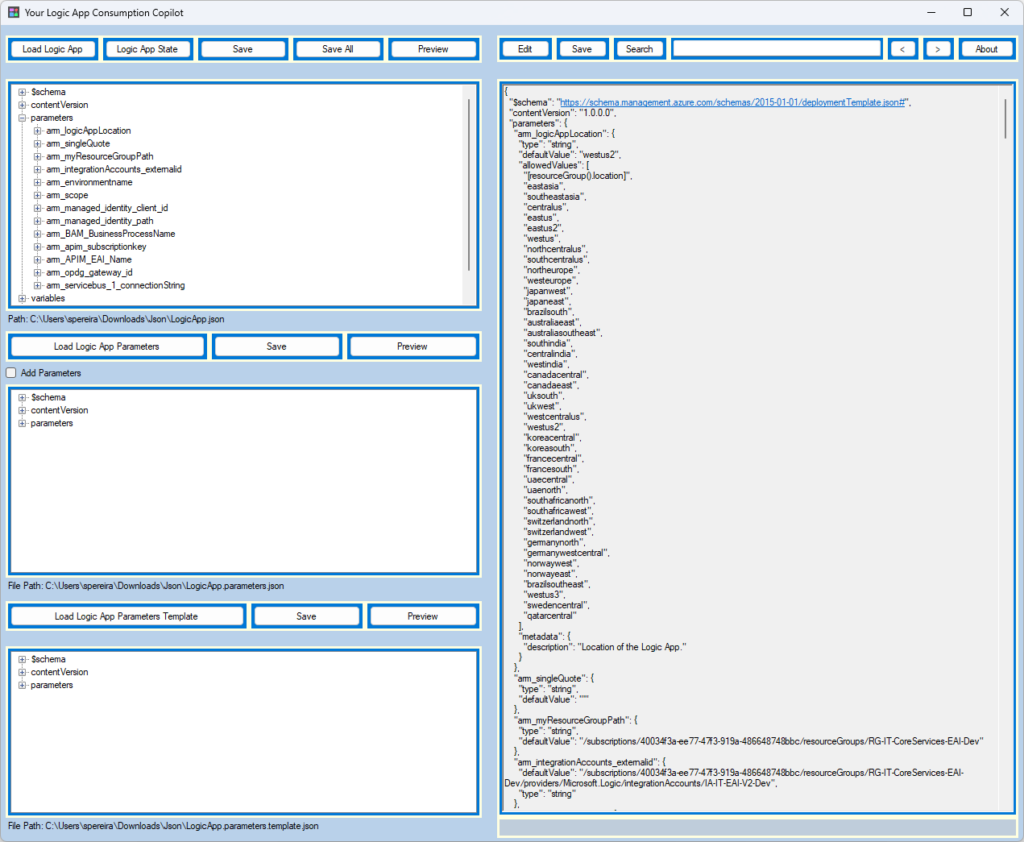
I initially called this tool Logic App Consumption DevBuddy, but then my dear friend Mike Stephenson told me that I should call it Copilot, and I liked the idea.
Copilot is a term that these days is generally bound to Microsoft AI that is present on almost all of Microsoft’s applications and experiences, including Microsoft 365, Windows 11, Edge, or Bing, and that can assist users and optimize their work, such as generating text and tables in Word, summarizing and drafting emails in Outlook. However, the primary definition of a Copilot is a qualified pilot who assists or relieves the pilot but is not in command.
Well, Logic App Consumption Copilot doesn’t have AI involved behind the scenes but is able to optimize and expedite the developers’ work while building Logic Apps Consumption.
While developing Logic Apps Consumption with Visual Studio, there are certain tasks, mainly tasks related to the ARM template configuration and CI/CD, that are very annoying and time-consuming, such as:
Add new ARM parameters.
Add new Logic App (workflow) parameters.
Configure ARM parameters for CI/CD and Visual Studio deployment.
Add new Logic Apps to our ARM template.
And many more.
The reason these tasks are time-consuming is that most of them cannot be done inside the Logic App design, and they need to be performed manually in the JSON definition, which leads us, at least to me, to remember all the time to:
Where to put them (place)?
ARM parameters are easy to know, but Logic App (workflow) parameters are more tricky.
What is the correct code definition?
The code for ARM parameters and Logic App (workflow) parameters is the same, but Variables are different, such as defining the Logic App’s initial state.
Does it already exist? And so on.
These are basically the reasons I decided, with the help of my team at DevScope, to create the Logic App Consumption Copilot tool. This is a .NET Windows application assistant named Copilot, designed to enhance productivity for developers who frequently create Logic Apps Consumptions. This tool can help automate routine tasks such as creating new ARM or Logic App (workflow) parameters, setting ARM parameters for CI/CD and Visual Studio deployment, and many more.
On this first version, Logic App Consumption Copilot has the following capabilities:
Create new ARM parameters and automatically propagate them to the following files:
LogicApp.parameters.json (for Visual Studio Deployment).
LogicApp.parameters.template.json (for CI/CD).
Enforce ARM parameters naming convention.
Create new Logic App (workflow) parameters in a specific Logic App.
Add new black Logic Apps or a new Logic App based on an existing template.
Enforce Logic App (workflow) naming convention.
Search inside the ARM template definition.
Define the Initial Status of a Logic App.
What’s next?
We just released V1, but we are already working on the next version of the tool, and these are the items already on the backlog:
Adjust some UI functionalities.
Edit values in a better way.
Add Logic App (workflow) parameters referring to ARM parameters.
Improve the Logic App Initial Status functionality.
Please go ahead and provide us feedback or submit a GitHub change request.
Download
You can download the Logic App Consumption Copilot tool from GitHub here:
If you liked the content or found it helpful and want to help me write more content, you can buy (or help buy) my son a Star Wars Lego!
Author: Sandro Pereira
Sandro Pereira lives in Portugal and works as a consultant at DevScope. In the past years, he has been working on implementing Integration scenarios both on-premises and cloud for various clients, each with different scenarios from a technical point of view, size, and criticality, using Microsoft Azure, Microsoft BizTalk Server and different technologies like AS2, EDI, RosettaNet, SAP, TIBCO etc.
He is a regular blogger, international speaker, and technical reviewer of several BizTalk books all focused on Integration. He is also the author of the book “BizTalk Mapping Patterns & Best Practices”. He has been awarded MVP since 2011 for his contributions to the integration community.
View all posts by Sandro Pereira
In my previous update, I discussed my intention to release a new major version of my stencils. However, I’ve opted for a gradual approach, releasing minor updates along the way. This way, it becomes easier for me because I don’t need to spend long periods allocated to this task, and at the same time, all of you can start enjoying these new icons.
Keeping my promise, I’m presenting another update. I hope it meets your expectations! If you have any specific requests, don’t hesitate to share them with me.
What’s new in this version? (for now)
The main goal of this release was to provide the new icons present in the Azure Portal, on the Power Platform, and new existing Services. In this version, the changes and additions are:
New stencil packages: Additional stencil packages were incorporated into this project to enhance the discoverability of shapes:
MIS Azure Integration Services: this file contains shapes related to Azure Integration Service and messaging.
MIS Microsoft Fabric: this file contains shapes related to Microsoft Fabric – This was actually a request made by a community member. And credits to Sam Debruyn for these Microsoft SVG files. I only had the work to “convert” them into proper Visio stencils.
Move some shapes: I reorganized and relocated certain shapes to other files within this package.
SVG Files: Add new SVG files;
Special Highlights: API Center, Policy fragments, Event Grid, Event Grid: Namespace, Partner namespaces and Partner registrations or APIM Schemas
Microsoft Integration, Azure, Power Platform, Office 365, and much more Stencils Pack
Microsoft Integration, Azure, Power Platform, Office 365, and much more Stencils Pack it’s a Visio package that contains fully resizable Visio shapes (symbols/icons) that will help you to visually represent On-premise, Cloud or Hybrid Integration and Enterprise architectures scenarios (BizTalk Server, API Management, Logic Apps, Service Bus, Event Hub…), solutions diagrams and features or systems that use Microsoft Azure and related cloud and on-premises technologies in Visio 2016/2013:
BizTalk Server
Microsoft Azure
Integration
Integration Service Environments (ISE)
Logic Apps and Azure App Service in general (API Apps, Web Apps, and Mobile Apps)
Azure API Management
Messaging: Event Hubs, Event Grid, Service Bus, …
Azure IoT and Docker
AI, Machine Learning, Stream Analytics, Data Factory, Data Pipelines
SQL Server, DocumentDB, CosmosDB, MySQL, …
and so on
Microsoft Power Platform
Microsoft Flow
PowerApps
Power BI
Office365, SharePoint,…
DevOps and PowerShell
Security and Governance
And much more…
… and now non-related Microsoft technologies like:
SAP Stencils
The Microsoft Integration Stencils Pack is composed of 29 files:
Microsoft Integration Stencils
MIS Additional or Support Stencils
MIS AI and Machine Learning Stencils
MIS Apps and Systems Logo Stencils
MIS Azure Additional or Support Stencils
MIS Azure Integration Services
MIS Azure Mono Color
MIS Azure Old Versions
MIS Azure Others Stencils
MIS Azure Stencils
MIS Buildings Stencils
MIS Databases and Analytics Stencils
MIS Deprecated Stencils
MIS Developer Stencils
MIS Devices Stencils
MIS Files Stencils
MIS Generic Stencils
MIS Infrastructure Stencils
MIS Integration Fun
MIS Integration Patterns Stencils
MIS IoT Devices Stencils
MIS Microsoft Fabric
MIS Office365
MIS Power BI Stencils
MIS PowerApps and Flows Stencils
MIS SAP Stencils
MIS Security and Governance
MIS Servers (HEX) Stencils
MIS Users and Roles Stencils
You can use and resize without losing quality.
Download
You can download Microsoft Integration, Azure, BAPI, Office 365, and much more Stencils Pack for Visio from GitHub here:
Hope you find this helpful! So, if you liked the content or found it helpful and want to help me write more content, you can buy (or help buy) my son a Star Wars Lego!
Author: Sandro Pereira
Sandro Pereira lives in Portugal and works as a consultant at DevScope. In the past years, he has been working on implementing Integration scenarios both on-premises and cloud for various clients, each with different scenarios from a technical point of view, size, and criticality, using Microsoft Azure, Microsoft BizTalk Server and different technologies like AS2, EDI, RosettaNet, SAP, TIBCO etc.
He is a regular blogger, international speaker, and technical reviewer of several BizTalk books all focused on Integration. He is also the author of the book “BizTalk Mapping Patterns & Best Practices”. He has been awarded MVP since 2011 for his contributions to the integration community.
View all posts by Sandro Pereira
I’m thrilled to be back doing a presential event after INTEGRATE 2023! And I’m excited to return to Gothenburg and Sweden after seven years! It has been so long! The last time I was in Sweden was in 2016 when I presented at BizTalk User Group Sweden in Stockholm and Gothenburg.
This time, I was invited by Contica to present at their event: BizTalk to Azure -The Migration Journey. In fact, my presence should have happened last year, but for personal reasons, I had to cancel my trip. But I promised that I would come back, and here it is! And to make up for it, in double dose! I will be delivering not one but two talks:
1: Elevating Integration – The Roadmap from BizTalk Server: If you are embracing the journey to move your current BizTalk Server environment to the cloud, in this session, we’ll guide you through the steps, strategies, and best practices needed to successfully transition your integration solutions to the cloud. What phases in your migration journey are crucial? Which tools and technologies should you use? After this session, you’ll know about the dos and don’ts, as well as the key considerations that will empower the agility and scalability of Azure Integration Services. Join us to unlock the potential of Azure’s cloud-native services and streamline your integration landscape.
2: Azure Integration in Action – BizTalk to Azure Transition Case Studies: Join us for an engaging session where we bring Azure Integration Services to life through simple real-world case samples. Through these exercises, you’ll gain practical insights, strategies, and tips to ensure a smooth BizTalk Server migration while embracing Azure’s agility, scalability, and cost-efficiency. Take advantage of this opportunity to see Azure Integration Services in action, guiding your path toward a seamless and future-ready integration landscape.
The event will take place on September 28, 2023, between 5 PM – 9 PM (local time) at Contica, floor 9 Masthamnsgatan 1, Göteborg, Sweden.
Simon Stender will join me at this eventto deliver a session about Design and Infrastructure in Azure: Shaping Robust Infrastructure.
Link for the registration
See more about the event and sign up now to secure your seat at the event page: https://www.eventcreate.com/e/themigrationjourney
The event is free! See you there!
Author: Sandro Pereira
Sandro Pereira lives in Portugal and works as a consultant at DevScope. In the past years, he has been working on implementing Integration scenarios both on-premises and cloud for various clients, each with different scenarios from a technical point of view, size, and criticality, using Microsoft Azure, Microsoft BizTalk Server and different technologies like AS2, EDI, RosettaNet, SAP, TIBCO etc.
He is a regular blogger, international speaker, and technical reviewer of several BizTalk books all focused on Integration. He is also the author of the book “BizTalk Mapping Patterns & Best Practices”. He has been awarded MVP since 2011 for his contributions to the integration community.
View all posts by Sandro Pereira
A Log Analytics workspace is a unique environment for logging data from Azure Monitor and other Azure services, such as Microsoft Sentinel and Microsoft Defender for Cloud. Each workspace has its own data repository and configuration but might combine data from multiple services. It is also a centralized place where you can store, collect, and analyze data from various sources.
Think of it as a tool that helps you keep track of everything happening across your Azure environment. It allows you to perform advanced analytics and visualize data in real-time to help you identify and troubleshoot issues quickly. You can also use it to create custom queries and alerts, set up automation tasks, and integrate with other Azure services to get even more insights into your data. Overall, the log analytics workspace is a powerful tool that helps you stay on top of your Azure environment and ensure everything runs smoothly.
In this video, we’ll cover the process of sending log analytics error reports by filtering data from an entire resource group.
Send Log Analytics error reports by filtering Data from an entire Resource Group by Luis Rigueira
Hope you find this helpful! So, if you liked the content or found it useful and want to help me write more content, you can buy (or help buy) my son a Star Wars Lego!
Big thanks to my team member Luís Rigueira for creating this video.
Author: Sandro Pereira
Sandro Pereira lives in Portugal and works as a consultant at DevScope. In the past years, he has been working on implementing Integration scenarios both on-premises and cloud for various clients, each with different scenarios from a technical point of view, size, and criticality, using Microsoft Azure, Microsoft BizTalk Server and different technologies like AS2, EDI, RosettaNet, SAP, TIBCO etc.
He is a regular blogger, international speaker, and technical reviewer of several BizTalk books all focused on Integration. He is also the author of the book “BizTalk Mapping Patterns & Best Practices”. He has been awarded MVP since 2011 for his contributions to the integration community.
View all posts by Sandro Pereira
Azure Logic App (Consumption) is one of the most used integration services for orchestrating critical workflows, and an error in it would essentially affect your business continuity.
By default, Logic App allows handling errors using the Configure run after settings at a per action level. For more complex scenarios, it can be done by setting up Scope action and implementing try-catch or try-catch-finally statements.
This video aims to explain and discuss error handling within Logic Apps and explore the implementation of a try-catch-finally statement. Even though we are using Logic Apps Consumption for this proof of concept, the same principles will be applied to Logic Apps Standard.
Error Handling in Logic Apps by Luis Rígueira
Hope you find this helpful! So, if you liked the content or found it useful and want to help me write more content, you can buy (or help buy) my son a Star Wars Lego!
Big thanks to my team member Luís Rigueira for creating this video.
Author: Sandro Pereira
Sandro Pereira lives in Portugal and works as a consultant at DevScope. In the past years, he has been working on implementing Integration scenarios both on-premises and cloud for various clients, each with different scenarios from a technical point of view, size, and criticality, using Microsoft Azure, Microsoft BizTalk Server and different technologies like AS2, EDI, RosettaNet, SAP, TIBCO etc.
He is a regular blogger, international speaker, and technical reviewer of several BizTalk books all focused on Integration. He is also the author of the book “BizTalk Mapping Patterns & Best Practices”. He has been awarded MVP since 2011 for his contributions to the integration community.
View all posts by Sandro Pereira
Because the Math (or Mathematical) functions category has too many functions, I decide to break this blog post into different parts, so welcome to the second part!
Overview
Math (or Mathematical) functions are used to perform a variety of mathematical and scientific operations, such as addition and multiplication. If you come from the BizTalk Server background or are migrating BizTalk Server projects, they are the equivalent of Mathematical and Scientific Functoids inside BizTalk Mapper Editor.
Available Functions
The Math functions are:
Absolute: Returns the absolute value of the specified number.
Add: Returns the sum from adding two or more numbers.
Arctangent: Returns the arc tangent of a number.
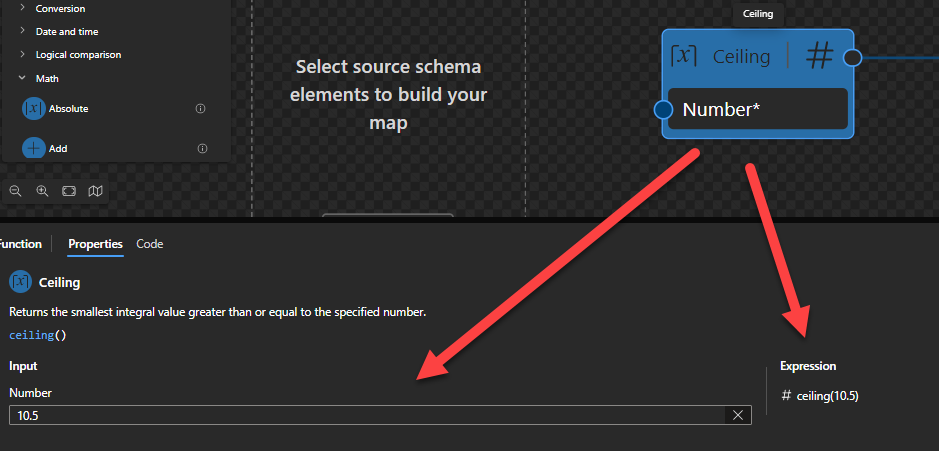
Ceiling: Returns the smallest integral value greater than or equal to the specified number.
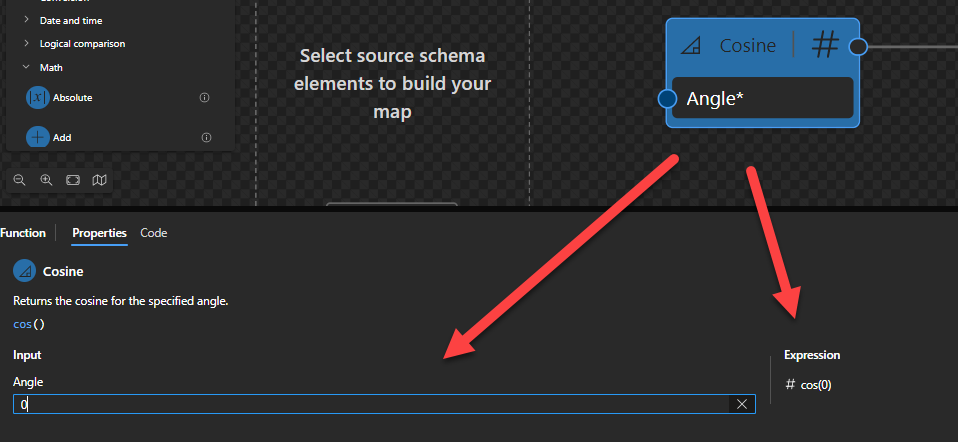
Cosine: Returns the cosine for the specified angle.
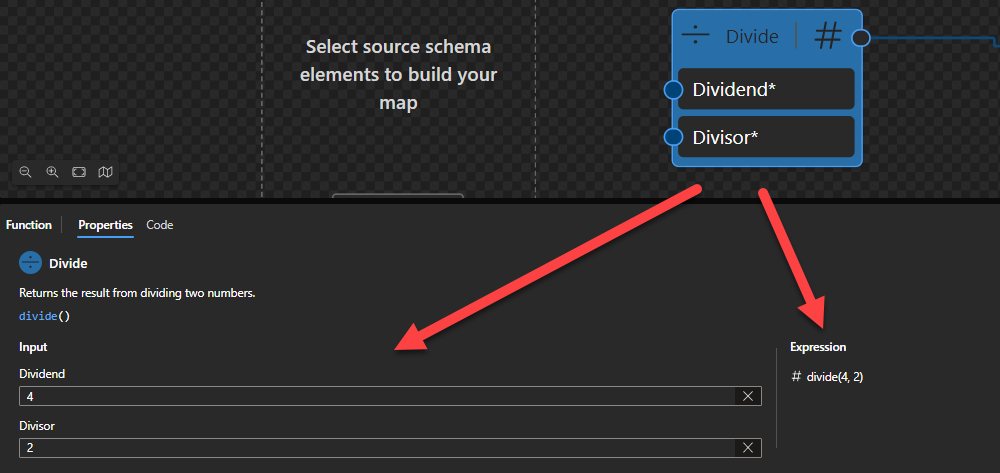
Divide: Returns the result from dividing two numbers.
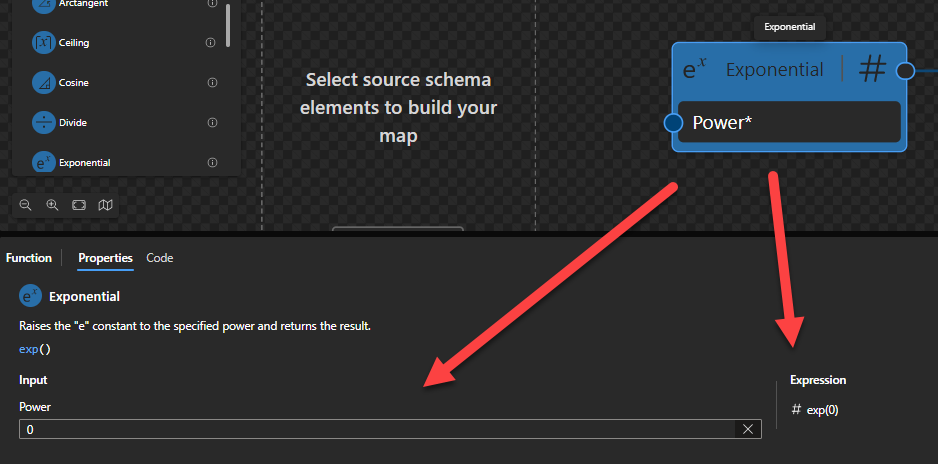
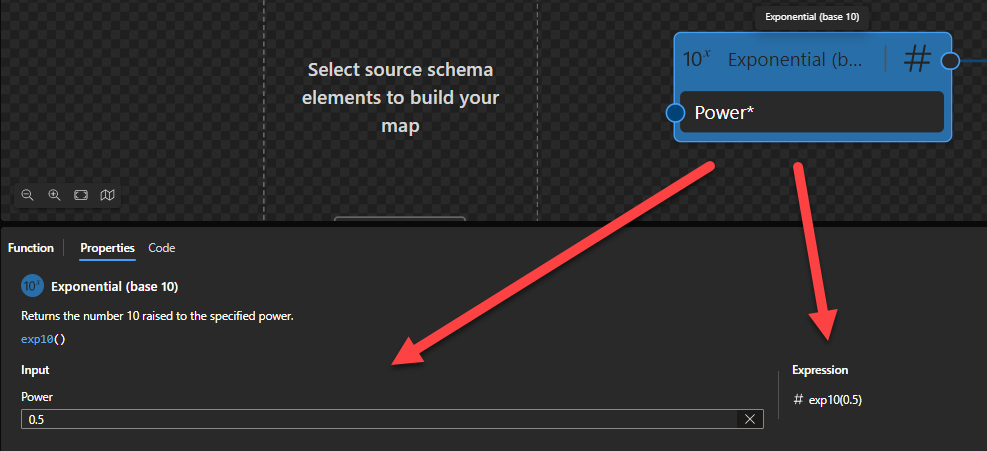
Exponential: Raises the “e” constant to the specified power and returns the result.
Exponential (base 10): Returns the number 10 raised to the specified power.
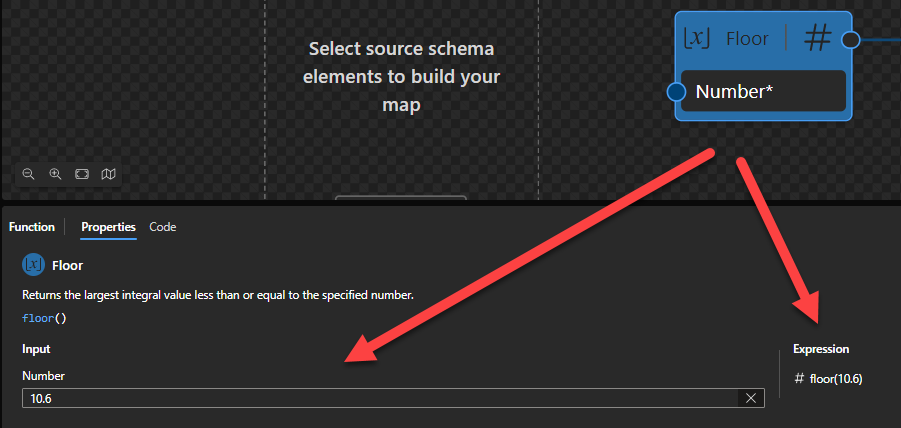
Floor: Returns the largest integral value less than or equal to the specified number.
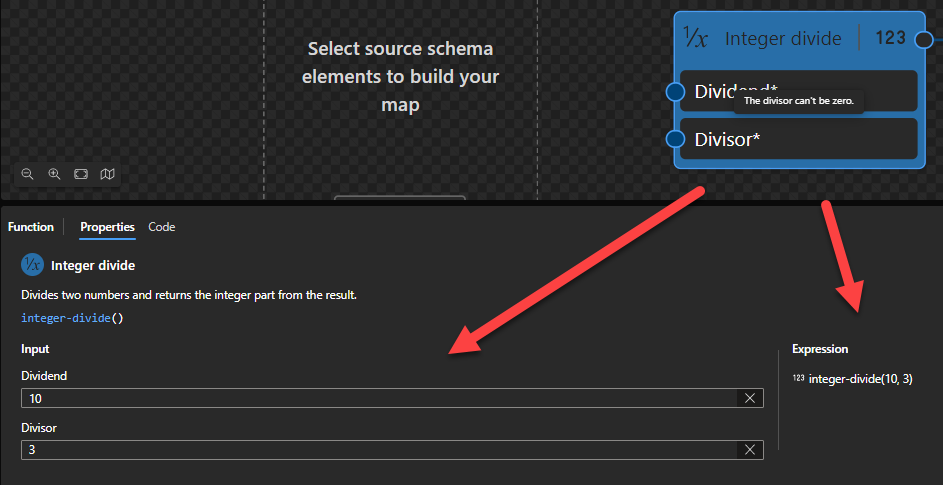
Integer divide: Divides two numbers and returns the integer part from the result.
Log: Returns the logarithm for the specified number in the specified base.
Log (base 10): Returns the base 10 logarithm for the specified number.
Modulo: Returns the remainder from dividing the specified numbers.
Multiply: Returns the product from multiplying two or more specified numbers.
Power: Returns the specified number raised to the specified power.
Round: Rounds a value to the nearest integer or the specified number of fractional digits and returns the result.
Square root: Returns the square root for the specified number.
Subtract: Subtracts the second number from the first number and returns the result.
Tangent: Returns the tangent for the specified angle.
Log
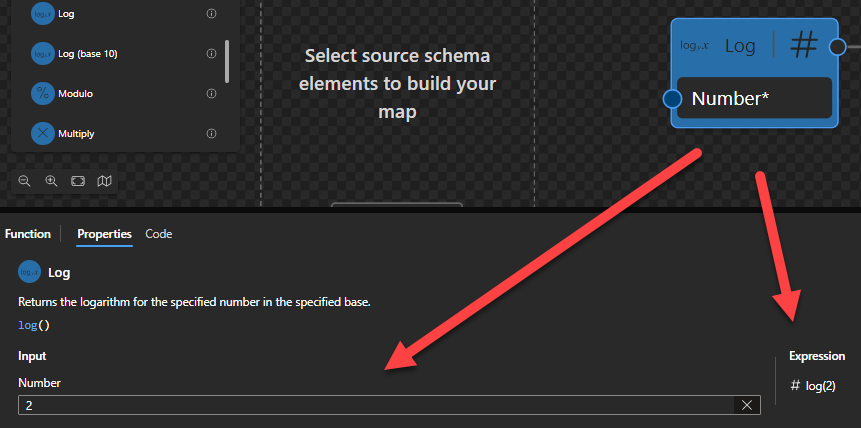
This function states that it will return the logarithm for the specified number in the specified base.
Behind the scenes, this function is translated to the following XPath function: math:log($arg)
math:log($arg as xs:double?) as xs:double?
Rules:
The result is the natural logarithm of $arg
Sample:
The expression math:log(0) returns xs:double('-INF').
The expression math:log(-1) returns xs:double('NaN').
The expression math:log(2) returns 0.6931471805599453
Log (base 10)
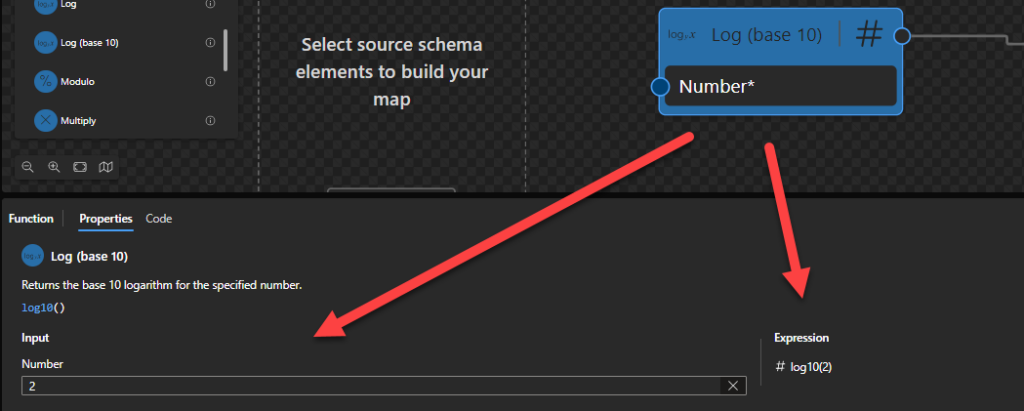
This function states that it will return the base 10 logarithm for the specified number.
Behind the scenes, this function is translated to the following XPath function: math:log10($arg)
math:log10($arg as xs:double?) as xs:double?
Rules:
The result is the base-10 logarithm of $arg
Sample:
The expression math:log10(0) returns xs:double('-INF')
The expression math:log10(2) returns 0.3010299956639812
The expression math:log10(-1) returns xs:double('NaN')
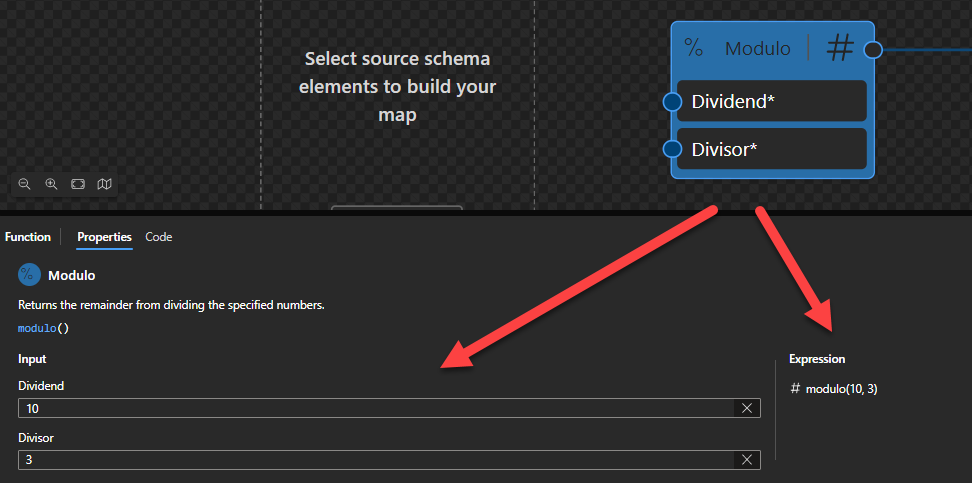
Modulo
This function states that it will return the remainder from dividing the specified numbers.
Behind the scenes, this function is translated to the following XPath expression: ($arg1) mod ($arg2)
fn:error($code as xs:QName?, $description as xs:string) as none
Rules:
Returns the remainder resulting from dividing $arg1, the dividend, by $arg2, the divisor.
The operation a mod b for operands that are xs:integer or xs:decimal, or types derived from them, produces a result such that (a idiv b)*b+(a mod b) is equal to a and the magnitude of the result is always less than the magnitude of b. This identity holds even in the special case that the dividend is the negative integer of largest possible magnitude for its type and the divisor is -1 (the remainder is 0). It follows from this rule that the sign of the result is the sign of the dividend.
Sample:
The expression (10) mod (3) returns 1.
The expression (6) mod (-2) returns 0.
The expression (4.5) mod (1.2) returns 0.9.
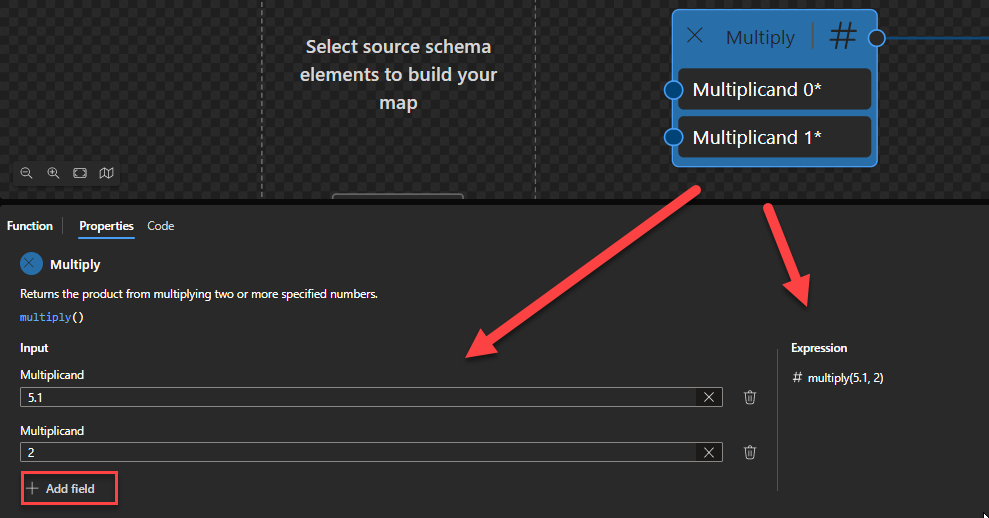
Multiply
This function states that it will return the product from multiplying two or more specified numbers.
Behind the scenes, this function is translated to the following XPath expression: ($arg1) * ($arg2) (allows more inputs)
($arg1) * ($arg2) as xs:numeric?
Rules:
Returns the arithmetic product of its operands: ($arg1 * $arg2).
For the four types xs:float, xs:double, xs:decimal and xs:integer, it is guaranteed that if the type of $arg is an instance of type T then the result will also be an instance of T. The result may also be an instance of a type derived from one of these four by restriction. For example, if $arg is an instance of xs:decimal then the result may be an instance of xs:integer.
This function allows two or more inputs.
Sample:
The expression (5) + (2) returns 10.
The expression (5.1) + (2) returns 10.2.
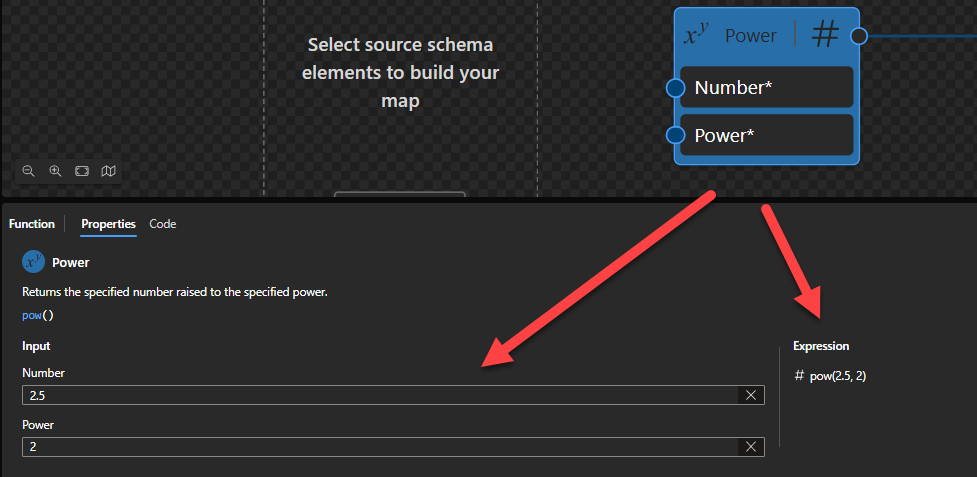
Power
This function states that it will return the specified number raised to the specified power.
Behind the scenes, this function is translated to the following XPath function: math:pow($arg1, $arg2)
math:pow($arg1 as xs:double?, $arg2 as xs:numeric) as xs:double?
Rules:
If $arg2 is an instance of xs:integer, the result is $arg1 raised to the power of $arg2. Otherwise $arg2 is converted to an xs:double by numeric promotion, and the result is the value of $arg1 raised to the power of $arg2.
Sample:
The expression math:pow(2, 3) returns 8.
The expression math:pow(-2, 3) returns -8
The expression math:pow(2, 0) returns 1
The expression math:pow(2.5, 2) returns 6.25
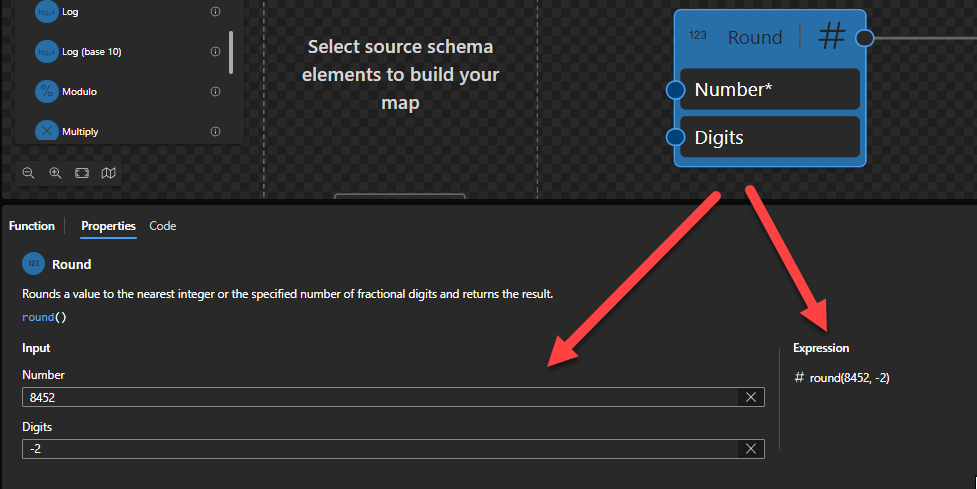
Round
This function states that it will round a value to the nearest integer or the specified number of fractional digits and returns the result.
Behind the scenes, this function is translated to the following XPath function: round($arg1, $arg2)
fn:round($arg as xs:numeric?, $precision as xs:integer) as xs:numeric?
Rules:
The function returns the nearest (that is, numerically closest) value to $arg that is a multiple of ten to the power of minus $precision. If two such values are equally near (for example, if the fractional part in $arg is exactly .5), the function returns the one that is closest to positive infinity.
For the four types xs:float, xs:double, xs:decimal and xs:integer, it is guaranteed that if the type of $arg is an instance of type T then the result will also be an instance of T. The result may also be an instance of a type derived from one of these four by restriction. For example, if $arg is an instance of xs:decimal and $precision is less than one, then the result may be an instance of xs:integer.
Sample:
The expression fn:round(1.125, 2) returns 1.13
The expression fn:round(8452, -2) returns 8500
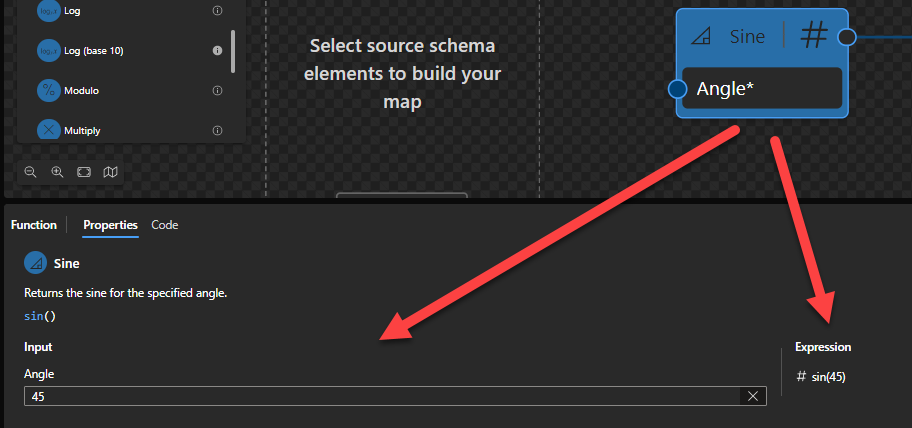
Sine
This function states that it will return the sine for the specified angle.
Behind the scenes, this function is translated to the following XPath function: math:sin($arg)
math:sin($arg as xs:double?) as xs:double?
Rules:
If $arg is positive or negative zero, the result is $arg.
Returns the sine of the argument. The argument is an angle in radians.
Sample:
The expression math:sin(0) returns 0.
The expression math:sin(45) returns 0.8509035245341184.
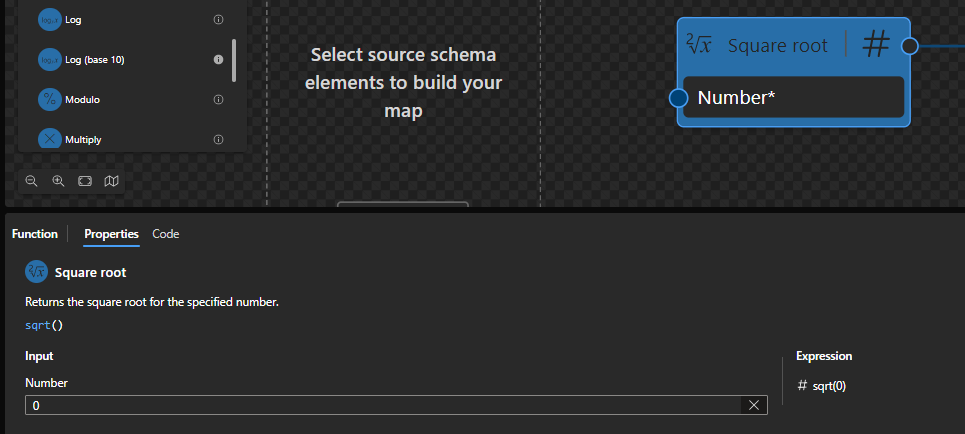
Square root
This function states that it will return the square root for the specified number.
Behind the scenes, this function is translated to the following XPath function: math:sqrt($arg)
math:sqrt($arg as xs:double?) as xs:double?
Rules:
If $arg is positive or negative zero, positive infinity, or NaN, then the result is $arg. (Negative zero is the only case where the result can have negative sign)
The result is the mathematical non-negative square root of $arg
Sample:
The expression math:sqrt(0) returns 0.
The expression math:sqrt(-2) returns NaN.
The expression math:sqrt(4) returns 2.
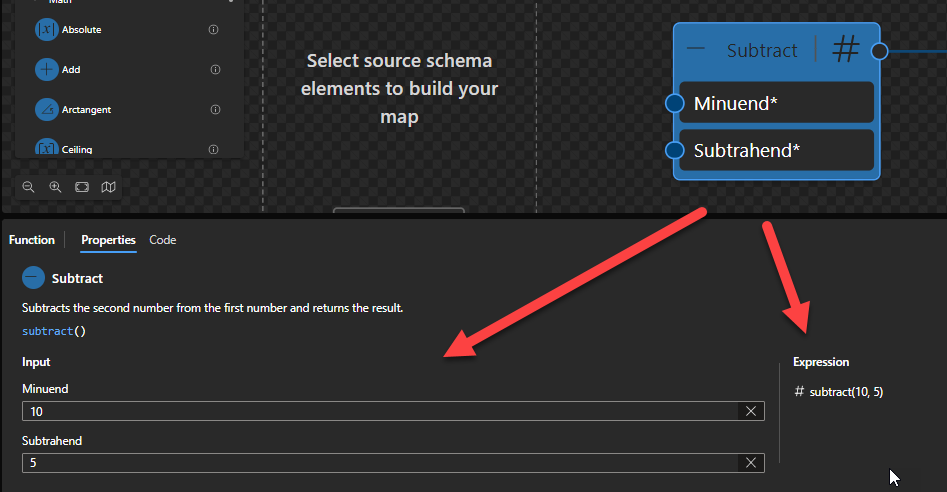
Subtract
This function states that it will subtract the second number from the first number and returns the result.
Behind the scenes, this function is translated to the following XPath function: ($arg1) - ($arg2)
($arg1 as xs:numeric - $arg2 as xs:numeric) as xs:numeric
Rules:
Returns the arithmetic difference of its operands: ($arg1 - $arg2).
$arg1 and $arg2 are numeric values (xs:float, xs:double, xs:decimal and xs:integer)
Sample:
The expression (3) - (1) returns 2.
The expression (2) - (1.12) returns 0.88.
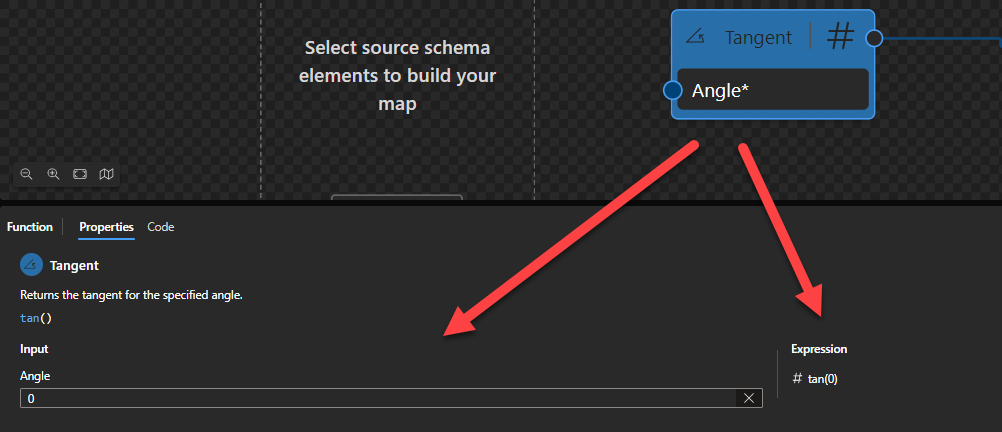
Tangent
This function states that it will return the tangent for the specified angle.
Behind the scenes, this function is translated to the following XPath function: math:tan($arg)
math:tan($arg as xs:double?) as xs:double?
Rules:
If $arg is positive or negative infinity, or NaN, then the result is NaN.
Returns the tangent of the argument. The argument is an angle in radians.
Sample:
The expression math:tan(0) returns 0
The expression math:tan(12) returns -0.6358599286615808
Hope you find this helpful! So, if you liked the content or found it useful and want to help me write more, you can buy (or help buy) my son a Star Wars Lego!
Author: Sandro Pereira
Sandro Pereira lives in Portugal and works as a consultant at DevScope. In the past years, he has been working on implementing Integration scenarios both on-premises and cloud for various clients, each with different scenarios from a technical point of view, size, and criticality, using Microsoft Azure, Microsoft BizTalk Server and different technologies like AS2, EDI, RosettaNet, SAP, TIBCO etc.
He is a regular blogger, international speaker, and technical reviewer of several BizTalk books all focused on Integration. He is also the author of the book “BizTalk Mapping Patterns & Best Practices”. He has been awarded MVP since 2011 for his contributions to the integration community.
View all posts by Sandro Pereira
Math (or Mathematical) functions are used to perform a variety of mathematical and scientific operations, such as addition and multiplication. If you come from the BizTalk Server background or are migrating BizTalk Server projects, they are the equivalent of Mathematical and Scientific Functoids inside BizTalk Mapper Editor.
Available Functions
The Math functions are:
Absolute: Returns the absolute value of the specified number.
Add: Returns the sum from adding two or more numbers.
Floor: Returns the largest integral value less than or equal to the specified number.
Integer divide: Divides two numbers and returns the integer part from the result.
Log: Returns the logarithm for the specified number in the specified base.
Log (base 10): Returns the base 10 logarithm for the specified number.
Modulo: Returns the remainder from dividing the specified numbers.
Multiply: Returns the product from multiplying two or more specified numbers.
Power: Returns the specified number raised to the specified power.
Round: Rounds a value to the nearest integer or the specified number of fractional digits and returns the result.
Sine: Returns the sine for the specified angle.
Square root: Returns the square root for the specified number.
Subtract: Subtracts the second number from the first number and returns the result.
Tangent: Returns the tangent for the specified angle.
Absolute
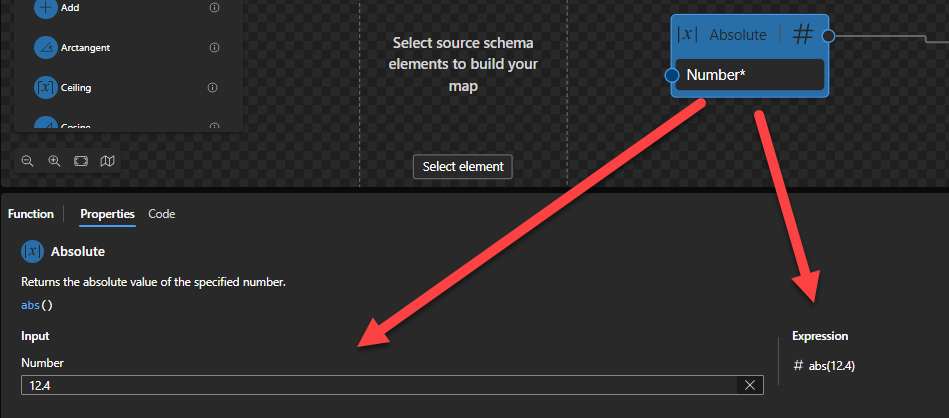
This function states that it will return the absolute value of the specified number.
Behind the scenes, this function is translated to the following XPath function: abs($arg)
fn:abs($arg as xs:numeric?) as xs:numeric?
Rules:
If $arg is negative, the function returns -$arg. Otherwise, it returns $arg.
For the four types xs:float, xs:double, xs:decimal and xs:integer, it is guaranteed that if the type of $arg is an instance of type T then the result will also be an instance of T. The result may also be an instance of a type derived from one of these four by restriction. For example, if $arg is an instance of xs:positiveInteger then the value of $arg may be returned unchanged.
For xs:float and xs:double arguments, if the argument is positive zero or negative zero, then positive zero is returned. If the argument is positive or negative infinity, positive infinity is returned.
Sample:
The expression fn:abs(10.5) returns 10.5.
The expression fn:abs(-10.5) returns 10.5.
Add
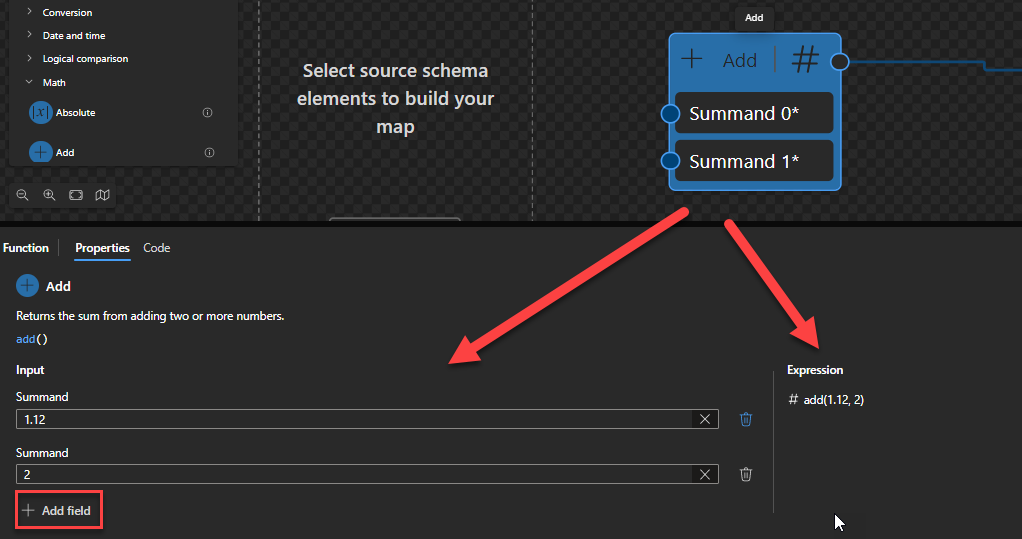
This function states that it will return the sum from adding two or more numbers.
Behind the scenes, this function is translated to the following XPath expression: $arg1 + $arg2 (allows more inputs)
($arg1 as xs:numeric + $arg2 as xs:numeric) as xs:numeric
Rules:
Returns the arithmetic sum of its operands: ($arg1 + $arg2).
$arg1 and $arg2 are numeric values (xs:float, xs:double, xs:decimal and xs:integer)
This function allows two or more inputs.
Sample:
The expression (1) + (3) returns 4.
The expression (1.12) + (2) returns 3.12.
Arctangent
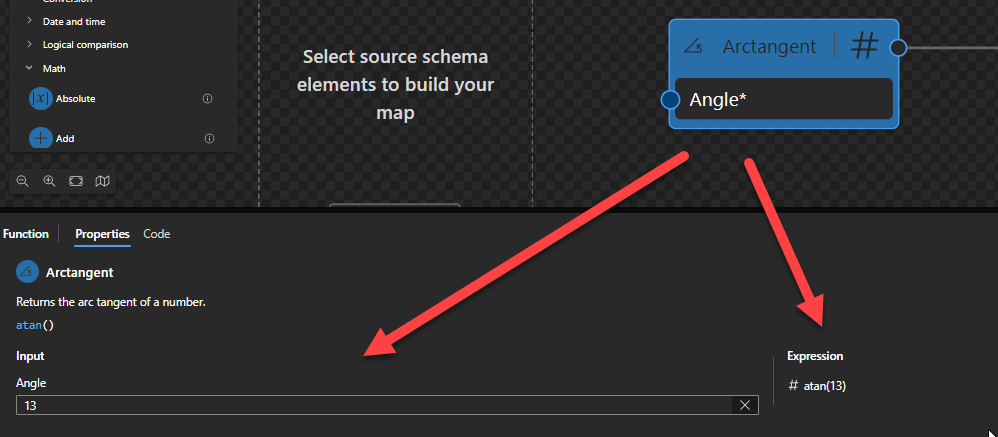
This function states that it will return the arc tangent of a number.
Behind the scenes, this function is translated to the following XPath function: math:atan($arg)
math:atan($arg as xs:double?) as xs:double?
Rules:
If $arg is a non-numeric value, then the result is empty.
Sample:
The expression math:atan(0) returns 0.
The expression math:atan(1.28) returns 0.9075933340888034.
Ceiling
This function states that it will return the smallest integral value greater than or equal to the specified number.
Behind the scenes, this function is translated to the following XPath function: ceiling($arg)
fn:ceiling($arg as xs:numeric?) as xs:numeric?
Rules:
The function returns the smallest (closest to negative infinity) number with no fractional part that is not less than the value of $arg.
For the four types xs:float, xs:double, xs:decimal and xs:integer, it is guaranteed that if the type of $arg is an instance of type T then the result will also be an instance of T. The result may also be an instance of a type derived from one of these four by restriction. For example, if $arg is an instance of xs:decimal then the result may be an instance of xs:integer.
Sample:
The expression fn:ceiling(10.5) returns 11.
The expression fn:ceiling(-10.5) returns -10.
Cosine
This function states that it will return the cosine for the specified angle.
Behind the scenes, this function is translated to the following XPath function: math:cos($arg)
math:cos($arg as xs:double?) as xs:double?
Rules:
If $arg is positive or negative zero, the result is $arg.
Sample:
The expression math:cos(0) returns 1
The expression math:cos(1212) returns 0.7931914936378434
Divide
This function states that it will return the result from dividing two numbers.
Behind the scenes, this function is translated to the following XPath function: $arg1 div $arg2
$arg1 div $arg2 as xs:numeric?
Rules:
For the four types xs:float, xs:double, xs:decimal and xs:integer, it is guaranteed that if the type of $arg is an instance of type T then the result will also be an instance of T. The result may also be an instance of a type derived from one of these four by restriction. For example, if $arg is an instance of xs:decimal then the result may be an instance of xs:integer.
Sample:
The expression (10) div (3) returns 3.
The expression (-3) div (-2) returns 1.5.
The expression (-3) div (2) returns -1.
The expression (-3.5) div (3) returns 0.7.
Exponential
This function states that it will raise the “e” constant to the specified power and returns the result.
Behind the scenes, this function is translated to the following XPath function: math:exp($arg)
math:exp($arg as xs:double?) as xs:double?
Rules:
Returns the value of e
Sample:
The expression math:exp(0) returns 1.
The expression math:exp(1) returns 2.7182818284590455.
Exponential (base 10)
This function states that it will return the number 10 raised to the specified power.
Behind the scenes, this function is translated to the following XPath function: math:exp10($arg)
math:exp10($arg as xs:double?) as xs:double?
Rules:
Returns the value of 10
Sample:
The expression math:exp10(0) returns 1
The expression math:exp10(1) returns 1.0e1.
The expression math:exp10(0.5) returns 3.1622776601683795
Floor
This function states that it will return the largest integral value less than or equal to the specified number.
Behind the scenes, this function is translated to the following XPath function: floor($arg)
fn:error($code as xs:QName?, $description as xs:string) as none
Rules:
The function returns the largest (closest to positive infinity) number with no fractional part that is not greater than the value of $arg.
For the four types xs:float, xs:double, xs:decimal and xs:integer, it is guaranteed that if the type of $arg is an instance of type T then the result will also be an instance of T. The result may also be an instance of a type derived from one of these four by restriction. For example, if $arg is an instance of xs:decimal then the result may be an instance of xs:integer.
Sample:
The expression fn:floor(10.5) returns 10.
The expression fn:floor(10.9) returns 10.
The expression fn:floor(-10.5) returns -11.
Integer divide
This function states that it will divide two numbers and returns the integer part from the result.
Behind the scenes, this function is translated to the following XPath expression: ($arg1) idiv ($arg2)
($arg1) idiv ($arg2) as xs:integer
Rules:
Performs an integer division.
For the four types xs:float, xs:double, xs:decimal and xs:integer, it is guaranteed that if the type of $arg is an instance of type T then the result will also be an instance of T. The result may also be an instance of a type derived from one of these four by restriction. For example, if $arg is an instance of xs:decimal then the result may be an instance of xs:integer.
Sample:
The expression (10) idiv (3) returns 3.
The expression (-3) idiv (-2) returns 1.
The expression (-3) idiv (2) returns -1.
The expression (-3.5) idiv (3) returns -1.
Stay tune for the second part of this blog post.
Hope you find this helpful! So, if you liked the content or found it useful and want to help me write more, you can buy (or help buy) my son a Star Wars Lego!
Author: Sandro Pereira
Sandro Pereira lives in Portugal and works as a consultant at DevScope. In the past years, he has been working on implementing Integration scenarios both on-premises and cloud for various clients, each with different scenarios from a technical point of view, size, and criticality, using Microsoft Azure, Microsoft BizTalk Server and different technologies like AS2, EDI, RosettaNet, SAP, TIBCO etc.
He is a regular blogger, international speaker, and technical reviewer of several BizTalk books all focused on Integration. He is also the author of the book “BizTalk Mapping Patterns & Best Practices”. He has been awarded MVP since 2011 for his contributions to the integration community.
View all posts by Sandro Pereira
Utility functions are used to perform a variety of additional and distinct operations that don’t fit in the above Categories, such as stopping a transformation and returning the specified error code and description or format, etc.
Available Functions
The Utility functions are:
Copy: Copies any and all of the input’s substructure.
Error: Stops a transformation and returns the specified error code and description.
Format date: Returns a date in the specified format.
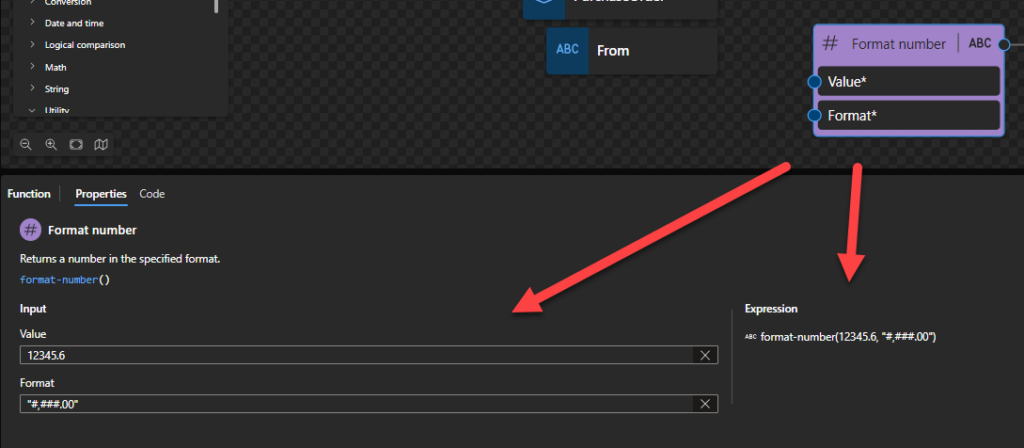
Format number: Returns a number in the specified format.
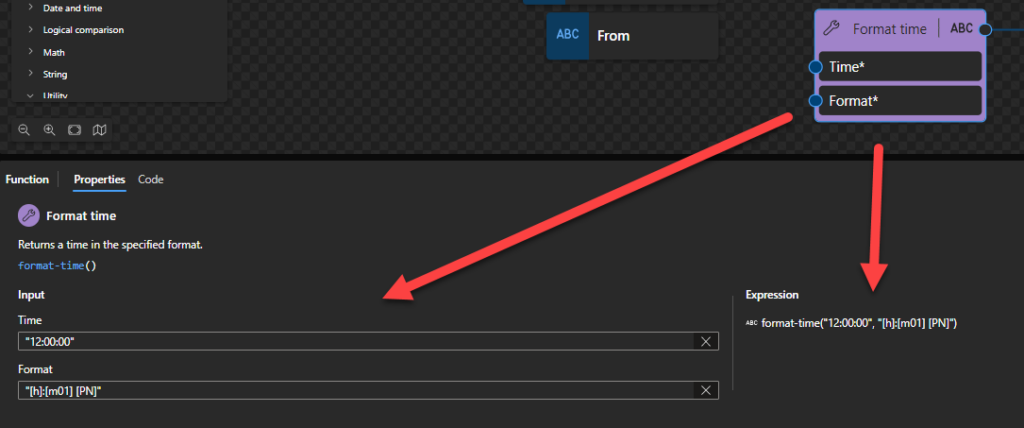
Format time: Returns a time in the specified format.
Copy
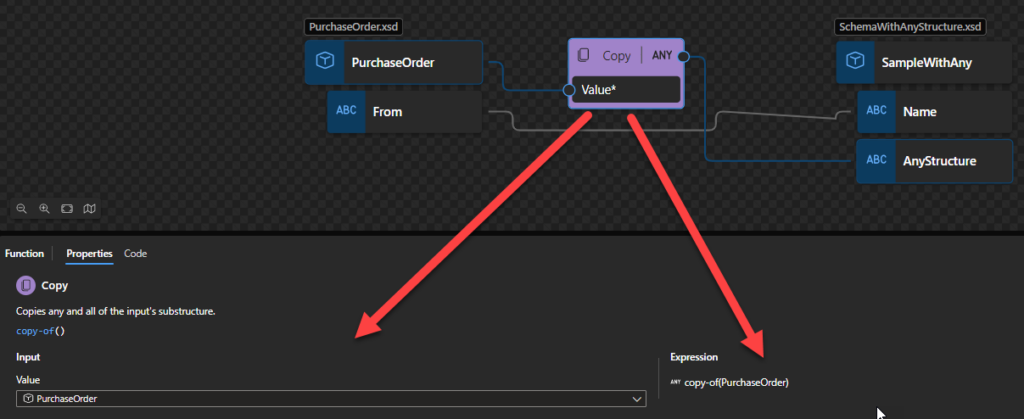
This function states that it will copy any and all of the input’s substructure. It enables your maps to use schemas that include any and anyAttribute elements. These elements are, in essence, wildcards provided in the Schema definition language to match unknown structures or attributes.
The following figure shows the Copy function used in a map.
Behind the scenes, this function is translated to the following XPath expression: copy-of($arg)
Rules:
The Copy function copies the element in the input instance message corresponding to the source schema node connected to the Copy function. The function also copies any and all of its substructure and re-creates it in the output instance message at the linked node in the destination schema. Thus, you can also use the Copy function to copy any source and destination records having identical substructures.
Error
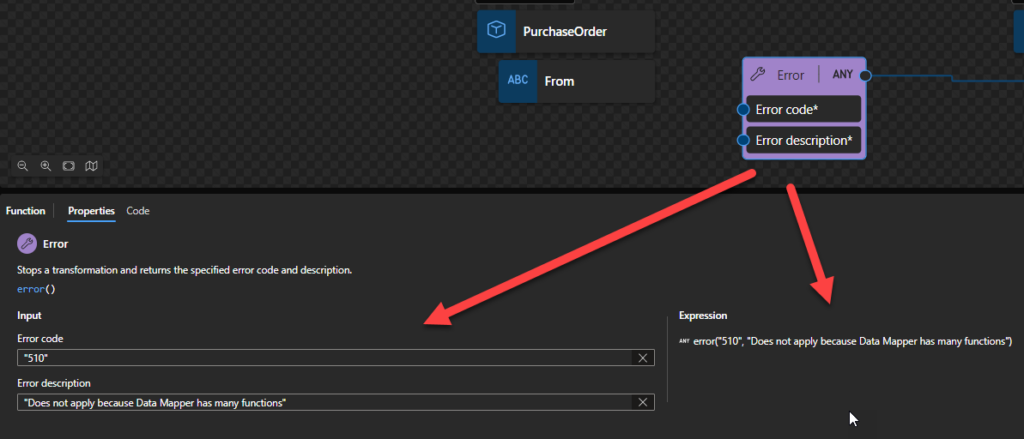
This function states that it will stop a transformation and returns the specified error code and description.
Behind the scenes, this function is translated to the following XPath function: error($code, $description)
fn:error($code as xs:QName?, $description as xs:string) as none
Rules:
Calling the fn:error function raises an application-defined error.
This function never returns a value. Instead, it always raises an error. The effect of the error is identical to the effect of dynamic errors raised implicitly, for example, when an incorrect argument is supplied to a function.
The $code is an error code that distinguishes this error from others. It is an xs:QName; the namespace URI conventionally identifies the component, subsystem, or authority responsible for defining the meaning of the error code, while the local part identifies the specific error condition. The namespace URI http://www.w3.org/2005/xqt-errors is used for errors defined in this specification; other namespace URIs may be used for errors defined by the application.
The $description is a natural-language description of the error condition.
Format date
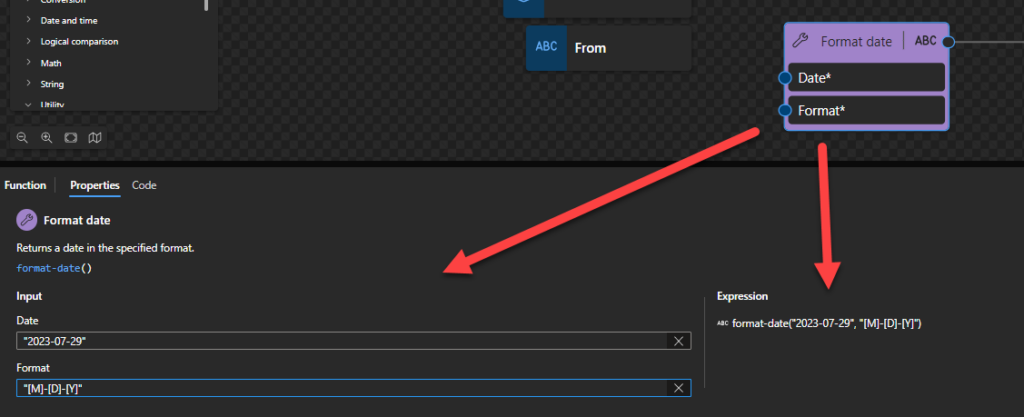
This function states that it returns a date in the specified format.
Behind the scenes, this function is translated to the following XPath function: format-date($arg1, $arg2)
fn:format-date($value as xs:date?, $picture as xs:string) as xs:string?
Rules:
The $arg1 needs to be an xs:date in the following format yyyy-MM-DD or yyyy-MM-DDZ.
The $arg2 (or picture) consists of a sequence of variable markers and literal substrings. A substring enclosed in square brackets is interpreted as a variable marker; substrings not enclosed in square brackets are taken as literal substrings. The literal substrings are optional and, if present, are rendered unchanged, including any whitespace. The variable markers are replaced in the result by strings representing aspects of the date and/or time to be formatted. These are described in detail below:
Y – year (absolute value);
M – month in the year
D – day in the month
d – day in the year
F – day of the week
W – week in year
w – week in the month
C – calendar: the name or abbreviation of a calendar name
E – era: the name of a baseline for the numbering of years, for example, the reign of a monarch
Sample:
The expression fn:format-date($d, “[Y0001]-[M01]-[D01]”) returns 2002-12-31
The expression fn:format-date($d, "[M]-[D]-[Y]") returns 12-31-2002.
The expression fn:format-date($d, "[D1] [MI] [Y]") returns 31 XII 2002.
The expression fn:format-date($d, “[D1o] [MNn], [Y]”) returns 31st December, 2002
The expression fn:format-date($d, "[D01] [MN,*-3] [Y0001]") returns 31 DEC 2002.
The expression fn:format-date($d, "[YWw]") returns Two Thousand and Three.
Format DateTime value
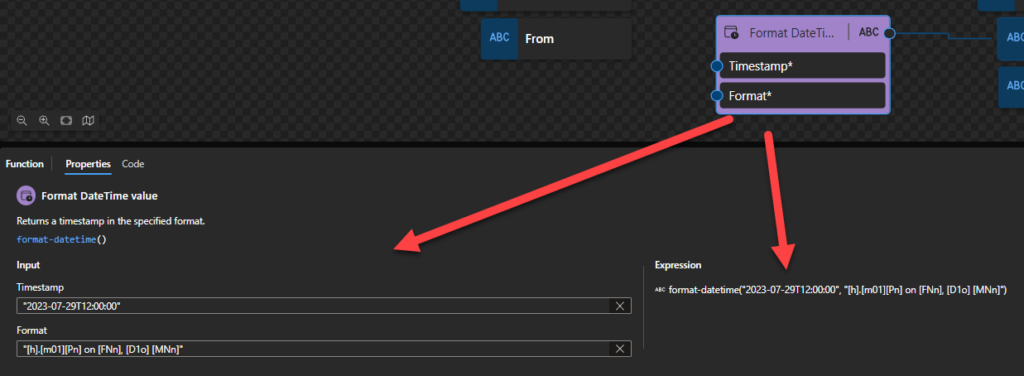
Returns a timestamp in the specified format.
This function states that it returns the specified value as an integer.
Behind the scenes, this function is translated to the following XPath function: format-dateTime($arg1, $arg2)
fn:format-dateTime($value as xs:dateTime?, $picture as xs:string) as xs:string?
Rules:
The $arg1 needs to be an xs:dateTime in the following format yyyy-MM-DDTHH:mm:ssZ or yyyy-MM-DDTHH:mm:ss-hh:mm.
The $arg2 (or picture) consists of a sequence of variable markers and literal substrings. A substring enclosed in square brackets is interpreted as a variable marker; substrings not enclosed in square brackets are taken as literal substrings. The literal substrings are optional and, if present, are rendered unchanged, including any whitespace. The variable markers are replaced in the result by strings representing aspects of the date and/or time to be formatted. These are described in detail below:
Y – year (absolute value);
M – month in the year
D – day in the month
d – day in the year
F – day of the week
W – week in year
w – week in the month
H – hour in the day (24 hours)
h – hour in half-day (12 hours)
P – am/pm marker
m – minute in the hour
s – second in a minute
f – fractional seconds
Z – timezone
z – timezone (same as Z, but modified where appropriate to include a prefix as a time offset using GMT, for example, GMT+1 or GMT-05:00. For this component, there is a fixed prefix of GMT or a localized variation thereof for the chosen language, and the remainder of the value is formatted as for specifier Z. 01:01
C – calendar: the name or abbreviation of a calendar name
E – era: the name of a baseline for the numbering of years, for example, the reign of a monarch
Sample:
The expression fn:format-dateTime($dt, “[h].[m01][Pn] on [FNn], [D1o] [MNn]”) returns 3.58pm on Tuesday, 31st December
The expression fn:format-date($d, "[M]-[D]-[Y]") returns 12-31-2002.
The expression fn:format-dateTime($dt, "[M01]/[D01]/[Y0001] at [H01]:[m01]:[s01]") returns 12/31/2002 at 15:58:45.
Format number
Returns a number in the specified format.
This function states that it returns the specified value as an integer.
Behind the scenes, this function is translated to the following XPath function: format-number($arg1, $arg2)
fn:format-number($value as xs:numeric?, $picture as xs:string) as xs:string
Rules:
Returns a string containing a number formatted according to a given picture string, taking account of decimal formats specified in the static context.
The $arg1 maybe of any numeric data type (xs:double, xs:float, xs:decimal, or their subtypes, including xs:integer).
Sample:
The expression format-number(12345.6, '#,###.00') returns "12,345.60".
The expression format-number(12345678.9, '9,999.99') returns "12,345,678.90".
The expression format-number(123.9, '9999') returns "0124".
The expression format-number(0.14, '01%') returns "14%".
The expression format-number(-6, '000') returns "-006".
Format time
Returns a time in the specified format.
This function states that it returns the specified value as an integer.
Behind the scenes, this function is translated to the following XPath function: format-time($arg1, $arg2)
fn:format-time($value as xs:time?, $picture as xs:string) as xs:string?
Rules:
The $arg1 needs to be an xs:time in the following format HH:mm:ssZ or HH:mm:ss-hh:mm.
The $arg2 (or picture) consists of a sequence of variable markers and literal substrings. A substring enclosed in square brackets is interpreted as a variable marker; substrings not enclosed in square brackets are taken as literal substrings. The literal substrings are optional and, if present, are rendered unchanged, including any whitespace. The variable markers are replaced in the result by strings representing aspects of the date and/or time to be formatted. These are described in detail below:
H – hour in the day (24 hours)
h – hour in half-day (12 hours)
P – am/pm marker
m – minute in the hour
s – second in a minute
f – fractional seconds
Z – timezone
z – timezone (same as Z, but modified where appropriate to include a prefix as a time offset using GMT, for example, GMT+1 or GMT-05:00. For this component, there is a fixed prefix of GMT or a localized variation thereof for the chosen language, and the remainder of the value is formatted as for specifier Z. 01:01
C – calendar: the name or abbreviation of a calendar name
E – era: the name of a baseline for the numbering of years, for example, the reign of a monarch
Sample:
The expression fn:format-time($t, “[h]:[m01] [PN]”) returns 3:58 PM
The expression fn:format-time($t, "[h]:[m01]:[s01] [PN] [ZN,*-3]") returns 3:58:45 PM PDT.
The expression fn:format-time($t,”[H01]:[m01]:[s01] [z,6-6]”) returns 15:58:45 GMT+02:00.
Hope you find this helpful! So, if you liked the content or found it useful and want to help me write more, you can buy (or help buy) my son a Star Wars Lego!
Author: Sandro Pereira
Sandro Pereira lives in Portugal and works as a consultant at DevScope. In the past years, he has been working on implementing Integration scenarios both on-premises and cloud for various clients, each with different scenarios from a technical point of view, size, and criticality, using Microsoft Azure, Microsoft BizTalk Server and different technologies like AS2, EDI, RosettaNet, SAP, TIBCO etc.
He is a regular blogger, international speaker, and technical reviewer of several BizTalk books all focused on Integration. He is also the author of the book “BizTalk Mapping Patterns & Best Practices”. He has been awarded MVP since 2011 for his contributions to the integration community.
View all posts by Sandro Pereira
Because the Date and Time functions category has too many functions, I decide to break this blog post into different parts, so welcome to the fourth part!
Overview
Date and Time functions are used to perform a variety of operations over Dates, such as retrieving the current date and time or adding dates, etc. If you come from the BizTalk Server background or are migrating BizTalk Server projects, they are the equivalent of Date/Time Functoids inside BizTalk Mapper Editor.
Available Functions
The Date and Time functoids are:
Add days: Adds a positive or negative number of days to the specified timestamp. Returns a timestamp that’s respectively later or earlier than the specified timestamp.
Add DayTime to Date: Adds a positive or negative DayTime duration to the specified Date value (xs:date). Returns a Date that’s respectively after or before the specified Date.
Add DayTime to DateTime: Adds a positive or negative DayTime duration to the specified DateTime value (xs:dateTime). Returns a DateTime that’s respectively after or before the specified DateTime.
Add DayTime to Time: Adds a positive or negative DayTime duration to the specified Time value (xs:time). Returns a Time that’s respectively after or before the specified Time. Durations that wrap around past midnight also return an earlier Time.
Add YearMonth to DateTime: Adds a positive or negative YearMonth duration to the specified DateTime value (xs:dateTime). Returns a DateTime that’s respectively after or before the specified DateTime.
Adjust Date: Adjusts the specified Date value (xs:date) to the current or dynamic time zone.
Adjust DateTime: Adjusts the specified DateTime value (xs:dateTime) to the current or dynamic time zone.
Adjust Time: Adjusts the specified Time value (xs:time) to the current or dynamic time zone.
Current date: Returns the current date in YYYY-MM-DD format.
Current DateTime value: Returns the current date and time in YYYY-MM-DDThh:mm:ss format.
Current time: Returns the current date and time in YYYY-MM-DDThh:mm:ss format.
DateTime: Creates and returns a DateTime value based on the specified Date and Time.
Day from Date: Returns the day from the specified Date value (xs:date).
Day from DateTime: Returns the day from the specified DateTime value (xs:dateTime).
Equal Date: Returns true or false based on whether the specified Date values are equal.
Equal DateTime: Returns true or false based on whether with the specified DateTime values are equal.
Equal Day: Returns true or false based on whether the specified Day values (xs:gDay) are equal with the same starting time when the day values are in the same month and year.
Equal Month: Returns true or false based on whether the specified Month values (xs:gMonth) have the same starting time when the month values are in the same year.
Equal MonthDay: Returns true or false based on whether the specified MonthDay values (xs:gMonthDay) are equal with the same starting time when the day values are in the same year.
Equal Time: Returns true or false based on whether the specified Time values are equal.
Equal Year: Returns true or false based on whether the specified Year values (xs:gYear) have the same starting time.
Equal YearMonth: Returns true or false based on whether the specified YearMonth values (xs:gYearMonth) are the same.
Greater Date: Returns true or false based on whether the first Date value is later than the second Date value.
Greater DateTime: Returns true or false based on whether the first DateTime value is later than the second DateTime value.
Greater Time: Returns true or false based on whether the first Time value is later than the second Time value.
Hours from DateTime: Returns the hours from the specified DateTime value (xs:dateTime).
Hours from Time: Returns the hours from the specified Time value (xs:time).
Less Date: Returns true or false based on whether the first Date value is earlier than the second Date value.
Less DateTime: Returns true or false based on whether the first DateTime value is earlier than the second DateTime value.
Less Time: Returns true or false based on whether the first Time value is earlier than the second Time value.
Minutes from DateTime: Returns the minutes from the specified DateTime value (xs:dateTime).
Minutes from Time: Returns the minutes from the specified Time value (xs:time).
Month from Date: Returns the month from the specified Date value (xs:date).
Month from DateTime: Returns the month from the specified DateTime value (xs:dateTime).
Seconds from DateTime: Returns the seconds from the specified DateTime value (xs:dateTime).
Seconds from Time: Returns the seconds from the specified Time value (xs:time).
Subtract Dates: Returns the DayTimeDuration value (xs:dayTimeDuration) representing the elapsed time between the starting times for the specified Date values.
Subtract DateTimes: Returns a DayTimeDuration value (xs:dayTimeDuration) representing the elapsed time between the specified DateTime values..
Subtract DateTime from Date: Subtracts a positive or negative DayTime duration from the specified Date value (xs:date). Returns a Date that’s respectively before or after the specified Date..
Subtract DateTime from DateTime: Subtracts a positive or negative DayTime duration from the specified DateTime value (xs:dateTime). Returns a DateTime that’s respectively before or after the specified DateTime.
Subtract DateTime from Time: Subtracts a positive or negative Time duration from the specified Time value (xs:time). Returns a Time that’s respectively before or after the specified Time. A duration that wraps around past midnight also returns a later Time.
Subtract Times: Returns a DayTime: Duration value (xs:dayTimeDuration) representing the elapsed time between the specified Time values, which are treated as times on the same date.
Subtract YearMonth from Date: Subtracts a positive or negative YearMonth duration from the specified Date value (xs:date). Returns a Date that’s respectively before or after the specified Date.
Subtract YearMonth from DateTime: Subtracts a positive or negative YearMonth duration from the specified DateTime value (xs:dateTime). Returns a DateTime that’s respectively before or after the specified DateTime.
Time zone from Date: Returns the time zone from the specified Date value (xs:date).
Time zone from DateTime: Returns the time zone from the specified DateTime value (xs:dateTime).
Time zone from Time: Returns the time zone from the specified Time value (xs:time).
Year from Date: Returns the year from the specified Date value (xs:date).
Year from DateTime: Returns the year from the specified DateTime value (xs:dateTime).
Time zone from Date
This function states that it will return the time zone from the specified Date value (xs:date).
Behind the scenes, this function is translated to the following XPath function: timezone-from-date($arg)
fn:timezone-from-date($arg as xs:date?) as xs:dayTimeDuration?
Rules:
The function returns the timezone component of $arg, if any. If $arg has a timezone component, then the result is an xs:dayTimeDuration that indicates deviation from UTC; its value may range from +14:00 to -14:00 hours, both inclusive. If $arg has no timezone component, the result is the empty sequence.
The $arg1 needs to be an xs:date in the following format yyyy-MM-DD-hh:mm or yyyy-MM-DDZ.
Sample:
The expression fn:timezone-from-date(xs:date("2023-07-29-05:00")) returns xs:dayTimeDuration("-PT5H").
The expression fn:timezone-from-date(xs:date("2023-07-29Z")) returns xs:dayTimeDuration("PT0S").
The expression fn:timezone-from-date(xs:date("2023-07-29")) returns ().
Time zone from DateTime
This function states that it will return the time zone from the specified DateTime value (xs:dateTime).
Behind the scenes, this function is translated to the following XPath function: timezone-from-dateTime($arg)
fn:timezone-from-dateTime($arg as xs:dateTime?) as xs:dayTimeDuration?
Rules:
The function returns the timezone component of $arg, if any. If $arg has a timezone component, the result indicates deviation from UTC; its value may range from +14:00 to -14:00 hours, both inclusive. If $arg has no timezone component, the result is an empty sequence.
The $arg1 needs to be an xs:dateTime in the following format yyyy-MM-DDTHH:mm:ssZ or yyyy-MM-DDTHH:mm:ss-hh:mm.
Sample:
The expression fn:timezone-from-dateTime(xs:dateTime("2023-07-29T13:20:00-05:00")) returns xs:dayTimeDuration("-PT5H").
The expression fn:timezone-from-dateTime(xs:dateTime("2023-07-29T13:20:00Z")) returns xs:dayTimeDuration("PT0S").
The expression fn:timezone-from-dateTime(xs:dateTime("2023-07-29T00:00:00")) returns ().
Time zone from Time
This function states that it will return the time zone from the specified Time value (xs:time).
Behind the scenes, this function is translated to the following XPath function: timezone-from-time($arg)
fn:timezone-from-time($arg as xs:time?) as xs:dayTimeDuration?
Rules:
The function returns the timezone component of $arg, if any. If $arg it has a timezone component, the result indicates deviation from UTC; its value may range from +14:00 to -14:00 hours, both inclusive. If $arg has no timezone component, the result is an empty sequence.
The $arg needs to be an xs:time in the following format HH:mm:ssZ or HH:mm:ss-hh:mm.
Sample:
The expression fn:timezone-from-time(xs:time("13:20:00-05:00")) returns xs:dayTimeDuration("-PT5H").
The expression fn:timezone-from-time(xs:time("13:20:00Z")) returns xs:dayTimeDuration("PT0S").
The expression fn:timezone-from-time(xs:time("13:20:00")) returns ().
Year from Date
This function states that it will return the year from the specified Date value (xs:date).
Behind the scenes, this function is translated to the following XPath function: year-from-date($arg)
fn:year-from-date($arg as xs:date?) as xs:integer?
Rules:
The function returns an xs:integer representing the year in the local value of $arg. The value may be negative.
The $arg needs to be an xs:date in the following format yyyy-MM-DD or yyyy-MM-DDZ.
Sample:
The expression fn:year-from-date(xs:date("2023-07-29")) returns 2023.
The expression fn:year-from-date(xs:date("2023-07-29+05:00")) returns 2023.
The expression fn:year-from-date(xs:date("-0002-06-01")) returns -2
Year from DateTime
This function states that it will return the year from the specified DateTime value (xs:dateTime).
Behind the scenes, this function is translated to the following XPath function: year-from-dateTime($arg)
fn:year-from-dateTime($arg as xs:dateTime?) as xs:integer?
Rules:
The function returns an xs:integer representing the year in the local value of $arg. The value may be negative.
The $arg needs to be an xs:dateTime in the following format yyyy-MM-DDTHH:mm:ss or yyyy-MM-DDTHH:mm:ss-hh:mm.
Sample:
The expression fn:year-from-dateTime(xs:dateTime("2023-07-29T21:30:00-05:00")) returns 2023.
The expression fn:year-from-dateTime(xs:dateTime("2023-07-29T19:20:00")) returns 2023.
The expression fn:year-from-dateTime(xs:dateTime("2021-12-31T24:00:00")) returns 2022.
The expression fn:year-from-dateTime(xs:dateTime("-0002-06-06T00:00:00")) returns -2
Hope you find this helpful! So, if you liked the content or found it useful and want to help me write more, you can buy (or help buy) my son a Star Wars Lego!
Author: Sandro Pereira
Sandro Pereira lives in Portugal and works as a consultant at DevScope. In the past years, he has been working on implementing Integration scenarios both on-premises and cloud for various clients, each with different scenarios from a technical point of view, size, and criticality, using Microsoft Azure, Microsoft BizTalk Server and different technologies like AS2, EDI, RosettaNet, SAP, TIBCO etc.
He is a regular blogger, international speaker, and technical reviewer of several BizTalk books all focused on Integration. He is also the author of the book “BizTalk Mapping Patterns & Best Practices”. He has been awarded MVP since 2011 for his contributions to the integration community.
View all posts by Sandro Pereira
Because the Date and Time functions category has too many functions, I decide to break this blog post into different parts, so welcome to the fourth part!
Overview
Date and Time functions are used to perform a variety of operations over Dates, such as retrieving the current date and time or adding dates, etc. If you come from the BizTalk Server background or are migrating BizTalk Server projects, they are the equivalent of Date/Time Functoids inside BizTalk Mapper Editor.
Available Functions
The Date and Time functoids are:
Add days: Adds a positive or negative number of days to the specified timestamp. Returns a timestamp that’s respectively later or earlier than the specified timestamp.
Add DayTime to Date: Adds a positive or negative DayTime duration to the specified Date value (xs:date). Returns a Date that’s respectively after or before the specified Date.
Add DayTime to DateTime: Adds a positive or negative DayTime duration to the specified DateTime value (xs:dateTime). Returns a DateTime that’s respectively after or before the specified DateTime.
Add DayTime to Time: Adds a positive or negative DayTime duration to the specified Time value (xs:time). Returns a Time that’s respectively after or before the specified Time. Durations that wrap around past midnight also return an earlier Time.
Add YearMonth to DateTime: Adds a positive or negative YearMonth duration to the specified DateTime value (xs:dateTime). Returns a DateTime that’s respectively after or before the specified DateTime.
Adjust Date: Adjusts the specified Date value (xs:date) to the current or dynamic time zone.
Adjust DateTime: Adjusts the specified DateTime value (xs:dateTime) to the current or dynamic time zone.
Adjust Time: Adjusts the specified Time value (xs:time) to the current or dynamic time zone.
Current date: Returns the current date in YYYY-MM-DD format.
Current DateTime value: Returns the current date and time in YYYY-MM-DDThh:mm:ss format.
Current time: Returns the current date and time in YYYY-MM-DDThh:mm:ss format.
DateTime: Creates and returns a DateTime value based on the specified Date and Time.
Day from Date: Returns the day from the specified Date value (xs:date).
Day from DateTime: Returns the day from the specified DateTime value (xs:dateTime).
Equal Date: Returns true or false based on whether the specified Date values are equal.
Equal DateTime: Returns true or false based on whether with the specified DateTime values are equal.
Equal Day: Returns true or false based on whether the specified Day values (xs:gDay) are equal with the same starting time when the day values are in the same month and year.
Equal Month: Returns true or false based on whether the specified Month values (xs:gMonth) have the same starting time when the month values are in the same year.
Equal MonthDay: Returns true or false based on whether the specified MonthDay values (xs:gMonthDay) are equal with the same starting time when the day values are in the same year.
Equal Time: Returns true or false based on whether the specified Time values are equal.
Equal Year: Returns true or false based on whether the specified Year values (xs:gYear) have the same starting time.
Equal YearMonth: Returns true or false based on whether the specified YearMonth values (xs:gYearMonth) are the same.
Greater Date: Returns true or false based on whether the first Date value is later than the second Date value.
Greater DateTime: Returns true or false based on whether the first DateTime value is later than the second DateTime value.
Greater Time: Returns true or false based on whether the first Time value is later than the second Time value.
Hours from DateTime: Returns the hours from the specified DateTime value (xs:dateTime).
Hours from Time: Returns the hours from the specified Time value (xs:time).
Less Date: Returns true or false based on whether the first Date value is earlier than the second Date value.
Less DateTime: Returns true or false based on whether the first DateTime value is earlier than the second DateTime value.
Less Time: Returns true or false based on whether the first Time value is earlier than the second Time value.
Minutes from DateTime: Returns the minutes from the specified DateTime value (xs:dateTime).
Minutes from Time: Returns the minutes from the specified Time value (xs:time).
Month from Date: Returns the month from the specified Date value (xs:date).
Month from DateTime: Returns the month from the specified DateTime value (xs:dateTime).
Seconds from DateTime: Returns the seconds from the specified DateTime value (xs:dateTime).
Seconds from Time: Returns the seconds from the specified Time value (xs:time).
Subtract Dates: Returns the DayTimeDuration value (xs:dayTimeDuration) representing the elapsed time between the starting times for the specified Date values.
Subtract DateTimes: Returns a DayTimeDuration value (xs:dayTimeDuration) representing the elapsed time between the specified DateTime values..
Subtract DateTime from Date: Subtracts a positive or negative DayTime duration from the specified Date value (xs:date). Returns a Date that’s respectively before or after the specified Date..
Subtract DateTime from DateTime: Subtracts a positive or negative DayTime duration from the specified DateTime value (xs:dateTime). Returns a DateTime that’s respectively before or after the specified DateTime.
Subtract DateTime from Time: Subtracts a positive or negative Time duration from the specified Time value (xs:time). Returns a Time that’s respectively before or after the specified Time. A duration that wraps around past midnight also returns a later Time.
Subtract Times: Returns a DayTimeDuration value (xs:dayTimeDuration) representing the elapsed time between the specified Time values, which are treated as times on the same date.
Subtract YearMonth from Date: Subtracts a positive or negative YearMonth duration from the specified Date value (xs:date). Returns a Date that’s respectively before or after the specified Date.
Subtract YearMonth from DateTime: Subtracts a positive or negative YearMonth duration from the specified DateTime value (xs:dateTime). Returns a DateTime that’s respectively before or after the specified DateTime.
Time zone from Date: Returns the time zone from the specified Date value (xs:date).
Time zone from DateTime: Returns the time zone from the specified DateTime value (xs:dateTime).
Time zone from Time: Returns the time zone from the specified Time value (xs:time).
Year from Date: Returns the year from the specified Date value (xs:date).
Year from DateTime: Returns the year from the specified DateTime value (xs:dateTime).
Seconds from DateTime
This function states that it will return the seconds from the specified DateTime value (xs:dateTime).
Behind the scenes, this function is translated to the following XPath function: seconds-from-dateTime($ard)
fn:seconds-from-dateTime($arg as xs:dateTime?) as xs:decimal?
Rules:
The function returns an xs:decimal value greater than or equal to zero and less than 60, representing the seconds and fractional seconds defined in $arg without adjusting the timezone.
The $arg needs to be an xs:dateTime in the following format yyyy-MM-DDTHH:mm:ss or yyyy-MM-DDTHH:mm:ss-hh:mm.
Sample:
The expression fn:seconds-from-dateTime(xs:dateTime("1999-05-31T13:20:32-05:00")) returns 32.
Seconds from Time
This function states that it will return the seconds from the specified Time value (xs:time).
Behind the scenes, this function is translated to the following XPath function: seconds-from-time($arg)
fn:seconds-from-time($arg as xs:time?) as xs:decimal?
Rules:
the function returns an xs:decimal value greater than or equal to zero and less than 60, representing the seconds and fractional seconds defined in $arg without adjusting the timezone.
The $arg needs to be an xs:time in the following format HH:mm:ss or HH:mm:ss-hh:mm.
Sample:
The expression fn:seconds-from-time(xs:time("13:20:10.5")) returns 10.5.
Subtract Dates
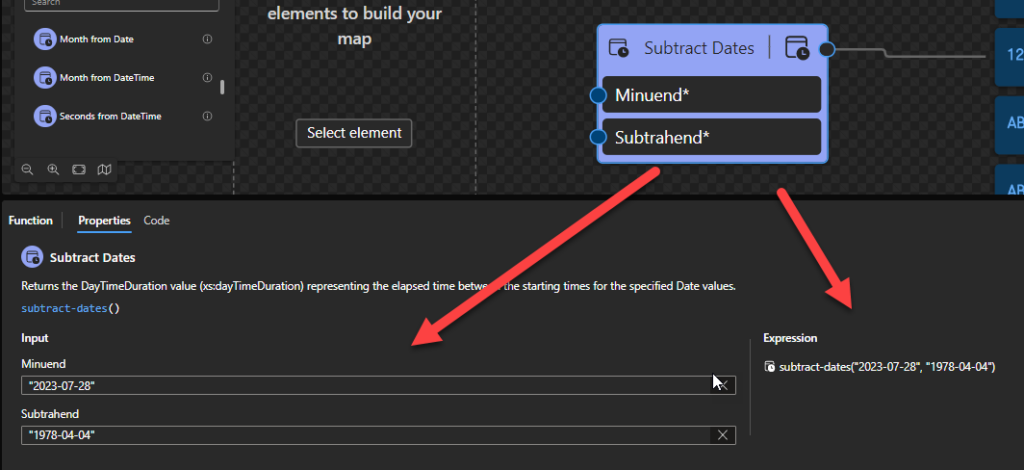
This function states that it will return the DayTimeDuration value (xs:dayTimeDuration) representing the elapsed time between the starting times for the specified Date values.
Behind the scenes, this function is translated to the following XPath expression: xs:dayTimeDuration(xs:date($arg1) – xs:date($arg2))
xs:dayTimeDuration(xs:date($arg1) – xs:date($arg2)) as xs:dayTimeDuration
Rules:
If the starting instant of $arg1 precedes in time the starting instant of $arg2, then the returned value is a negative duration.
Returns the xs:dayTimeDuration (for example, “PT2H12M”) that corresponds to the elapsed time between the starting instant of $arg1 and the starting instant of $arg2.
The $arg1 and $arg2 need to be an xs:date in the following format yyyy-MM-DD or yyyy-MM-DDZ.
Sample:
The following Data Mapper transformation rule: subtract-dates(“2023-07-28”, “1978-04-04”) will be translated to {xs:dayTimeDuration(xs:date(‘2023-07-28’) – xs:date(‘1978-04-04’))} and the return will be P16551D.
Subtract DateTimes
This function states that it will return a DayTimeDuration value (xs:dayTimeDuration) representing the elapsed time between the specified DateTime values.
Behind the scenes, this function is translated to the following XPath expression: xs:dayTimeDuration(xs:dateTime($arg1) – xs:dateTime($arg2))
xs:dayTimeDuration(xs:dateTime($arg1) – xs:dateTime($arg2)) as xs:dayTimeDuration
Rules:
If the normalized value of $arg1 precedes in time the normalized value of $arg2, then the returned value is a negative duration.
Returns an xs:dayTimeDuration representing the amount of elapsed time between the instants arg2 and arg1.
The $arg1 and $arg2 need to be an xs:dateTime in the following format yyyy-MM-DDTHH:mm:ss or yyyy-MM-DDTHH:mm:ss-hh:mm.
Sample:
The following Data Mapper transformation rule: subtract-datetimes(“2023-07-28T23:00:00”, “1978-04-04T10:30:00”) will be translated to {xs:dayTimeDuration(xs:dateTime(‘2023-07-28T23:00:00’) – xs:dateTime(‘1978-04-04T10:30:00’))} and the return will be P16551DT12H30M.
Subtract DateTime from Date
This function states that it will subtract a positive or negative DayTime duration from the specified Date value (xs:date). Returns a Date that’s respectively before or after the specified Date.
Behind the scenes, this function is translated to the following XPath expression: xs:date(xs:date($arg1) – xs:dayTimeDuration($arg2))
xs:date(xs:date($arg1) – xs:dayTimeDuration($arg2)) as xs:date
Rules:
Returns the xs:date that is a given duration before a specified xs:date (or after, if the duration is negative).
The $arg1 needs to be an xs:date in the following format yyyy-MM-DD or yyyy-MM-DDZ.
The $arg1 needs to be an xs:dayTimeDuration in the ISO 8601 format. ISO-8601 standard was created to elaborate crystal clear language to talk about dates and periods and avoid misinterpretation. Where Duration (“how long“) is represented with the format P[n]Y[n]M[n]DT[n]H[n]M[n]S, where n is a number.
Sample:
The following Data Mapper transformation rule: subtract-daytime-from-date(“2023-07-28”, “P16551D”) will be translated to {xs:date(xs:date(‘2023-07-28’) – xs:dayTimeDuration(‘P16551D’))} and the return will be 1978-04-04.
Subtract DateTime from DateTime
This function states that it will subtract a positive or negative DayTime duration from the specified DateTime value (xs:dateTime). Returns a DateTime that’s respectively before or after the specified DateTime.
Behind the scenes, this function is translated to the following XPath expression: xs:dateTime(xs:dateTime($arg1) – xs:dayTimeDuration($arg2))
xs:dateTime(xs:dateTime($arg1) – xs:dayTimeDuration($arg2)) as xs:dateTime
Rules:
Returns the xs:dateTime that is a given duration before a specified xs:dateTime (or after, if the duration is negative).
The $arg1 needs to be an xs:dateTime in the following format yyyy-MM-DDTHH:mm:ss or yyyy-MM-DDTHH:mm:ss-hh:mm.
The $arg1 needs to be an xs:dayTimeDuration in the ISO 8601 format. ISO-8601 standard was created to elaborate crystal clear language to talk about dates and periods and avoid misinterpretation. Where Duration (“how long“) is represented with the format P[n]Y[n]M[n]DT[n]H[n]M[n]S, where n is a number.
Sample:
The following Data Mapper transformation rule: subtract-daytime-from-datetime(“2023-07-28T23:00:00”, “P16551DT12H30M”) will be translated to {xs:dateTime(xs:dateTime(‘2023-07-28T23:00:00’) – xs:dayTimeDuration(‘P16551DT12H30M’))} and the return will be 1978-04-04T10:30:00.
Subtract DateTime from Time
This function states that it will subtract a positive or negative Time duration from the specified Time value (xs:time). Returns a Time that’s respectively before or after the specified Time. A duration that wraps around past midnight also returns a later Time.
Behind the scenes, this function is translated to the following XPath expression: xs:time(xs:time($arg1) – xs:dayTimeDuration($arg2))
xs:time(xs:time($arg1) – xs:dayTimeDuration($arg2)) as xs:time
Rules:
Returns the xs:time value that is a given duration before a specified xs:time (or after, if the duration is negative or causes wrap-around past midnight)
The $arg1 needs to be an xs:time in the following format HH:mm:ss or HH:mm:ss-hh:mm.
The $arg1 needs to be an xs:dayTimeDuration in the ISO 8601 format. ISO-8601 standard was created to elaborate crystal clear language to talk about dates and periods and avoid misinterpretation. Where Duration (“how long“) is represented with the format P[n]Y[n]M[n]DT[n]H[n]M[n]S, where n is a number.
Sample:
The following Data Mapper transformation rule: subtract-daytime-from-time(“11:00:00”, “PT30M”) will be translated to {xs:time(xs:time(’11:00:00?) – xs:dayTimeDuration(‘PT30M’))} and the return will be 10:30:00.
Subtract Times
This function states that it will return a DayTimeDuration value (xs:dayTimeDuration) representing the elapsed time between the specified Time values, which are treated as times on the same date.
Behind the scenes, this function is translated to the following XPath expression: xs:dayTimeDuration(xs:time($arg1) – xs:time($arg2))
xs:dayTimeDuration(xs:time($arg1) – xs:time($arg2)) as xs:dayTimeDuration
Rules:
Returns the xs:dayTimeDuration that corresponds to the elapsed time between the values of $arg2 and $arg1 treated as times on the same date.
The $arg1 and $arg2 need to be an xs:time in the following format HH:mm:ss or HH:mm:ss-hh:mm.
Sample:
The following Data Mapper transformation rule: subtract-times(“10:30:00”, “10:00:00”) will be translated to {xs:dayTimeDuration(xs:time(’10:30:00?) – xs:time(’10:00:00?))} and the return will be PT30M.
Subtract YearMonth from Date
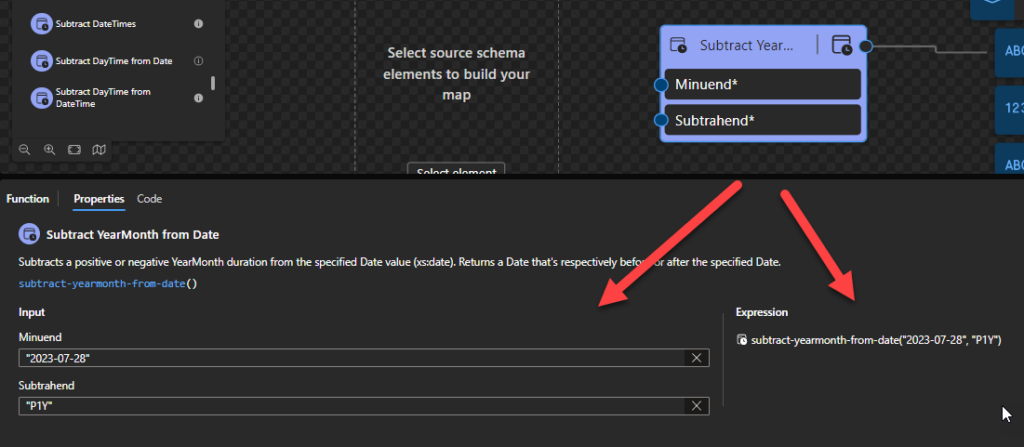
This function states that it will subtract a positive or negative YearMonth duration from the specified Date value (xs:date). Returns a Date that’s respectively before or after the specified Date.
Behind the scenes, this function is translated to the following XPath expression: xs:date(xs:date($arg1) – xs:yearMonthDuration($arg2))
xs:date(xs:date($arg1) – xs:yearMonthDuration($arg2)) as xs:date
Rules:
Returns the xs:date that is a given duration after a specified xs:date (or before, if the duration is negative).
The $arg1 needs to be an xs:date in the following format yyyy-MM-DD or yyyy-MM-DDZ.
The $arg2 needs to be an interval in ISO 8601 format. ISO-8601 standard was created to elaborate crystal clear language to discuss dates and periods and avoid misinterpretation. Where Duration (“how long“) is represented with the format P[n]Y[n], where n is a number – xs:yearMonthDuration.
Sample:
The following Data Mapper transformation rule: subtract-yearmonth-from-date(“2023-07-28”, “P1Y”) will be translated to {xs:date(xs:date(‘2023-07-28’) – xs:yearMonthDuration(‘P1Y’))} and the return will be 2022-07-28.
Subtract YearMonth from DateTime
This function states that it will subtract a positive or negative YearMonth duration from the specified DateTime value (xs:dateTime). Returns a DateTime that’s respectively before or after the specified DateTime.
Behind the scenes, this function is translated to the following XPath expression: xs:dateTime(xs:dateTime($arg1) – xs:yearMonthDuration($arg2)
xs:dateTime(xs:dateTime($arg1) – xs:yearMonthDuration($arg2) as xs:dateTime
Rules:
Returns the xs:dateTime that is a given duration before a specified xs:dateTime (or after, if the duration is negative).
The $arg1 needs to be an xs:dateTime in the following format yyyy-MM-DDTHH:mm:ss or yyyy-MM-DDTHH:mm:ss-hh:mm.
The $arg2 needs to be an interval in ISO 8601 format. ISO-8601 standard was created to elaborate crystal clear language to discuss dates and periods and avoid misinterpretation. Where Duration (“how long“) is represented with the format P[n]Y[n], where n is a number – xs:yearMonthDuration.
Sample:
The following Data Mapper transformation rule: subtract-yearmonth-from-datetime(“2023-07-28T12:00:00”, “P1Y”) will be translated to {xs:dateTime(xs:dateTime(‘2023-07-28T12:00:00’) – xs:yearMonthDuration(‘P1Y’))} and the return will be 2022-07-28T12:00:00.
Stay tuned for the fifth part of this blog post.
Hope you find this helpful! So, if you liked the content or found it useful and want to help me write more, you can buy (or help buy) my son a Star Wars Lego!
Author: Sandro Pereira
Sandro Pereira lives in Portugal and works as a consultant at DevScope. In the past years, he has been working on implementing Integration scenarios both on-premises and cloud for various clients, each with different scenarios from a technical point of view, size, and criticality, using Microsoft Azure, Microsoft BizTalk Server and different technologies like AS2, EDI, RosettaNet, SAP, TIBCO etc.
He is a regular blogger, international speaker, and technical reviewer of several BizTalk books all focused on Integration. He is also the author of the book “BizTalk Mapping Patterns & Best Practices”. He has been awarded MVP since 2011 for his contributions to the integration community.
View all posts by Sandro Pereira