Do you feel difficult to keep up to date on all the frequent updates and announcements in the Microsoft Integration platform and Azure iPaaS?
Integration weekly update can be your solution. It’s a weekly update on the topics related to Integration – enterprise integration, robust & scalable messaging capabilities and Citizen Integration capabilities empowered by Microsoft platform to deliver value to the business.
If you want to receive these updates weekly, then don’t forget to Subscribe!
This is a collection of 5 different image formats of the new UnofficialBizTalk Server 2020 logo (or logotype), three of them are available in vector format (ai, eps and pdf) that will allow you to use and resize without losing quality:
BizTalkServer2020-linhas.ai
BizTalkServer2020-linhas.eps
BizTalkServer2020-linhas.pdf
BizTalkServer2020-linhas-01.jpg
BizTalkServer2020-linhas-01.png
You can be used to customize a banner for your blog, an article, making flyers, stickers, brochure or rollups for BizTalk Server or integration events/conferences and much more – your imagination is the limit!
Again, this is not the official logo because the product is not yet available, so I don’t know what Microsoft will do. This is made by taking into consideration the previous logos of the product. Remember that in BizTalk Server 2016 Microsoft decided to drop the fancy Server icon from the logo and the version identification, it is a simple generic logo with just Text with the intention to be consistent in this and further versions of BizTalk Server. But people still prefer to use the “old” format just because it is easier to visual specify the version of BizTalk Server… for that reason only, there you have this new logo with 2020!
Thanks to Cristovão Silva (UX/UI DESIGNER at DevScope) for helping me creating these resources.
BizTalk Server 2020 logo in vector format (3.1 MB) Microsoft | TechNet Gallery
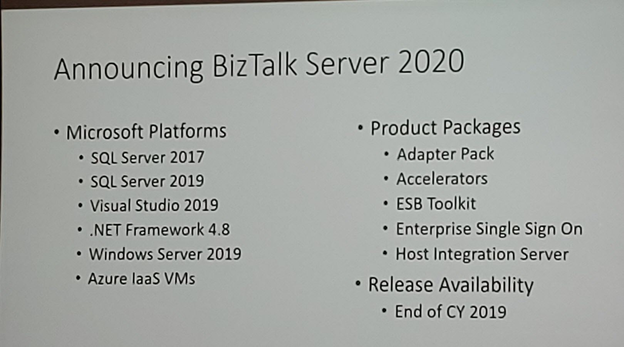
After once again many speculations and controversy caused in INTEGRATE 2018 London event about the vNext release of BizTalk Server, promptly denied two weeks after the event with a formal announcement from the Microsoft Integration team, finally some excellent news for the Microsoft Integration community and all the clients out there that still consider MSFT Integration Stack the best in the market. Paul Larson announced in his session at INTEGRATE 2019 London event the release of BizTalk Server 2020 to be scheduled for the end of this year.
Of course, one of the main reasons for this new version is about Platform Alignment. This new version will support:
SQL Server 2019 and SQL Server 2017 (still not sure if SQL Server 2016 will be also supported)
Windows Server 2019 and I’m almost sure that Windows Server 2016 will still be supported
What can we expect… more in BizTalk Server 2020 release?
One of the greatest things for customers that are running BizTalk Server Standard Edition is that BizTalk Server 2020 already comes built-in with all BizTalk Server 2016 Feature Pack Features, that means that all these features are now part of the product in all versions:
A new set of cloud adapters:
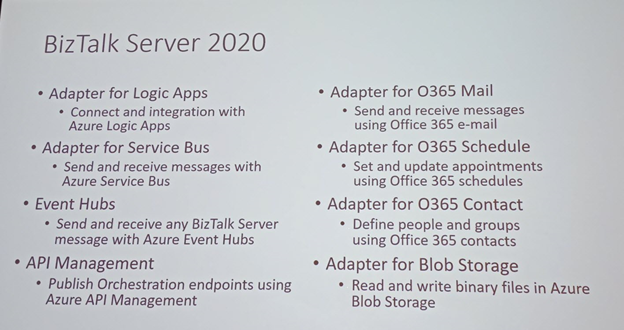
Logic Apps adapter: that will allow you to easily connect and easily extend part of your integration with Azure Logic Apps, making it easier to implement robust hybrid solutions;
Service Bus adapter: that will allow you to send and receive messages with Azure Service Bus;
Event Hubs adapter: that will allow you to send and receive messages with Azure Event Hubs;
Office 365 Mail adapter: that will allow you to send and receive messages using Office 365 e-mail;
Office 365 Schedule adapter: that will allow you to set and update appointments using Office 365 schedules;
Office 365 Contact adapter: that will allow you to define people and groups using Office 365 contacts;
Blob Storage adapter: that will allow you to read and write binary files in Azure Blob Storage;
API Management connectivity: the availability to publish an Orchestration endpoint directly on Azure API Management;
Deployments with VSTS: Application Life cycle Management feature will help you to perform automatic deployments in an improved and easy way using Visual Studio Team System (VSTS);
Security features:
Transport Layer Security 1.2: TLS 1.2 is now fully supported in BizTalk Server. This includes all the adapters and accelerators. You can also disable SSL, TLS 1.0, and TLS 1.1 in BizTalk Server;
SQL Server Encrypted Data: You will be able to read and write to SQL Server always encrypted columns using BizTalk Server WCF-SQL adapter. The ColumnEncryptionSetting binding property is used to enable or disable the functionality to get decrypted/encrypted column values from an Always Encrypted database;
BizTalk Database Backup to Blob Storage: the availability to backup BizTalk Server databases, using the default backup job directly to an Azure Blob Storage;
Advanced Scheduling: the availability to set up recurrence on BizTalk Server receive locations with greater precision using times zones, months, weeks, and days;
Application Insights: the availability to send BizTalk Server tracking data to Application Insights for extensible analytics, to understand performance and usage of BizTalk Server;
Power BI operational data feed in BizTalk Server: Analyze and report BizTalk Server tracking data template, for use with Power Bi visualizations and dashboards;
Tracking data to Azure: the availability to send BizTalk tracking data to Azure Application Insights or Event Hubs
BizTalk Server Rest Management API’s: you will able to manage BizTalk Server environments using standard RESTful Web Services APIs. You will have now available REST-based API for pretty much for any management activities like retrieving Applications, Hosts, Send Ports, Receive Ports, Receive Locations, Orchestrations, Schemas, Maps, EDI specific things like Agreements, Batches, Parties, Policies, and so on.
But you may expect some small improvements like:
Administration (read-only): New set of privileged to access to the BizTalk Server Administration Console by allowing you to restrict unprivileged administrators to viewing existing configurations
Enterprise Single Sign-On 2020
and others not publicly available yet… let’s wait.
Along BizTalk Server 2020, we will also have a new version of Host Integration Server (HIS) with the same platform alignment that BizTalk Server but also with:
With this release, Microsoft continues to deliver a mature, reliable and stable integration server that honors the trust of the thousands of customers who run their mission-critical business processes on BizTalk Server.
Do you feel difficult to keep up to date on all the frequent updates and announcements in the Microsoft Integration platform and Azure iPaaS?
Integration weekly update can be your solution. It’s a weekly update on the topics related to Integration – enterprise integration, robust & scalable messaging capabilities and Citizen Integration capabilities empowered by Microsoft platform to deliver value to the business.
If you want to receive these updates weekly, then don’t forget to Subscribe!
Integrate is the premier integration conference for everyone working in the Microsoft Integration Space. Integrate happens annually in London and this year it happened from 3 to 5 June. The 3-day event, with speakers from the Microsoft Product Group and from the Global Integration Community, is the ideal event to listen to leading Integration Specialists and learn what is coming next in Microsoft integration. This year a lot of newer people were joining the event. Initially, the event used to be a BizTalk Server focused event however, from last few years it expanded the scope to general integration technologies in Microsoft space, including Azure Integration capabilities.
The Value of Hybrid Integration
Paul Larsen, a Principal Program Manager for the Microsoft Corporation in Redmond, presented a session on “The Value of Hybrid Integration”. At Microsoft, Paul leads the Host Integration engineering team to deliver and support Azure, BizTalk Server, SQL Server, Office, and Windows connectors to existing IBM systems. At Integrate, he started the session by explaining the legacy of BizTalk Server and explained the meaning of the word Hybrid with some examples.
BizTalk Server 2020 Announcement
After that, Paul made the big announcement of “BizTalk Server 2020” and he also announced it will be released at the end of 2019.
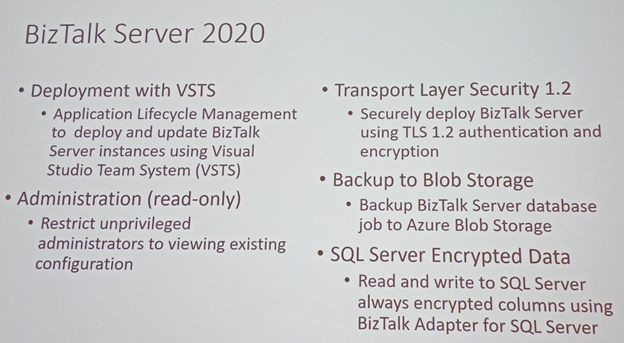
Important feature updates in BizTalk Server 2020 are:
Integrate cloud Services with built-in adapters for cloud, Logic Apps to On-Premise Gateway, Service Bus, Event Hubs, API Management, O365 Mail, O365 Schedule, O365 Contact, Blob Storage (Dev) API management to all the resources (On-Premise and Cloud)
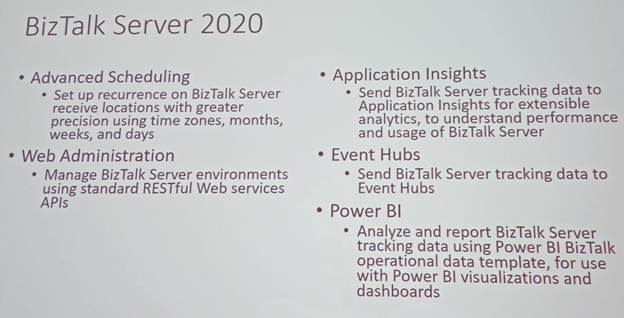
Manage BizTalk Server environments by using the new BizTalk Server REST API’s
The Blob Storage adapter is still under development. Using File adapters which are published as a UNC Endpoint is not straight forward, as pluggable. Using Blob storage adapter will be a useful feature that will help administrators to, for example, have the Backup BizTalk Server job write the backups to Azure Blob storage
Secure the BizTalk Server Infrastructure settings with Read-only administrator view
Deployment with VSTS – Application Life Cycle Management to deploy and update BizTalk Server instances using Visual Studio Team System
Transport Layer Security 1.2– Securely deploy BizTalk Server using TLS 1.2 authentication and encryption
SQL Server Encrypted Data– Read and write to SQL Server with Always encrypted columns using BizTalk Adapter for SQL Server
Advanced Scheduling -Set up recurrence on BizTalk Server receive locations with greater precision using time zones, months, weeks, and days
Application Insights– Send BizTalk Server tracking data to Application Insights for extensible analytics, to understand performance and usage of BizTalk Server
Event Hubs – Send BizTalk Server tracking data to Event Hubs
Power BI Integration – Analyze and report BizTalk Server tracking data using Power BI. BizTalk operational data template, for use with Power BI visualizations and dashboards
.NET components continue to evolve over the last release of the .NET MQ Client.
A new version of Enterprise Single Sign-On
Host Integration Services
Host Integration Services has improved a lot in this version of BizTalk Server 2020. In short, most of the packages in BizTalk Server are getting updated in this version:
HIS as add on to BizTalk licensing
New Microsoft platforms
New IBM platforms – integrated feature packs
BizTalk Server Migration Tool
Microsoft IT develops the BizTalk Server Migration tool which they use to migrate their own BizTalk environments. Because the architecture of BizTalk Server is kept common between BizTalk Server 2010,2013, 2013 R2 and 2016, the migration does not affect the underlying layer of BizTalk Components. In addition, as Microsoft makes this tool available to BizTalk users, this tool will be helpful for them on dehydrating the configuration on an old BizTalk server and re-hydrate that configuration to new Azure IAAS or VM.
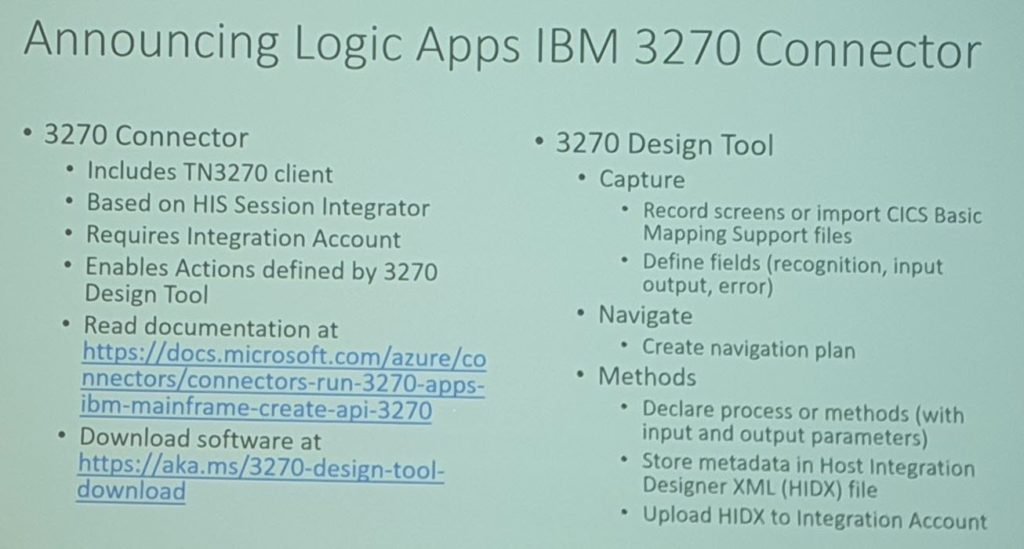
Currently, the Logic Apps connector for IBM 3270 emulation is available in preview. In short, the Microsoft Connector for 3270 integrates Azure applications with resources available via TN 3270 Screen Scraping.
Robotic Process Automation (RPA) is an Industrial trend in cloud computing which offers screen scraping capabilities. Host Integration Server extends the Integration to the TN3270 connector with Telnet or TCP protocol to connect to IBM Mainframe systems. However, you require an Integration account to be able to connect the IBM 3270 adapters.
After that, Paul demonstrated the Integration of IBM mainframe programs and Azure Cloud application with 3270 Logic App connector. After the Demo, he made a couple of announcements about CICS, IMS screen clients for 3270/5050 connectors and VSAM, DDM .NET clients for IBM file systems.
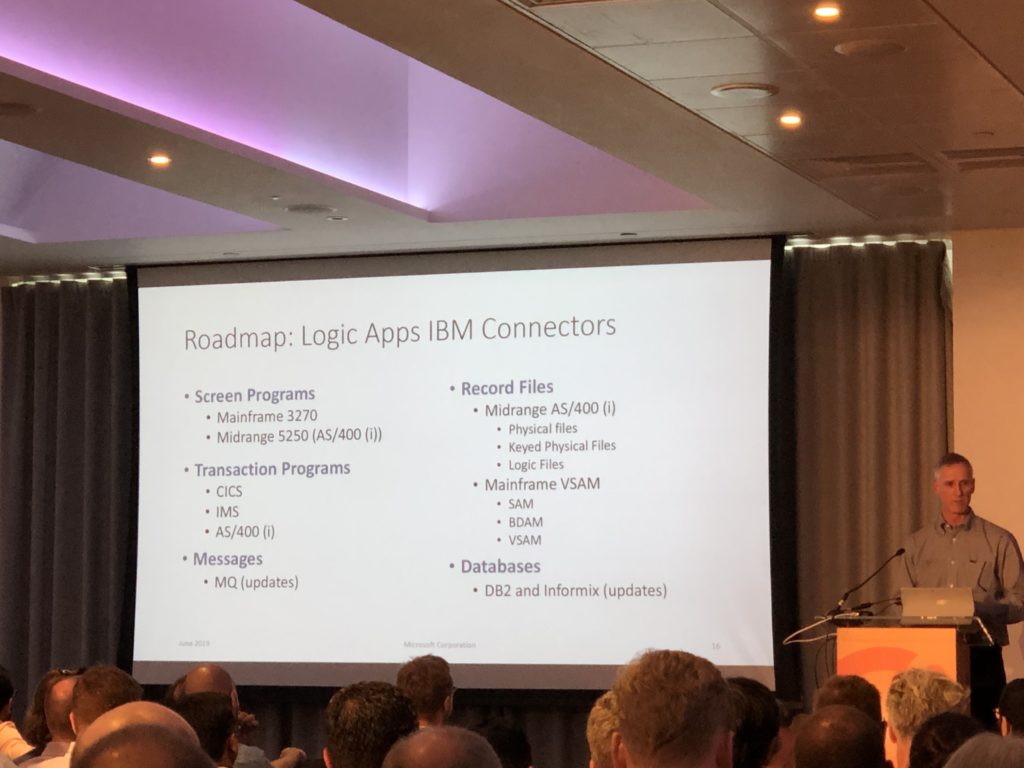
Logic Apps IBM Connectors Road Map
In conclusion, Paul touched base on the Logic Apps IBM Connectors Road Map beyond the 2020 version. For instance, BizTalk Server vNext version will include improvement on a number of Logic Apps connectors:
3270 IBM Connector Improvement
Midrange 5250 AS connector
Mainframe SAM Connectors
DB2 and Informix Support
Conclusion
The well-informed reader might have noticed that several BizTalk Server 2020 features also appear in the so-called Feature Packs for BizTalk Server 2016 which have been released by Microsoft. However, BizTalk Server 2020 also helps in aligning with the latest versions of the platform products. So, this release of BizTalk Server will be of use for all BizTalk Server customers.
Secondly, the release of BizTalk Server 2020 is good news for all existing BizTalk users, as it indicates that Microsoft covers them for the next couple of years. Similarly, we notice that customers who are just starting their integration journey, also choose for Microsoft BizTalk Server. In other words, this new release will be very helpful for them as it will help them with both their on-premise integrations, as well with their hybrid integrations.
The announcement of BizTalk Server 2020 was done during Integrate 2019 in London. However, in case you missed the event, there is no need to worry, because at the end of this month, Integrate will also come to the US! So, if you are still not sure if you should attend Integrate 2019 US, then this blog post, written by our CEO Saravana Kumar, might convince you to participate in the world-wide premier Microsoft Integration event.




 BizTalk Server 2020 logo in vector format (3.1 MB)