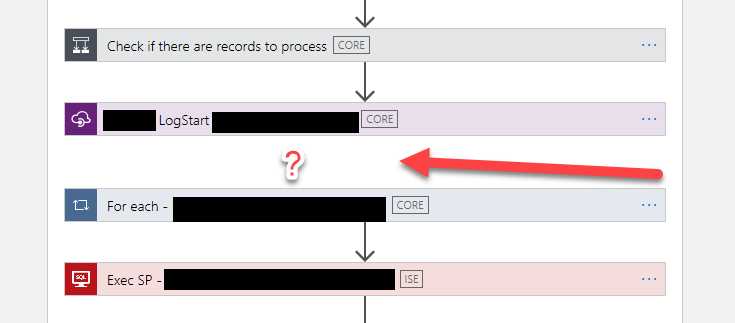
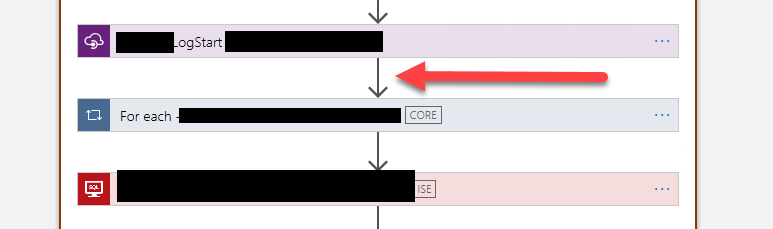
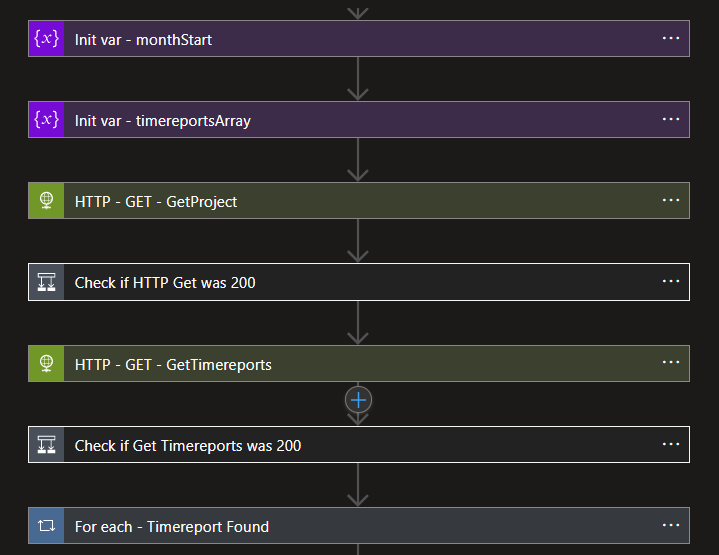
Today while developing an existing Logic App Consumption in Visual Studio 2019, yes, we still don’t have support for Visual Studio 2022, I realized that for some unknown reason, one of the actions, in my case a For each action, didn’t have the normal arrow – that indicates the precedence of the previous step in the Logic App designer as you can see in the picture above – for some unknown reason it evaporated:
I tried to re-order (or move) the For each action in the designer to see if I could fix this issue, without success. A good option that you should always try is to close that file and open it again to force a refresh on the designer – that solves many issues – but it didn’t do the trick on this issue.
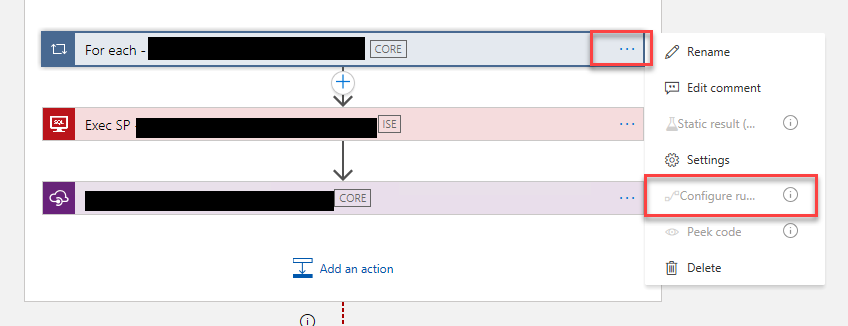
I couldn’t by Designer solve this issue because the property Configure run after settings were disabled:
I honestly don’t know what would happen if I tried to deploy this Logic App in this situation, but it shouldn’t be good. And this situation was causing me inconvenience when moving and reordering the actions. So I have no other option than try to fix it.
Cause
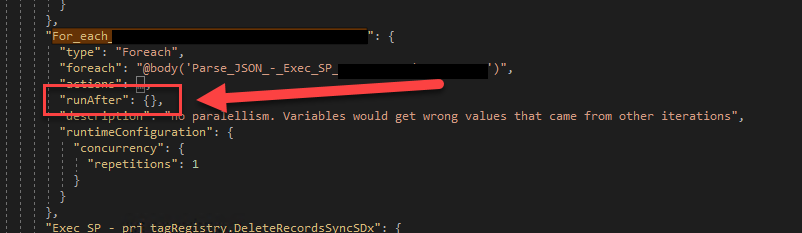
When inspecting the Code view, I realized that, again, for some unknown reason, the runAfter property was empty. The Logic App designer normally fills this value to run if the previous action Succeeded.
Solution
To fix this issue or behavior, we need to manually configure the runAfter property like:
Where the Name_Previous_Action is the name of the previous action on the workflow, the spaces in the action name are replaced by underscores.
After that, if you return to the designer, you will see everything back to normality:
Hope you find this useful! So, if you liked the content or found it useful and want to help me write more content, you can buy (or help buy) my son a Star Wars Lego!
Author: Sandro Pereira
Sandro Pereira lives in Portugal and works as a consultant at DevScope. In the past years, he has been working on implementing Integration scenarios both on-premises and cloud for various clients, each with different scenarios from a technical point of view, size, and criticality, using Microsoft Azure, Microsoft BizTalk Server and different technologies like AS2, EDI, RosettaNet, SAP, TIBCO etc.
He is a regular blogger, international speaker, and technical reviewer of several BizTalk books all focused on Integration. He is also the author of the book “BizTalk Mapping Patterns & Best Practices”. He has been awarded MVP since 2011 for his contributions to the integration community.
View all posts by Sandro Pereira
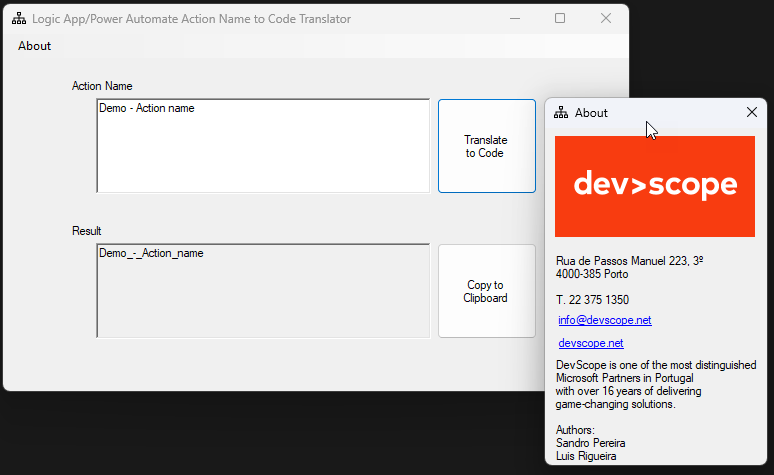
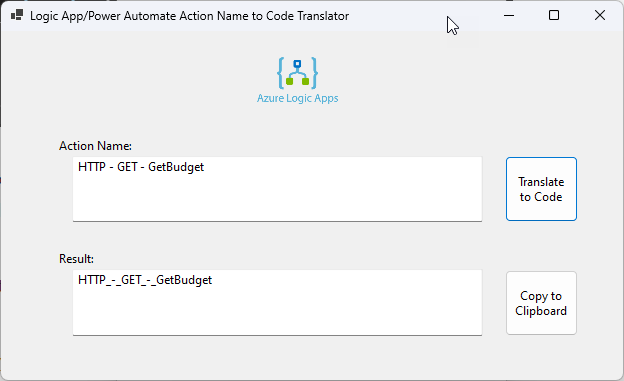
Yesterday I designed the idea and the main layout of a simple tool to translate Action Names or Trigger names from Logic App Design to Code View equivalent and gave free freedom to my team to implement it. Diogo Formosinho created a .NET Core application, the tool we published yesterday: Logic App/Power Automate Action Name to Code Translator Tool.
On the other hand, Luis Rigueira decided to go more old school and create a simple .NET Framework Windows Application. Both do the same and have almost the same look and feel. The main difference is that one is built on top of .NET Core, and the other on top of .NET Framework 4.7.2.
Once again, the major problem is that when we need to use the name of the Actions inside Expressions, many times, we need to replace the spaces of the action or trigger name with underscores. If we see the Code View or peek at the code of the action, we will see that all spaces are indeed replaced by _ (underscores). And this is sometimes a time-consuming and annoying task. This tool is so simple and stupid, and I love it! It is a tool that will improve productivity for Logic App Developers!
This second version of the tool is a Windows Application built in .NET Framework 4.7.2. and you can download, for free, the here:
Download
Hope you find this useful! So, if you liked the content or found it useful and want to help me write more content, you can buy (or help buy) my son a Star Wars Lego!
Author: Sandro Pereira
Sandro Pereira lives in Portugal and works as a consultant at DevScope. In the past years, he has been working on implementing Integration scenarios both on-premises and cloud for various clients, each with different scenarios from a technical point of view, size, and criticality, using Microsoft Azure, Microsoft BizTalk Server and different technologies like AS2, EDI, RosettaNet, SAP, TIBCO etc.
He is a regular blogger, international speaker, and technical reviewer of several BizTalk books all focused on Integration. He is also the author of the book “BizTalk Mapping Patterns & Best Practices”. He has been awarded MVP since 2011 for his contributions to the integration community.
View all posts by Sandro Pereira
This tool goes directly to my top favorite tools for a simple reason. It saves me from the annoying work of renaming the Action names every time I need to use them in an expression! It is a time saver!
The triggers or action names inside the Logic App or Power Automate workflow are not the same as we see in the Logic App Designer and behind the scenes on the code view. On the Logic App Designer, the trigger or action name allows you to provide a name between a minimum of 1 and a maximum of 80 characters. Contrary to what happens in Power Automates, you can use all types of characters. In the Logic App, the name of the actions (or triggers) cannot contain any control characters or any of the following symbols:
‘
<
>
%
&
?
/
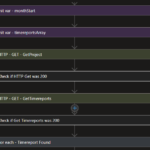
One of the characters you can use, both in Logic App and Power Automate, is the space as you can see in the picture:
HTTP – GET – GetProject
Check if HTTP Get was 200
HTTP – GET – GetTimereports
and many others
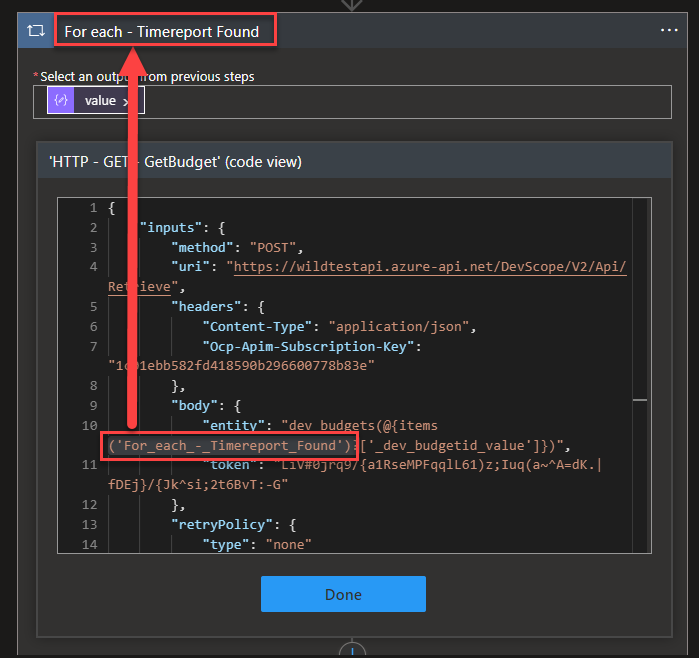
The problem is that when we need to use them inside Expressions, the spaces of the action or trigger name need to be replaced by underscores. If we see the Code View or peek at the code of the action, we will see that all spaces are indeed replaced by _ (underscores)
If we use the tokens (dynamic content window) to set up these values/configurations, the Logic App designer is smart enough to replace the spaces with underscores. However:
if we are using them inside Expressions, sometimes we need to set up these names manually.
If we go to Code View and try to search for an action, then we need to remember to replace the spaces with underscores.
Trust me that this is just an annoying and time-consuming task after a while. For this reason, my team and I decided to create a simple and basic tool that translates the action name that you provide by its equivalent in the Code View.
It is simple and stupid, and I love it!
Download
This first version of the tool is a Windows Application built in .NET Core. and you can download, for free, the here:
Hope you find this useful! So, if you liked the content or found it useful and want to help me write more content, you can buy (or help buy) my son a Star Wars Lego!
Author: Sandro Pereira
Sandro Pereira lives in Portugal and works as a consultant at DevScope. In the past years, he has been working on implementing Integration scenarios both on-premises and cloud for various clients, each with different scenarios from a technical point of view, size, and criticality, using Microsoft Azure, Microsoft BizTalk Server and different technologies like AS2, EDI, RosettaNet, SAP, TIBCO etc.
He is a regular blogger, international speaker, and technical reviewer of several BizTalk books all focused on Integration. He is also the author of the book “BizTalk Mapping Patterns & Best Practices”. He has been awarded MVP since 2011 for his contributions to the integration community.
View all posts by Sandro Pereira