Unfortunately, there are no out-of-the-box capabilities inside Logic Apps, Consumption or Standard, to zip (or compress) files. You may be wondering why we need this type of capability. Well, there are legacy systems or integrations that require these capabilities, especially when the communication channel is email.
And yes, still happens today! It is not uncommon that some partners require that messages (or files) be sent by email, and to minimize the impact (to avoid reaching the attachment size limit or filling the mailbox), to zip the attachment.
This is also very useful to migrate AS IS BizTalk Server solutions into Azure (in this case, AS-IS means without changing the solution requirements).
And what does this Azure Function do?
The ZipFile Azure Function is simply an Azure Function that zips an inbound file. This can later be sent in an attachment of an email, sent to a folder or storage account.
Where can I download it?
You can download the complete Azure Functions source code here:
Hope you find this helpful! So, if you liked the content or found it useful and want to help me write more, you can buy (or help me buy) my son a Star Wars Lego!
Thanks to my team member Luís Rigueira for helping me realize and implement this idea.
Author: Sandro Pereira
Sandro Pereira lives in Portugal and works as a consultant at DevScope. In the past years, he has been working on implementing Integration scenarios both on-premises and cloud for various clients, each with different scenarios from a technical point of view, size, and criticality, using Microsoft Azure, Microsoft BizTalk Server and different technologies like AS2, EDI, RosettaNet, SAP, TIBCO etc.
He is a regular blogger, international speaker, and technical reviewer of several BizTalk books all focused on Integration. He is also the author of the book “BizTalk Mapping Patterns & Best Practices”. He has been awarded MVP since 2011 for his contributions to the integration community.
View all posts by Sandro Pereira
In my previous update, I discussed my intention to release a new major version of my stencils. However, I’ve opted for a gradual approach, releasing minor updates along the way. This way, it becomes easier for me because I don’t need to spend long periods allocated to this task, and at the same time, all of you can start enjoying these new icons.
Keeping my promise, I’m presenting another update. I hope it meets your expectations! If you have any specific requests, don’t hesitate to share them with me.
What’s new in this version? (for now)
The main goal of this release was to provide the new icons present in the Azure Portal, on the Power Platform, and new existing Services. In this version, the changes and additions are:
New stencil packages: Additional stencil packages were incorporated into this project to enhance the discoverability of shapes:
MIS Azure Integration Services: this file contains shapes related to Azure Integration Service and messaging.
MIS Microsoft Fabric: this file contains shapes related to Microsoft Fabric – This was actually a request made by a community member. And credits to Sam Debruyn for these Microsoft SVG files. I only had the work to “convert” them into proper Visio stencils.
Move some shapes: I reorganized and relocated certain shapes to other files within this package.
SVG Files: Add new SVG files;
Special Highlights: API Center, Policy fragments, Event Grid, Event Grid: Namespace, Partner namespaces and Partner registrations or APIM Schemas
Microsoft Integration, Azure, Power Platform, Office 365, and much more Stencils Pack
Microsoft Integration, Azure, Power Platform, Office 365, and much more Stencils Pack it’s a Visio package that contains fully resizable Visio shapes (symbols/icons) that will help you to visually represent On-premise, Cloud or Hybrid Integration and Enterprise architectures scenarios (BizTalk Server, API Management, Logic Apps, Service Bus, Event Hub…), solutions diagrams and features or systems that use Microsoft Azure and related cloud and on-premises technologies in Visio 2016/2013:
BizTalk Server
Microsoft Azure
Integration
Integration Service Environments (ISE)
Logic Apps and Azure App Service in general (API Apps, Web Apps, and Mobile Apps)
Azure API Management
Messaging: Event Hubs, Event Grid, Service Bus, …
Azure IoT and Docker
AI, Machine Learning, Stream Analytics, Data Factory, Data Pipelines
SQL Server, DocumentDB, CosmosDB, MySQL, …
and so on
Microsoft Power Platform
Microsoft Flow
PowerApps
Power BI
Office365, SharePoint,…
DevOps and PowerShell
Security and Governance
And much more…
… and now non-related Microsoft technologies like:
SAP Stencils
The Microsoft Integration Stencils Pack is composed of 29 files:
Microsoft Integration Stencils
MIS Additional or Support Stencils
MIS AI and Machine Learning Stencils
MIS Apps and Systems Logo Stencils
MIS Azure Additional or Support Stencils
MIS Azure Integration Services
MIS Azure Mono Color
MIS Azure Old Versions
MIS Azure Others Stencils
MIS Azure Stencils
MIS Buildings Stencils
MIS Databases and Analytics Stencils
MIS Deprecated Stencils
MIS Developer Stencils
MIS Devices Stencils
MIS Files Stencils
MIS Generic Stencils
MIS Infrastructure Stencils
MIS Integration Fun
MIS Integration Patterns Stencils
MIS IoT Devices Stencils
MIS Microsoft Fabric
MIS Office365
MIS Power BI Stencils
MIS PowerApps and Flows Stencils
MIS SAP Stencils
MIS Security and Governance
MIS Servers (HEX) Stencils
MIS Users and Roles Stencils
You can use and resize without losing quality.
Download
You can download Microsoft Integration, Azure, BAPI, Office 365, and much more Stencils Pack for Visio from GitHub here:
Hope you find this helpful! So, if you liked the content or found it helpful and want to help me write more content, you can buy (or help buy) my son a Star Wars Lego!
Author: Sandro Pereira
Sandro Pereira lives in Portugal and works as a consultant at DevScope. In the past years, he has been working on implementing Integration scenarios both on-premises and cloud for various clients, each with different scenarios from a technical point of view, size, and criticality, using Microsoft Azure, Microsoft BizTalk Server and different technologies like AS2, EDI, RosettaNet, SAP, TIBCO etc.
He is a regular blogger, international speaker, and technical reviewer of several BizTalk books all focused on Integration. He is also the author of the book “BizTalk Mapping Patterns & Best Practices”. He has been awarded MVP since 2011 for his contributions to the integration community.
View all posts by Sandro Pereira
I’m thrilled to be back doing a presential event after INTEGRATE 2023! And I’m excited to return to Gothenburg and Sweden after seven years! It has been so long! The last time I was in Sweden was in 2016 when I presented at BizTalk User Group Sweden in Stockholm and Gothenburg.
This time, I was invited by Contica to present at their event: BizTalk to Azure -The Migration Journey. In fact, my presence should have happened last year, but for personal reasons, I had to cancel my trip. But I promised that I would come back, and here it is! And to make up for it, in double dose! I will be delivering not one but two talks:
1: Elevating Integration – The Roadmap from BizTalk Server: If you are embracing the journey to move your current BizTalk Server environment to the cloud, in this session, we’ll guide you through the steps, strategies, and best practices needed to successfully transition your integration solutions to the cloud. What phases in your migration journey are crucial? Which tools and technologies should you use? After this session, you’ll know about the dos and don’ts, as well as the key considerations that will empower the agility and scalability of Azure Integration Services. Join us to unlock the potential of Azure’s cloud-native services and streamline your integration landscape.
2: Azure Integration in Action – BizTalk to Azure Transition Case Studies: Join us for an engaging session where we bring Azure Integration Services to life through simple real-world case samples. Through these exercises, you’ll gain practical insights, strategies, and tips to ensure a smooth BizTalk Server migration while embracing Azure’s agility, scalability, and cost-efficiency. Take advantage of this opportunity to see Azure Integration Services in action, guiding your path toward a seamless and future-ready integration landscape.
The event will take place on September 28, 2023, between 5 PM – 9 PM (local time) at Contica, floor 9 Masthamnsgatan 1, Göteborg, Sweden.
Simon Stender will join me at this eventto deliver a session about Design and Infrastructure in Azure: Shaping Robust Infrastructure.
Link for the registration
See more about the event and sign up now to secure your seat at the event page: https://www.eventcreate.com/e/themigrationjourney
The event is free! See you there!
Author: Sandro Pereira
Sandro Pereira lives in Portugal and works as a consultant at DevScope. In the past years, he has been working on implementing Integration scenarios both on-premises and cloud for various clients, each with different scenarios from a technical point of view, size, and criticality, using Microsoft Azure, Microsoft BizTalk Server and different technologies like AS2, EDI, RosettaNet, SAP, TIBCO etc.
He is a regular blogger, international speaker, and technical reviewer of several BizTalk books all focused on Integration. He is also the author of the book “BizTalk Mapping Patterns & Best Practices”. He has been awarded MVP since 2011 for his contributions to the integration community.
View all posts by Sandro Pereira
Unfortunately, no Logic App connector can make the bridge to RabbitMQ, which makes this integration challenge a little bit more complicated. However, we have the ability to create an Azure Function by using the RabbitMQ trigger for Azure Functions to overpass this limitation.
And we saw and explained in our last blog post that Azure Functions integrates with RabbitMQ via triggers and bindings. The Azure Functions RabbitMQ extension allows you to send and receive messages using the RabbitMQ API with Functions.
The purpose of this video is to explain how you create a POC that allows you to receive a message in a RabbitMQ queue, and that event triggers the Azure Function that then will route the message to a Logic App.
This was a real problem presented by a client during one of our Logic Apps training courses, where they have RabbitMQ on-premises, and they did want to pull messages from a queue into a Logic App Consumption to integrate them with other systems.
Hope you find this helpful! So, if you liked the content or found it useful and want to help me write more content, you can buy (or help buy) my son a Star Wars Lego!
Big thanks to my team member Luís Rigueira for creating this video.
Author: Sandro Pereira
Sandro Pereira lives in Portugal and works as a consultant at DevScope. In the past years, he has been working on implementing Integration scenarios both on-premises and cloud for various clients, each with different scenarios from a technical point of view, size, and criticality, using Microsoft Azure, Microsoft BizTalk Server and different technologies like AS2, EDI, RosettaNet, SAP, TIBCO etc.
He is a regular blogger, international speaker, and technical reviewer of several BizTalk books all focused on Integration. He is also the author of the book “BizTalk Mapping Patterns & Best Practices”. He has been awarded MVP since 2011 for his contributions to the integration community.
View all posts by Sandro Pereira
Unfortunately, no Logic App connector can make the bridge to RabbitMQ, which makes this integration challenge a little bit more complicated. However, we have the ability to create an Azure Function by using the RabbitMQ trigger for Azure Functions to overpass this limitation.
Azure Functions integrates with RabbitMQ via triggers and bindings. The Azure Functions RabbitMQ extension allows you to send and receive messages using the RabbitMQ API with Functions.
So we pretend here to have an Azure Function that triggers when a message enters the queue and then routes that message into a Logic App.
And what does this Azure Function do?
This Azure Function is triggered by a RabbitMQmessage in a specified queue. When a message arrives, the function is executed and performs the following steps:
Logs an information message indicating that the function has been triggered.
Prepares the payload for a request by creating an object with a “Message” property containing the content of the RabbitMQ message.
Serializes the payload object into a JSON string.
Creates an HTTPrequest with the JSONpayload as the content and sets the content type to “application/json“.
Defines the URL of a LogicApp that will receive the HTTPrequest.
Sends the HTTP request to the LogicApp using the URLand payload.
Check the response status of the request.
If the request is successful (status code in the 2xx range), logs an information message indicating that the request was sent to the Logic App successfully.
If the requestfails (status code outside the 2xx range), logs an error message indicating the failure and includes the response’s status code.
In summary, this AzureFunction acts as a bridge between a RabbitMQ queue and a LogicApp. It receives messages from RabbitMQ, sends them as JSONpayloads to a specified LogicApp endpoint via an HTTPrequest, and logs the success or failure of the request.
To create the AzureFunction, we need to:
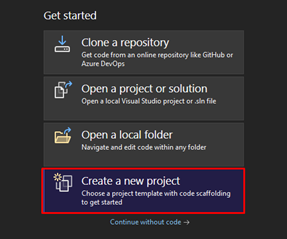
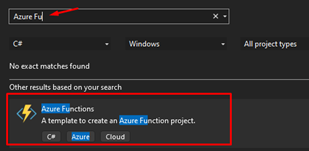
In Visual Studio 2022, click on Create a new project.
On the project template, choose Azure Functions.
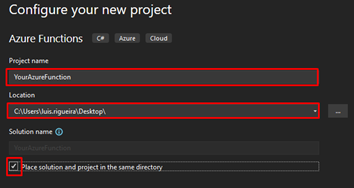
On the Configure your new project panel, give your Azure Function a name that makes sense to you and your coworkers, do not forget to start using proper names from day one! Choose the location of your Azure Function.
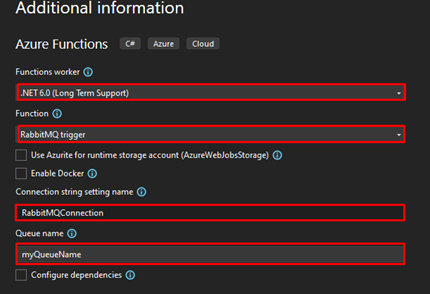
Click next, and now you need to configure some fields:
On the Function worker, choose .NET 6.0 (Long Term Support).
On Function, select the RabbitMQ trigger.
On the Connection string setting name, you can name the connection string as RabbitMQConnection.
On the Queue name, add the name of the queue you created previously.
Click on Create. After the project is created, use the following code you can find on GitHub here:
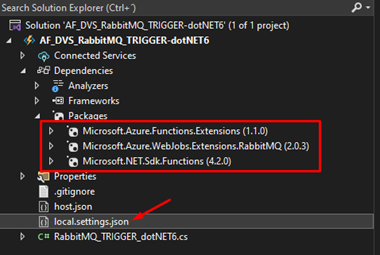
Add these NuGet packages to the solution.
Next on the file local.settings.json is where you will store the connection string that will make it possible to connect with RabbitMQ and to do that, this is how the file should look like:
Notice that you need to apply the proper configuration to the RabbitMQConnection keyword.
amqp://user:[email protected]:5672/my-vhost-v2 is just an example, but only the password and IP are fictitious in this example because you should have your own.
Where can I download it?
You can download the complete Azure Functions source code here:
Hope you find this helpful! So, if you liked the content or found it helpful and want to help me write more content, you can buy (or help buy) my son a Star Wars Lego!
Big thanks to my team member Luís Rigueira for helping me realize and implement this idea.
Author: Sandro Pereira
Sandro Pereira lives in Portugal and works as a consultant at DevScope. In the past years, he has been working on implementing Integration scenarios both on-premises and cloud for various clients, each with different scenarios from a technical point of view, size, and criticality, using Microsoft Azure, Microsoft BizTalk Server and different technologies like AS2, EDI, RosettaNet, SAP, TIBCO etc.
He is a regular blogger, international speaker, and technical reviewer of several BizTalk books all focused on Integration. He is also the author of the book “BizTalk Mapping Patterns & Best Practices”. He has been awarded MVP since 2011 for his contributions to the integration community.
View all posts by Sandro Pereira
In Google Web UI Perspective, we have the option to download the Google Docs (word) files in terms of the formats. From the Logic App perspective, we can easily list files from the folder, but converting that .gdoc files into Onedrive word files (.docx extension) using Azure Logic App is not a straightforward task since we don’t have a suitable connector to achieve it.
For this reason, we decide to create the Azure Function that will act as our connector to archive this transformation.
Google Documents (.gdoc) into Word Documents (.docx) Converter Azure Function
This is a simple function that will be able to convert a .gdoc file inside Google Drive into a base64 .docx encoded file.
The Azure Function will include the following NuGet packages:
Google.Apis.Auth (Version 1.58.0 or later): This package provides authentication and authorization functionality for accessing Google APIs.
Google.Apis.Docs.v1 (Version 1.58.0 or later): This package provides the Google Docs API client library, allowing you to interact with Google Docs.
Google.Apis.Drive.v3 (Version 1.58.0 or later): This package provides the Google Drive API client library, enabling you to interact with Google Drive.
And basically, what this function will do is:
The Azure Function is triggered from the Logic App (can be another method) by an HTTP POST request ([HttpTrigger(AuthorizationLevel.Anonymous, “post”, Route = null)]).
The function expects the fileId to be provided as a query parameter in the request URL and the X-Secret-Google-Credentials header to contain the Google service account credentials in JSON format.
If either the fileId or X-Secret-Google-Credentials is missing or empty, the function returns a BadRequest response indicating the missing information.
If the required parameters are provided, the function loads the service account credentials from the provided JSON file (GoogleCredential.FromJson(googleCredentialsJson)).
The function creates Drive and Docs services using the service account credentials.
It then makes a request to export the specified Google Docs file (service.Files.Export(googleDocsFileId, “application/vnd.openxmlformats-officedocument.wordprocessingml.document”)) and retrieves the resulting document as a stream.
The stream is used to create an HttpResponseMessage with the exported document as the content.
The response headers are set to indicate that the response content should be treated as a downloadable attachment with the file name “converted.docx” and the MIME type “application/vnd.openxmlformats-officedocument.wordprocessingml.document”.
Overall, the Azure Function converts a Google Docs file to a DOCX file format using the Google Docs API and returns the converted file in base64 in the HTTP response.
To use this function, you need to:
Pass the fileID as a query parameter to the Azure Function.
fileId=
And then, set the X-Secret-Google-Credentials header with this JSON format containing the Google credentials -> you can find this info when you create a private key on your Google service account.
You can download the complete Azure Functions source code here:
Hope you find this helpful! So, if you liked the content or found it helpful and want to help me write more content, you can buy (or help buy) my son a Star Wars Lego!
Big thanks to my team member Luís Rigueira for realizing this idea.
Author: Sandro Pereira
Sandro Pereira lives in Portugal and works as a consultant at DevScope. In the past years, he has been working on implementing Integration scenarios both on-premises and cloud for various clients, each with different scenarios from a technical point of view, size, and criticality, using Microsoft Azure, Microsoft BizTalk Server and different technologies like AS2, EDI, RosettaNet, SAP, TIBCO etc.
He is a regular blogger, international speaker, and technical reviewer of several BizTalk books all focused on Integration. He is also the author of the book “BizTalk Mapping Patterns & Best Practices”. He has been awarded MVP since 2011 for his contributions to the integration community.
View all posts by Sandro Pereira
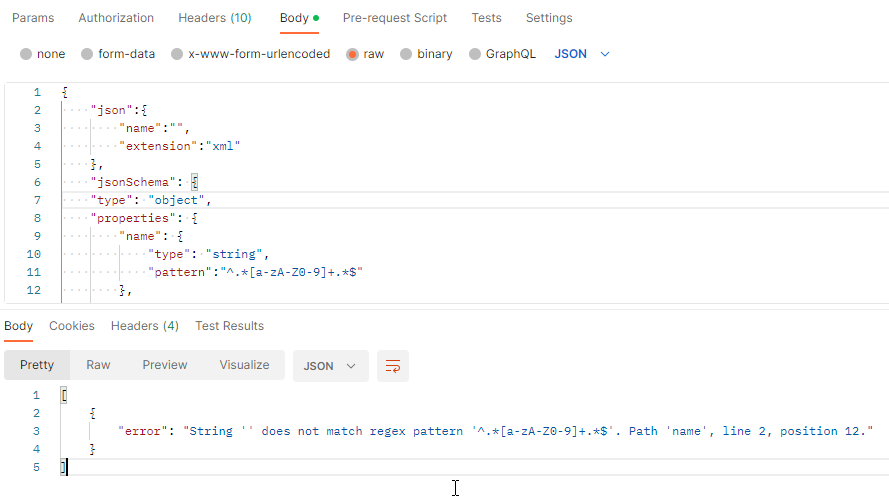
We just released another version of our Azure Function JSON Schema Validation, adding support to another feature. In this case, a very basic one, required fields.
In order to specify the mandatory properties or elements, we need to use the required keyword, where you can specify a list of strings that need to be present as key names in the list of key:value pairs that appear in a JSON document. Each of these strings must be unique.
JSON Schema Validation Function
The JSON Schema Validation is a simple Azure Function that allows you to validate your JSON message against a JSON Schema, enabling you to specify constraints on the structure of instance data to ensure it meets the requirements.
The function receives a JSON payload with two properties:
Or a 400 Bad Request if there are validation errors/issues.
Where can I download it?
You can download the complete Azure Functions source code here:
Hope you find this helpful! So, if you liked the content or found it helpful and want to help me write more content, you can buy (or help buy) my son a Star Wars Lego!
Big thanks to my team members Luís Rigueira and Diogo Formosinho for testing and adding this new feature.
Author: Sandro Pereira
Sandro Pereira lives in Portugal and works as a consultant at DevScope. In the past years, he has been working on implementing Integration scenarios both on-premises and cloud for various clients, each with different scenarios from a technical point of view, size, and criticality, using Microsoft Azure, Microsoft BizTalk Server and different technologies like AS2, EDI, RosettaNet, SAP, TIBCO etc.
He is a regular blogger, international speaker, and technical reviewer of several BizTalk books all focused on Integration. He is also the author of the book “BizTalk Mapping Patterns & Best Practices”. He has been awarded MVP since 2011 for his contributions to the integration community.
View all posts by Sandro Pereira
We just released a new version of our Azure Function JSON Schema Validation, adding support for more complex schema validations. In this case, we add support for applying subschemas validation conditionally.
The if, then and else keywords allow the application of a subschema based on the outcome of another schema, much like the if/then/else constructs you’ve probably seen in traditional programming languages.
If if is valid, then must also be valid (and else is ignored.) If if is invalid, else must also be valid (and then is ignored).
If then or else is not defined, if behaves as if they have a value of true.
If then and/or else appear in a schema without if, then and else are ignored.
JSON Schema Validation Function
The JSON Schema Validation is a simple Azure Function that allows you to validate your JSON message against a JSON Schema, enabling you to specify constraints on the structure of instance data to ensure it meets the requirements.
The function receives a JSON payload with two properties:
Hope you find this helpful! So, if you liked the content or found it helpful and want to help me write more content, you can buy (or help buy) my son a Star Wars Lego!
Big thanks to my team member Luís Rigueira for adding this new feature.
Author: Sandro Pereira
Sandro Pereira lives in Portugal and works as a consultant at DevScope. In the past years, he has been working on implementing Integration scenarios both on-premises and cloud for various clients, each with different scenarios from a technical point of view, size, and criticality, using Microsoft Azure, Microsoft BizTalk Server and different technologies like AS2, EDI, RosettaNet, SAP, TIBCO etc.
He is a regular blogger, international speaker, and technical reviewer of several BizTalk books all focused on Integration. He is also the author of the book “BizTalk Mapping Patterns & Best Practices”. He has been awarded MVP since 2011 for his contributions to the integration community.
View all posts by Sandro Pereira
The last time I released a new version of my stencil, it was on January 26 of 2022. A long time ago indeed, so it is fair to say that I do need to release a new major version of my stencils, and that will be a long work and process. However, I decided to do this task progressively and release minor updates during this “journey”. This way, it becomes easier for me because I don’t need to spend long periods allocated to this task, and at the same time, all of you can start enjoying these new icons.
What’s new in this version? (for now)
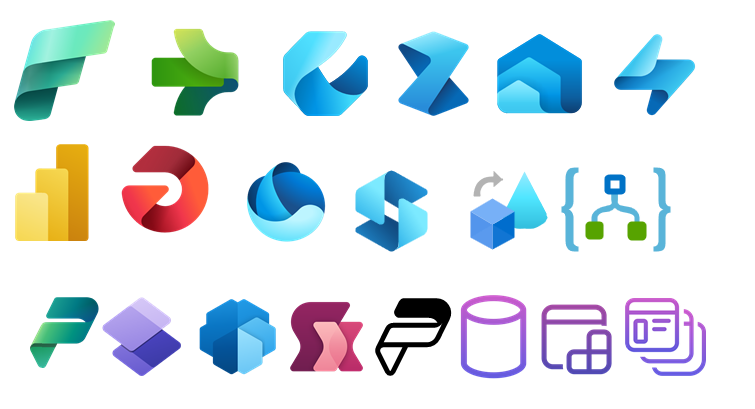
The main goal of this release was to provide the new icons present in the Azure Portal, on the Power Platform, and new existing Services. In this version, the changes and additions are:
New shapes: New shapes added on MIS Databases and Analytics Stencils, MIS Azure Additional or Support Stencils, Microsoft Integration Stencils, MIS Azure Stencils, and MIS Power Platform Stencils;
SVG Files: Add new SVG files;
Special Highlights: Microsoft Fabric and the new Logic App Data Mapper
Microsoft Integration, Azure, Power Platform, Office 365, and much more Stencils Pack
Microsoft Integration, Azure, Power Platform, Office 365, and much more Stencils Pack it’s a Visio package that contains fully resizable Visio shapes (symbols/icons) that will help you to visually represent On-premise, Cloud or Hybrid Integration and Enterprise architectures scenarios (BizTalk Server, API Management, Logic Apps, Service Bus, Event Hub…), solutions diagrams and features or systems that use Microsoft Azure and related cloud and on-premises technologies in Visio 2016/2013:
BizTalk Server
Microsoft Azure
Integration
Integration Service Environments (ISE)
Logic Apps and Azure App Service in general (API Apps, Web Apps, and Mobile Apps)
Azure API Management
Messaging: Event Hubs, Event Grid, Service Bus, …
Azure IoT and Docker
AI, Machine Learning, Stream Analytics, Data Factory, Data Pipelines
SQL Server, DocumentDB, CosmosDB, MySQL, …
and so on
Microsoft Power Platform
Microsoft Flow
PowerApps
Power BI
Office365, SharePoint,…
DevOps and PowerShell
Security and Governance
And much more…
… and now non-related Microsoft technologies like:
SAP Stencils
The Microsoft Integration Stencils Pack is composed of 27 files:
Microsoft Integration Stencils
MIS Additional or Support Stencils
MIS AI and Machine Learning Stencils
MIS Apps and Systems Logo Stencils
MIS Azure Additional or Support Stencils
MIS Azure Mono Color
MIS Azure Old Versions
MIS Azure Others Stencils
MIS Azure Stencils
MIS Buildings Stencils
MIS Databases and Analytics Stencils
MIS Deprecated Stencils
MIS Developer Stencils
MIS Devices Stencils
MIS Files Stencils
MIS Generic Stencils
MIS Infrastructure Stencils
MIS Integration Fun
MIS Integration Patterns Stencils
MIS IoT Devices Stencils
MIS Office365
MIS Power BI Stencils
MIS PowerApps and Flows Stencils
MIS SAP Stencils
MIS Security and Governance
MIS Servers (HEX) Stencils
MIS Users and Roles Stencils
That you can use and resize without losing quality, in particular, the new shapes.
Download
You can download Microsoft Integration, Azure, BAPI, Office 365, and much more Stencils Pack for Visio from GitHub here:
Hope you find this helpful! So, if you liked the content or found it helpful and want to help me write more content, you can buy (or help buy) my son a Star Wars Lego!
Author: Sandro Pereira
Sandro Pereira lives in Portugal and works as a consultant at DevScope. In the past years, he has been working on implementing Integration scenarios both on-premises and cloud for various clients, each with different scenarios from a technical point of view, size, and criticality, using Microsoft Azure, Microsoft BizTalk Server and different technologies like AS2, EDI, RosettaNet, SAP, TIBCO etc.
He is a regular blogger, international speaker, and technical reviewer of several BizTalk books all focused on Integration. He is also the author of the book “BizTalk Mapping Patterns & Best Practices”. He has been awarded MVP since 2011 for his contributions to the integration community.
View all posts by Sandro Pereira
JSON Schema is a declarative language that allows you to annotate. It provides a format for what JSON data is required for a given application and how to interact with it and validate JSON documents to ensure it meets the requirements.
Applying JSON Schemas validation in your solutions will let you enforce consistency and data validity across similar JSON data.
If you are not familiar with JSON Schema, you will then notice that the JSON Schema itself is written in JSON-based format. It’s just a declarative format for “describing the structure of other data”. This is both its strength and its weakness (which it shares with other similar schema languages). It is easy to concisely describe the surface structure of data, and automate validating data against it. However, since a JSON Schema can’t contain arbitrary code, certain constraints exist on the relationships between data elements that can’t be expressed. JSON Schema is a proposed IETF standard.
JSON Schema Validation Function
The JSON Schema Validation is a simple Azure Function that allows you to validate your JSON message against a JSON Schema, enabling you to specify constraints on the structure of instance data to ensure it meets the requirements.
The function receives a JSON payload with two properties:
Or a 400 Bad Request if there are validation errors/issues.
Where can I download it?
You can download the complete Azure Functions source code here:
Hope you find this helpful! So, if you liked the content or found it helpful and want to help me write more content, you can buy (or help buy) my son a Star Wars Lego!
Big thanks to my team member Diogo Formosinho for testing and helping me develop this function with me!
Author: Sandro Pereira
Sandro Pereira lives in Portugal and works as a consultant at DevScope. In the past years, he has been working on implementing Integration scenarios both on-premises and cloud for various clients, each with different scenarios from a technical point of view, size, and criticality, using Microsoft Azure, Microsoft BizTalk Server and different technologies like AS2, EDI, RosettaNet, SAP, TIBCO etc.
He is a regular blogger, international speaker, and technical reviewer of several BizTalk books all focused on Integration. He is also the author of the book “BizTalk Mapping Patterns & Best Practices”. He has been awarded MVP since 2011 for his contributions to the integration community.
View all posts by Sandro Pereira