by Sandro Pereira | Feb 15, 2019 | BizTalk Community Blogs via Syndication
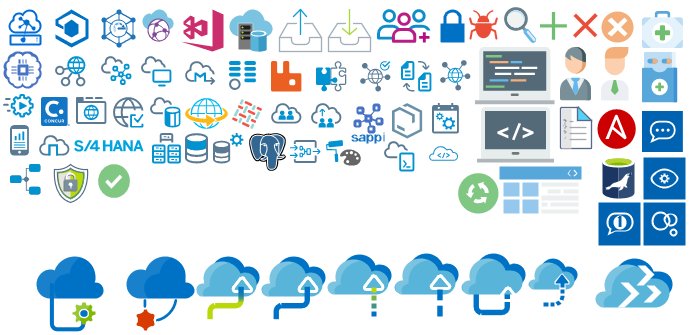
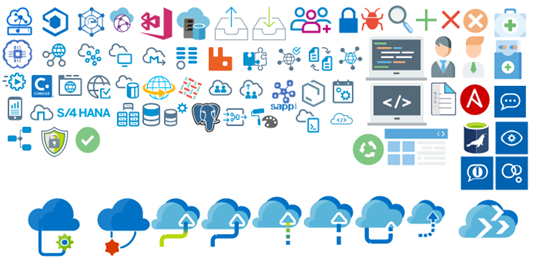
Microsoft Integration, Azure, BAPI, Office 365 and much more Stencils Pack it’s a Visio package that contains fully resizable Visio shapes (symbols/icons) that will help you to visually represent On-premise, Cloud or Hybrid Integration and Enterprise architectures scenarios (BizTalk Server, API Management, Logic Apps, Service Bus, Event Hub…), solutions diagrams and features or systems that use Microsoft Azure and related cloud and on-premises technologies in Visio 2016/2013:
- BizTalk Server
- Microsoft Azure
- Azure App Service (API Apps, Web Apps, Mobile Apps, and Logic Apps)
- Event Hubs, Event Grid, Service Bus, …
- API Management, IoT, and Docker
- Machine Learning, Stream Analytics, Data Factory, Data Pipelines
- and so on
- Microsoft Flow
- PowerApps
- Power BI
- PowerShell
- Infrastructure, IaaS
- Office 365
- And many more…
- … and now non-related Microsoft technologies like:

What’s new in this version?
- New shapes: new shapes were added to existing modules like Generic, Azure, AI, Developer, Files or Users. But in particular a new module was born:
- MIS SAP Stencils contains stencils that will represent some SAP services
You can download Microsoft Integration, Azure, BAPI, Office 365 and much more Stencils Pack for Visio from:
 Microsoft Integration, Azure, BAPI, Office 365 and much more Stencils Pack for Visio (18,6 MB)
GitHub
Or from:
Microsoft Integration and Azure Stencils Pack for Visio 2016/2013 v3.1.0 (18,6 MB)
Microsoft | TechNet Gallery
Author: Sandro Pereira
Sandro Pereira lives in Portugal and works as a consultant at DevScope. In the past years, he has been working on implementing Integration scenarios both on-premises and cloud for various clients, each with different scenarios from a technical point of view, size, and criticality, using Microsoft Azure, Microsoft BizTalk Server and different technologies like AS2, EDI, RosettaNet, SAP, TIBCO etc. He is a regular blogger, international speaker, and technical reviewer of several BizTalk books all focused on Integration. He is also the author of the book “BizTalk Mapping Patterns & Best Practices”. He has been awarded MVP since 2011 for his contributions to the integration community. View all posts by Sandro Pereira

by Sandro Pereira | Feb 13, 2019 | BizTalk Community Blogs via Syndication
Finally, I will be in Australia and New Zealand but unfortunately not in person, maybe next time, but instead remotely. Nevertheless, it will be a pleasure to present in this amazing community for the first time and it’s tomorrow already on a session about How we at DevScope are using Microsoft Integration features and related Azure technologies to improve our processes and by doing so engaging customers to also adopt some of these Microsoft Integration features.
Session Name: “How we are using Microsoft Integration features and related Azure technologies to improve our processes”
Session Overview: In this session, I will show you real live scenarios on how we at DevScope are using Microsoft Integration features (Logic Apps, API Management, API’s) and related Azure technologies like PowerApps, Flows and Power BI to:
- First, improve our internal processes like expenses reports, time reports and so on;
- And, secondly, how the first step helps us out to extend our product and our business by exporting these same approaches and concepts to our clients
This will be a lightweight talk addressing some real scenarios and show them in action.
I invite you all to join us tomorrow morning or in the afternoon depending on where you are from. Grab your “seat” by registering in this session here.
Author: Sandro Pereira
Sandro Pereira lives in Portugal and works as a consultant at DevScope. In the past years, he has been working on implementing Integration scenarios both on-premises and cloud for various clients, each with different scenarios from a technical point of view, size, and criticality, using Microsoft Azure, Microsoft BizTalk Server and different technologies like AS2, EDI, RosettaNet, SAP, TIBCO etc. He is a regular blogger, international speaker, and technical reviewer of several BizTalk books all focused on Integration. He is also the author of the book “BizTalk Mapping Patterns & Best Practices”. He has been awarded MVP since 2011 for his contributions to the integration community. View all posts by Sandro Pereira

by Sandro Pereira | Feb 8, 2019 | BizTalk Community Blogs via Syndication
Yes, if you want to visit Porto, my city and a destination that has been fashionable due to the various awards, nominations, and mentions all across the world like:
- Elected as the most romantic city in the world;
- Elected the best destination in the world;
- I think 3 years in a row as best European destination;
- Many travelers believe the most beautiful McDonald’s in the world is in Porto;
- One of the most beautiful libraries in the world;
- and many other crazy nominations…
Personally, I believe that today we living in a fanatical environment of everyone or everything wanting to be the best in the world, the honest reality is that Porto is a beautiful place like many others in the world and I recommend you to visit… and I have just a perfect romantic and traditional place for you!
Casa Sr. José (Mr. Joseph’s house) is my AIRBNB host, as traditional and recently renovated house that is at a walking distance from the Douro River (1 min – 78 m) in the beautiful and typical Porto civil parish of Massarelos. Located in the heart of Porto, next to the Douro River, is a perfect spot that is near to almost everything: Porto´s Unesco World Heritage historical center (10 mins); Foz do Douro (10 min) were Douro river and the Atlantic Ocean meet (beach); and near of 1 most well-known landmarks of Porto: the Clérigos Tower (10 min) and it is available for all you that once again, want to visit Porto.
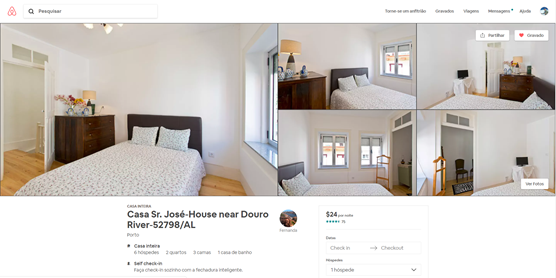
This is my non-technology pet project and I love it but it also gives me some challenges, challenges that I’m trying to solve with technology.
One of these challenges is that in Portugal, as well as in most European countries, all paid accommodation establishments need to record the stay and collect identification details from all foreign citizens, whether they are from the Member States of the European Union or Third Country Nationals, in order to communicate them within three days to the Immigration and Borders Service. At the moment, I have a very rudimentary process in place:
- A form paper (Ficha de hóspede / Guest card / Carte d’invité) that the guests need to fill once they arrive;
- I have to go to the house to get the form;
- The guests don’t need to be there if they allow me to enter the house to grab the form;
- Otherwise, I need to arrange a date hour with them to grab the form;
- I then need to access to the SEF (Serviço de Estrangeiros e Fronteiras – Foreign Service and borders) online portal, authenticate with my account and manually fill an online form (SIBA – Sistema de Informação de Boletins de Alojamento – Accommodation Bulletin) with the information of all guests like:
- Full name
- Date of birth
- Nationality
- Country of residence
- And so on
- and submit the accommodation bulletin to SEF.
This is a very time-consuming task and inconvenient for both me and the guests:
- I need to “annoy” the guests to access “their house for a week” or arrange a date/hour for them to meet with me to give me the form;
- I then need to understand the hand write and type everything to an only form;
- And so on
Again all of these are time-consuming tasks.
This week, and I’m being an integration guy, my mind automatically started to think:
- How can I easily automate these tasks?
- But it needs to be user-friendly to my guests;
- And it needs to be easier for my wife to understand, to share with the guest and to control and… she is not a technical person;
- If I started to speak in terms of Flow, Azure or anything else… she will say no! I don’t know what you are talking about.
In the end, I elaborated a process with two parts:
- Part 1: the first approach to address and expedite our interaction with our guests;
- Part 2: my end goal, fully integrated;
In this post, I will address Part 1, the one that is at the moment in-place.
How Microsoft Forms and Microsoft Flow allows me to better interact and automate my Porto Airbnb host processes?
The first thing I decide to do was an Online Form for the guest to fill, instead of using a paper. This could be done with several options online: Google Spreadsheet and Form; Formstack; Cognito Forms and so on. I choose to use Microsoft Forms, to do that you need to
- Access in your web browser to forms.office.com.
- Sign in with your Office 365 school credentials, Office 365 work credentials, or Microsoft account (Hotmail, Live, or Outlook.com).
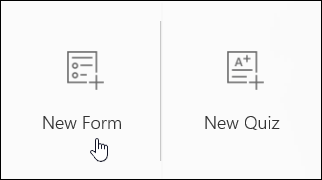
- Under “My Forms”, click “New Form” to begin creating your form.
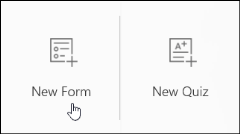
- You should enter a name for your form, and you can also enter an optional subtitle and picture.
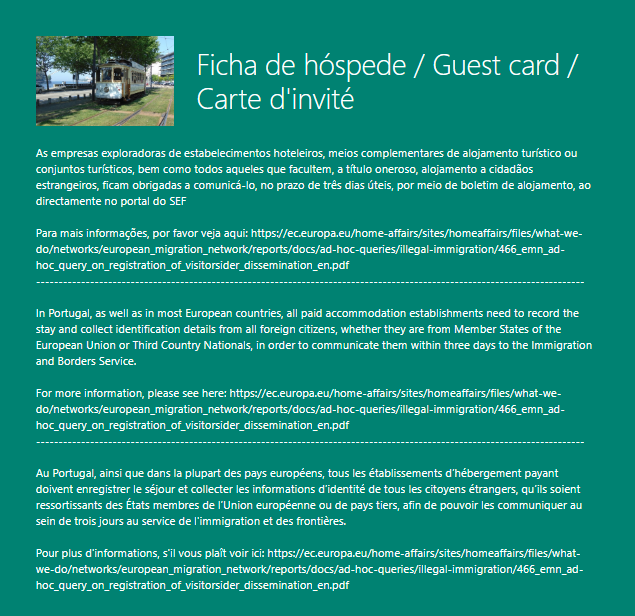
- I decide to call my form name: “Ficha de hóspede / Guest card / Carte d’invité”
- Add a picture and a subtitle with an explanation of why guest need to fill this form
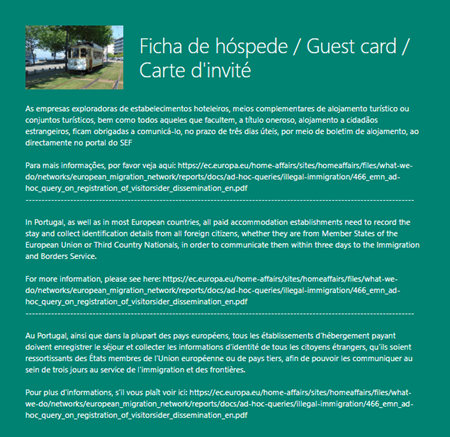
Then, you need to start creating your questions. To do that you need:
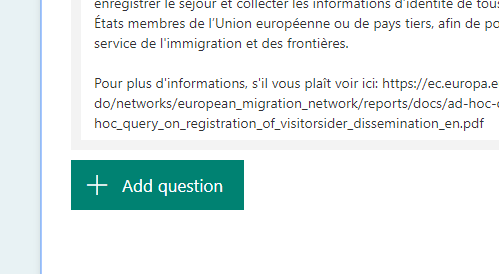
- Click “Add Question” to add a new question to the form.
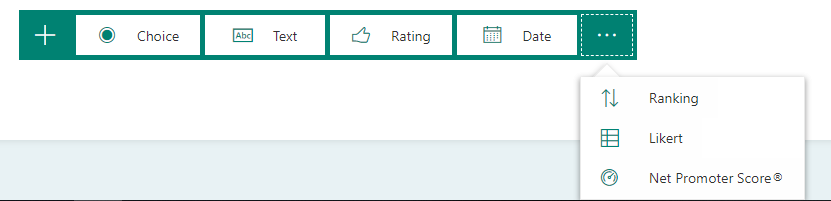
- By default you have the options “Choice”, “Text”, “Rating”, or “Date” questions, but you can always click to see more option under “…” button, and you can select from “Ranking”, “Likert”, or “Net Promoter Score®” questions.
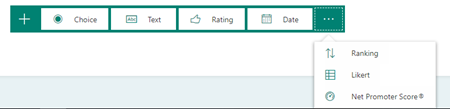
- In my case I added:
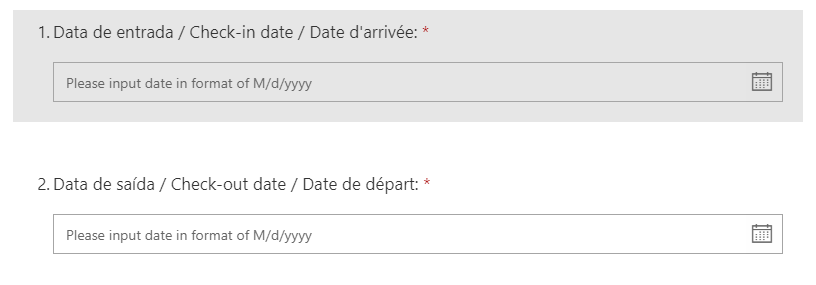
- Two Date questions:
- “Data de entrada / Check-in date / Date d’arrivée”
- “Data de saída / Check-out date / Date de départ”
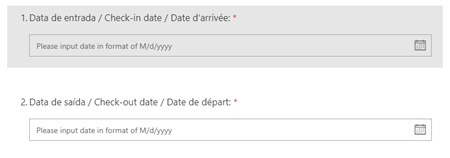
-
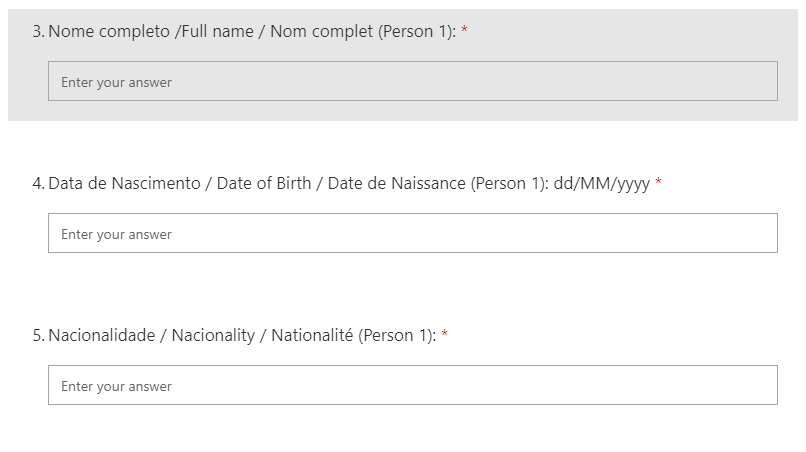
- 8 text questions:
- “Nome completo /Full name / Nom complet (Person 1)”
- “Data de Nascimento / Date of Birth / Date de Naissance (Person 1): dd/MM/yyyy”
- “Nacionalidade / Nacionality / Nationalité (Person 1)”
- “Local de Nascimento / Birthplace / Lieu de résidence (Person 1)”
- “Local de Residência / Country of residence / Pays de résidence (Person 1)”
- “País de residência / Country of residence / Pays de résidence (Person 1)”
- “Numero de documento / Document number / Numéro de document (Person 1)”
- “País emissor do documento / Country issuing the document / Pays délivrant le document (Person 1)”
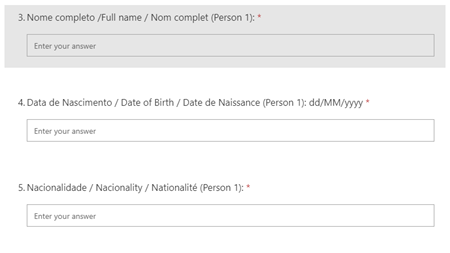
-
- 1 choose question
- “Tipo de documento / Document type (Person 1)”

-
- And finally, a true/false question, that is basically another optional question
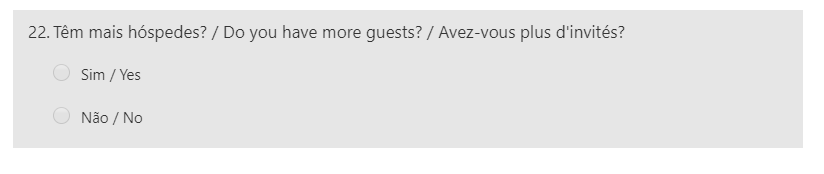
- “Têm mais hóspedes? / Do you have more guests? / Avez-vous plus d’invités?”
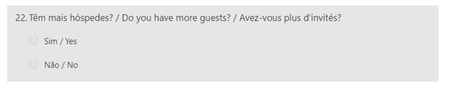
And here is where the fun begins. Why this last question?
The first reason is that I need to deliver to SEF the information of all the guests and my house can host a maximum of 6 guests. But there is more… Because my house can host a maximum of 6 guests, I have to duplicate these questions 6 times, with the exception of the first two:
- “Data de entrada / Check-in date / Date d’arrivée”
- “Data de saída / Check-out date / Date de départ”
Because all of them are from the same booking. That’s why in my final form you will see the same question duplicated with the suffix: Person 2, Person 3… Person 6
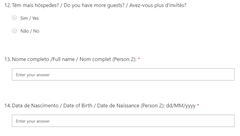
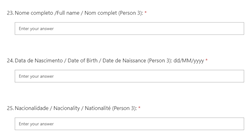
But my first form draft didn’t have this last question. I add it becaus, without this question, the guests had to scroll until the bottom of the form to submit it, for example, if I was hosting a couple, they had to fill Person 1 and Person 2 information but them they had to scroll down passing all questions of person 3, 4, 5 and 6 to finally submit the form.
Again, to improve and provide the best user experience to my guest I decide to create this question and apply some logic inside allowing me to create like an array of guest information data – this doesn’t exist in Microsoft Forms by the way.
To accomplish that at the end of this list of questions for each guest I’m adding this last question:
- “Têm mais hóspedes? / Do you have more guests? / Avez-vous plus d’invités?”
And add a branching logic to my form so that it changes according to the responses to that question. This way, If the guest says:
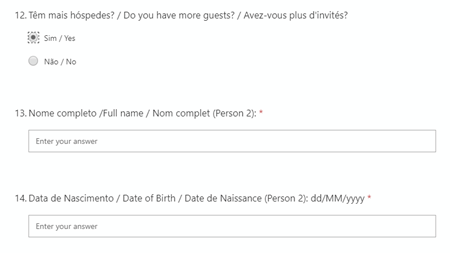
- “Sim / Yes” it will show the list of questions for the second guest… and so on.
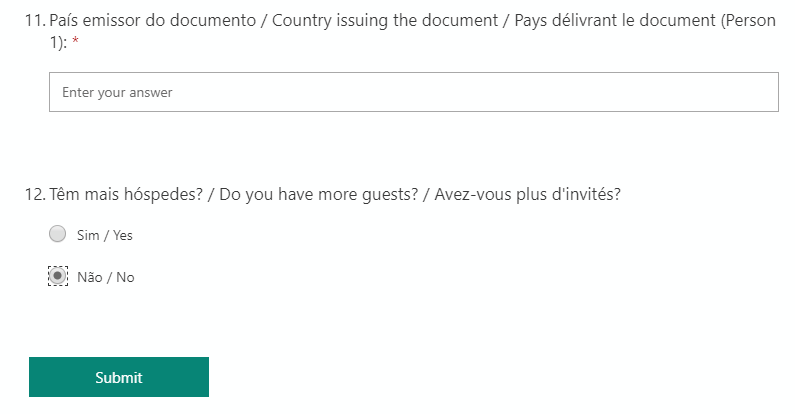
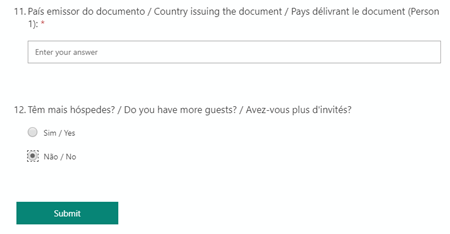
- If “Não / No”, it will hide the rest of the questions and “go” directly to the end – “Submit”
Here is how the experience will look like if you say “No” or the default behavior:
And here is the behavior if you select or change to “Yes”:
For example, despite all questions in the form are mandatory, if I select or refer that I only have two guests, the form is smart to know that this is an optional pack of questions:
- If you select that have a new guest you need to fill the questions for that specific guest, otherwise, it allows you to submit the previous questions, without having to fill dummy information for guests 3 to 6 for example.
This improved a lot the Form user experience with the guests.
To accomplish this, you need to:
- Click the ellipses button (…) on the main menu, and then select Branching.
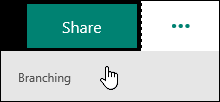
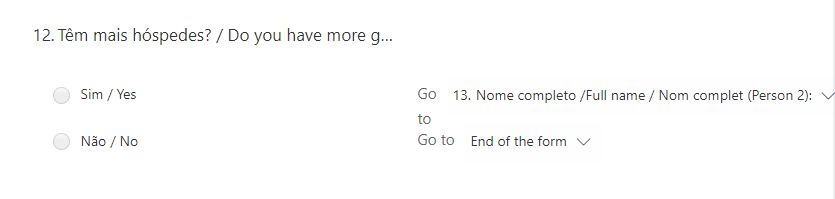
- On the Branching options page, there are dropdown menus that appear with each answer under every question. Click the arrow to see a dropdown menu.
-
- In this case, if I select the “Sim / Yes” option this should “Go” to question 13 that is the beginning of a new guest form
- Basically, it shows the “second part” of the form
- If you select “Não / No” it should go to the end of the form
- Basically, it hides the rest of the form
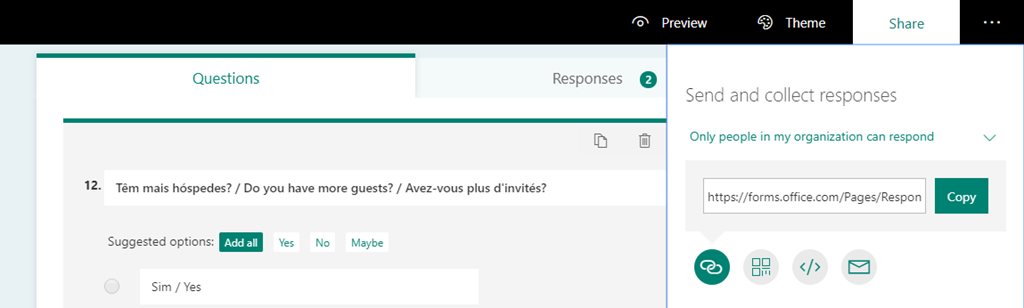
And of course, I can share the form thru a URL, QR Code, thru an iframe on a webpage and by email.
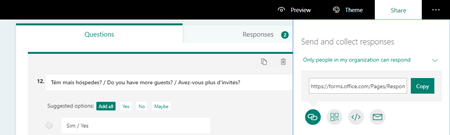
Being the Microsoft Form
Microsoft Form is great to help to improve the interaction with my guests, but it allows me to go to a certain point but not solve all my problems/concerns.
Now that I have retrieved the data from my guests, the question is how I can automate my process my SEF and how can I notify the persons that are managing the house (me, my wife, my brother-in-law, and sister-in-law).
For that, I choose to use a Microsoft Flow that is triggered each time a new form Is submitted and automated these tasks. Unfortunately, do some restrictions I still cannot integrate directly to SEF thru API. I had to request access and I’m still waiting for their approval.
That is the reason why this is PART 1… end goal is to be fully automated without any manual process (PART 2).
So, to minimize the manual work, I decide that is this phase the Flow will go thru each question and notify us by email that a new form was submitted but also give us on the body email all the information submitted for us to be better to copy that information and fill the online SEF form and submit them – basically it would be a copy and past operation, instead of adding to manually type all the data which can lead to many mistakes. This way we are:
- Minimizing mistakes and misspellings;
- Minimize the time I need to fill these SEF forms;
To accomplish that you need to:
- Access the Flow portal: https://flow.microsoft.com/ and sign in with your account
- In flow.microsoft.com, select “My flows” in the top navigation bar, and then select “+ Create from blank” to create a Flow from scratch.
- On the “Create a flow from blank”, select “Create from blank” to start the process of creating an empty Flow
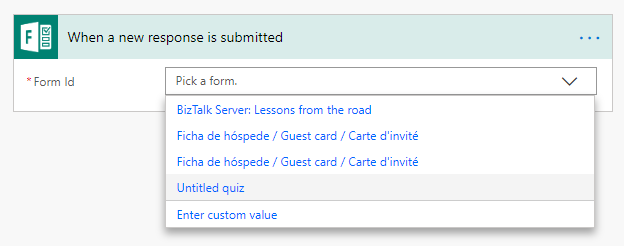
- On the Flow designer, on the Trigger event enter “Microsoft Forms” and select the option “When a new response is submitted” and pick the form you like from the dropdown list
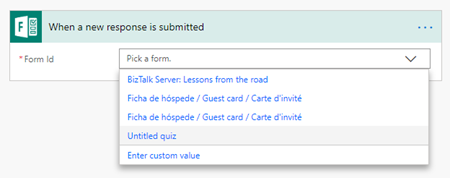
- Add the next step by clicking the “+New step” button and then choose the “Add an action” option
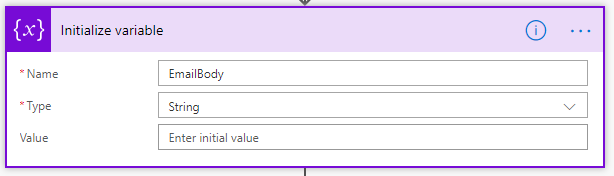
- On the “Choose an action” window, enter “Variables” and select the action “Variables – Initialize variable”
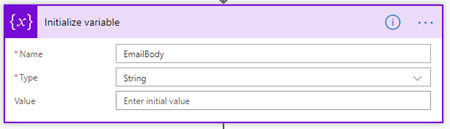
- On the Variable action configuration:
- On the “Name” property, type “EmailBody”
- On the “Type” property, specify the type as “String”
- On the “Value” property leave it blank
- Add the next step by clicking the “+New step” button and then choose the “Add an action” option
- On the “Choose an action” window, enter “Control” and select the action “Apply to each”
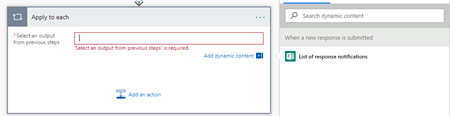
- On the Apply to each action configuration:
- On the “Select an output from previous step” property, select from the list of tokens the “Key” token “List of response notifications” from the “When a new response is submitted” trigger
- Inside the loop, add the next step by clicking the “+New step” button and then choose the “Add an action” option
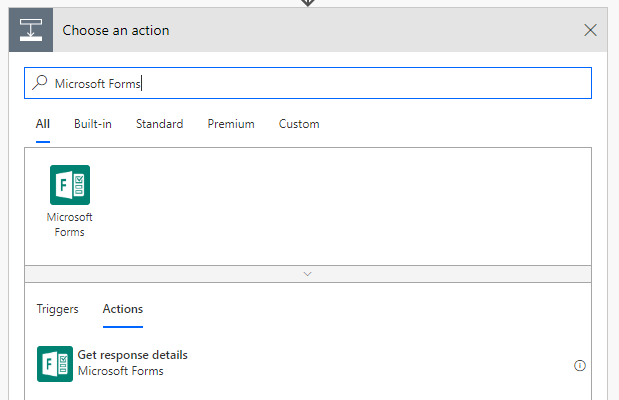
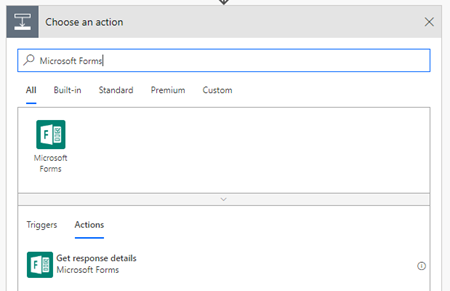
- On the “Choose an action” window, enter “Microsoft Forms” and select the action “Get response details”
-
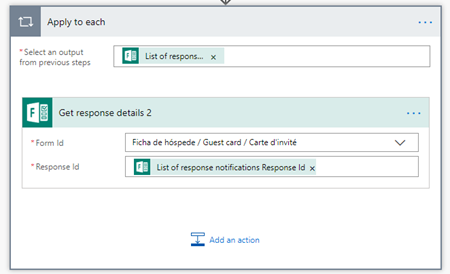
- On the action configuration:
- On the “Form Id” property, pick once again the Form from the dropdown list
- On the “Response Id” property, type the following expression
@{items('Apply_to_each')['resourceData']['responseId']}
- Add the next step by clicking the “+New step” button and then choose the “Add an action” option
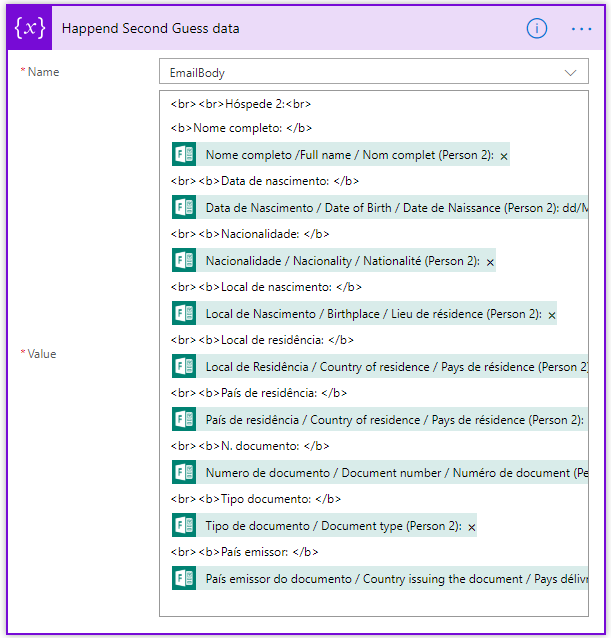
- On the “Choose an action” window, enter “Variables” and select the action “Variables – Append to string variable”
- On the Variable action configuration:
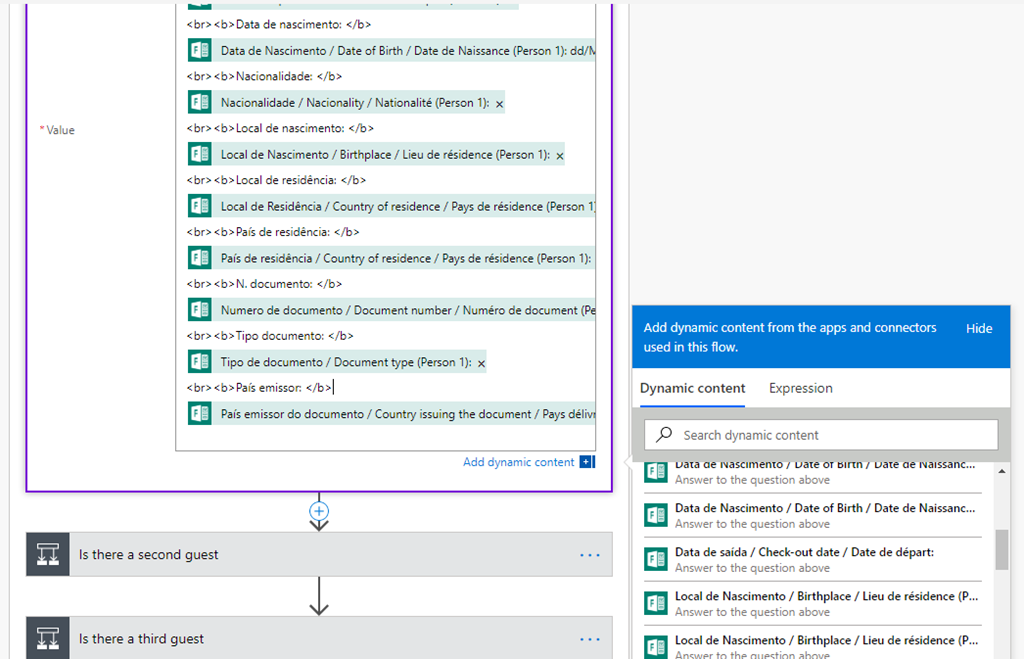
- On the “Name” property, select “EmailBody” variable
- On the “Type” property leave it blank
Ficha de hóspedes:

<b>Data de entrada: </b> @{body('Get_response_details')['rfb0478a71c77463eb855db4a6617b596']}
<b>Data de saída: </b> @{body('Get_response_details')['rbad828de65664088a332fbbad18ba4c3']}


Hóspede 1:
<b>Nome completo: </b> @{body('Get_response_details')['r9bde314fe5ea4c74883f46750183bd0f']}

<b>Data de nascimento: </b>@{body('Get_response_details')['rf3e762220a604c578cca006c83d98756']}
<b>Nacionalidade: </b>@{body('Get_response_details')['r8b7428bfbda94eb684c0e43edbff0a87']}

<b>Local de nascimento: </b>@{body('Get_response_details')['r2c926c630529444e86ba53359b6adaf4']}

<b>Local de residência: </b>@{body('Get_response_details')['rddbf3f41f16e402b9dba65f49631c27c']}
<b>País de residência: </b>@{body('Get_response_details')['r52c69618890540e392dca6fd4f8f5fc0']}
<b>N. documento: </b>@{body('Get_response_details')['r9b9ee64cf84d42c89bd7770389ea94d9']}
<b>Tipo documento: </b>@{body('Get_response_details')['r48f5e4ecf66a48328269b656b034ddd1']}

<b>País emissor: </b>@{body('Get_response_details')['raa2bcdec2c6b4b5d8b3d17cd6f946a8a']}
Basically, all the tokens were added from the tokens list
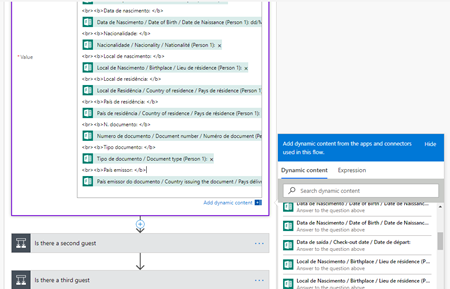
And what we are doing is creating a string, king of a string builder, with the HTML email body with the guest information
Then we need to check if another guest was added and append that information by:
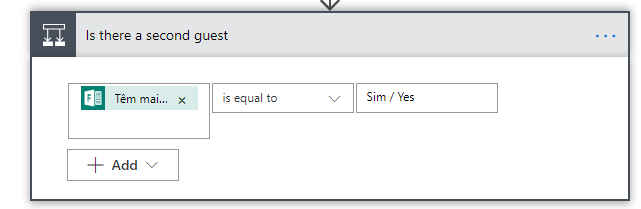
- And then add a new condition by selecting “Add new action”, enter “Control” and select the action “Condition”
- On the “Condition” configuration add the following condition:
- If the first “Têm mais hóspedes? / Do you have more guests? / Avez-vous plus d’invités?” question value is equal to “Sim / Yes”
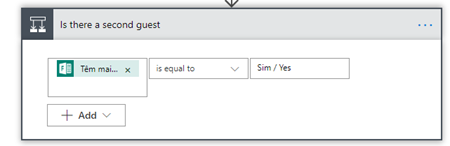
- On the “If yes” branch
- Choose the “Add an action” option and on the “Choose an action” window, enter “Variables” and select the trigger “Variables – Append to string variable”
- And add the same previous code but this time with the data of the second guest
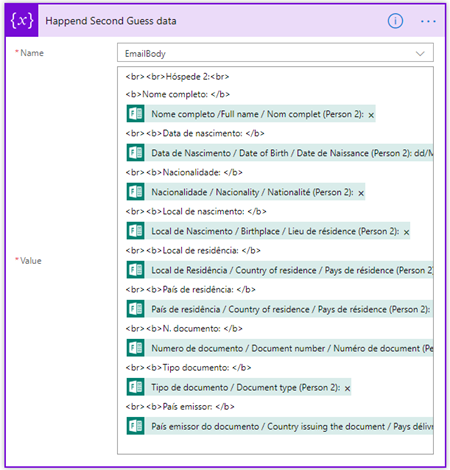
- On the “If no” branch
- Leave it without any action
Now we just need to do the same for the other 6 guests:
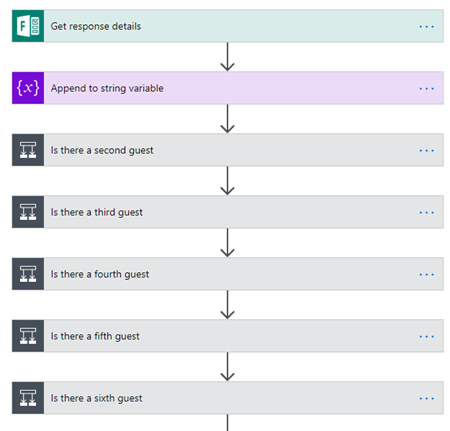
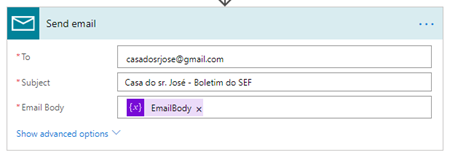
Finally, on the end send an email with that data to our host email address, to do that we need to:
- Add the next step by clicking the “+New step” button and then choose the “Add an action” option
- On the “Choose an action” window, enter “Mail” and select the action “Send an email notification”
- On the action configuration:
- On the “to” property, type your email
- On the “Subject” property, type “Guest notification”
- On the “Email Body” property, select from the list of tokens the “Key” token variable “EmailBody”
Give a proper name to the flow and save it
The end result
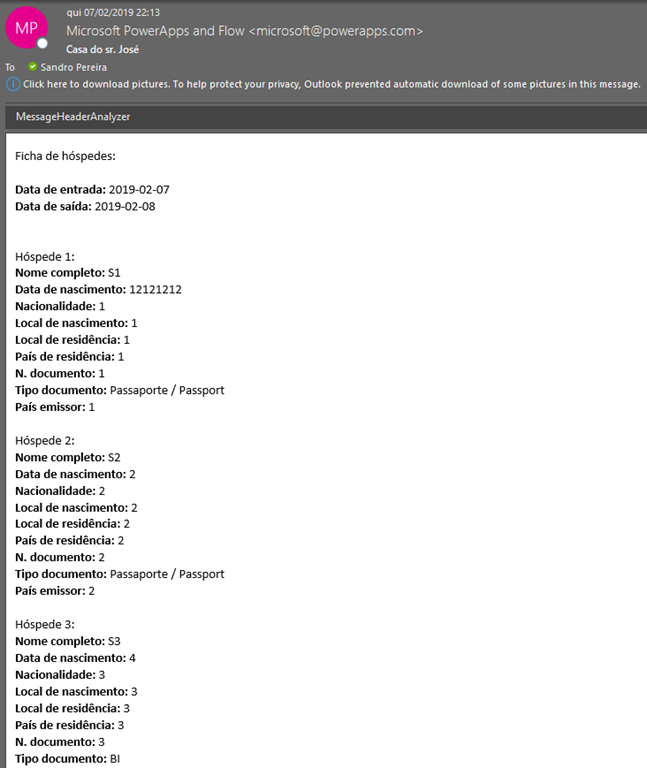
Each time a guest submits an Accommodation Bulletin I will be receiving an email with this format:
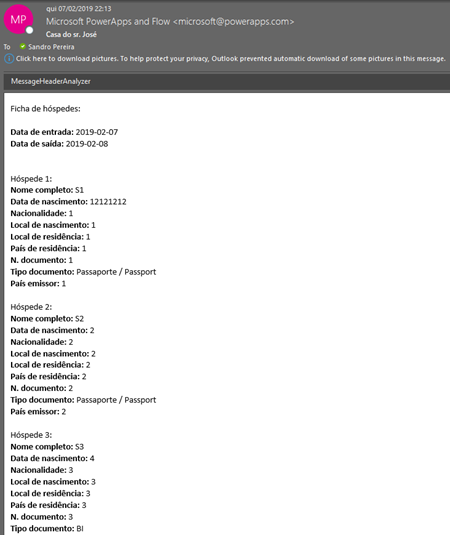
That will help my task to manually fulfill the SEF online form…. Until I completely automate this task.
And by the way… if you planning to visit Porto, have a chat with me, stay in our house and I may get you a discount: https://www.airbnb.pt/rooms/18272087?guests=1&adults=1
Author: Sandro Pereira
Sandro Pereira lives in Portugal and works as a consultant at DevScope. In the past years, he has been working on implementing Integration scenarios both on-premises and cloud for various clients, each with different scenarios from a technical point of view, size, and criticality, using Microsoft Azure, Microsoft BizTalk Server and different technologies like AS2, EDI, RosettaNet, SAP, TIBCO etc. He is a regular blogger, international speaker, and technical reviewer of several BizTalk books all focused on Integration. He is also the author of the book “BizTalk Mapping Patterns & Best Practices”. He has been awarded MVP since 2011 for his contributions to the integration community. View all posts by Sandro Pereira

by Sandro Pereira | Feb 3, 2019 | BizTalk Community Blogs via Syndication
I’m glad to be back, once again, to Integration Monday Events! The first time I presented a session on this user group was almost 3 years ago on April 25, 2016, and I’m always happy to come back.
Also, I’m glad to be invited by the product owner to speak about BizTalk NoS Ultimate add-in because I feel like a godfather of this tool, some many nights I spend with Nino Crudele providing feedback and demanding new features and capabilities – from that day Nino thinks twice before I asked me for feedback or opinions about anything is developing hehe.
This will be the second time I speak about this tool on this user group. The first time it was on August 2015 in a session about “Real Case Scenarios Where BizTalk NoS Ultimate Can Improve Our Efficiency“. This time will be a different session with, in my personal opinion, full of great and good news!
Session Name: “The NOS-addin – your (free) BizTalk Dev buddy!”
Session Overview: The NOS-add-in is a tool specifically developed for BizTalk developers. It contains all kind of features to make the life of a BizTalk developer easier and thereby less time-consuming.
In this session, Sandro shows the different capabilities of the tool.
I invite you all to join us next Monday. Grab your “seat” by registering in this session here.
Author: Sandro Pereira
Sandro Pereira lives in Portugal and works as a consultant at DevScope. In the past years, he has been working on implementing Integration scenarios both on-premises and cloud for various clients, each with different scenarios from a technical point of view, size, and criticality, using Microsoft Azure, Microsoft BizTalk Server and different technologies like AS2, EDI, RosettaNet, SAP, TIBCO etc. He is a regular blogger, international speaker, and technical reviewer of several BizTalk books all focused on Integration. He is also the author of the book “BizTalk Mapping Patterns & Best Practices”. He has been awarded MVP since 2011 for his contributions to the integration community. View all posts by Sandro Pereira

by Sandro Pereira | Jan 29, 2019 | BizTalk Community Blogs via Syndication
This post is for the Portuguese Communities (Office365, Integration, and others). It will be held on January 30, 2019, between 18:50 – 20:30 the XLVIII Porto.Data Community meeting at the Science and Technology Park of University of Porto (UPTEC) in Oporto.
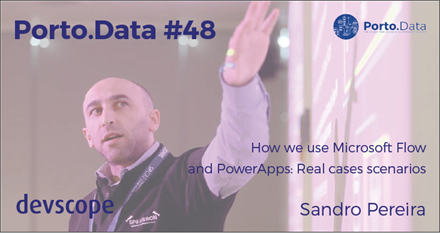
For me it is once again a pleasure to return to this community speaking once again about PowerApps and Microsoft Flow, this time showing real case scenarios on a talk with the following title: “How we use Microsoft Flow and PowerApps: Real cases scenarios”
Abstract
We know that all business problem can be solved with a variety of technologies and different solutions. However, sometimes developing that type of solutions has traditionally been too costly and time-consuming for many of the need’s teams and departments face, especially those projects that are internally for organizations to use or for a short time period. As a result, many of these projects or solutions will be on the shelf or in the imaginary of the collaborators.
They are in Dynamics 365, Office 365, on premises, on the cloud… they are everywhere, and they are fantastic! Developers can do it; IT can do it… you can do it!
Microsoft Flow and PowerApps, sometimes together sometimes isolated are here to help you, and in this session, we will show you real live scenarios on how we use these two technologies in our customers and internally at DevScope.
XLVIII Porto.Data Agenda
- 18:50 – Welcome reception
- 19:00 – “How we use Microsoft Flow and PowerApps: Real cases scenarios” – Sandro Pereira – Azure MVP – DevScope
- 20:00 – Coffee break / Q.A / Community News
- 20:15 – Closure
- 20:20 – Prize draw
- 20:30 – Dinner (optional)
This is a free event with very limited seats that you will not want to miss, register now!
We are waiting for you.
Author: Sandro Pereira
Sandro Pereira lives in Portugal and works as a consultant at DevScope. In the past years, he has been working on implementing Integration scenarios both on-premises and cloud for various clients, each with different scenarios from a technical point of view, size, and criticality, using Microsoft Azure, Microsoft BizTalk Server and different technologies like AS2, EDI, RosettaNet, SAP, TIBCO etc. He is a regular blogger, international speaker, and technical reviewer of several BizTalk books all focused on Integration. He is also the author of the book “BizTalk Mapping Patterns & Best Practices”. He has been awarded MVP since 2011 for his contributions to the integration community. View all posts by Sandro Pereira
by Sandro Pereira | Jan 28, 2019 | BizTalk Community Blogs via Syndication
What started to be a Microsoft Integration Stencil Packs is now almost a full Microsoft stack stencil package that includes Microsoft Integration, Azure, BAPI, Office365, devices, products, competing technologies or partners and much more Stencils Pack it’s a Visio package.
This package contains fully resizable Visio shapes (symbols/icons) that will help you to visually represent On-premise, Cloud or Hybrid Integration and Enterprise architectures scenarios (BizTalk Server, API Management, Logic Apps, Service Bus, Event Hub…), solutions diagrams and features or systems that use Microsoft Azure and related cloud and on-premises technologies in Visio 2016/2013:
- BizTalk Server
- Microsoft Azure
- Azure App Service (API Apps, Web Apps, Mobile Apps, and Logic Apps)
- Event Hubs, Event Grid, Service Bus, …
- API Management, IoT, and Docker
- Machine Learning, Stream Analytics, Data Factory, Data Pipelines
- and so on
- Microsoft Flow
- PowerApps
- Power BI
- PowerShell
- Infrastructure, IaaS
- Office 365
- And many more
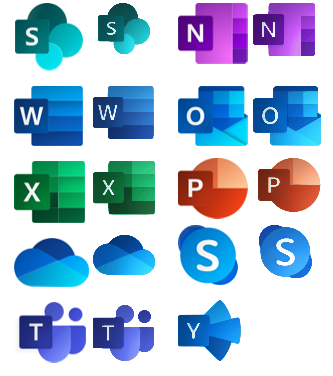
This new small update includes the new Office365 icons that were recently announced by Microsoft. It includes an additional of 19 new shapes and some reorganization.
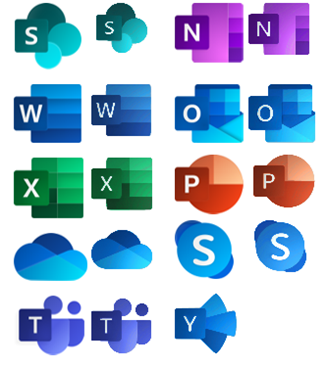
The Microsoft Integration Stencils Pack v3.1.1 is composed of 22 files:
- Microsoft Integration Stencils v3.1.0
- MIS Additional or Support Stencils v3.1.0
- MIS Apps and Systems Logo Stencils v3.1.0
- MIS AI Stencils v3.1.0
- MIS Azure Additional or Support Stencils v3.1.0
- MIS Azure Others Stencils v3.1.0
- MIS Azure Stencils v3.1.0
- MIS Buildings Stencils v3.1.0
- MIS Databases Stencils v3.1.0
- MIS Deprecated Stencils v3.1.0
- MIS Developer Stencils v3.1.0
- MIS Devices Stencils v3.1.0
- MIS Files Stencils v3.1.0
- MIS Generic Stencils v3.1.0
- MIS Infrastructure Stencils v3.1.0
- MIS Integration Patterns Stencils v3.1.0
- MIS IoT Devices Stencils v3.1.0
- MIS Office365 v3.1.1
- MIS Power BI Stencils v3.1.0
- MIS PowerApps and Flows Stencils v3.1.1
- MIS Servers (HEX) Stencils v3.1.0
- MIS Users and Roles Stencils v3.1.0
You can download Microsoft Integration, Azure, BAPI, Office 365 and much more Stencils Pack for Visio from:
Microsoft Integration, Azure, BAPI, Office 365 and much more Stencils Pack for Visio (18,6 MB)
GitHub
Or from:
Microsoft Integration and Azure Stencils Pack for Visio 2016/2013 v3.1.1 (18,6 MB)
Microsoft | TechNet Gallery
Author: Sandro Pereira
Sandro Pereira lives in Portugal and works as a consultant at DevScope. In the past years, he has been working on implementing Integration scenarios both on-premises and cloud for various clients, each with different scenarios from a technical point of view, size, and criticality, using Microsoft Azure, Microsoft BizTalk Server and different technologies like AS2, EDI, RosettaNet, SAP, TIBCO etc. He is a regular blogger, international speaker, and technical reviewer of several BizTalk books all focused on Integration. He is also the author of the book “BizTalk Mapping Patterns & Best Practices”. He has been awarded MVP since 2011 for his contributions to the integration community. View all posts by Sandro Pereira

by Sandro Pereira | Jan 22, 2019 | BizTalk Community Blogs via Syndication
Last year I didn’t have the opportunity to deliver 16 sessions across the world like 2017 because I had to slow down my trips, or I didn’t participate as I would or did in the past in some communities and I don’t regret a single second. If I have to describe 2018 in a single word I have to choose: family.
I don’t have any difficulty in selecting the best moments, my baby boy born and I move my family to a bigger house because we now have 3 kids, two beautiful girls, like there mother and of course a mini-me.


So, as you may imagine, I struggle to have free time, but when you love what you do, instead of finding excuses you will always find a way to do it. So in the end, I was able to:
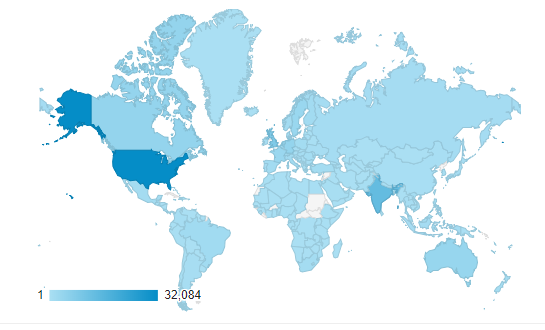
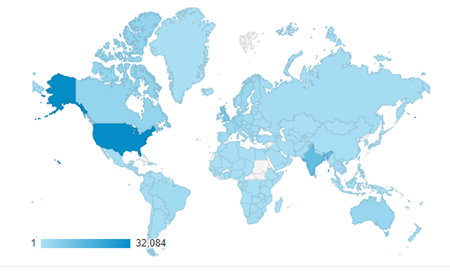
- Publish 70 new posts in my blog; I wrote more blog post that in 2017, And I just now realize that! And the countries that most visited my blog still are the United States, followed by India, the United Kingdom, and Canada in a total of 194 countries
- Publish 2 guest blog posts on Serveless360
- Publish 8 guest blog posts on BizTalk360
- Moreover, publishing 2 whitepapers:
However, that not all:
- Deliver 5 speaking sessions:
- IntegrationMonday |online |The birth of a new SSO Application Configuration Tool
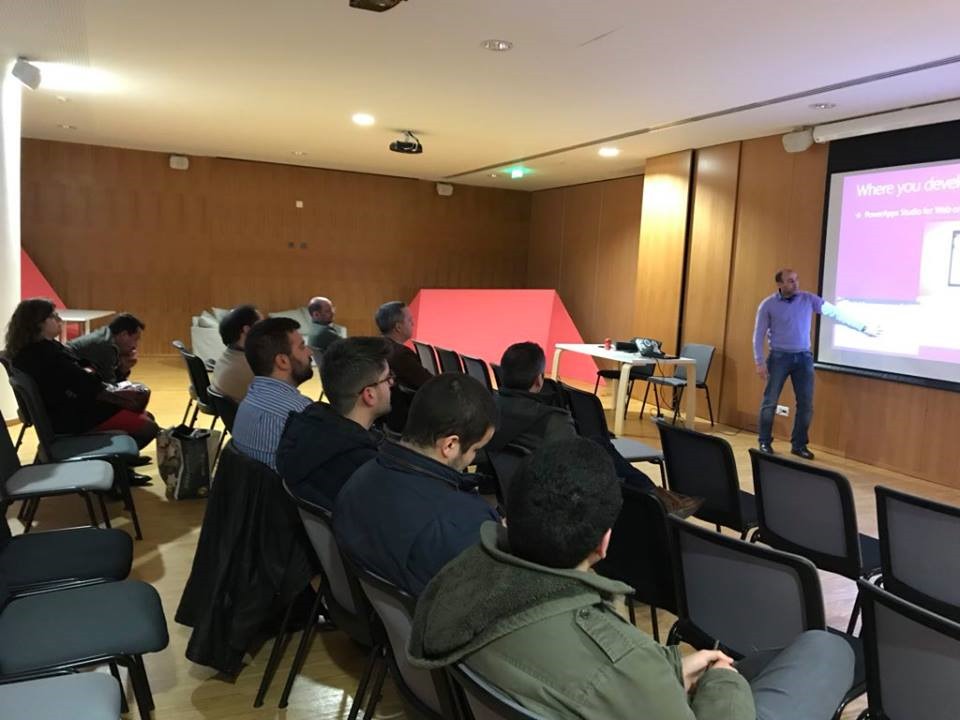
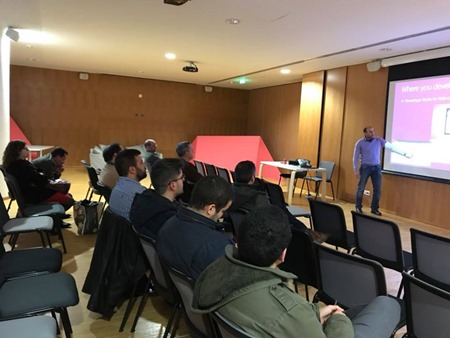
- XXXX Porto.Data meeting, March 27 | Porto | Automatization Platform with Dynamics 365 | Dynamics365, Microsoft Flow and PowerApps
-
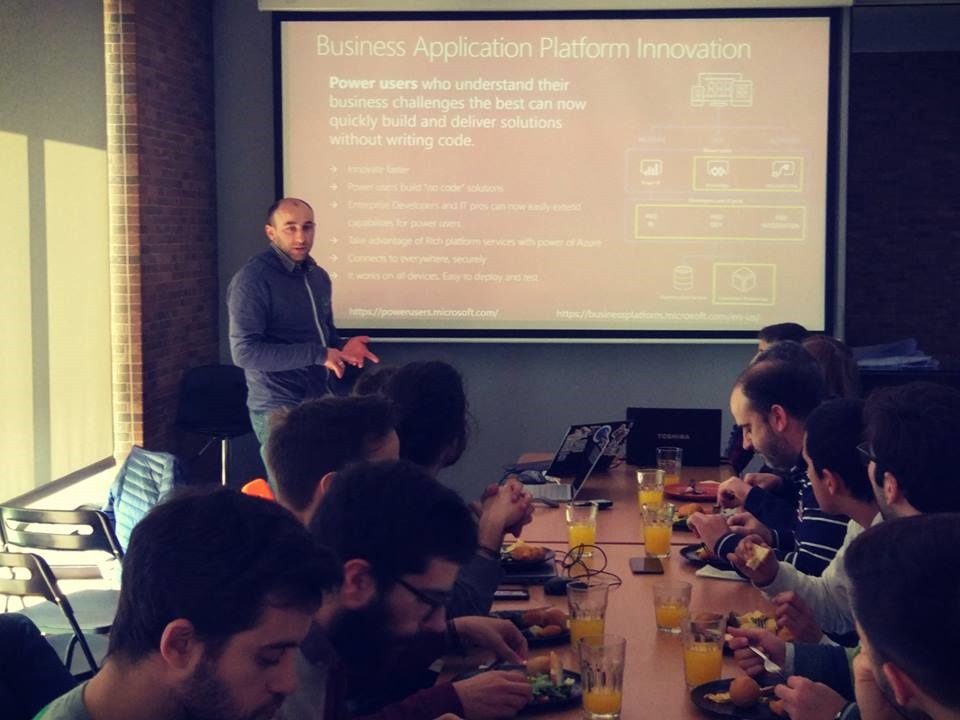
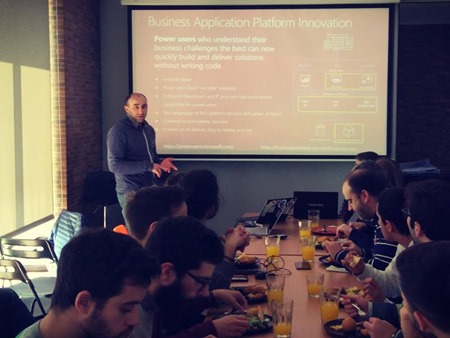
- CSI about Microsoft Flow and PowerApps
-
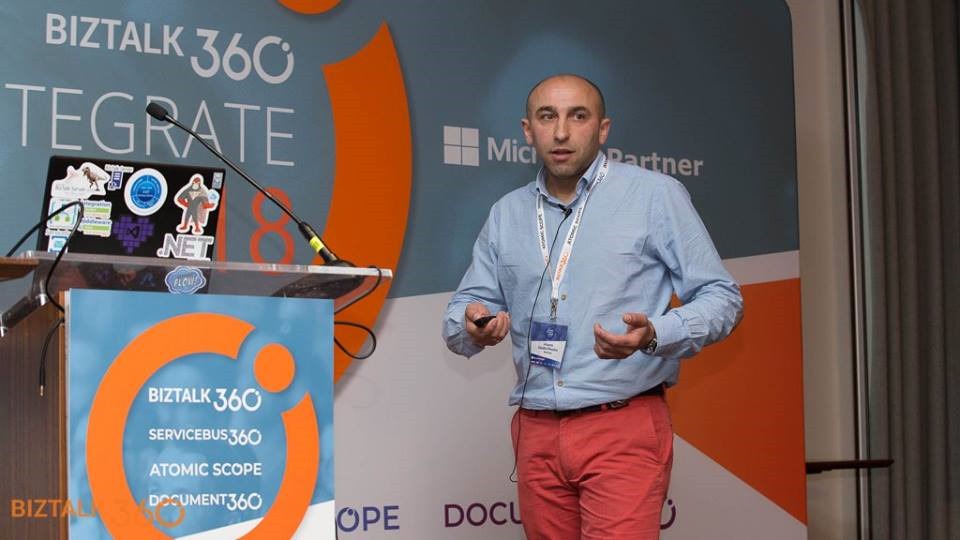
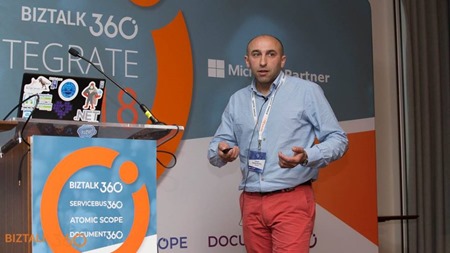
- Integrate 2018 | London | BizTalk Server Notes from the Road


-
- MVPDays Microsoft Flow Conference 2018 | online | How we use Microsoft Flow and PowerApps: Real cases scenarios
- And migrate all and improve, at least almost all, my community projects to GitHub:
And this is just a small set of my contributions because I still publish several small scripts and sample codes on TechNet Gallery and Code Gallery and help in other ways the community.
My favorite’s posts
The top posts that I enjoyed writing or add more fun to do it last year was:
Because of the fact normally people look at me and think that I’m a BizTalk guy but I really do more than BizTalk Server, but I only like to write about real stuff that I use daily and indeed I had a lot of fun writing these blog post and real-life cases.
And of course, to close this list:
Thanks for following me, for reading my blog and I promise that I will continue to share my knowledge during 2019.
Author: Sandro Pereira
Sandro Pereira lives in Portugal and works as a consultant at DevScope. In the past years, he has been working on implementing Integration scenarios both on-premises and cloud for various clients, each with different scenarios from a technical point of view, size, and criticality, using Microsoft Azure, Microsoft BizTalk Server and different technologies like AS2, EDI, RosettaNet, SAP, TIBCO etc. He is a regular blogger, international speaker, and technical reviewer of several BizTalk books all focused on Integration. He is also the author of the book “BizTalk Mapping Patterns & Best Practices”. He has been awarded MVP since 2011 for his contributions to the integration community. View all posts by Sandro Pereira
by Sandro Pereira | Dec 13, 2018 | BizTalk Community Blogs via Syndication
Welcome back to another entry on my blog post series about “BizTalk Server Tips and Tricks” for developers, administrators or business users and I couldn’t resist on speaking about a topic that normally divides BizTalk developers and BizTalk administrators: Tracking Data!
Problem
Normally Developers have in their environments Full tracking Enabled, why? Because it’s easier to debug, troubleshoot, analyze or validate and see if everything is running well or simply, what is happening with their new applications.
The important question is: Do Developers remember to disable tracking before they put the resources in production?
No! And actually… they don’t care about that! Is not their task to do it or control it. And if you ask them, you should always have them enabled! Sometimes, to be fair, they don’t know the right configurations that should be applied to production.
This can be an annoying and time-consuming operation. It will be the same as asking developers to change their way of being, and for them to remember each time they export an application to disable the Tracking data properties can be a big challenge… or even impossible!
Solution (or possible solutions)
My advice is, if you are a BizTalk Administrator, let them be happy thinking they are annoying you and take back the control of your environment by yourself.
These tasks can be easily automated and configured by easily creating or using PowerShell.
You should disable all Tracking or enable just the important settings at the application level. You may lose 1 day developing these scripts, but then you do not need to worry anymore about it.
As an example, with this script: BizTalk DevOps: How to Disable Tracking Settings in BizTalk Server Environment, you can easily disable all tracking settings for all the artefacts (orchestrations, schemas, send ports, receive ports, pipelines) in your BizTalk Server Environment
# Disable tracking settings in orchestrations
$Application.orchestrations |
%{ $_.Tracking = [Microsoft.BizTalk.ExplorerOM.OrchestrationTrackingTypes]::None }

# Disable tracking settings in Send ports
$disablePortsTracking = New-Object Microsoft.BizTalk.ExplorerOM.TrackingTypes
$Application.SendPorts |
%{ $_.Tracking = $disablePortsTracking }

# Disable tracking settings in Receive ports
$Application.ReceivePorts |
%{ $_.Tracking = $disablePortsTracking }

# Disable tracking settings in pipelines
$Application.Pipelines |
%{ $_.Tracking = [Microsoft.BizTalk.ExplorerOM.PipelineTrackingTypes]::None }

# Disable tracking settings in Schemas
$Application.schemas |
    ?{ $_ -ne $null } |
    ?{ $_.type -eq "document" } |
    %{ $_.AlwaysTrackAllProperties = $false }
This can easily be edited by you to disable only one application or you can configure the right tracking setting that you want for your applications and environment.
If you are working with BizTalk Server 2016…
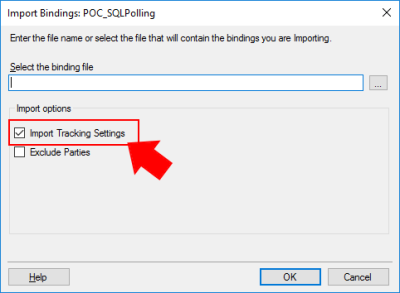
In previous versions of BizTalk Server, tracking settings were automatically imported with the rest of the application bindings. However, if you are working with BizTalk Server 2016, you have a new feature that allows you to have a better control while importing your BizTalk Applications: Import Tracking Settings.
If you are importing an MSI file, on the “Application Settings” tab, you will have a checkbox “Import Tracking Settings” that allows you to say: I don’t want to import the tracking from DEV or another environment in which the MSI was generated from.
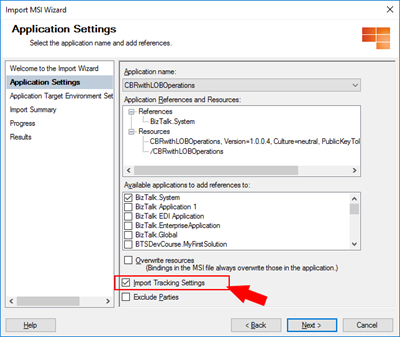
If you are importing a Binding file you will also have this same option:
Of course, if you want to properly define the correct or minimum tracking settings of your application, you need to do it manually or, once again, using a PowerShell script to accomplish that.
Quick, simple and practical.
Stay tuned for new tips and tricks!
Author: Sandro Pereira
Sandro Pereira is an Azure MVP and works as an Integration consultant at DevScope. In the past years, he has been working on implementing Integration scenarios both on-premises and cloud for various clients, each with different scenarios from a technical point of view, size, and criticality, using Microsoft Azure, Microsoft BizTalk Server and different technologies like AS2, EDI, RosettaNet, SAP, TIBCO etc. View all posts by Sandro Pereira

by Sandro Pereira | Dec 9, 2018 | BizTalk Community Blogs via Syndication
There are simple BizTalk Server installations and then there are some quite annoying BizTalk Server topologies and complex configurations which tend to give rise to the appearance of diverse types of errors: SQLNCLI11 ole db provider not found in the system. It’s one of the most recent I’ve found.
Let me contextualize the appearance of this error.
To simplify I have 5 machines in my environment:
- 2 SQL Server’s in a cluster and SSO Master Secret Server in a cluster
- 2 BizTalk Server’s
- And 1 IBM WebSphere MQ Server and with only BizTalk Server 2016 MQSeries Agent installed
I successfully installed:
- BizTalk Server 2016 Cumulative Update 5 (CU5) in the SSO Master Secret Server’s
- And BizTalk Server Feature Pack 3 with CU5 on BizTalk Server’s
Nevertheless, while I was trying to install BTS2016 CU5 on the MQ Server I got the following error:
Ole db providers : SQLOLEDB, MSDataShape, ADsDSOObject, MSDASQL, MSDASQL Enumerator, SQLOLEDB Enumerator, MSDAOSP
SQLNCLI11 ole db provider not found in the system.
TLS1.2 support requires SQL Server 2012 Native client 11.0 must be installed on all BizTalk machines. Install SQL Server Native client 11.0 before applying the update.
To download and install Microsoft SQL Server 2012 Native Client 11.0, see this Microsoft Download Center webpage. https://www.microsoft.com/en-us/download/details.aspx?id=50402&751be11f-ede8-5a0c-058c-2ee190a24fa6=True
Aborting installation of this update.
Please try after installing SQL Server 2012 Native client 11.0.
Cause
Unfortunately, to install BizTalk Server CU5 and I guess previous ones there is this default requirement that you need to have: SQL Server 2012 Native client 11.0 installed in the server.
In fact, for the BizTalk Server 2016 MQSeries Agent to work properly this component is not required. This is a validation requirement of the CU5.
Solution
The solution is quite simple:
After you install the SQL client you will be able to successfully apply the BizTalk Server 2016 CU5.
Author: Sandro Pereira
Sandro Pereira lives in Portugal and works as a consultant at DevScope. In the past years, he has been working on implementing Integration scenarios both on-premises and cloud for various clients, each with different scenarios from a technical point of view, size, and criticality, using Microsoft Azure, Microsoft BizTalk Server and different technologies like AS2, EDI, RosettaNet, SAP, TIBCO etc. He is a regular blogger, international speaker, and technical reviewer of several BizTalk books all focused on Integration. He is also the author of the book “BizTalk Mapping Patterns & Best Practices”. He has been awarded MVP since 2011 for his contributions to the integration community. View all posts by Sandro Pereira
by Sandro Pereira | Dec 7, 2018 | BizTalk Community Blogs via Syndication
There is something special when you find a solution or possible solution to an annoying error message (for not using another type of language) and this is one of these cases: There is a problem with this Windows Installer package!
This error occurred each time my team was trying to install a BizTalk Application on a non-developer environment: Test or QA. And the full error description was:
There is a problem with this Windows Installer package. A program run as part of the setup did not finish as expected. Contact your support personnel or package vendor.
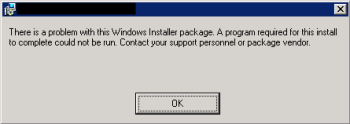
And “Contact your support personnel or package vendor”? What a ****, It is me! I am the support personnel and package vendor/creator… you still write these kinds of error messages?
Cause
Unfortunately, this error may be caused by several reasons, but some places may tell you that this problem can be related to:
- The package is actually corrupted, you should export again and import it – not really like to a happen or solve it
- The fact of the destination location does not exist – that is not true, because the installation will create the directories;
- Invalid drive letter – again it is not true because the MSI will not go further on the wizard if that happens
To correctly diagnose the problem and find the cause of the problem you should consult the Event Viewer of the BizTalk Server in which you are trying to install the MSI. Normally you will find more details about the cause of the error.
The most common will be:
- The Installation Path that you are providing in the wizard along with the name of the assemblies will have more than 256 characters.
By default, the installation folder will be:
- C:Program Files (x86)Generated by BizTalkname of the BizTalk Application
That is:
- 46 characters for the default folder “C:Program Files (x86)Generated by BizTalk”
- Adding, more or less, 15 characters for the BizTalk Application name folder
Will give you a total of 195 characters to be used in the assembly’s names. Which normally is enough.
Solution
Once again, in this case, the solution is very simple:
- ·Change the installation folder to a small path like:
By providing a small path, my team was able to successfully install the MSI.
Author: Sandro Pereira
Sandro Pereira lives in Portugal and works as a consultant at DevScope. In the past years, he has been working on implementing Integration scenarios both on-premises and cloud for various clients, each with different scenarios from a technical point of view, size, and criticality, using Microsoft Azure, Microsoft BizTalk Server and different technologies like AS2, EDI, RosettaNet, SAP, TIBCO etc. He is a regular blogger, international speaker, and technical reviewer of several BizTalk books all focused on Integration. He is also the author of the book “BizTalk Mapping Patterns & Best Practices”. He has been awarded MVP since 2011 for his contributions to the integration community. View all posts by Sandro Pereira