by Gautam | Feb 26, 2017 | BizTalk Community Blogs via Syndication
Do you feel difficult to keep up to date on all the frequent updates and announcements in the Microsoft Integration platform?
Integration weekly update can be your solution. It’s a weekly update on the topics related to Integration – enterprise integration, robust & scalable messaging capabilities and Citizen Integration capabilities empowered by Microsoft platform to deliver value to the business.
If you want to receive these updates weekly, then don’t forget to Subscribe!
On-Premise Integration:
Cloud and Hybrid Integration:
- BizTalk Developer at Experis, Conway, Arkansas
- BizTalk Developer at Anchor Point Technology Resources, Indianapolis, Indiana
- BizTalk Developer at TekParters, Medley, FL, US
- BizTalk Consultant at Capgemini, Jersey City, New Jersey
- BizTalk Developer at CACI, International, Arlington, VA, US
- BizTalk Developer at CTS, Inc. Atlanta, GA, US
- BizTalk Developer at Hiring Ideas, Dallas, TX, US
- Developer – BizTalk WellMed – San Antonio, TX or Telecommute, UnitedHealth Group, San Antonio, TX, US
Feedback
Hope this would be helpful. Please feel free to let me know your feedback on the Integration weekly series.
by Gautam | Feb 19, 2017 | BizTalk Community Blogs via Syndication
Do you feel difficult to keep up to date on all the frequent updates and announcements in the Microsoft Integration platform?
Integration weekly update can be your solution. It’s a weekly update on the topics related to Integration – enterprise integration, robust & scalable messaging capabilities and Citizen Integration capabilities empowered by Microsoft platform to deliver value to the business.
If you want to receive these updates weekly, then don’t forget to Subscribe!
On-Premise Integration:
Cloud and Hybrid Integration:
Feedback
Hope this would be helpful. Please feel free to let me know your feedback on the Integration weekly series.
by Gautam | Feb 12, 2017 | BizTalk Community Blogs via Syndication
Are you struggling to keep up to date on all the frequent updates and announcements in the Microsoft Integration platform?
Integration weekly update can be your solution. It’s a weekly update on the topics related to Integration – enterprise integration, robust & scalable messaging capabilities and Citizen Integration capabilities empowered by Microsoft platform to deliver value to the business.
If you want to receive these updates weekly, then don’t forget to Subscribe!
On-Premise Integration:
Cloud and Hybrid Integration
Feedback
Hope this would be helpful. Please feel free to let me know your feedback on the Integration weekly series.
by Gautam | Feb 2, 2017 | BizTalk Community Blogs via Syndication
Azure Application Gateway a Layer-7 HTTP load balancer that provides application-level routing and load balancing services. It distributes traffic requests based upon data found in application layer protocols such as HTTP/HTTPS and also on application specific data such as HTTP headers, cookies, or data within the application message itself, such as the value of a specific parameter.
You basically need to define rules to accept the traffic requests and route them to the appropriate back-end instances.
Application Gateway currently supports the following features:
- Web Application Firewall (WAF)
- Scaleble, highly-available HTTP load balancing solution
- Cookie-based session affinity
- SSL offload for better utilization
- URL-based content routing
- Multi-site routing
- Web socket support
- Health monitoring
- Advance diagnostics
While Azure is responsible for securing the infrastructure and platform that your application runs on, it is your responsibility to secure your application itself. Now Web Application Firewall (WAF) in Azure Application Gateway can provide protection to your web applications against common threats such as SQL injection, cross-site scripting attacks, and session hijacks.
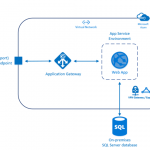
If your organization hosts highly sensitive information, the number-one priority is having a fully-isolated and dedicated environment for only your organization’s applications. Using an App Service Environment, your organization can have security and isolation for your web apps and use a virtual network for control over traffic.
An App Service Environment is a premium service plan option of Azure App Service that provides a fully isolated and dedicated environment. App Service Environments are isolated to run only a single customer’s applications and are always deployed into an Azure Virtual Network. At a high level, an App Service Environment consists of compute resources running in the Azure Hosted Service, Storage, Database, a Virtual Network, and a subnet with the hosted service running in it.
From a single open port, one option to block most traffic would be to use WAF in Application gateway in front of ASE to protect your Web apps.You can also Create a network security group, and assign it to a subnet in your Azure Virtual Network to restrict traffic to the App Service Environment from the WAF only by using the VIP address.
Here you have all the security with a straight forward architecture. Easy to provision, maintain and administer.
The path for request would be: App Gateway (WAF mode) –> ASE
To create this architecture here are the steps involved:
- Create a virtual network (ex: frontend-vnet) for both App Service Environment (ASE) and Application Gateway(AG).
- Create subnet for Application Gateway. Subnet for App Service Environment will be created as a part of ASE provision process.
- Creates an App Service Environment in your virtual network with a private internal load balancer address using Azure Quickstart Template. This step would take up to 2 hours to complete.
- Deploy a test web app – The vnet (frontend-vnet) is not publicly accessible so in order to deploy app, you need to create a Virtual Machine that is living within the same Virtual Network and use that to deploy and access the Web App with its internal IP. Once you have deployed your test web app, you should successfully be able to access it from any VM which is living within same vnet (frontend-vnet).
- Create WAF-enable Application Gateway
- Configure Application Gateway
- Test your web app form public endpoint.
In this blog post I will go through the creation and configuration of Application Gateway in detail.
Create WAF-enabled Application Gateway
In Azure Portal, Go to New—>Networking and select Application Gateway. Provide the information for the basic setting as shown below. Make sure you select WAF tier.
In the settings, make sure to select the same Virtual Network (frontend-vnet) you used to configure ASE earlier and the subnet you created specifically for the Application Gateway. You also need configure the public IP address.
Configure the WAF specific settings.
- Firewall status – This setting turns WAF on or off.
- Firewall mode – This setting determines the actions WAF takes on malicious traffic. If Detection is chosen, traffic is only logged. If Prevention is chosen, traffic is logged and stopped with a 403 Unauthorized.
Review the results and click on OK to create the gateway.
Configure the Application Gateway
Add servers to backend pool – Once the application gateway is created, go to the Backend Pools and select the current backend pool.
Add the IP address of ILB ASE and Save. Now the incoming traffic that enters the application gateway would be routed to the backend address added here.
Configure SSL offload – Application gateway can be configured to terminate the Secure Sockets Layer (SSL) session at the gateway to avoid costly task of decrypting HTTPS traffic off your web servers. Application gateway decrypts the request and sends it to backend server and re-encrypts the response before sending it back to the client.
To configure SSL offload with an application gateway, a certificate (pfx format) is required. This certificate is loaded on the application gateway and used to encrypt and decrypt the traffic sent via SSL.
Add an HTTPS listener – It will look for traffic based on its configuration and helps route the traffic to the backend pools. Click Listeners and click the Add button to add a listener. Fill out the required information for the listener and upload the .pfx certificate.
Create a rule and associate it to the listener – Once listener is created, you need to create a rule to handle the traffic from the listener. Click the Rules of the application gateway, and then click Add. Type in the friendly name for the rule and choose the listener created in the previous step. Choose the appropriate backend pool and http setting and click OK.
Create the custom probe – Custom probes allow you to have a more granular control over the health monitoring. When using custom probes, you can configure the probe interval, the URL and path to test, and how many failed responses to accept before marking the back-end pool instance as unhealthy.
Probes are configured in a two-step process through the portal. The first step is to create the probe. Next you add the probe to the backend http settings of the application gateway. Create a Custom Probe with the Host set as your custom Web App domain, for example sample-app.com as shown below.
Add probe to the gateway – Go to the HTTP settings, and make sure that the setting has Custom Probes turned on and select the probe you just created. Otherwise, the Application Gateway will try to go to the IP of the App Service Environment without passing a Host header, which won’t work and will throw the probe into an Unhealthy state resulting in the 502 Gateway Proxy error.
Testing
There are couple of ways to do the testing. First you can use ModHeader Chrome extension to open the public IP address/hostname of the Application Gateway in the browser. You need to pass in the Custom Domain you configured on the Web App as a Host Header and the website should come up. Refer Sabbour blog post for further detail.
The other way is to add hostname (sample-app.com) to Custom Domains in the setting of app deployed in ASE as shown below.
You need to add an entry for your host in Hosts file on your local machine. The path would be c:WindowsSystem32Driversetchosts.
Now if you go to https://sample-app.com it should open up the sample web app as shown below.
Logging and troubleshooting
Application Gateway provides following capabilities to monitor resources.
Backend health – Application gateway provides the capability to monitor the health of individual members of the backend pools through the portal, PowerShell, and CLI.
Logging – There are different types of logs in Azure to manage and troubleshoot application gateways such as performance, firewall and access logs.
Here is a sample firewall log.
There are three different options to choose for storing your logs
- Storage Account
- Event Hubs
- Log Analytics
Metrics – Application gateway currently has one metric. This metric measures the throughput of the application gateway in Bytes per second.
You can also set alert rule for application gateway based on metrics on a resource.
For example, an alert can email an administrator if the throughput of the application gateway is above, below or at a threshold for a specified period of time.
Summary
To summarize, we explored the option to protect your web applications against common threats such as SQL injection, cross-site scripting attacks, and session hijacks using Azure Application Gateway. We ‘ve hosted a Web App securely in an App Service Environment. This Web App isn’t publicly accessible as it is sitting in a subnet inside a Virtual Network and it isn’t exposed to the internet. The only way to access the site is through a Web Application Firewall enabled Application Gateway.

by Gautam | Jan 19, 2017 | BizTalk Community Blogs via Syndication
Microsoft Tech Summits kicked off today at Chicago with lots of keynotes, technical training sessions and hands-on labs to build and develop cloud skills of interested individuals.
There were also deep dive sessions covering a range of topics across Microsoft Azure and the hybrid platform including security, networking, data, storage, identity, mobile, cloud infrastructure, management, DevOps, app platform, productivity, collaboration and more.
The Microsoft Tech Summit provides Free, two-day technical training for IT professionals and developers with experts who build the cloud services across Microsoft Azure, Office 365, and Windows 10.
Here is the Agenda look like.
You can also find a city near you and Register for the event
Here’s a list of the currently published Tech Summit events around the globe:
- Amsterdam, March 23 – 24
- Bangalore, March 16 – 17
- Birmingham, March 27 – 28
- Chicago, January 19 – 20
- Copenhagen, March 30 – 31
- Frankfurt, February 9 – 10
- Johannesburg, February 6 – 7
- Milan, March 20 – 21
- Seoul, April 27 – 28
- Singapore, March 13 – 14
- Washington D.C. March 6 – 7
.
There is another free event coming up for integration community – Global integration boot camp.
This event is driven by user groups and communities around the world, backed by Microsoft, for anyone who wants to learn more about Microsoft’s integration story. In this full-day boot camp there will deep-dive into Microsoft’s integration stack with hands-on sessions and labs, delivered to you by the experts and community leaders.
In this Boot Camp, the main focus will be on:
BizTalk 2016 –BizTalk Server 2016, what’s new, and using the new Logic Apps adapter
Logic Apps –Creating Logic Apps using commonly-used connectors
Servicebus –Build reliable and scalable cloud messaging and hybrid integration solutions
Enterprise Integration Pack –Using the Enterprise Integration Pack (EIP) with Logic Apps
API Management –How does API management help you organize your APIs and how does it increase security?
On-Premise Gateway –Connecting to on-prem resources using the On-Premise Gateway
Hybrid Integration –Hybrid integrations using BizTalk Server and Logic Apps
Microsoft Flow – Learn to compose flows with Microsoft Flow
If you are interested to be part of it or to host it on your location, you can reach out to organizers by providing your details.
Organizers
by Gautam | Jan 19, 2017 | BizTalk Community Blogs via Syndication
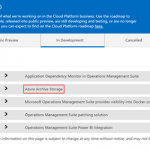
This week during our discovery session with one of our new customer and Azure Black Belt Team members we came to know about a new storage type called Archive Storage which is still in development phase.
It is also mentioned in the Microsoft Cloud Platform roadmap documentation which provides a snapshot of what Microsoft is working on in their Cloud Platform business. You can use the document to find out which cloud services are
- recently made generally available
- released into public preview
- are still developing and testing
- or are no longer developing
As per documentation,
Azure Archive Storage is a very low cost cloud storage for data that is archived and very rarely accessed with retrieval time in hours. It can be useful for archive data such as medical reports, compliance documents, exchange mails, etc. that are accessed rarely but need to be stored for many years.
Currently Azure Storage offers two storage tiers for Blob – Hot and cool storage.
Azure hot storage tier – is optimized for storing data that is accessed frequently.
Azure cool storage tier – is optimized for storing data that is infrequently accessed and long-lived.
Azure Archive Storage is different than Hot and Cold because it’s in a way offline data storage. And that’s the reason if the Archive Storage data need to be accessed then it will be made online with retrieval time in hours. It will also be cheaper than Cold storage almost half price.
With Archive Storage there will be an option to apply a policy to move the data from hot or cold tier to Archive. For example, you can have an automated process based on a policy to move any data which is one-year-old to archive storage.
I hope archive storage type would provide an option to enterprise customers to store archival data in most cost-effective way in Azure.
by Gautam | Jan 9, 2017 | BizTalk Community Blogs via Syndication
Microsoft’s Cognitive services provides set of powerful intelligence APIs. These APIs can be integrated into your app on the platform of your choice to tap into ever-growing collection of powerful artificial intelligence algorithms for vision, speech, language, knowledge and search.
Integrating Cognitive Services into an application provides the app with the ability to SEE, RECOGNIZE, HEAR and even understand the SENTIMENT of your text.
In this blog post, I am trying to experiment with the Text Analytics API in Logic App. The API is a suite of text analytics services built with Azure Machine Learning to evaluate sentiment and topics of text to understand what user want.
For Sentiment analysis the API returns a numeric score between 0 and 1. Scores close to 1 indicate positive sentiment and scores close to 0 indicate negative sentiment. For Key phrase extraction the API returns a list of strings denoting the key talking points in the input text.
Cognitive Service account for the Text Analytics APIs
To build to Logic App to use Text Analytics APIs, first you need to sign up of the text analytic services.
- Login to Azure Portal with your valid MSDN Subscription and Search for Cognitive Services APIs.
- Create a Cognitive Service account by providing the details as shown below.
- Make sure Text Analytics is selected as the ‘API type’ and select free plan – free tier for 5,000 transactions/month
- Complete the other fields and create your account.
- After you sign up for Text Analytics, find your API Key. Copy the primary key, as you will need it Logic App.
Logic App to detect sentiment and extract key phases
Logic Apps is a cloud-based service that you can use to create workflows that run in cloud. It provides a way to connect your applications, data and SaaS using rich set of connectors. If you are new to Logic App, please refer the Azure documentation for further details.
Now let’s create a Logic App to detect sentiment and extract key phrases from user’s text using the Text Analytic API.
Go to New >Enterprise Integration and select Logic App as shown below.
Create a Logic App by providing the details as shown below.
After our deployment success, we can start editing our Logic App.
To access it, in your left, browse All Resources > [Name of your Logic App].
Clicking in your Logic App will open the Logic Apps Designer. In welcome screen, there are a lot of templates ready to use. Choose a blank template from Logic Apps Designer
On Logic App designer, a search box is available where you can look for available Microsoft managed connectors and APIs available. Select the Request from the list which would act as a trigger to your Logic App and can receive incoming request.
Now we need to define a request body JSON Schema and the designer will generate tokens to parse and pass data from the trigger through the workflow.
We can use a tool like jsonschema.net to generate a JSON schema from a sample body payload

JSON schema for the above payload looks like below
Now use this JSON schema in the Request trigger body as shown below
Next step is to look for Cognitive Service API connector in the managed API list.
Select the Detect Sentiment and provide a connection name and Cognitive Service Account Key which we have copied in the previous section and click on Create.
Now you need to provide the Text value to the Detect Sentiment API from “text” variable of the Request trigger as shown below.
Next step would be to add Cognitive Service connector for Key Phrases same way we did for Detect Sentiment.
Now we would use the Compose and Response action to send HTTP response for the sentiment and key phrase analysis.
This is how I have composed the response using a simple new JSON message using the variable “key phrase” and “score” from the Key Phrase and Detect Sentiment APIs.
You can also use code view to compose the response message as shown below.
And finally use the output of compose action to send the HTTP response.
So here is complete workflow look like
Quick and easy! Now once you save the workflow the topmost Request trigger will have the URL for this particular Logic App.
Now let’s invoke this Logic App from one of my favorite API testing tool, Postman.
I submitted the sample JSON message to the endpoint with following text – “I had a wonderful experience! Azure cognitive services are amazing.”
Sure enough, I got the key phrase and sentiment score as below:
Conclusion
Clearly Microsoft’s Cognitive Services are easy to use in your app on the platform of your choice. The Text Analytics API is just one of many different Artificial Intelligence APIs provide by Microsoft. I am sure this new platform would mature in the coming days and different types of app can leverage this technology.
References:
https://docs.microsoft.com/en-us/azure/cognitive-services/cognitive-services-text-analytics-quick-start
https://social.technet.microsoft.com/wiki/contents/articles/36074.logic-apps-with-azure-cognitive-service.aspx

by Gautam | Aug 10, 2016 | BizTalk Community Blogs via Syndication
Bill Chesnut, @BizTalkBill
Bill is Cloud Platform & API Evangelist at SixPivot located in Melbourne Australia. He started his career in 1983 with the US Defense as an IBM Systems Programmer. He switched to the Microsoft Windows platform in 1994, and has been involved with Windows development ever since.
Most recently, Bill has been driving various application integration projects using BizTalk Server 2000, 2002, 2004, 2006 and 2006 R2 to connect a variety of Microsoft Business Solutions applications with other systems. Bill is also a Microsoft Certified Trainer and has been actively training BizTalk developers since the release of BizTalk 2004. He is also a member of the elite Microsoft Virtual Technology Specialist (VTSP) team, a small group of selected industry experts working as an extension to the Microsoft Technology Specialist teams. He is also a Microsoft Integration Microsoft Valuable Professional (MVP)
Bill is very involved in the Microsoft User Group Community as leader of the Melbourne .Net User Group. Bill has also been working closely with Microsoft to run the BizTalk User group in Melbourne. Bill is also the primary organizer of the BizTalk Saturday BizTalk Hands on Days around Australia and New Zealand. Bill also maintain a blog at http://www.biztalkbill.com/
He has also spoke couple of times in Integration User Group – Integration Monday
Last year Bill also delivered sessions in Microsoft Ignite New Zealand and Microsoft Ignite Australia
It’s really great to have him as one of the reviewer of our book– Robust Cloud Integration with Azure. Here is his thoughts about the book.
1. What do you think about the outline of the book?
I think this book will be a great reference for those integration developers moving from on-premises to the cloud and to help those developers already working in the cloud leverage the full Microsoft PaaS Integration stack.
2. What is your expectation from the book or how do you think this book would be valuable for its reader’s time and money?
There are a number of different technologies in Azure and the question always come up about what particular component to use and when to use them, this book should offer some well needed guidance to help answer those question and get integration developers start on the cloud integration journey.
I welcome Bill to our book reviewer team and I am sure his guidance will shape the book to a valuable resource for cloud integration.
Related links:

by Gautam | Jul 15, 2016 | BizTalk Community Blogs via Syndication
Howard S. Edidin, @hsedidin
Howard S. Edidin is a Cloud Architect/Consultant specializing with Azure PaaS Integration. He is a well know speaker and contributor to BizTalk community. He is also been awarded as Data Platform MVP.
Currently he is working as a Senior Azure Solution Architect with VNB Consulting, Inc. He is specialized in Healthcare and Life Sciences Integration using BizTalk Server and Azure.
He is certified as Microsoft Certified Technical Specialist (MCTS) in BizTalk Server 2010 and is also a Gold Member of the HL7 Organization. He is a Microsoft Virtual Technical Specialist (BizTalk, Azure) for Healthcare (P-TSP) and a member of the Azure Advisory Group.
He is considered the “go to” person for HL7 Integration. Howard is working with Microsoft Healthcare and Life Sciences on the integration of HL7 FHIR with Azure. He was the first to implement FHIR using Microsoft BizTalk Server.
Howard has co-authored three books on BizTalk Server. He also maintains a blog, The Azure DocumentDB and publishes a Daily newspaper Healthcare Integration
He has also spoke few times in Integration User Group – Integration Monday.
It’s really great to have him as one of the reviewer of our book– Robust Cloud Integration with Azure. Now that he is in the reviewer team of our book, I asked him to share his thoughts on the following couple of questions about the book.
1. What do you think about the outline of the book?
The outline is very thorough. The biggest issue is trying to keep up with the constant updates and new functionality on Azure.Many of the products and service available in Azure today are in preview.
2. What is your expectation from the book or how do you think this book would be valuable for its reader’s time and money?
The most difficult task is to provide content that is not publicly available on the Azure site or a blog. Every topic requires at least one good tutorial.
Glenn Colpaert, @GlennColpaert
Glenn Colpaert is an Integration Consultant and Microsoft Azure MVP at Codit.
He believes its shame to let his learning, experiences, POCs / demos, sit there with no purpose. So he often share his learning and experience with the community by writing a blog post or giving a talk on that subject.
Glenn is also part of the Microsoft Azure Insider program as well as the BizTalk Advisors group.
He became a board member of BTUG.be, the Belgian BizTalk User Group and is an active blogger on the Codit Blog.
He has also spoke couple of times in Integration User Group – Integration Monday.
He has also created a video for Microsoft Channel 9 about Microsoft Cloud Integration and SAP.
He was the first who showed keen interest for reviewing the book after reading the blog post. Here is his thought on the following couple of questions about the book.
1. What do you think about the outline of the book?
After reading the announcement blog post about the robust integration book I reached out to the team behind it and asked if they could use some help with the review of the book. The outline of the book immediately triggered my interest as it tried the cover the broad spectrum of the current integration landscape without losing sight of what’s coming next within the integration space..
2. What is your expectation from the book or how do you think this book would be valuable for its reader’s time and money?
The team behind robust integration is setting some high expectations as they try to cover all important areas of modern/hybrid Integration. Covering the broad spectrum from Logic Apps over API Management to Hybrid Integration with BizTalk Server 2016, this book will definitely will be a must read for all people involved or interested in the current and to be integration landscape.
I welcome both Howard and Glenn to our book reviewer team.
Related links:

by Gautam | Jul 7, 2016 | BizTalk Community Blogs via Syndication
Riaan Gouws, @RiaanGouws74
Riaan is Chief Technical Officer at Synegrate, a Southern California based software consulting company specializing in on premise, hybrid and cloud based integration. Synegrate is also a Microsoft Gold Partner in Application Integration with specialized skills in Modern Integration (Azure Micro Services and BizTalk Server), based out of Costa Mesa, California. The company has been operating since 2004 as Inobits Inc. and was rebranded as Synegrate in 2014.
Riaan is a BizTalk Server expert, having worked with the platform since its initial release 15 years ago. He furthermore is a keen supporter of Microsoft’s cloud first strategy and has aligned Synegrate with this strategy. He is also a member of the elite Microsoft Virtual Technology Specialist (VTSP) team, a small group of selected industry experts working as an extension to the Microsoft Technology Specialist teams. He has a strong relationship with Microsoft as a valued partner in implementing enterprise solutions on top of Microsoft Azure.
I got opportunity to work with Riaan during my last project where he was the architect for the BizTalk solution – EDI and EAI, for the enterprise customer. He is amazing person and a great consultant to work with.
Now a days he is mostly involved with customers where they are implementing modern integration strategies using Microsoft Azure. He was the first person I reached out for the reviewer of our book – Robust Cloud Integration with Azure.
Now that he is in the reviewer team of our book, I asked him to share his thoughts on the following couple of questions about the book.
1. What do you think about the outline of the book?
I reviewed the book outline and I think it is well thought out, accurately targeted towards integration professionals, and reads very easily. I especially love Chapter 3 – Getting started with API Apps; I think it is comparable to a theme park thrill ride. It takes the user from introduction to API apps, to advanced topics in a quick 40 pages or so. Love it!
Then the approach you guys are taking with Logic Apps is also great. You start the reader off slow, but then quickly accelerate through the chapters, showing the users basic to advanced concepts on orchestrating data. I also appreciate the fact that you are on cusp of new offerings in Azure, such as Integration Account and Integration Pack.
2. What is your expectation from the book or how do you think this book would be valuable for its reader’s time and money?
I expect the book to take an integration developer/architect, with predominantly an on-premise integration skill and mindset, to being knowledgeable and comfortable building integration solutions in Azure. Synegrate is currently involved with customers where we are implementing modern integration strategies using Microsoft Azure. I see readers gaining a lot of knowledge from the book; knowledge that we have gained from practical experience in the field. I think of this book as something that will allow readers to fast-track their entry into getting modern integration solutions built in Azure.
I thanks Riaan to be part of our team as reviewer and also sharing his thoughts about the book.
I wish him and Synegrate very best for their future endeavors.

