Do you feel difficult to keep up to date on all the frequent updates and announcements in the Microsoft Integration platform and Azure iPaaS?
Integration weekly update can be your solution. It’s a weekly update on the topics related to Integration – enterprise integration, robust & scalable messaging capabilities and Citizen Integration capabilities empowered by Microsoft platform to deliver value to the business.
If you want to receive these updates weekly, then don’t forget to Subscribe!
INTEGRATE (formerly known BizTalk Summit) is the premier, and maybe the biggest integration conference in the world focused on Microsoft Integration and a must go event for anyone who is working in this area. So, if you missed the chance to attend the London event this year, this is your last chance to meet and interact with the Microsoft Product Group, Microsoft Integration MVP’s and a huge list of attendees that are in fact experts from the field in these areas.
Since the first BizTalk Summit event till today, I’m a constant presence as a speaker at these events, and I had the enormous pleasure to present last time this event happened in USA (2017), that was, in fact, the first time I deliver a session in an event in the USA… and the way I was received and cherished by the attendees was so special that I could not miss this opportunity to come back again! So, I’m thrilled to say that I will be present once again in the INTEGRATE USA event delivering the second part of the session: BizTalk Server Fast & Loud!
Also, I’m extremely happy to say that for the second time DevScope (my company) will be sponsoring this amazing event!
I receive so many amazing feedbacks about my BizTalk Server Fast & Loud session two years ago, that this year I decided to create this second part, I was a bit nervous in the beginning because I want to keep the good level on the previous session and avoid what usually happens with the sequels in the movies, as a new part is released the quality goes down… and I think I did a good job, at least based on the feedback in London event. Personally, I love this session more than the previous. But at that time, I decide to do this session I did not know, and/or I had not decided that I would be present in the USA this year. So, this is, in fact, a happy coincidence, because the last time the event happened in USA my talk was the first part of this session :), so it makes more sense. But if you were not there you can see the first part of this session here: BizTalk Server Fast & Loud
About my session
Session Name: BizTalk Server Fast & Loud Part II: Optimizing BizTalk
Session Overview: Following the success of one of Sandro’s previous presentations at Integrate, Sandro decided to go deep on this hardcore BizTalk topic: Optimizing your BizTalk Server. This session will allow you to gain a better view on how to optimize BizTalk Server for better performance in all phases: your teams proactivity, your code, your environment, and your goals. Once again, this is a very extensive and complex topic and there is no magic formula you can apply to solve all your problems. This presentation will aim to guide you through some of the most important steps, operations, tasks and best practices that you need to do or be aware of, in order to boost the performance of your BizTalk Server projects and that you can adjust or follow according to your needs.
The event will take place between June 24-26, 2019 at Microsoft Campus, Redmond, WA and you are still on time to register for the conference here.
From time to time we go on a call with our customers because they raised a support ticket, or simply to explain a particular feature of the product. During such sessions, in most cases, the Operations Dashboard is the first screen which will show up after starting BizTalk360.
Unfortunately, quite often we find that dashboard in its out-of-the-box status. In this article, we will explain taking maximum benefits of the Operations Dashboard.
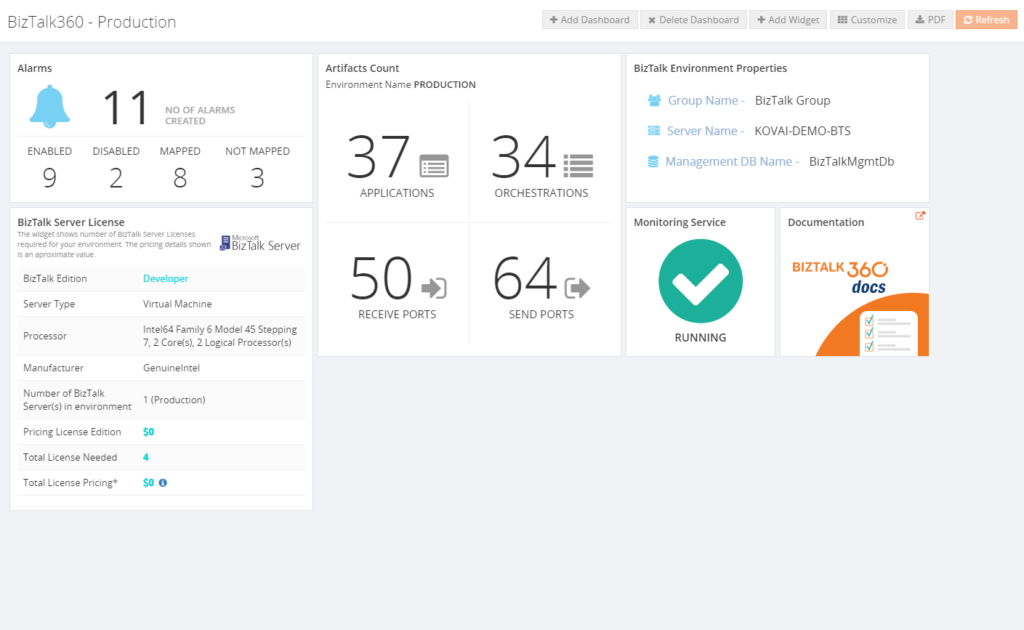
The default dashboard looks similarly like shown below.
Of course, it is up to our customers to leave the BizTalk360 Operations Dashboard to its defaults. However, there is a big opportunity to make the Operations Dashboard much more informative about your BizTalk environment. In this article, we will show some examples on how to improve the Operations Dashboard.
What is the Operations Dashboard?
The Operations Dashboard, the Home Page of BizTalk360, is designed to provide its users with valuable information about their BizTalk environment. The advantage is that each user has its own homepage and can shape it to his/her own requirements. For example, you can think of showing information in the following categories:
• Suspended/Running Instances
• Status of BizTalk artifacts
• EDI Interchanges and Transaction Sets
• ESB Faults, Itineraries and Resubmissions
• Customized information based on REST API’s
• Shortcuts to BizTalk360 features
All the information is shown in, what we call, widgets. For most widgets, you can decide on matters like:
• Location on the dashboard
• Size of the widget
• Refresh interval of the widget
In summary, by choosing the relevant widgets from the available set of widgets, rearranging and resizing them according to your needs, you can create a highly usable and effective dashboard which gives you a good overview of the health of the environment.
You can read more about Widgets and Widget Operations in the Documentation Portal of BizTalk360.
Before I joined Kovai.co, I was a BizTalk consultant and mainly had developer and administrator roles at many different companies. During that time, I frequently helped these customers out by installing and implementing BizTalk360. Obviously, setting up the Operations Dashboard was a part of that kind of assignments.
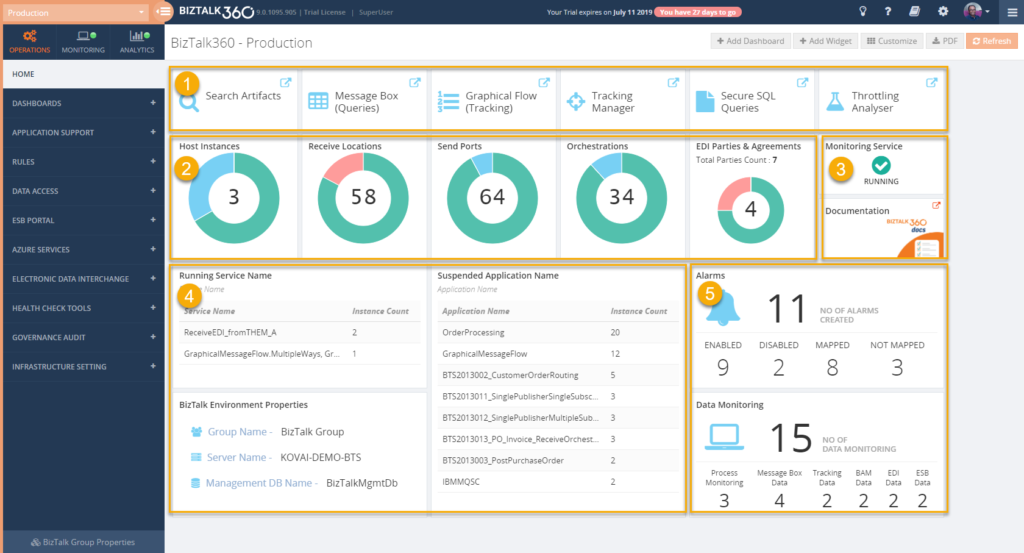
In many cases, I ended up with a dashboard like the one which is shown below.
Above dashboard is divided into the following 5 different sections:
1 – Shortcuts to BizTalk360 features
As BizTalk360 has grown over the years to a very rich-featured product, it can be hard to find your way through all the features. Because we want to make navigation throughout all the features a bit easier, we have added pinpoints to most of the features. By clicking on such a pinpoint, a shortcut to the feature is added to the Operations Dashboard. This first section contains several such pinpoints.
2 – Status of BizTalk artifacts Part of providing an overview of your BizTalk environment is being aware of the status of your BizTalk artifacts. You can think of your Receive/Send Ports, Orchestrations, Host Instances and depending on your scenario, also the EDI Parties & Agreements. BizTalk360 helps you in providing the status of these artifacts in one glance, after you have added these artifacts from the widget library to the dashboard, resize them and drag them to the position you want them to show up.
3 – Some miscellaneous widgets
This section shows the following 2 widgets:
• Monitoring status – this widget reflects the status of the BizTalk360 Monitoring Service. This Windows NT service is used for amongst others performing the actual monitoring, sending notifications, etc. Because this is such an important component, it makes sense to show its status on the dashboard.
• Link to the documentation portal – to help our customers, we put a lot of effort into the maintenance of the documentation portal. Besides topics like Release Notes for all its releases, you will also find detailed information about all the features of the product. That’s why it is handy to have this portal easily accessible from the dashboard.
4 – BizTalk runtime information
Another important category of information to have at hand is the runtime information about Running and Suspended instances. BizTalk 360 contains widgets for both categories and for aggregations like Service Class, Service Name, Error Code, Host Name, BizTalk Application and few more. These different aggregations enable you to take the aggregation you prefer the most.
Besides the Runtime information, the section also shows the BizTalk Environment Properties, which you will find handy to have at hand.
5 – Alarm information
This last section shows information about the two different kinds of alarms. With BizTalk360, you can setup Alarms, being:
• Alarms – used for threshold and health monitoring. The widget shows information about the number of created alarms, how many are Enabled/Disabled, how many alarms contain mappings to (BizTalk) artifacts and how many still need to be mapped to (BizTalk) artifacts
• Data Monitoring – used for monitoring the processing of messages by BizTalk. This widget shows the number of monitors created for each type of monitor.
The purpose of these widgets is to provide the insight if, for example, alarms have been turned on/off for maintenance or few alarms are just empty containers and still need to be mapped to artifacts.
The described set of widgets is just an example. If you feel like some of those widgets are not helpful for you, it is totally fine to select different widgets from the library.
Custom widgets
From time to time, we see customers experimenting with the so-called Custom Widgets. A Custom Widget consists of HTML and JavaScript. By creating such widgets, you can make calls to REST API’s and show the output of such REST API’s in the widget. This leads to an enormous range of capabilities! We have seen customers making calls to BizTalk360 API’s to show the result of for example SQL queries, or the status of the BizTalk related SQL Server jobs, but we have also seen customers are embedding Power BI views directly in their BizTalk360 Operations Dashboard!
In the Documentation Portal, we have written an article about creating a Custom Widget for showing the results of a SQL query. We have seen that this is something quite useful. Read this article in the Documentation portal, or this blog post, if you want to know more about how this is done.
Global and private dashboards
The Operations Dashboard is the home page for the BizTalk360 user. However, having one dashboard might not be enough for your requirements. You might need to show a lot of different information on a dashboard, and having that information on a single dashboard would make it messy and you’ll lose the overview.
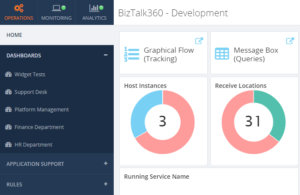
To help you out, you can create additional dashboards in BizTalk360. Additionally created dashboards show up in the Operations menu, under Dashboards.
In addition, you can choose whether a dashboard is Global or Private.
A Global dashboard can be accessed by anyone who has access to BizTalk360. A Private dashboard can only be accessed by the BizTalk360 user who created the private dashboard.
User Policy limited access to information
The data which becomes shown in the dashboards depends on the permissions which are provided to the user. This means that:
there are no limitations for a Super User
a Normal User will only have access to the information according to his/her User Access Policy. A few examples:
if the user has no permissions to EDI, the EDI related widgets will not show up nor be accessible for that user
information about BizTalk Applications (Ports, Orchestrations and Service instances) for which the user has no permissions, will not show up in the dashboards
Conclusion
With this article, we intend to encourage you to think about your Operations Dashboard. It is not hard to customize your dashboard and you will benefit from a nicely customized dashboard immediately!
If you want to discuss your Operations Dashboard or need some help to properly set it up, feel free to contact us at [email protected].
Do you feel difficult to keep up to date on all the frequent updates and announcements in the Microsoft Integration platform and Azure iPaaS?
Integration weekly update can be your solution. It’s a weekly update on the topics related to Integration – enterprise integration, robust & scalable messaging capabilities and Citizen Integration capabilities empowered by Microsoft platform to deliver value to the business.
If you want to receive these updates weekly, then don’t forget to Subscribe!
This is a collection of 5 different image formats of the new UnofficialBizTalk Server 2020 logo (or logotype), three of them are available in vector format (ai, eps and pdf) that will allow you to use and resize without losing quality:
BizTalkServer2020-linhas.ai
BizTalkServer2020-linhas.eps
BizTalkServer2020-linhas.pdf
BizTalkServer2020-linhas-01.jpg
BizTalkServer2020-linhas-01.png
You can be used to customize a banner for your blog, an article, making flyers, stickers, brochure or rollups for BizTalk Server or integration events/conferences and much more – your imagination is the limit!
Again, this is not the official logo because the product is not yet available, so I don’t know what Microsoft will do. This is made by taking into consideration the previous logos of the product. Remember that in BizTalk Server 2016 Microsoft decided to drop the fancy Server icon from the logo and the version identification, it is a simple generic logo with just Text with the intention to be consistent in this and further versions of BizTalk Server. But people still prefer to use the “old” format just because it is easier to visual specify the version of BizTalk Server… for that reason only, there you have this new logo with 2020!
Thanks to Cristovão Silva (UX/UI DESIGNER at DevScope) for helping me creating these resources.
BizTalk Server 2020 logo in vector format (3.1 MB) Microsoft | TechNet Gallery
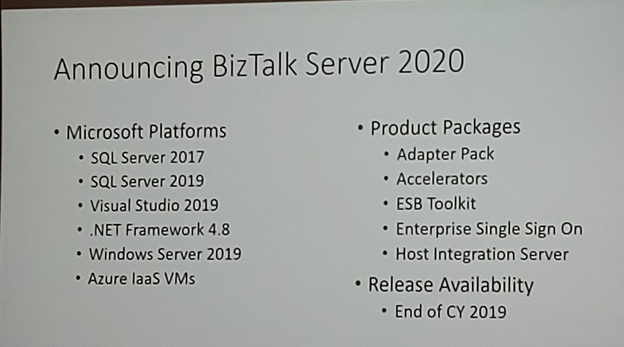
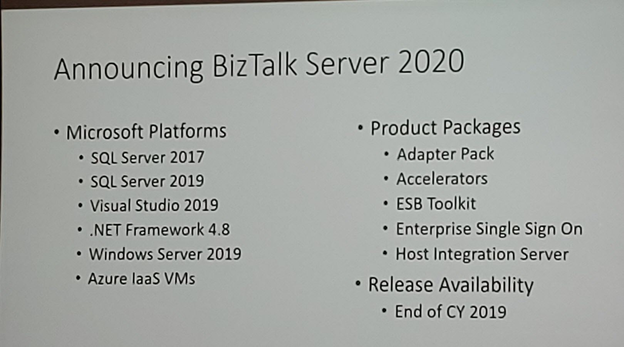
After once again many speculations and controversy caused in INTEGRATE 2018 London event about the vNext release of BizTalk Server, promptly denied two weeks after the event with a formal announcement from the Microsoft Integration team, finally some excellent news for the Microsoft Integration community and all the clients out there that still consider MSFT Integration Stack the best in the market. Paul Larson announced in his session at INTEGRATE 2019 London event the release of BizTalk Server 2020 to be scheduled for the end of this year.
Of course, one of the main reasons for this new version is about Platform Alignment. This new version will support:
SQL Server 2019 and SQL Server 2017 (still not sure if SQL Server 2016 will be also supported)
Windows Server 2019 and I’m almost sure that Windows Server 2016 will still be supported
What can we expect… more in BizTalk Server 2020 release?
One of the greatest things for customers that are running BizTalk Server Standard Edition is that BizTalk Server 2020 already comes built-in with all BizTalk Server 2016 Feature Pack Features, that means that all these features are now part of the product in all versions:
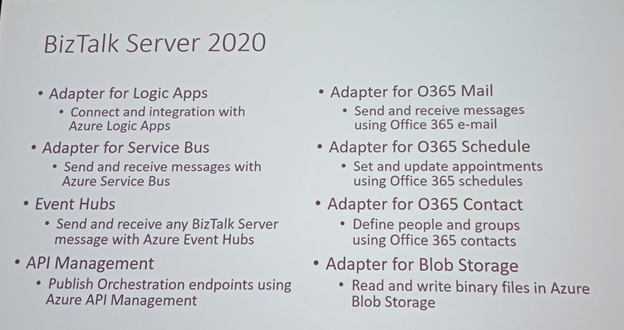
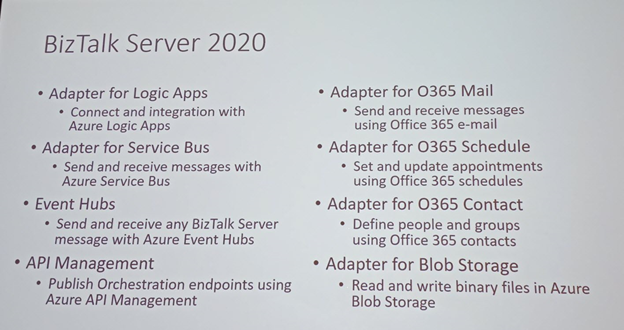
A new set of cloud adapters:
Logic Apps adapter: that will allow you to easily connect and easily extend part of your integration with Azure Logic Apps, making it easier to implement robust hybrid solutions;
Service Bus adapter: that will allow you to send and receive messages with Azure Service Bus;
Event Hubs adapter: that will allow you to send and receive messages with Azure Event Hubs;
Office 365 Mail adapter: that will allow you to send and receive messages using Office 365 e-mail;
Office 365 Schedule adapter: that will allow you to set and update appointments using Office 365 schedules;
Office 365 Contact adapter: that will allow you to define people and groups using Office 365 contacts;
Blob Storage adapter: that will allow you to read and write binary files in Azure Blob Storage;
API Management connectivity: the availability to publish an Orchestration endpoint directly on Azure API Management;
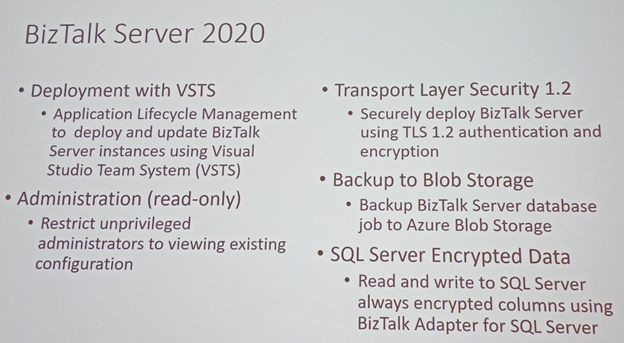
Deployments with VSTS: Application Life cycle Management feature will help you to perform automatic deployments in an improved and easy way using Visual Studio Team System (VSTS);
Security features:
Transport Layer Security 1.2: TLS 1.2 is now fully supported in BizTalk Server. This includes all the adapters and accelerators. You can also disable SSL, TLS 1.0, and TLS 1.1 in BizTalk Server;
SQL Server Encrypted Data: You will be able to read and write to SQL Server always encrypted columns using BizTalk Server WCF-SQL adapter. The ColumnEncryptionSetting binding property is used to enable or disable the functionality to get decrypted/encrypted column values from an Always Encrypted database;
BizTalk Database Backup to Blob Storage: the availability to backup BizTalk Server databases, using the default backup job directly to an Azure Blob Storage;
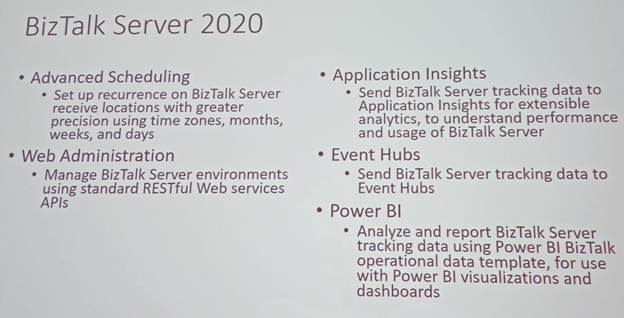
Advanced Scheduling: the availability to set up recurrence on BizTalk Server receive locations with greater precision using times zones, months, weeks, and days;
Application Insights: the availability to send BizTalk Server tracking data to Application Insights for extensible analytics, to understand performance and usage of BizTalk Server;
Power BI operational data feed in BizTalk Server: Analyze and report BizTalk Server tracking data template, for use with Power Bi visualizations and dashboards;
Tracking data to Azure: the availability to send BizTalk tracking data to Azure Application Insights or Event Hubs
BizTalk Server Rest Management API’s: you will able to manage BizTalk Server environments using standard RESTful Web Services APIs. You will have now available REST-based API for pretty much for any management activities like retrieving Applications, Hosts, Send Ports, Receive Ports, Receive Locations, Orchestrations, Schemas, Maps, EDI specific things like Agreements, Batches, Parties, Policies, and so on.
But you may expect some small improvements like:
Administration (read-only): New set of privileged to access to the BizTalk Server Administration Console by allowing you to restrict unprivileged administrators to viewing existing configurations
Enterprise Single Sign-On 2020
and others not publicly available yet… let’s wait.
Along BizTalk Server 2020, we will also have a new version of Host Integration Server (HIS) with the same platform alignment that BizTalk Server but also with:
With this release, Microsoft continues to deliver a mature, reliable and stable integration server that honors the trust of the thousands of customers who run their mission-critical business processes on BizTalk Server.
Do you feel difficult to keep up to date on all the frequent updates and announcements in the Microsoft Integration platform and Azure iPaaS?
Integration weekly update can be your solution. It’s a weekly update on the topics related to Integration – enterprise integration, robust & scalable messaging capabilities and Citizen Integration capabilities empowered by Microsoft platform to deliver value to the business.
If you want to receive these updates weekly, then don’t forget to Subscribe!
It was again time for the most awaited conference in the Microsoft Integration space and the execution happened successfully! INTEGRATE is a global annual conference organized by BizTalk360 for people working in the Microsoft Integration space. Here, we bring the highlights of all the BizTalk sessions at the #INTEGRATE 2019 UK.
The Value of Hybrid integration – Paul Larsen
Paul Larsen, a Principal Program Manager for the Microsoft Corporation in Redmond, presented the session “The Value of Hybrid Integration” by explaining about the legacy of BizTalk Server and he gave meaning to the word Hybrid with some examples. He made the big announcement “BizTalk Server 2020” and confirmed that it will be released at the end of 2019.
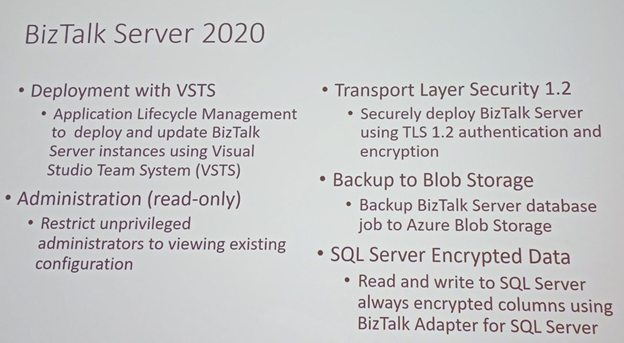
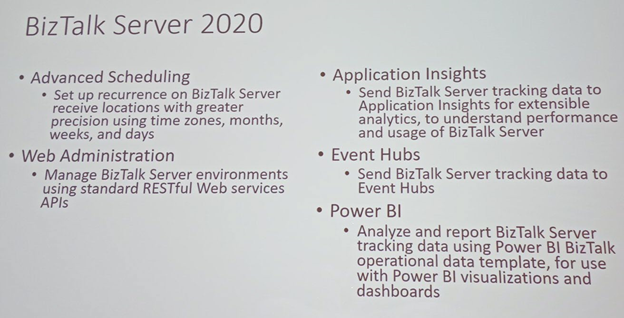
Paul announced the important feature updates in BizTalk Server 2020:
This version of BizTalk Server will have capabilities to deploy BizTalk Server applications using VSTS, make backups to Blob Storage and so on. It will also have integration with App Insights, Event Hubs, Power BI, etc.
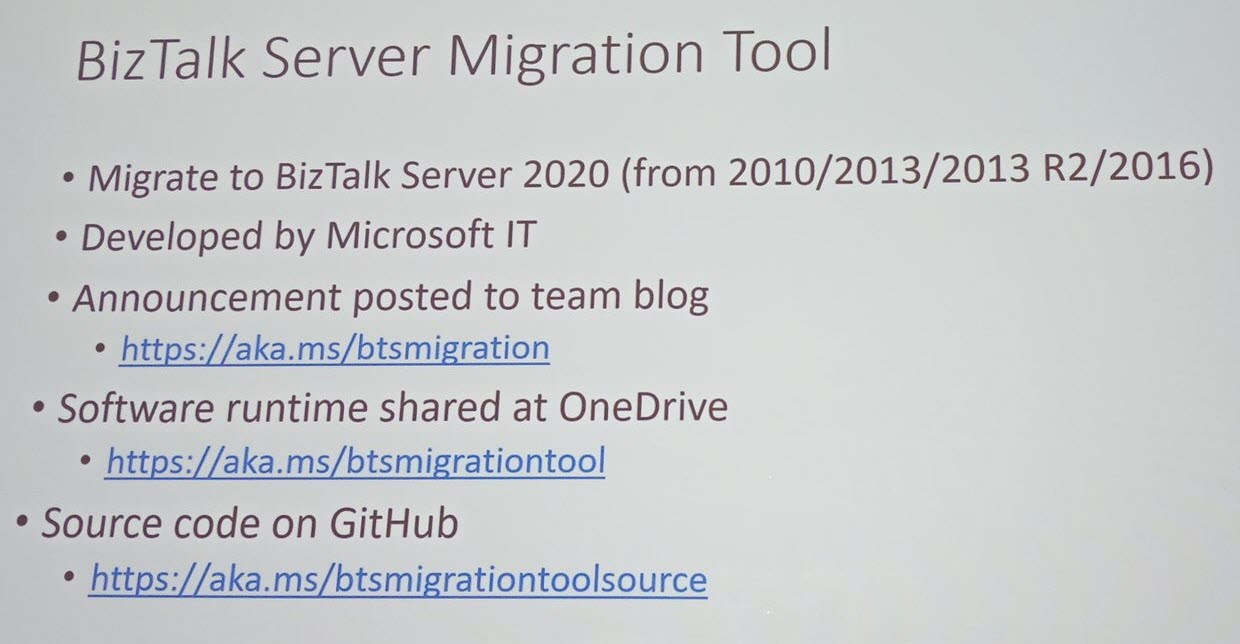
Migration Tool
Paul talks about the BizTalk Server Migration tool and Host Integration Server 2020. This Migration tool will be helpful on dehydrating our configuration on old BizTalk Server environments and rehydrate that configuration to new Azure IaaS VM’s or local VM’s. Microsoft IT developed the BizTalk Server Migration tool which they use to migrate their own BizTalk environments. Because the architecture of BizTalk Server is kept common between BizTalk Server 2010, 2013, 2013 R2 and 2016, the migration does not affect the underlying layer of BizTalk Components.
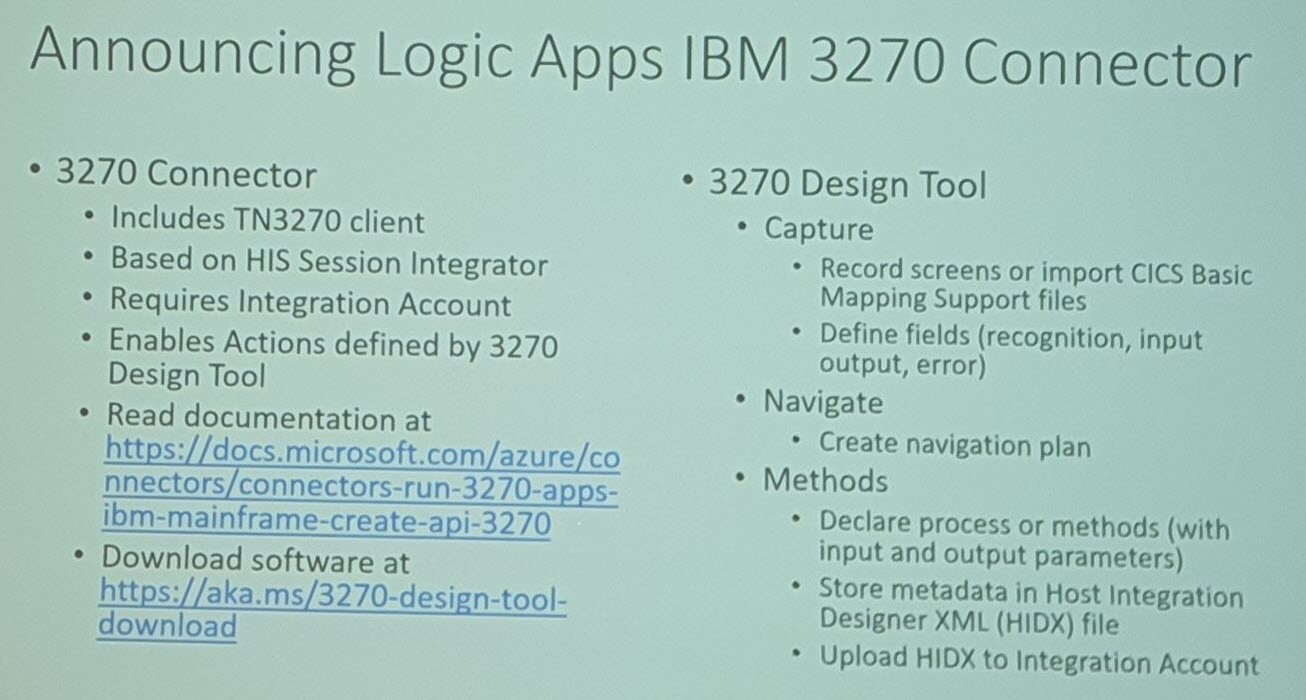
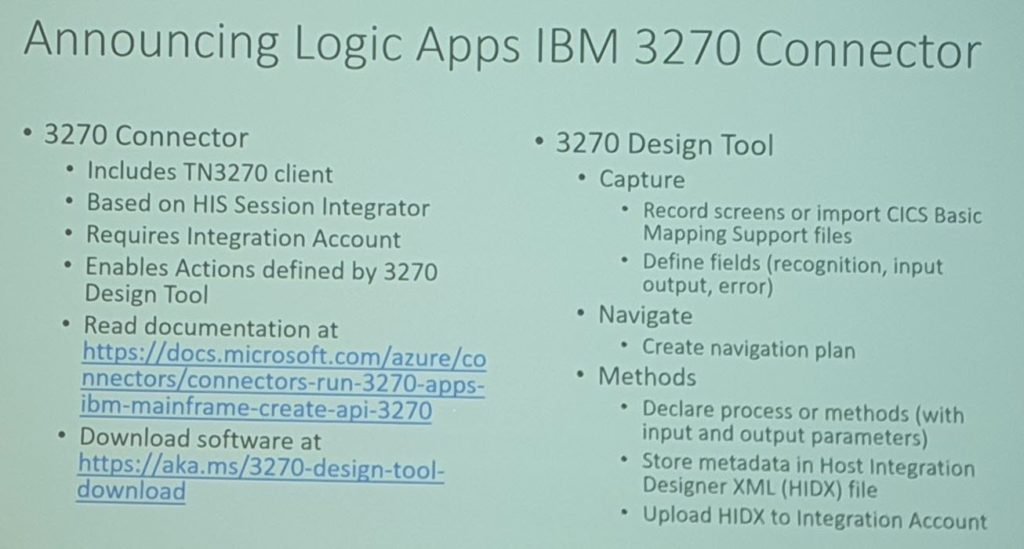
Logic Apps IBM 3270 Connector
Next, Paul made an announcement on the Logic Apps connectors for 3270 screen scraping which is available in preview. During an entertaining demo, Paul explained how the 3270 screens are used and how the 3270 Logic Apps connectors can be used.
BizTalk Server Fast & Loud Part II: Optimizing BizTalk – Sandro Pereira
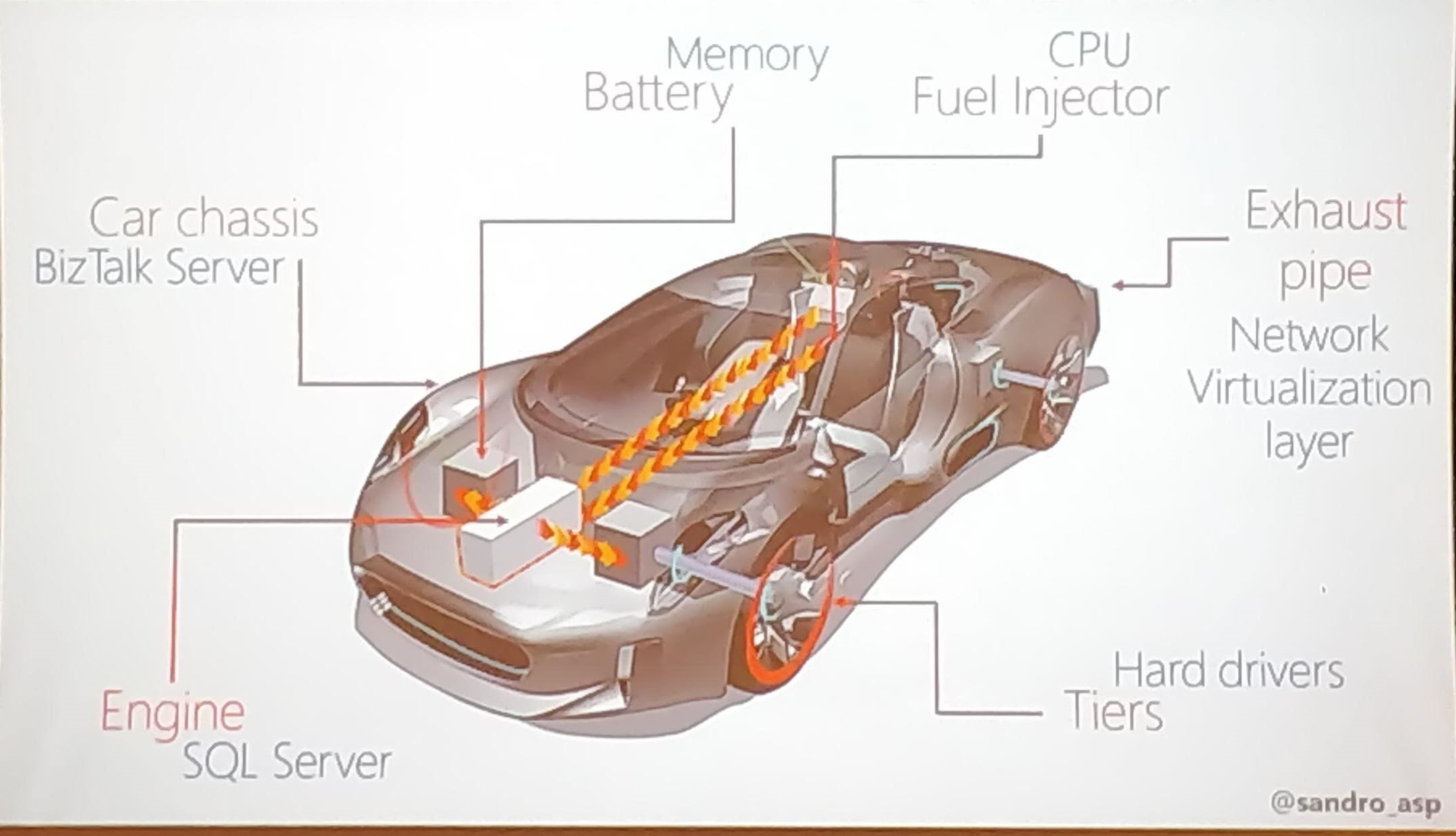
Sandro Pereira, as usual, sets the scene of the session by comparing BizTalk Server Performance to different types of cars like Formula 1 cars, BMW cars, and Truck Cars. He explained the different parameters that affect the performance of BizTalk Server with the functioning of a car (Memory, Network, Disk Space, BizTalk Server, SQL Server).
Next, Sandro provided different tips to optimize the performance:
What is your requirement?
To improve the performance of the BizTalk environment, choose the right set of infrastructure to manage your business requirement
Message Processing (Slowing Down)
BizTalk message processing can be slowed down when there are quite huge volumes of messages. In that case, use queues to process the messages
Techniques to optimize the performance
Sandro explained the different techniques which can be used to fix the performance issue
Observation
Analysis
Apply Fixes
Redesign the system
If an existing BizTalk solution is a bottleneck in the performance, you can suggest redesigning the solution to meet the business requirement and space, to scale the solution for future challenges.
Move to Historic Data (Tracking)
Sandro explained how to manage historical data. Storing the data is important, but use the minimum tracking necessary, to avoid database and disk performance issues.
SQL Server Memory optimization
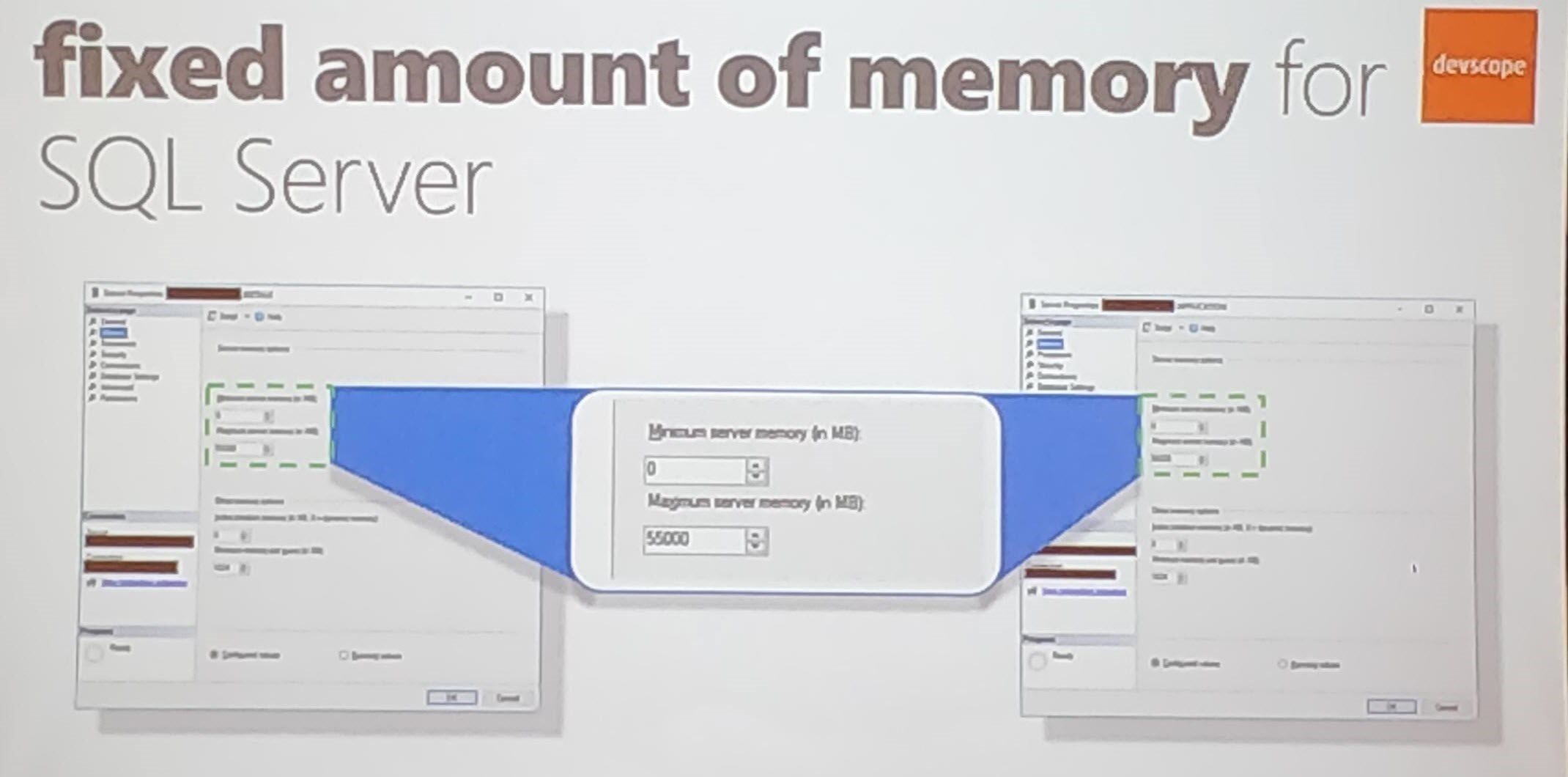
Use SQL Server memory configuration to optimize the performance of the message processing.
Sandro then explained two real-time solutions in which performance improvement was achieved;
Cock Sector World Leader
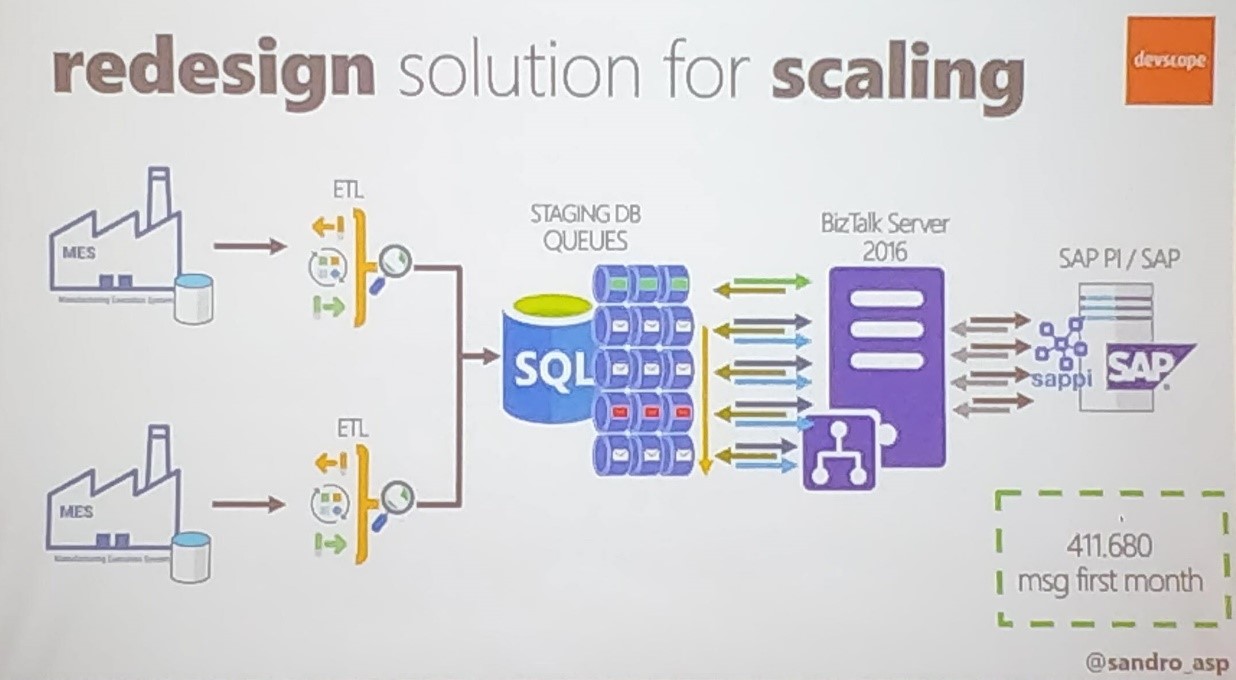
Sandro told about how the BizTalk Team scaled the solution when the performance was hit in one of the manufacturing sections;
Follow the sequences based on the number of messages (5 million messages)
Dividing the process – Parallel process (Queues)
Scaling up the SQL Server Tier
Move data to Historic (Enable the Minimum tracking)
Banking System
Sandro explained how his team provided the solution with a Banking system, with an example of opening a Banking Account scenario. He gave various techniques used in the Banking Solution;
Azure
API Management
Composite Orchestrations
To process the data to open a banking account takes more than 1 min to process the data. Sandro explained the factors that affect the performance;
Network/LDAP
Composite Orchestration Expression shape
Resources Unload (Slow First hit)
He continued to be telling about fine-tuning the performance to process the creating bank account by;
Improving warming up by Recycling BizTalk and IIS
Memory
IIS Application Pool
MQ Agent Recycling
He then explains various solutions to optimize performance;
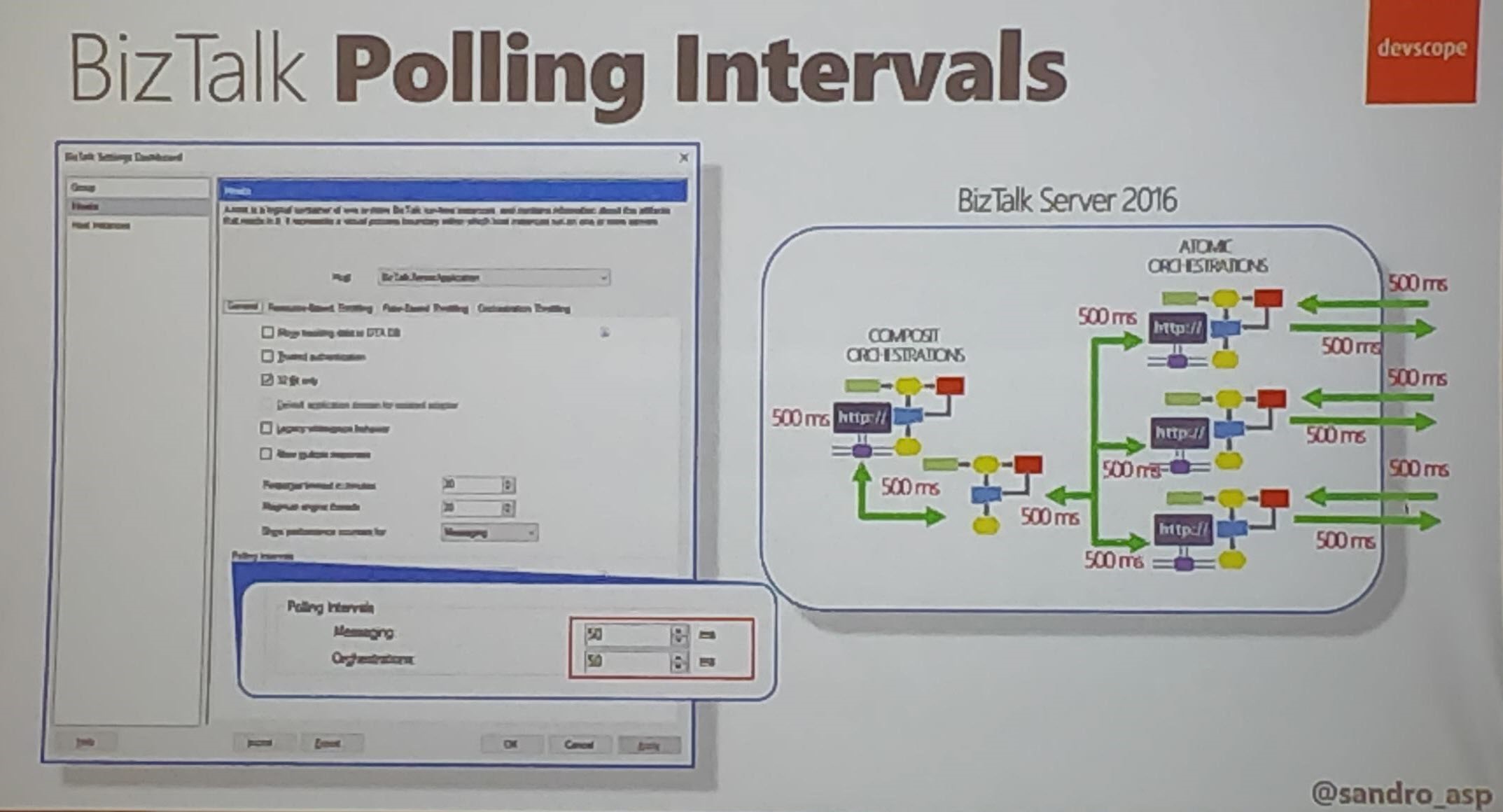
BizTalk Polling Intervals in MQ Agent (Careful on the set the polling)
Priority in BizTalk: Set Priority Send port priority (10 lowest – 1 Faster)
Scripting a BizTalk Server installation – Samuel Kastberg
Installing and configuring BizTalk server is not straightforward, and it can take a lot of time. It is useful to have scripts to run in a different environment and get everything in place. Samuel, Senior Premier Field Engineer at Microsoft, explains the importance of scripting BizTalk Server installation and during his session, he provides all kind of tips and tricks for scripting such an installation.
He listed what you should script:
Things you can control
Things you want to do it repeatedly
Good Candidates
Windows Features
Provision VM’s in Azure (if the environment needs to be created in Azure)
BizTalk features and group configurations
MSDTC settings, Hosts, Host Instances
Visual Studio, SQL server
Your favorite Monitoring tool
Bad candidate-Things which are going to change over time
Samuel advised considering below points before you start scripting;
Decide what your main drivers are, repetition and control are the drivers to automate, standardized developer machines, disaster recovery preparation, and test environments
Decide what your baseline is and document it, think what could change in 6 months or a year
Document the execution process, scripting is not a replacement for the documentation
Use the Server Manager to check for the installed features
Ensure the features and configurations you need are in place and use PowerShell cmdlets to install the required Windows features.
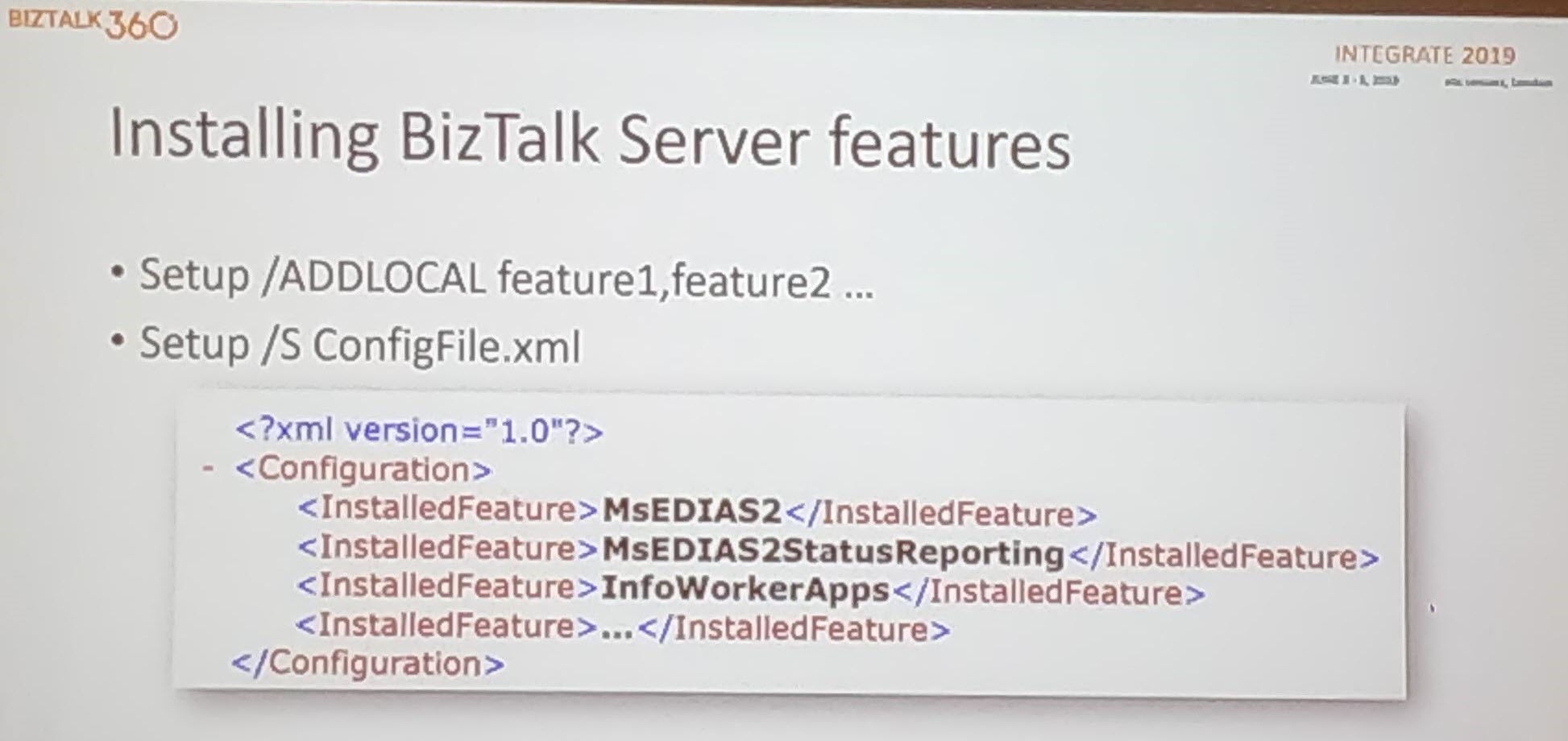
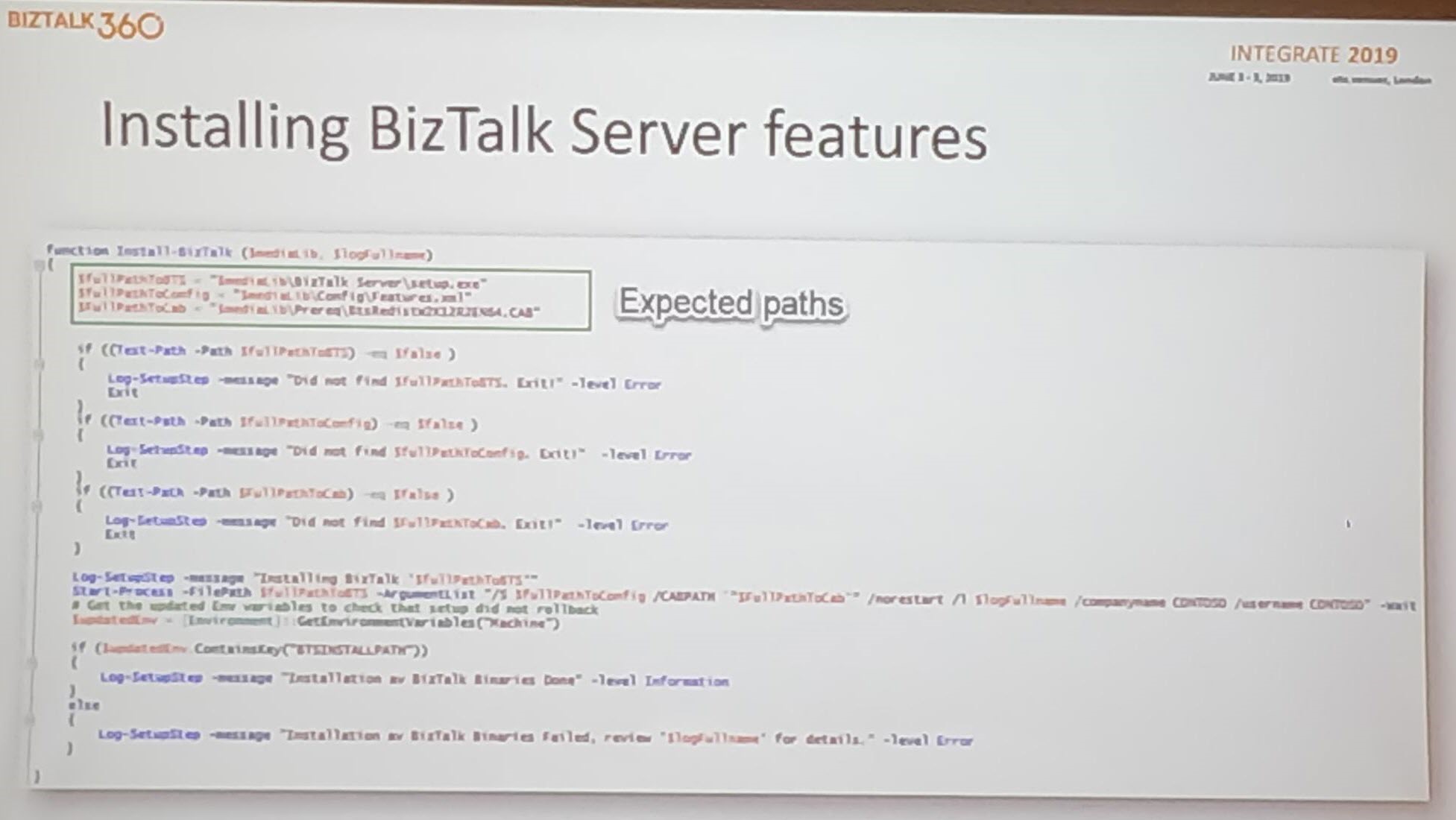
BizTalk Server Feature Installation
Setting up the BizTalk Server product consists of installation and configuration. Installation adds the binaries to the system, while configuration enables you to create or join a BizTalk Group and enable/configure other features as Rules Engine, BAM and EDI.
Setup/Add Local – Export configuration .xml file (select the required features).
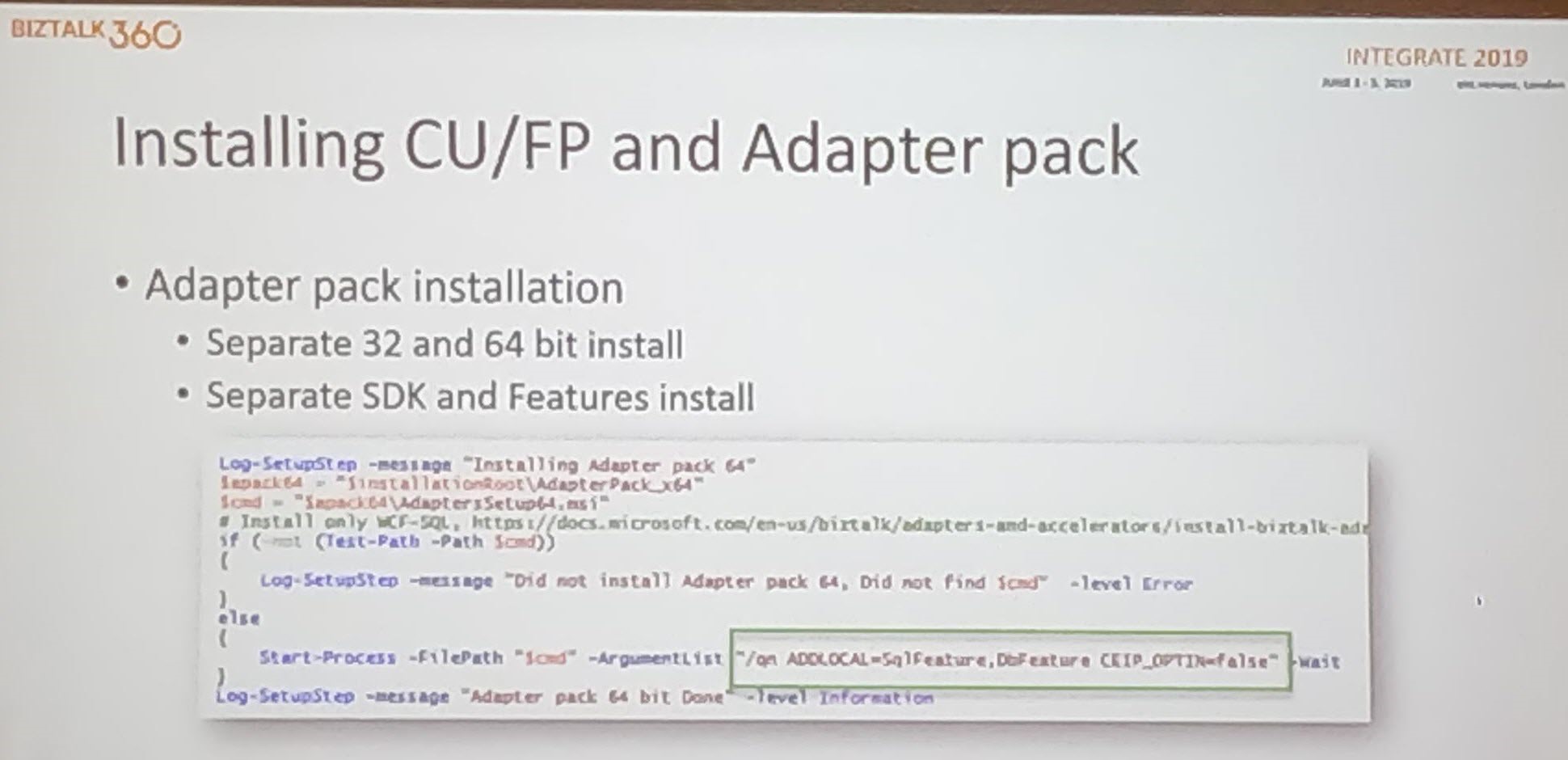
Installing CU/Adapter pack – More complex
Configuration File – Used for providing the required parameters
Consists of feature element – Each one maps to specific sections in the configuration tool
Each feature contains one or more questions – Answer attribute selected = True
Export from config.exe
Edit the export to be a template- Replace the real values at configuration time. You need one file while creating a group
Configure Host and instances – Use WMI or PowerShell provider
Create handlers – Use WMI and PowerShell
Handling secrets – Use KeyPass, Key Vault. KeyPass to use when no internet access is available.
Before using it in the real world: Test the Script in your environment!!!
Conclusion
Do you want to hear about the latest and greatest in Microsoft Integration? It’s not yet too late! By the end of the month, Integrate also comes to the USA and there are still tickets available! Check the web site!
Integrate is the premier integration conference for everyone working in the Microsoft Integration Space. Integrate happens annually in London and this year it happened from 3 to 5 June. The 3-day event, with speakers from the Microsoft Product Group and from the Global Integration Community, is the ideal event to listen to leading Integration Specialists and learn what is coming next in Microsoft integration. This year a lot of newer people were joining the event. Initially, the event used to be a BizTalk Server focused event however, from last few years it expanded the scope to general integration technologies in Microsoft space, including Azure Integration capabilities.
The Value of Hybrid Integration
Paul Larsen, a Principal Program Manager for the Microsoft Corporation in Redmond, presented a session on “The Value of Hybrid Integration”. At Microsoft, Paul leads the Host Integration engineering team to deliver and support Azure, BizTalk Server, SQL Server, Office, and Windows connectors to existing IBM systems. At Integrate, he started the session by explaining the legacy of BizTalk Server and explained the meaning of the word Hybrid with some examples.
BizTalk Server 2020 Announcement
After that, Paul made the big announcement of “BizTalk Server 2020” and he also announced it will be released at the end of 2019.
Important feature updates in BizTalk Server 2020 are:
Integrate cloud Services with built-in adapters for cloud, Logic Apps to On-Premise Gateway, Service Bus, Event Hubs, API Management, O365 Mail, O365 Schedule, O365 Contact, Blob Storage (Dev) API management to all the resources (On-Premise and Cloud)
Manage BizTalk Server environments by using the new BizTalk Server REST API’s
The Blob Storage adapter is still under development. Using File adapters which are published as a UNC Endpoint is not straight forward, as pluggable. Using Blob storage adapter will be a useful feature that will help administrators to, for example, have the Backup BizTalk Server job write the backups to Azure Blob storage
Secure the BizTalk Server Infrastructure settings with Read-only administrator view
Deployment with VSTS – Application Life Cycle Management to deploy and update BizTalk Server instances using Visual Studio Team System
Transport Layer Security 1.2– Securely deploy BizTalk Server using TLS 1.2 authentication and encryption
SQL Server Encrypted Data– Read and write to SQL Server with Always encrypted columns using BizTalk Adapter for SQL Server
Advanced Scheduling -Set up recurrence on BizTalk Server receive locations with greater precision using time zones, months, weeks, and days
Application Insights– Send BizTalk Server tracking data to Application Insights for extensible analytics, to understand performance and usage of BizTalk Server
Event Hubs – Send BizTalk Server tracking data to Event Hubs
Power BI Integration – Analyze and report BizTalk Server tracking data using Power BI. BizTalk operational data template, for use with Power BI visualizations and dashboards
.NET components continue to evolve over the last release of the .NET MQ Client.
A new version of Enterprise Single Sign-On
Host Integration Services
Host Integration Services has improved a lot in this version of BizTalk Server 2020. In short, most of the packages in BizTalk Server are getting updated in this version:
HIS as add on to BizTalk licensing
New Microsoft platforms
New IBM platforms – integrated feature packs
BizTalk Server Migration Tool
Microsoft IT develops the BizTalk Server Migration tool which they use to migrate their own BizTalk environments. Because the architecture of BizTalk Server is kept common between BizTalk Server 2010,2013, 2013 R2 and 2016, the migration does not affect the underlying layer of BizTalk Components. In addition, as Microsoft makes this tool available to BizTalk users, this tool will be helpful for them on dehydrating the configuration on an old BizTalk server and re-hydrate that configuration to new Azure IAAS or VM.
Currently, the Logic Apps connector for IBM 3270 emulation is available in preview. In short, the Microsoft Connector for 3270 integrates Azure applications with resources available via TN 3270 Screen Scraping.
Robotic Process Automation (RPA) is an Industrial trend in cloud computing which offers screen scraping capabilities. Host Integration Server extends the Integration to the TN3270 connector with Telnet or TCP protocol to connect to IBM Mainframe systems. However, you require an Integration account to be able to connect the IBM 3270 adapters.
After that, Paul demonstrated the Integration of IBM mainframe programs and Azure Cloud application with 3270 Logic App connector. After the Demo, he made a couple of announcements about CICS, IMS screen clients for 3270/5050 connectors and VSAM, DDM .NET clients for IBM file systems.
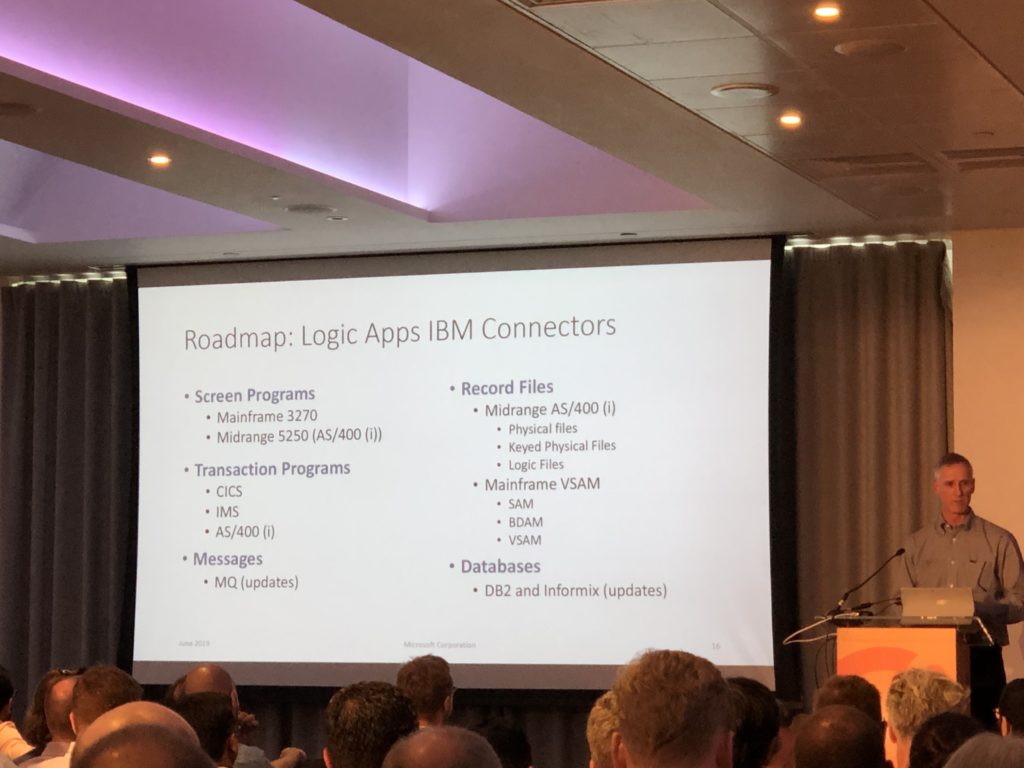
Logic Apps IBM Connectors Road Map
In conclusion, Paul touched base on the Logic Apps IBM Connectors Road Map beyond the 2020 version. For instance, BizTalk Server vNext version will include improvement on a number of Logic Apps connectors:
3270 IBM Connector Improvement
Midrange 5250 AS connector
Mainframe SAM Connectors
DB2 and Informix Support
Conclusion
The well-informed reader might have noticed that several BizTalk Server 2020 features also appear in the so-called Feature Packs for BizTalk Server 2016 which have been released by Microsoft. However, BizTalk Server 2020 also helps in aligning with the latest versions of the platform products. So, this release of BizTalk Server will be of use for all BizTalk Server customers.
Secondly, the release of BizTalk Server 2020 is good news for all existing BizTalk users, as it indicates that Microsoft covers them for the next couple of years. Similarly, we notice that customers who are just starting their integration journey, also choose for Microsoft BizTalk Server. In other words, this new release will be very helpful for them as it will help them with both their on-premise integrations, as well with their hybrid integrations.
The announcement of BizTalk Server 2020 was done during Integrate 2019 in London. However, in case you missed the event, there is no need to worry, because at the end of this month, Integrate will also come to the US! So, if you are still not sure if you should attend Integrate 2019 US, then this blog post, written by our CEO Saravana Kumar, might convince you to participate in the world-wide premier Microsoft Integration event.
Do you feel difficult to keep up to date on all the frequent updates and announcements in the Microsoft Integration platform and Azure iPaaS?
Integration weekly update can be your solution. It’s a weekly update on the topics related to Integration – enterprise integration, robust & scalable messaging capabilities and Citizen Integration capabilities empowered by Microsoft platform to deliver value to the business.
If you want to receive these updates weekly, then don’t forget to Subscribe!







 BizTalk Server 2020 logo in vector format (3.1 MB)